
In an increasingly digital financial landscape, the humble checkbook might seem like a relic of the past. Yet, for many individuals and businesses, checks remain an indispensable tool for managing finances, paying bills, and making secure transactions. Whether you’re making a down payment, paying rent to a landlord who prefers physical checks, or managing a small business that relies on paper trails, knowing how to efficiently order a new checkbook from your bank is a fundamental financial skill. If Chase is your primary banking institution, this comprehensive guide will walk you through every step of the process, ensuring you can acquire your new checkbook with ease and confidence. We’ll delve into the various methods available, highlight important considerations regarding cost and security, and provide insights to help you manage your check-related financial needs effectively.
Understanding Your Checkbook Needs in the Modern Era
Before diving into the mechanics of ordering, it’s crucial to understand why checkbooks persist and what considerations you should make to ensure your new order perfectly aligns with your financial requirements.
Why You Still Need Checks in a Digital Age
While online banking, direct debits, and digital payment apps have revolutionized how we manage money, physical checks retain their relevance for several key reasons. For one, they provide a tangible record of payment, often preferred by landlords, contractors, or certain service providers. They can be crucial for one-time, large transactions where digital transfer limits might be a constraint, or where a physical signature is required. Furthermore, checks serve as a vital backup method in areas with unreliable internet access or during power outages, ensuring you can still conduct essential financial operations. Small businesses frequently rely on checks for payroll, vendor payments, and client deposits, appreciating the detailed paper trail and often lower transaction fees compared to credit card processing. Understanding these scenarios helps justify the continued need for a checkbook in your financial toolkit.
Different Types of Chase Accounts and Check Eligibility
Chase offers a variety of checking accounts, each with distinct features and potentially different policies regarding checkbook orders. Typically, most personal checking accounts (such as Chase Total Checking®, Chase Premier Plus Checking℠, or Chase Sapphire℠ Banking) are eligible for checkbook orders. Business checking accounts (like Chase Business Complete Banking℠ or Chase Performance Business Checking®) also inherently support check writing. However, it’s worth noting that some basic or student accounts might have specific stipulations or even include a limited number of free checks. Savings accounts or credit card accounts, by their nature, do not come with check writing capabilities. Before ordering, confirm that your specific Chase account type supports checks and whether there are any associated benefits, such as complimentary first checkbook orders or discounts for certain premium accounts.
Determining the Right Quantity and Design
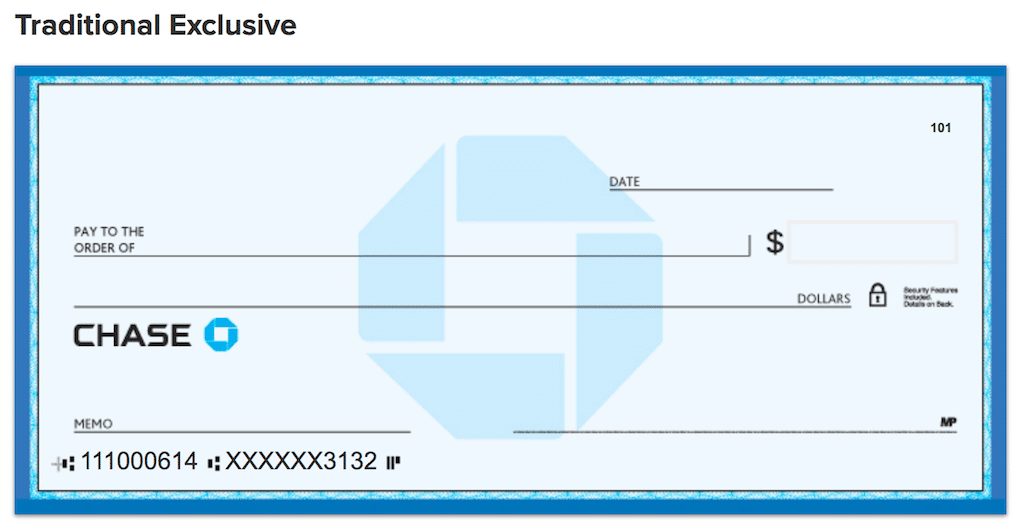
When placing an order, you’ll typically be asked to select the quantity of checks (e.g., single box of 150, two boxes, etc.) and potentially a design. Consider your usage frequency. If you only write a few checks a year, a single box might last a very long time. If you use checks regularly for business or personal expenses, ordering a larger quantity can be more cost-effective in the long run. As for design, standard checks are often sufficient, but many banks and third-party providers offer a range of personalized designs, from scenic landscapes to custom logos for business accounts. While personalized designs can add a touch of individuality, remember that these often come with an additional cost. Prioritize clarity, security features, and cost-effectiveness over elaborate aesthetics unless personal branding is a key concern for your business.
Step-by-Step Guide to Ordering Through Chase Online
For most Chase customers, the most convenient and efficient method for ordering a checkbook is directly through their online banking portal or mobile app. This method offers flexibility, security, and often a clearer view of customization options and pricing.
Navigating the Chase Website or Mobile App
Begin by logging into your Chase Online account via a desktop browser at Chase.com or through the official Chase Mobile® App on your smartphone or tablet. Ensure you are using a secure internet connection and that you are on the legitimate Chase website to protect your financial information. Once logged in, you’ll typically land on your account summary page, displaying all your linked Chase accounts.
Locating the Check Reorder Section
The exact navigation path might vary slightly based on updates to Chase’s interface, but generally, you’ll need to look for options related to your checking account.
- Select the Account: Click or tap on the specific checking account for which you want to order checks.
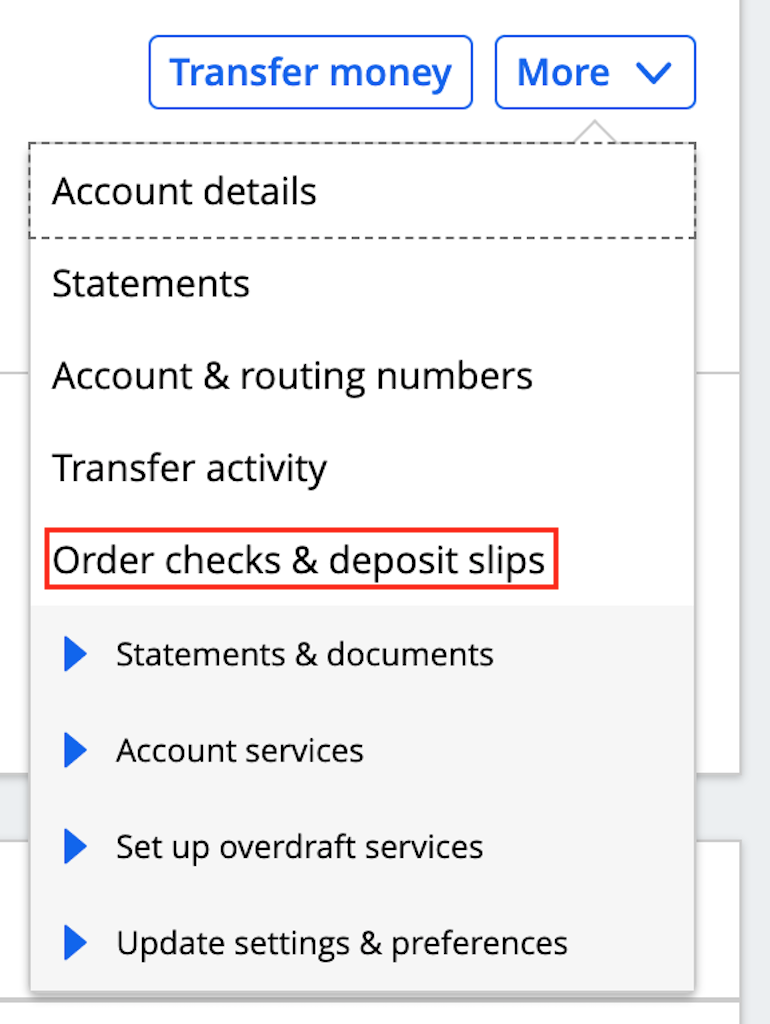
- Find “Account Services” or “Order Checks”: Look for a section or link labeled “Account Services,” “Customer Service,” “Order Checks,” or similar. On the desktop site, this is often found in the navigation menu associated with the specific account, or sometimes under a broader “More” or “Services” menu. In the mobile app, you might need to tap on your checking account, then look for a “Manage” or “Services” option.
- Initiate Order: Once you find the “Order Checks & Deposit Slips” or similar option, click or tap to proceed. Chase often partners with a third-party check printer like Harland Clarke for these orders, and you may be redirected to their secure portal within the Chase framework.
Customizing Your Order (Personalization, Security Features)
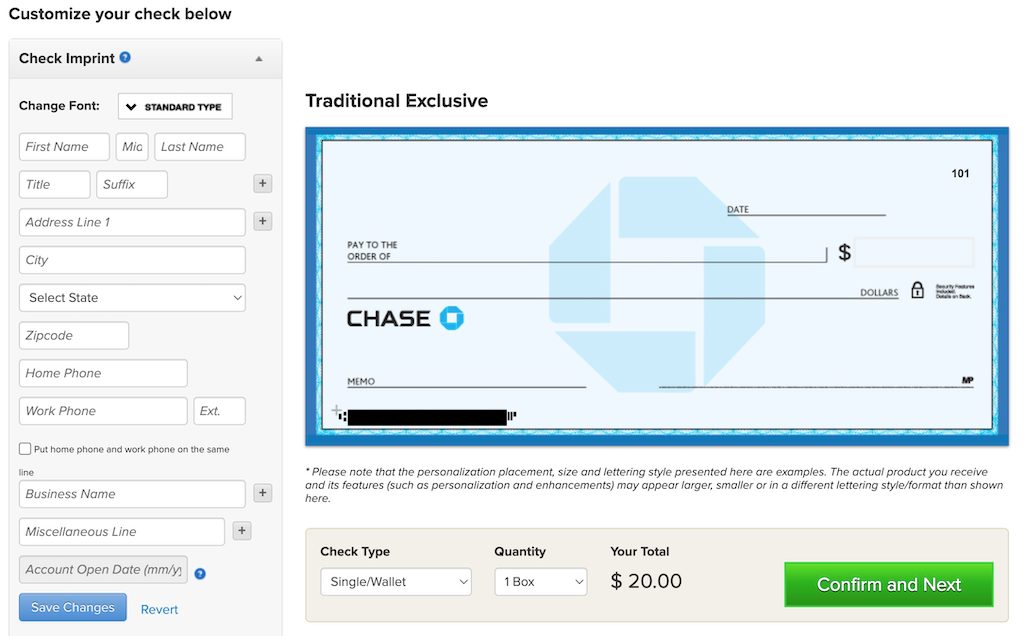
Upon entering the check ordering interface, you’ll be presented with several customization options:
- Quantity: Choose the number of check boxes you need.
- Style/Design: Select from basic designs, themed options, or business-specific layouts. Note that premium designs often incur extra costs.
- Personal Information: Verify that your name, address, and account number are correctly displayed. If you need to update your address, do so with Chase directly before ordering checks.
- Security Features: Many checks come with standard security features (e.g., microprint, chemically sensitive paper). You might have options for additional features like tamper-resistant backgrounds or holograms for enhanced protection against fraud. Consider these, especially for business accounts, weighing the cost against the added security.
- Deposit Slips: You will also typically have the option to order matching deposit slips. If you frequently deposit cash or checks physically, these are essential.
Reviewing and Confirming Your Purchase
Before finalizing your order, a critical step is to thoroughly review all details.
- Verify Information: Double-check your name, address, account number, and routing number. Errors here can lead to delays or, worse, checks that cannot be cashed.
- Review Total Cost: Confirm the total cost, including any shipping and handling fees, and taxes. Ensure it aligns with your expectations.
- Shipping Address: Verify the shipping address where the checks will be delivered.
- Payment Method: Typically, the cost of the checks will be debited directly from the checking account for which you are ordering them.
Once everything is accurate, proceed to confirm your order. You should receive an order confirmation via email with a tracking number, which will allow you to monitor the delivery status of your checkbook.
Alternative Methods for Ordering Your Chase Checkbook
While online ordering is often the most convenient, Chase provides other avenues for customers who prefer different methods or require specific assistance.
Ordering Via Phone (Customer Service)
If you prefer speaking directly with a representative or need assistance with your order, you can contact Chase customer service.
- Locate the Number: Find the customer service number on the back of your Chase debit card, on your monthly bank statement, or on the official Chase website (usually under “Contact Us”).
- Identify Yourself: Be prepared to verify your identity with your account number, personal information, and potentially security questions.
- Place Your Order: Inform the representative that you wish to order a new checkbook. They will guide you through the available options, confirm your details, and process the order for you. This method is particularly useful if you have complex requirements or need to clarify specific pricing or delivery details.
Visiting a Chase Branch In-Person
For those who prefer face-to-face interaction or need immediate assistance, visiting a local Chase branch is a viable option.
- Find a Branch: Use the Chase website or mobile app to locate the nearest Chase branch.
- Bring ID: Take a valid form of photo identification (e.g., driver’s license, passport) and possibly your debit card or account number for verification.
- Speak with a Representative: A branch employee can help you place your checkbook order. They can often show you physical samples of check designs and explain pricing in detail. In some cases, for urgent needs, a branch might be able to print a temporary check or a small batch of counter checks, though this is usually for immediate use and not a full checkbook replacement.
Using Third-Party Check Printers (Considerations and Cautions)
Beyond ordering directly through Chase or its preferred partner, numerous third-party check printing services exist (e.g., Vistaprint, Checksforless, etc.). These companies often offer a wider array of designs, competitive pricing, and sometimes faster delivery.
- Considerations: If you choose a third-party printer, you will need your Chase routing number and account number. These are found on your existing checks or within your online banking portal. You might also need to upload your bank’s logo if you want it included.
- Cautions: While often cheaper, using third-party printers carries a slight risk. Ensure the company is reputable, secure, and has strong privacy policies. You are entrusting them with sensitive banking information. Verify that their checks meet industry standards and contain necessary security features. Always double-check the printed account and routing numbers against your official bank information to avoid errors. If an offer seems too good to be true, exercise extra vigilance. For most customers, ordering directly through Chase or its authorized partner is the safest and most straightforward option.
Costs, Delivery, and Security Considerations
Ordering a checkbook involves more than just selecting a design; it requires understanding the associated costs, anticipated delivery, and crucial security measures to protect your financial integrity.
Understanding Checkbook Pricing and Potential Fees
The cost of a checkbook from Chase can vary based on several factors:
- Account Type: Some premium checking accounts (e.g., Chase Sapphire℠ Banking) may offer complimentary checks.
- Quantity: Ordering a larger quantity might reduce the per-check cost, but the upfront total will be higher.
- Design and Features: Basic designs are usually the cheapest. Custom designs, themed checks, and enhanced security features will add to the price.
- Shipping and Handling: Expect to pay for shipping, which can vary based on speed.
- Reorder vs. First Order: Sometimes the first box of checks for a new account is free, while subsequent reorders incur a charge.
Always review the total cost before confirming your order. These costs will be debited directly from your checking account.
Estimated Delivery Times and Tracking
Once your order is placed, delivery times can vary:
- Standard Delivery: Typically takes 7-14 business days.
- Expedited Shipping: Most providers offer faster shipping options for an additional fee, often delivering within 3-5 business days.
After placing your order online or over the phone, you should receive a confirmation email containing an estimated delivery date and, importantly, a tracking number. Use this tracking number on the check printer’s website (often Harland Clarke for Chase) to monitor your package’s progress. If you don’t receive your checks within the estimated timeframe, contact Chase customer service or the check printer directly with your order details.
Enhancing Check Security (Fraud Prevention Tips)
Checks, by their nature, contain sensitive information, making security paramount.
- Store Securely: Keep your unused checks in a safe, secure location, such as a locked drawer or safe deposit box. Never leave them exposed.
- Write Clearly: Use indelible ink (blue or black gel pens are good) and write clearly to prevent alterations.
- Fill All Fields: Always fill in the payee, date, and amount completely. Draw a line through any blank spaces after the payee’s name and the dollar amount to prevent additions.
- Monitor Your Account: Regularly review your Chase bank statements and online transaction history to spot any unauthorized check withdrawals.
- Shred Old Checks: When checks are no longer valid or used, shred them thoroughly before disposal to prevent identity theft.
- Report Missing Checks: If you suspect checks have been lost, stolen, or compromised, immediately notify Chase to place a stop payment or close the account if necessary.
What to Do If Your Checks Are Lost or Stolen
If you discover that your checkbook, or even just a few blank checks, has been lost or stolen, immediate action is critical to protect your finances:
- Contact Chase Immediately: Call Chase’s customer service or visit a branch as soon as possible. Report the loss or theft.
- Place a Stop Payment: If you know the numbers of the missing checks, Chase can place a stop payment on them. This prevents anyone from cashing them.
- Monitor Your Account Closely: For the next few weeks or months, meticulously review all transactions on your checking account for any suspicious activity.
- Consider New Account: In severe cases, especially if a large number of checks are compromised, Chase might advise you to close your existing account and open a new one with different account and routing numbers to mitigate ongoing risk.
- File a Police Report: If you suspect theft, file a police report. This can be helpful for your bank and for any potential fraud investigations.
Managing Your Funds and Future Check Needs
Ordering a checkbook is just one part of effectively managing your finances. Proper management ensures you’re always prepared for future needs and avoid potential pitfalls.
Balancing Your Checkbook and Digital Transactions
While many transactions are digital, it’s still wise to maintain a consistent record of your checking account activity. Whether you use a traditional checkbook register, a spreadsheet, or a budgeting app, track all your deposits, withdrawals, and especially checks written. This helps you:
- Prevent Overdrafts: Know your true available balance.
- Reconcile Statements: Easily compare your records with your monthly Chase statements to identify discrepancies.
- Spot Errors/Fraud: Quickly detect unauthorized transactions or bank errors.
In today’s interconnected financial world, balancing your checkbook effectively means integrating your check usage with your digital spending habits for a holistic view of your money.
Preparing for Future Reorders
Don’t wait until you’re down to your last few checks to reorder. Most checkbooks include a reorder form or a clear indication of when it’s time to place a new order. Make it a habit to check your remaining supply periodically. Ordering well in advance (e.g., when you have about 20-30 checks left) allows ample time for processing and delivery, preventing you from being caught without checks when you need them most. Keep track of your check numbers to ensure continuity and easier reconciliation.
When to Consider Alternatives to Checks
While checks have their place, it’s also important to recognize situations where other payment methods might be more efficient, secure, or cost-effective.
- Online Bill Pay: For recurring bills, Chase’s online bill pay service allows you to schedule payments directly from your account, often for free, eliminating the need for checks, stamps, and mail time.
- Electronic Funds Transfers (EFTs): For direct deposits, payroll, or business-to-business payments, EFTs are faster and more secure than checks.
- Zelle®: For quick, person-to-person payments, Zelle, integrated into the Chase app, allows instant transfers to friends and family using just an email address or U.S. mobile number.
- Debit/Credit Cards: For everyday purchases, debit and credit cards offer convenience and purchase protection that checks do not.
By understanding when to use a check and when to opt for a digital alternative, you can optimize your financial processes, save time, and enhance the security of your transactions, ensuring your money works smarter for you.
Ordering a checkbook from Chase is a straightforward process, whether you choose the convenience of online banking, the personal touch of a phone call, or the direct assistance of a branch visit. By understanding your needs, following the steps carefully, and prioritizing security, you can ensure you always have this essential financial tool at your disposal while strategically integrating it with modern digital payment solutions for comprehensive money management.
aViewFromTheCave is a participant in the Amazon Services LLC Associates Program, an affiliate advertising program designed to provide a means for sites to earn advertising fees by advertising and linking to Amazon.com. Amazon, the Amazon logo, AmazonSupply, and the AmazonSupply logo are trademarks of Amazon.com, Inc. or its affiliates. As an Amazon Associate we earn affiliate commissions from qualifying purchases.