
In an era dominated by streaming services and complex cable packages, the simple act of receiving free over-the-air (OTA) television via an antenna might seem like a relic of the past. Yet, for millions, it remains a vital, cost-effective, and surprisingly high-quality method to access local news, live sports, and prime-time entertainment, including content from major networks like ABC. The question, “what channel is ABC in antenna?” isn’t just about a number; it’s an entry point into understanding broadcast technology, antenna mechanics, and the resurgence of free, accessible television. This guide will delve into the technical underpinnings and practical steps to ensure you’re not only finding ABC but optimizing your entire OTA viewing experience.

The Resurgence of Over-the-Air (OTA) Television
The landscape of television consumption has undergone a dramatic transformation. With escalating subscription costs and an overwhelming array of streaming options, many consumers are re-evaluating their media consumption habits. This shift has inadvertently shone a spotlight back on the humble antenna, highlighting its enduring value in the digital age.
Cutting the Cord: A Modern Imperative
The “cord-cutting” phenomenon is more than just a trend; it’s a strategic financial and lifestyle decision for many households. The average cable bill has steadily climbed, often bundling channels that viewers rarely watch. Streaming services, while offering immense flexibility, can also accumulate, leading to a “streaming fatigue” where the combined cost approaches or even exceeds traditional cable. In this context, the appeal of free, high-definition broadcast television becomes undeniable. An antenna provides access to major networks—ABC, CBS, NBC, FOX, PBS, and The CW—without a monthly fee, offering a compelling alternative to expensive subscriptions. This return to basic, free-to-air content is a powerful testament to the enduring public interest in live, local, and network programming.
The Core Technology: How Antennas Deliver Free TV
At its heart, an antenna is a transducer, a device that converts electromagnetic waves into electrical signals, and vice-versa. In the context of television, broadcast towers transmit television signals as electromagnetic waves through the air. Your antenna intercepts these waves, and its conductive elements (rods, loops, flat panels) resonate with the frequency of the incoming signal. This resonance induces a tiny electrical current, which is then sent via a coaxial cable to your television’s tuner. The tuner then processes this electrical signal, converting it into the audio and video you see on your screen. The effectiveness of this process depends on several factors, including the antenna’s design, its placement, and the strength and direction of the broadcast signal. Unlike the early days of fuzzy analog signals, modern OTA broadcasts are entirely digital, offering pristine high-definition quality comparable to, and often superior to, compressed cable feeds.
Digital Dominance: Understanding ATSC Standards
The transition from analog to digital broadcasting in the United States, completed in 2009, marked a pivotal moment for over-the-air television. This transition introduced the Advanced Television Systems Committee (ATSC) standard, specifically ATSC 1.0. This standard uses digital compression technology, primarily MPEG-2, to transmit more information within the same broadcast spectrum, leading to several key advantages:
- High Definition (HD) Quality: Digital signals can carry much higher resolution video, enabling broadcasts in 720p or 1080i, which is standard for most major networks.
- Multiple Sub-Channels: Digital allows broadcasters to transmit several “sub-channels” alongside their main programming. For instance, a local ABC affiliate might broadcast their main programming on “channel 7.1,” but also carry weather information on “7.2” or classic movies on “7.3.”
- Enhanced Audio: Digital signals support better audio fidelity, including surround sound formats.
- Robustness: While not immune to interference, digital signals are generally more resilient to noise and multipath interference compared to their analog predecessors. They either deliver a perfect picture or no picture at all, rather than the snowy, ghosted images of analog.
Understanding ATSC 1.0 is crucial because virtually all modern televisions are equipped with an ATSC tuner, capable of receiving and decoding these digital signals directly.
Demystifying Channel Numbers: Finding ABC and Beyond
One of the most common points of confusion for new antenna users is the discrepancy between what’s displayed on their TV (the “virtual channel”) and the actual frequency the signal is broadcast on (the “physical channel”). This distinction is critical for troubleshooting and understanding how channels are organized.
Virtual Channels vs. Physical Frequencies: The Digital Dance
When you tune into ABC, your TV might display “Channel 7.1.” This “7.1” is the virtual channel number. It’s a user-friendly identifier that broadcasters choose and transmit along with their digital signal. It doesn’t necessarily mean that ABC is physically broadcasting on frequency channel 7. In fact, due to spectrum reallocation and historical reasons, many broadcasters use a virtual channel number that bears no resemblance to their actual physical frequency. For example, a station might broadcast on UHF channel 34, but its virtual channel is “7.1” to maintain brand identity or historical recognition. Your TV’s tuner automatically maps the physical frequency to the virtual channel number for your convenience. This system allows for flexibility in broadcast allocation while providing a consistent and recognizable channel lineup for viewers.
The ABC Network: Its Broadcast Footprint
ABC (American Broadcasting Company) is one of the four major commercial broadcast television networks in the United States. Its programming, including popular shows like Grey’s Anatomy, American Idol, Good Morning America, and World News Tonight, along with a significant portfolio of sports programming via ESPN, makes it a highly sought-after channel for antenna users. ABC content is delivered through a network of local affiliate stations. This means there isn’t one universal “ABC channel number” across the entire country. Instead, each local market has its own ABC affiliate, which broadcasts on a specific physical frequency and typically uses a distinct virtual channel number (e.g., 7.1 in New York City, 13.1 in Los Angeles, 2.1 in Chicago). The exact channel number and strength of the signal will therefore vary significantly based on your geographical location.
Leveraging Online Tools for Local Channel Information
Given the variability of local broadcasts, the most effective way to determine what channel ABC is on in your specific area, along with signal strength predictions and antenna recommendations, is to use specialized online tools. These resources leverage databases of broadcast tower locations, frequencies, and your precise address to provide tailored information:
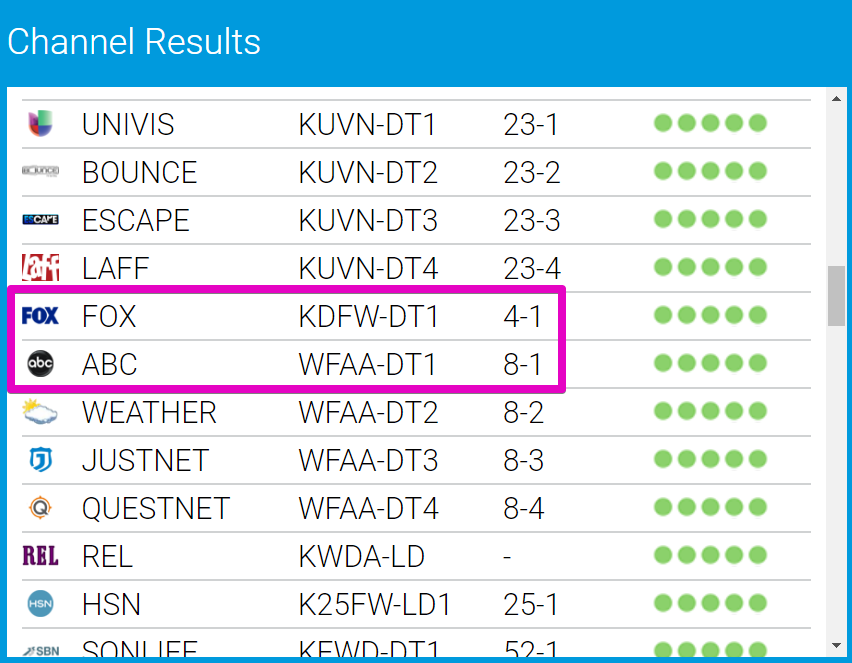
- FCC DTV Reception Maps (fcc.gov/media/engineering/dtvmaps): The Federal Communications Commission provides an official tool where you input your address to see a list of all receivable digital TV stations, their virtual and physical channel numbers, and an estimated signal strength (e.g., strong, moderate, weak).
- TVFool.com (tvfool.com/index.php?option=com_wrapper&Itemid=29): This popular third-party site offers a more detailed “radar plot” showing broadcast towers relative to your location, signal strengths, directions, and even terrain data. It’s excellent for advanced users planning antenna installations.
- RabbitEars.info (rabbitears.info/searchmap.php): Another highly regarded resource, RabbitEars provides comprehensive technical data on all broadcasters, including sub-channels, signal types, and projected coverage maps, which are invaluable for optimizing antenna choices and placement.
By entering your exact address into these tools, you can pinpoint the virtual channel number for your local ABC affiliate, identify its physical frequency, and understand the direction and strength of its broadcast, which is crucial for antenna selection and aiming.
Selecting and Positioning Your Antenna for Peak Performance
Choosing the right antenna and placing it correctly are the two most critical factors in achieving optimal reception, especially for major networks like ABC. A “one-size-fits-all” approach rarely works effectively due to varying signal environments.
Indoor vs. Outdoor Antennas: A Strategic Choice
The decision between an indoor and outdoor antenna largely depends on your proximity to broadcast towers and any obstructions.
- Indoor Antennas: These are compact and designed for use inside your home, often near a window. They are generally suitable for urban or suburban areas with strong, nearby signals (typically within 10-30 miles of broadcast towers). Common types include flat “leaf” antennas (like Mohu Leaf) or small tabletop models. Their main advantages are ease of installation and aesthetics. However, they are more susceptible to interference from household electronics, building materials (concrete, metal), and can struggle with weaker or distant signals.
- Outdoor Antennas: These are mounted on a roof, mast, or in an attic. They are the go-to choice for rural areas, homes far from broadcast towers (30+ miles), or locations with significant signal obstructions (hills, tall buildings). Outdoor antennas offer superior gain (ability to capture weaker signals) and are less prone to indoor interference. They are typically larger and require a more involved installation process, often involving running coaxial cable through walls or ceilings.
Directional vs. Omnidirectional: Tailoring to Your Location
Antennas also differ in their signal reception patterns:
- Omnidirectional Antennas: These are designed to receive signals from all directions (360 degrees) simultaneously. They are convenient if broadcast towers for your desired channels (including ABC) are scattered in different directions around your home. However, their broad reception pattern can also pick up more noise and interference, and they often have lower gain compared to directional antennas, making them less ideal for weaker signals.
- Directional Antennas: These must be pointed directly towards the broadcast towers for optimal reception. They excel at capturing strong signals from a specific direction and are less susceptible to interference from other directions. If all your major network affiliates (including ABC) are located in a similar general direction, a directional antenna is often the best choice for maximizing signal strength and clarity. Some advanced directional antennas can even be paired with a rotor, allowing you to electronically adjust their direction to pick up stations from various points.
The Art of Antenna Placement: Maximizing Signal Strength
Even the best antenna won’t perform optimally if poorly placed. The “line of sight” principle is paramount. Signals travel best through open air.
- Height is Might: The higher an antenna is mounted, the better its chance of clearing obstructions like trees, buildings, and terrain, thus improving signal reception. This is why outdoor antennas on roofs or tall masts are generally superior.
- Clear View: Position the antenna with the clearest possible line of sight towards the broadcast towers. Avoid placing it behind large metal objects, dense foliage, or thick walls.
- Indoor Antenna Best Practices: For indoor antennas, experiment with different locations near windows, high up on walls, or even inside an attic. Pointing it towards the general direction of your local ABC tower can make a significant difference. Use the signal strength meter on your TV (if available) while adjusting to find the sweet spot.
- Attic Installation: An attic can be an excellent compromise for an outdoor antenna, offering some protection from the elements while providing better height and less interference than inside a living space. However, attic materials can still slightly attenuate signals.
The Essential Steps to Scan and Enjoy ABC
Once you’ve selected and positioned your antenna, the final crucial step is to connect it to your television and perform a channel scan. This process allows your TV’s tuner to discover and store all available digital channels in your area, including your local ABC affiliate.
Connecting Your Antenna: A Simple Hardware Walkthrough
Connecting an antenna is straightforward:
- Locate the Antenna Input: On the back of your television, find the coaxial input labeled “Antenna In,” “RF In,” or “Cable In.” It’s a threaded port designed for an F-connector.
- Attach the Coaxial Cable: Screw the coaxial cable from your antenna securely onto this input. Ensure the connection is snug but don’t overtighten.
- Power Up (if applicable): If your antenna is “amplified” (active), it will require power, typically via a USB cable plugged into your TV or a wall adapter. Ensure it’s connected and powered on.
- Disconnect Other Sources (Optional but Recommended): While not strictly necessary, temporarily disconnecting other video sources (like cable boxes or streaming sticks) can simplify the setup and ensure your TV is focusing on the antenna input during the scan.
Navigating Your TV’s Menu: Performing a Channel Scan
Every television’s menu system is slightly different, but the general steps for initiating a channel scan (also known as “auto-program” or “auto-tune”) are consistent:
- Access the Menu: Use your TV remote to press the “Menu” or “Settings” button.
- Navigate to Channels/Input: Look for a section related to “Channels,” “Input,” “Setup,” or “Broadcast.”
- Select Antenna/Air Input: Ensure your TV is set to receive signals from the “Antenna” or “Air” input, not “Cable.”
- Initiate Auto Scan: Find an option like “Auto Program,” “Channel Scan,” “Auto Tune,” or “Find Channels” and select it.
- Wait for Completion: The TV will then search for all available digital channels. This process can take several minutes. Do not turn off your TV or switch inputs until it’s finished.
- Review Channels: Once complete, your TV will typically display how many channels it found. You can then exit the menu and use your remote’s channel up/down buttons to browse the newly discovered stations, including your local ABC affiliate.
Fine-Tuning and Rescanning: Optimizing Your Channel Lineup
It’s rare that the first scan yields perfect results, especially if you’re experimenting with antenna placement.
- Rescan After Adjustments: Any time you move your antenna, change its direction, or install an amplifier, you must perform a new channel scan. Your TV will not automatically detect new signals; it relies on a manual scan to update its channel list.
- Signal Meters: Many TVs have a built-in signal strength meter (often found within the “Channel Setup” or “Antenna Settings” menu). Use this while making minor antenna adjustments to observe real-time signal quality for specific channels, especially ABC. Aim for the highest possible signal strength and quality.
- Interference Check: If you’re missing channels or experiencing pixelation, check for potential sources of interference. This could be anything from LED lights, cell phone chargers, or even other electronics near your antenna or coaxial cable.
- Trial and Error: Finding the optimal position for an antenna often involves a degree of trial and error. Be patient and willing to experiment with different locations and orientations until you achieve consistent, high-quality reception for all your desired channels.
Troubleshooting Common Reception Challenges
Even with careful setup, occasional reception issues can arise. Understanding how to diagnose and address these problems is key to a smooth OTA viewing experience.
Combatting Pixelation and Signal Loss: Diagnostics and Solutions
Pixelation, freezing, or complete signal loss are tell-tale signs of a weak or intermittent digital signal. Unlike analog signals that degrade gracefully into snow, digital signals either provide a perfect picture or break up into blocks.
- Check Connections: The most basic troubleshooting step is to ensure all coaxial cable connections are secure at both the antenna and the TV. A loose connection can significantly degrade signal quality.
- Antenna Aim: Even a slight adjustment in antenna direction can improve or worsen reception, especially for directional antennas. Re-aim using an online tool’s recommended direction and perform a new channel scan.
- Obstructions: Have new trees grown, or has a new building been constructed between your antenna and the broadcast tower? Physical obstructions are major signal blockers.
- Weather: Heavy rain, snow, or dense fog can temporarily weaken broadcast signals. If issues are intermittent and coincide with bad weather, it might be a temporary atmospheric effect.
- Cable Length and Quality: Long or poor-quality coaxial cables can introduce signal loss. Ensure you’re using RG6 coaxial cable, which is designed for digital signals, and keep cable runs as short as practically possible.
The Role of Amplifiers and Filters: Boosting Your Signal
When your signal is consistently weak despite optimal antenna placement, certain accessories can help:
- Signal Amplifiers (Preamplifiers/Distribution Amplifiers): A preamplifier is mounted directly on the antenna (for outdoor models) or very close to it (for indoor models). Its purpose is to boost the weak signal at its source before it travels down the cable, combating signal loss over longer cable runs or splitting the signal to multiple TVs. A distribution amplifier boosts the signal closer to the TV, usually for splitting to multiple outputs. Caution: Amplifiers only boost existing signals; they cannot create a signal where none exists. Over-amplification can also lead to “overload,” causing pixelation or loss of channels. Use them judiciously.
- LTE Filters: With the increasing deployment of 4G/5G cellular networks, signals from nearby cell towers can interfere with OTA television signals, particularly those on the UHF band. An LTE filter (also known as a 5G filter) is a small device that connects in-line with your coaxial cable, designed to block these cellular frequencies while allowing TV signals to pass through. This can significantly improve reception if you live near a cell tower and experience unexplained signal issues.

Antenna Maintenance and Upgrades: Ensuring Longevity
Antennas, especially outdoor models, are exposed to the elements. Regular maintenance can extend their lifespan and ensure consistent performance:
- Visual Inspection: Periodically check outdoor antennas for physical damage, loose connections, corrosion, or signs of wear.
- Cable Integrity: Ensure coaxial cables are not frayed, cracked, or exposed to excessive UV, which can degrade the outer jacket and inner shielding.
- Grounding: Outdoor antennas should be properly grounded to protect against lightning strikes and static electricity buildup. Consult local electrical codes for proper grounding procedures.
- Considering ATSC 3.0 (NextGen TV): While current ATSC 1.0 antennas will continue to work, the future of OTA TV is ATSC 3.0 (NextGen TV). This new standard offers 4K UHD video, improved audio, more robust reception, and advanced features like interactive content and targeted advertising. If you’re considering a new TV or antenna in the coming years, researching ATSC 3.0 compatibility could be a worthwhile “future-proofing” upgrade. While existing antennas can often receive ATSC 3.0 signals, a dedicated ATSC 3.0 tuner (either built into a new TV or as an external box) will be required to decode the signals.
In conclusion, finding ABC via an antenna is more than just tuning to a channel; it’s an exercise in understanding basic broadcast technology, leveraging digital tools for precise information, and optimizing physical hardware for the best possible reception. By embracing these technical principles and practical steps, you can confidently unlock a world of free, high-definition entertainment, demonstrating that the antenna remains a relevant and valuable piece of technology in the modern home.
aViewFromTheCave is a participant in the Amazon Services LLC Associates Program, an affiliate advertising program designed to provide a means for sites to earn advertising fees by advertising and linking to Amazon.com. Amazon, the Amazon logo, AmazonSupply, and the AmazonSupply logo are trademarks of Amazon.com, Inc. or its affiliates. As an Amazon Associate we earn affiliate commissions from qualifying purchases.