
The way we consume television has undergone a revolutionary transformation over the past decade. The days of being tethered to rigid broadcast schedules, expensive cable packages, and limited content choices are rapidly fading into memory. “Streaming TV” has emerged as the dominant paradigm, offering unprecedented flexibility, vast content libraries, and often significant cost savings. But for newcomers, the landscape can seem daunting, filled with an array of devices, services, and technical jargon. This comprehensive guide aims to demystify the process, providing a clear roadmap to help you cut the cord, set up your streaming ecosystem, and unlock a world of digital entertainment.
Understanding the Fundamentals of TV Streaming
Before diving into specific devices and services, it’s crucial to grasp the core concepts behind streaming television. This foundational understanding will empower you to make informed decisions tailored to your viewing habits and budget.
What is Streaming TV?
At its heart, streaming TV refers to the delivery of television content – whether live broadcasts, movies, or on-demand shows – over the internet to a compatible device. Unlike traditional broadcasting, which transmits signals over the air or through physical cables, streaming uses your internet connection to send data packets containing video and audio directly to your screen. This “on-demand” nature means you can watch what you want, when you want, often pausing, rewinding, or fast-forwarding with ease. Live TV streaming services mimic the traditional cable experience, offering real-time broadcasts of channels, but they too rely entirely on an internet connection for delivery.
The technology behind streaming involves complex compression algorithms that reduce video file sizes without significant loss in quality, allowing for faster transmission. Content is broken into small data packets, sent from a server, and reassembled by your streaming device. A crucial element is adaptive bitrate streaming, which automatically adjusts the video quality based on your internet speed, ensuring a continuous playback experience even if your connection fluctuates.
Essential Requirements for a Seamless Streaming Experience
To truly enjoy streaming TV without frustrating interruptions, a few fundamental requirements must be met. These form the backbone of your digital entertainment setup.
Reliable Internet Connection
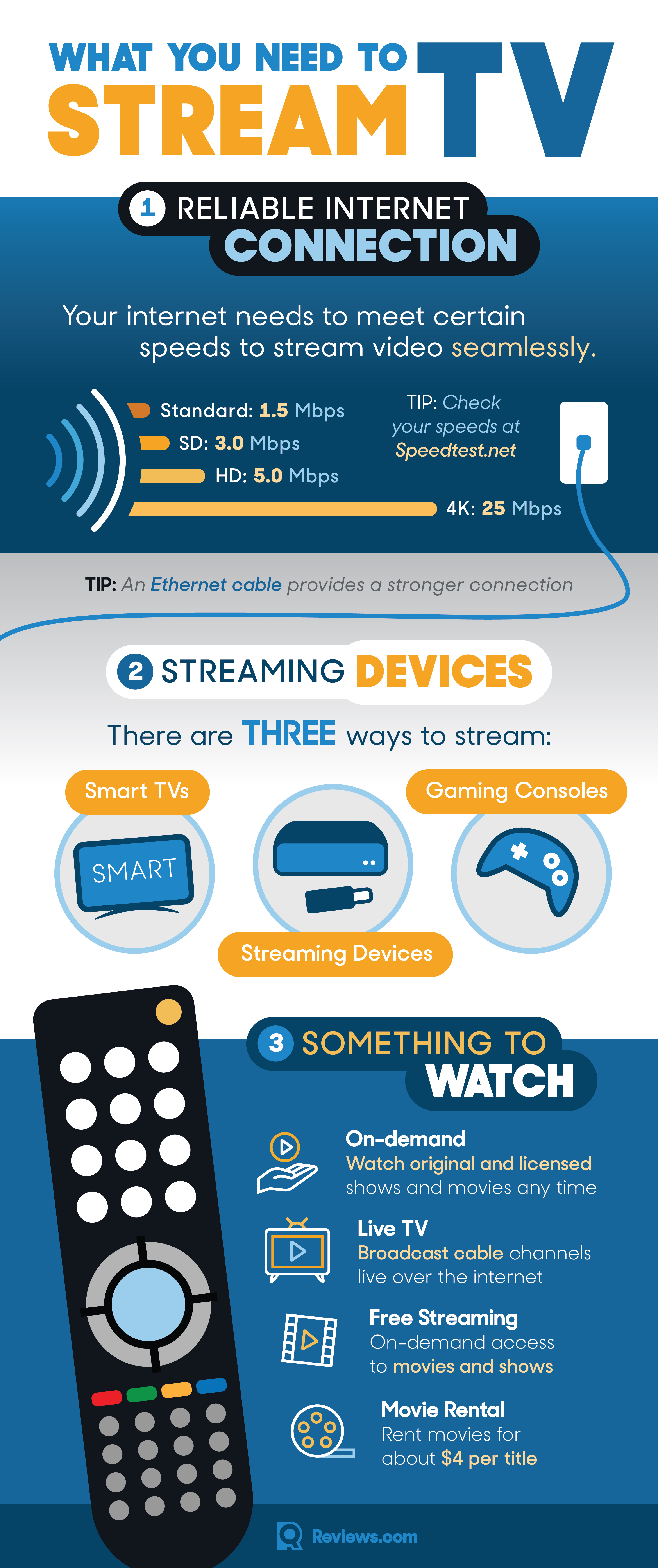
The most critical component for any streaming setup is a robust and stable internet connection. Without adequate bandwidth, you’ll experience frustrating buffering, pixelated video quality, and dropped connections. While specific speed recommendations vary by service and desired quality, here’s a general guideline:
- Standard Definition (SD): 3-5 Mbps
- High Definition (HD): 5-8 Mbps
- Ultra High Definition (4K/UHD): 20-25 Mbps (and higher for HDR content)
For households with multiple users streaming simultaneously or engaging in other high-bandwidth activities like online gaming, significantly higher speeds (50-100+ Mbps) are advisable. Opting for a wired Ethernet connection over Wi-Fi, where possible, can also provide greater stability and speed, especially for primary streaming devices.
Compatible Devices
You can’t stream TV without a device capable of receiving and decoding the internet-based video signals. Fortunately, the range of compatible devices is vast and growing:
- Smart TVs: Many modern televisions come with built-in streaming capabilities and apps.
- Streaming Sticks & Boxes: Dedicated devices like Roku, Amazon Fire TV, Apple TV, and Google Chromecast plug into your TV’s HDMI port.
- Computers/Laptops: Web browsers or dedicated desktop apps can access most streaming services.
- Mobile Devices: Smartphones and tablets offer excellent portability for on-the-go streaming.
- Gaming Consoles: PlayStation and Xbox consoles often include robust media apps for popular streaming services.
Understanding the different types of devices and their functionalities is key to building an efficient and enjoyable streaming environment.
Choosing the Right Streaming Devices
With your internet connection secured, the next step is to select the hardware that will bring streaming content to your screen. Each device type offers unique advantages and disadvantages in terms of convenience, features, and cost.
Smart TVs: The Integrated Solution
Modern Smart TVs are often the simplest entry point into streaming. They have an operating system (like Roku OS, Google TV, WebOS, Tizen) built directly into the television, providing a user-friendly interface to access apps for Netflix, Hulu, YouTube, and many others without additional hardware.
- Pros: Convenience of an all-in-one unit, fewer cables, usually comes with a single remote control.
- Cons: Operating systems can become outdated faster than dedicated streaming devices, app selection might be more limited on some older models, and performance can degrade over time. The interface can also be less responsive compared to a dedicated streamer.
If you already own a relatively new Smart TV, it’s a great place to start. However, if your TV is older or its smart features are sluggish, you might consider external devices for a superior experience.
Dedicated Streaming Sticks and Boxes
These external devices are the workhorses of the streaming world, offering powerful performance, regular software updates, and broad app compatibility. They connect to your TV via an HDMI port.
- Streaming Sticks (e.g., Roku Express/Streaming Stick, Amazon Fire TV Stick, Chromecast with Google TV): These compact devices are excellent for their portability and ease of setup. They offer a full streaming experience, often including voice control and 4K capabilities. They are generally more affordable.
- Streaming Boxes (e.g., Apple TV 4K, NVIDIA Shield TV Pro, Roku Ultra): These are typically more powerful, offering advanced features like faster processors, more storage, Ethernet ports, and sometimes support for higher-end audio formats. They tend to be pricier but provide the most robust and future-proof streaming experience.
Popular Options Comparison:
- Roku: Known for its user-friendly interface and agnostic approach to content, offering a vast array of channels.
- Amazon Fire TV: Deep integration with Amazon’s ecosystem (Prime Video, Alexa), offering a content-first interface.
- Apple TV: Premium hardware with tight integration with Apple services (Apple Arcade, Apple Fitness+, HomeKit) and a polished user experience.
- Google Chromecast with Google TV: Features a content-centric interface that aggregates recommendations from various services and strong Google Assistant integration.
Choosing between them often comes down to personal preference, ecosystem allegiance (Apple vs. Google vs. Amazon), and budget.
Computers, Laptops, and Mobile Devices
While not typically considered primary “TV” streaming devices for a living room setup, computers, laptops, smartphones, and tablets offer immense versatility for streaming.
- Computers/Laptops: You can access almost any streaming service through a web browser or dedicated desktop applications. This is ideal for office viewing or situations where a TV isn’t available. You can also connect a laptop to a TV via an HDMI cable for a larger screen experience.
- Mobile Devices: Smartphones and tablets are perfect for on-the-go viewing, commuting, or watching in bed. Most streaming services have excellent mobile apps that support offline downloads for viewing without an internet connection. Many also support casting or mirroring to a larger screen if you have a compatible streaming device or Smart TV.
These devices highlight the ubiquitous nature of streaming, making entertainment accessible virtually anywhere with an internet connection.
Navigating the World of Streaming Services
Once your devices are ready, the next step is to choose what to watch and where to find it. The streaming service landscape is diverse, encompassing everything from vast on-demand libraries to live TV channels, and even free ad-supported options.
Subscription Video-On-Demand (SVOD) Services
These are the most popular type of streaming service, offering extensive libraries of movies, TV shows, and original content for a monthly or annual fee.
- Netflix: A pioneer in SVOD, known for its massive library of original series, films, and documentaries across various genres.
- Max (formerly HBO Max): Home to HBO’s critically acclaimed content, Warner Bros. films, DC universe, and a wide array of other shows and movies.
- Disney+: Focuses on content from Disney, Pixar, Marvel, Star Wars, and National Geographic, making it a family-friendly choice.
- Amazon Prime Video: Included with an Amazon Prime subscription, offering a mix of original content, movies, and TV shows, plus options for rentals and purchases.
- Hulu (with Ads/Ad-Free): Features a large library of current and classic TV shows, along with original programming. Often bundled with Disney+.
The key to SVOD services is their on-demand nature, allowing you to watch episodes or movies at your leisure without commercials (depending on your subscription tier).
Live TV Streaming Services (Cord-Cutting Alternatives)
For those who still want the experience of traditional linear television channels, live TV streaming services offer a robust alternative to cable or satellite, delivered over the internet.
- YouTube TV: Offers a comprehensive package of live channels, including local networks, sports, and news, with an excellent cloud DVR.
- Sling TV: A more budget-friendly option, allowing users to choose between different base packages (“Orange” and “Blue”) and add-ons for a customizable experience.
- Hulu + Live TV: Combines Hulu’s on-demand library with a wide selection of live channels, including major sports networks.
- FuboTV: Heavily focused on sports, offering a wide array of sports channels alongside general entertainment.
- DirecTV Stream: Offers packages that closely resemble traditional cable, with various tiers of channels and local sports coverage.
These services typically include cloud DVR functionality, allowing you to record live shows and watch them later, much like a traditional DVR. They usually carry a higher monthly fee than SVOD services but still often prove more affordable and flexible than cable.
Free Ad-Supported Video-On-Demand (AVOD) Services
For budget-conscious streamers, a growing number of services offer content entirely free, supported by advertisements.
- Pluto TV: Features a unique blend of “channels” mimicking linear TV, alongside on-demand movies and shows across various genres.
- Tubi: Offers a large library of movies and TV series, often including cult classics and older blockbusters, all free with ads.
- The Roku Channel: Available on Roku devices and other platforms, offering free movies, TV shows, and live linear channels.
- Freevee (Amazon): Another ad-supported service with a mix of movies, TV shows, and some original content, accessible via the Amazon Prime Video app or standalone app.
These services are excellent for supplementing your content diet without incurring additional subscription costs, though you’ll need to tolerate commercial breaks.
Rental and Purchase Services (Transactional VOD – TVOD)
For the very latest movie releases or specific titles you want to own digitally, transactional video-on-demand allows you to rent or buy content on an individual basis.
- Apple TV (Store), Amazon Prime Video (Store), Google Play Movies & TV, Vudu: These platforms offer a vast catalog for rental or purchase, often including movies just released from theaters or TV shows immediately after broadcast.
- YouTube Movies & TV: Also provides options to rent or buy a wide selection of titles.
TVOD is perfect for accessing premium new content without subscribing to a full service or for building a digital movie library.
Setting Up and Optimizing Your Streaming Experience
Getting started with streaming is relatively straightforward, but a few tips can significantly enhance your viewing quality and overall satisfaction.
Initial Setup: Connecting Your Device and Account
- Physical Connection: Plug your streaming stick/box into an HDMI port on your TV. If required, connect it to a power source.
- Network Setup: Follow the on-screen instructions to connect your device to your home Wi-Fi network. Enter your Wi-Fi password.
- Account Creation/Login: You’ll typically need to create an account for the streaming device’s platform (e.g., Roku account, Amazon account). Then, download and log into the apps for your chosen streaming services (Netflix, Hulu, etc.) using your existing subscription credentials.
- User Profiles: Many services allow you to create individual user profiles, which helps tailor recommendations and viewing history for each family member.
Optimizing Network Performance
Beyond having a fast internet connection, how you manage your home network can drastically impact streaming quality.
- Wi-Fi vs. Ethernet: For devices that remain stationary (Smart TVs, streaming boxes), a wired Ethernet connection is almost always superior to Wi-Fi, offering greater speed and stability, and reducing interference.
- Router Placement: Position your Wi-Fi router centrally in your home, away from obstructions and other electronics that might cause interference.
- Mesh Wi-Fi Systems: For larger homes or those with dead spots, a mesh Wi-Fi system can significantly improve coverage and consistent speeds across all devices.
- Quality of Service (QoS): Some routers offer QoS settings, allowing you to prioritize streaming traffic over other network activities, ensuring bandwidth is always allocated for smooth playback.
Managing Your Subscriptions and Costs
One of the biggest advantages of streaming is flexibility, but it can also lead to “subscription fatigue” and accumulating costs.
- Audit Regularly: Periodically review your active subscriptions. Are you still using all of them? Many services offer free trials – use them wisely and cancel before they auto-renew if you don’t plan to continue.
- Bundle Options: Look for bundles (e.g., Disney+/Hulu/ESPN+) that can offer savings compared to subscribing to each service individually.
- Ad-Supported Tiers: If budget is a concern, consider opting for ad-supported versions of services like Hulu or Max, which are cheaper than their ad-free counterparts.
Enhancing Audio and Video Quality
To get the most out of your streaming experience, consider these enhancements:
- 4K/HDR Compatibility: For stunning visuals, ensure your TV, streaming device, and the streaming service itself all support 4K resolution and High Dynamic Range (HDR) formats like HDR10, Dolby Vision, or HLG. Your HDMI cables should also be high-speed.
- Soundbars and Home Theater Systems: While TV speakers have improved, a dedicated soundbar or a full home theater system (receiver, speakers) will dramatically elevate the audio experience, especially for movies and music. Look for support for surround sound formats like Dolby Atmos or DTS:X if your system and content allow.
Common Streaming Challenges and Troubleshooting
Even with the best setup, occasional glitches can occur. Knowing how to troubleshoot common streaming problems can save you frustration.
Buffering and Lag Issues
This is the most frequent complaint.
- Check Internet Speed: Use an online speed test (e.g., fast.com, speedtest.net) on your streaming device or a connected computer to ensure you’re getting adequate speeds.
- Restart Everything: Power cycle your modem and router, and then your streaming device. This often resolves temporary network or device hiccups.
- Reduce Network Congestion: If multiple devices are using bandwidth simultaneously, try pausing other downloads or streaming activities.
- Clear Cache: Some streaming apps allow you to clear their cache, which can resolve performance issues.
Audio/Video Sync Problems
When the audio doesn’t match the video.
- Restart the App/Device: Often a quick fix.
- Check TV/Sound System Settings: Some TVs or soundbars have audio delay settings that might be incorrectly configured.
- Update Software: Ensure your streaming device and TV firmware are up to date.
App Crashes and Freezes
When an app stops responding or closes unexpectedly.
- Force Close the App: On most devices, you can go to the app settings or recent apps menu to force close it.
- Restart Device: A full device restart can clear underlying software conflicts.
- Reinstall App: If issues persist with a specific app, try uninstalling and then reinstalling it.
Connectivity Problems
Device can’t connect to Wi-Fi or the internet.
- Check Wi-Fi Password: Ensure it’s entered correctly.
- Router Position: Move the streaming device closer to the router, or consider a Wi-Fi extender/mesh system.
- Interference: Other electronics (cordless phones, microwaves) can interfere with Wi-Fi signals.
- Contact ISP: If all else fails and other devices also have internet issues, contact your internet service provider.

Conclusion
Streaming TV has redefined home entertainment, placing an unparalleled wealth of content directly at your fingertips. By understanding the core technologies, selecting appropriate devices, navigating the diverse service landscape, and optimizing your setup, you can craft a personalized and highly enjoyable viewing experience. Cutting the cord is more than just saving money; it’s about embracing flexibility, choice, and a future where your entertainment schedule is dictated solely by you. With this guide, you now have the knowledge to confidently embark on your streaming journey and transform the way you watch television.
aViewFromTheCave is a participant in the Amazon Services LLC Associates Program, an affiliate advertising program designed to provide a means for sites to earn advertising fees by advertising and linking to Amazon.com. Amazon, the Amazon logo, AmazonSupply, and the AmazonSupply logo are trademarks of Amazon.com, Inc. or its affiliates. As an Amazon Associate we earn affiliate commissions from qualifying purchases.