
In an increasingly remote and hybrid world, virtual communication platforms like Zoom have transitioned from niche tools to indispensable infrastructure for businesses, educators, and individuals alike. The ubiquity of the “Zoom call” has made its name synonymous with online meetings, but a fundamental question often arises for potential users and organizations: “How much is a Zoom account?”
This seemingly simple query unravels into a nuanced discussion about tiered pricing, feature sets, value propositions, and the strategic financial decisions that underpin effective digital communication. Understanding the cost of a Zoom account isn’t merely about a monthly dollar figure; it’s about evaluating the monetary investment against the operational efficiency, connectivity, and collaborative potential it unlocks. This article delves into the financial intricacies of Zoom’s offerings, guiding you through its various subscription models, potential additional costs, and how to assess the return on your investment from a purely monetary perspective.
Deconstructing Zoom’s Cost Structure: Free vs. Paid Tiers
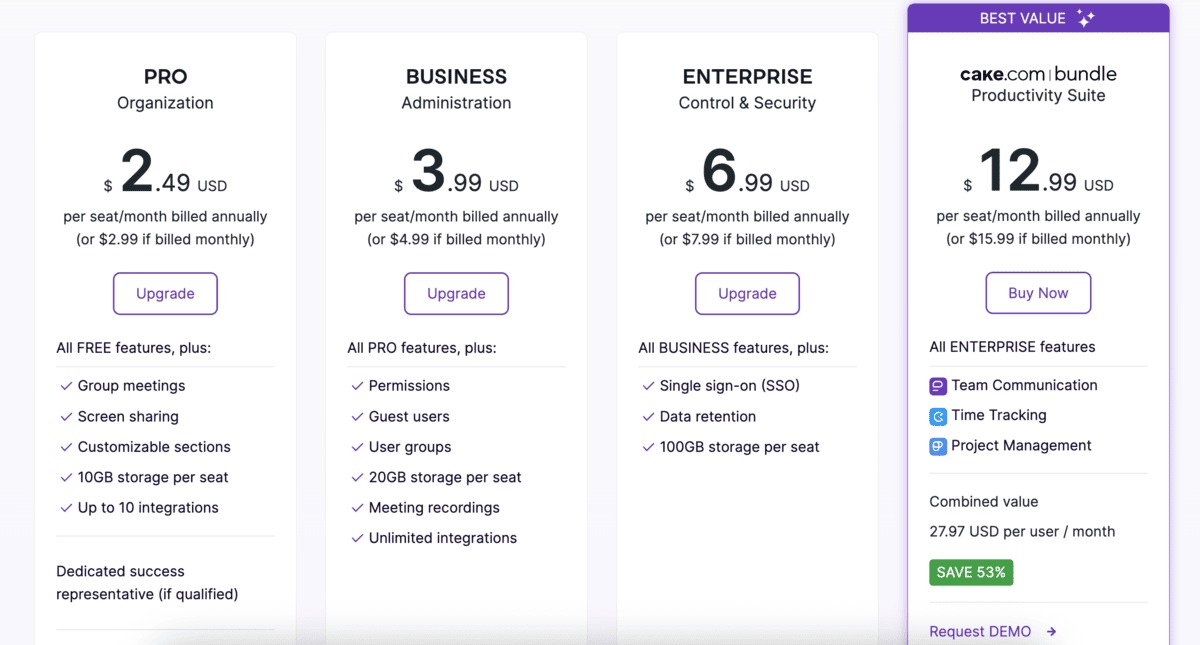
Zoom’s pricing strategy is designed to cater to a vast spectrum of users, from casual individuals to multinational corporations. This means that “a Zoom account” doesn’t have a singular price tag; rather, it represents a range of financial commitments tailored to different needs and budgets.
The Enduring Appeal of Zoom’s Free Tier: A Gateway to Basic Connectivity
For many, the introduction to Zoom begins with its free basic account. This tier has been instrumental in Zoom’s widespread adoption, offering fundamental video conferencing capabilities without any upfront monetary cost. Users can host meetings for up to 100 participants, with a crucial limitation: group meetings (three or more participants) are capped at 40 minutes. One-on-one meetings, however, can last up to 30 hours.
From a financial standpoint, the free tier is invaluable for individuals, small community groups, or those with very infrequent and short meeting requirements. It provides a zero-cost entry point into reliable virtual communication, making it an excellent option for family calls, brief online tutorials, or quick collaborative check-ins. The financial benefit here is obvious: communication without expenditure. However, its limitations inherently cap its utility for serious business or extended educational purposes, where the cost of interrupted meetings or the inability to record can quickly outweigh the “free” price tag.
The Monetary Case for Upgrading: When Free Becomes Costly
While the free tier is financially appealing, its limitations can inadvertently introduce hidden costs or reduce productivity for users with more demanding needs. The 40-minute time limit for group meetings often necessitates rejoining, disrupting workflow, and consuming valuable time. For businesses, this can translate into lost productivity and a less professional image. Similarly, the inability to record meetings on the free tier means information retention relies solely on note-taking, potentially leading to missed details or a lack of verifiable records—all of which have an indirect financial impact.
Therefore, for anyone relying on Zoom for professional or extensive personal use, an upgrade quickly becomes a sound financial decision. The investment in a paid account is often justified by the prevention of these “soft costs” associated with the free tier’s constraints, such as wasted time, reduced efficiency, or the need for alternative, less integrated solutions. The shift from free to paid is a strategic financial move, trading a direct monetary outlay for enhanced capability and reduced operational friction.
A Deep Dive into Zoom’s Paid Subscription Tiers and Their Price Points
Zoom offers several paid tiers, each designed with specific user bases and their corresponding financial capacities and feature demands in mind. Understanding these tiers is crucial for making an informed monetary decision.
Zoom Pro: The Entrepreneur’s and Small Team’s Essential Investment
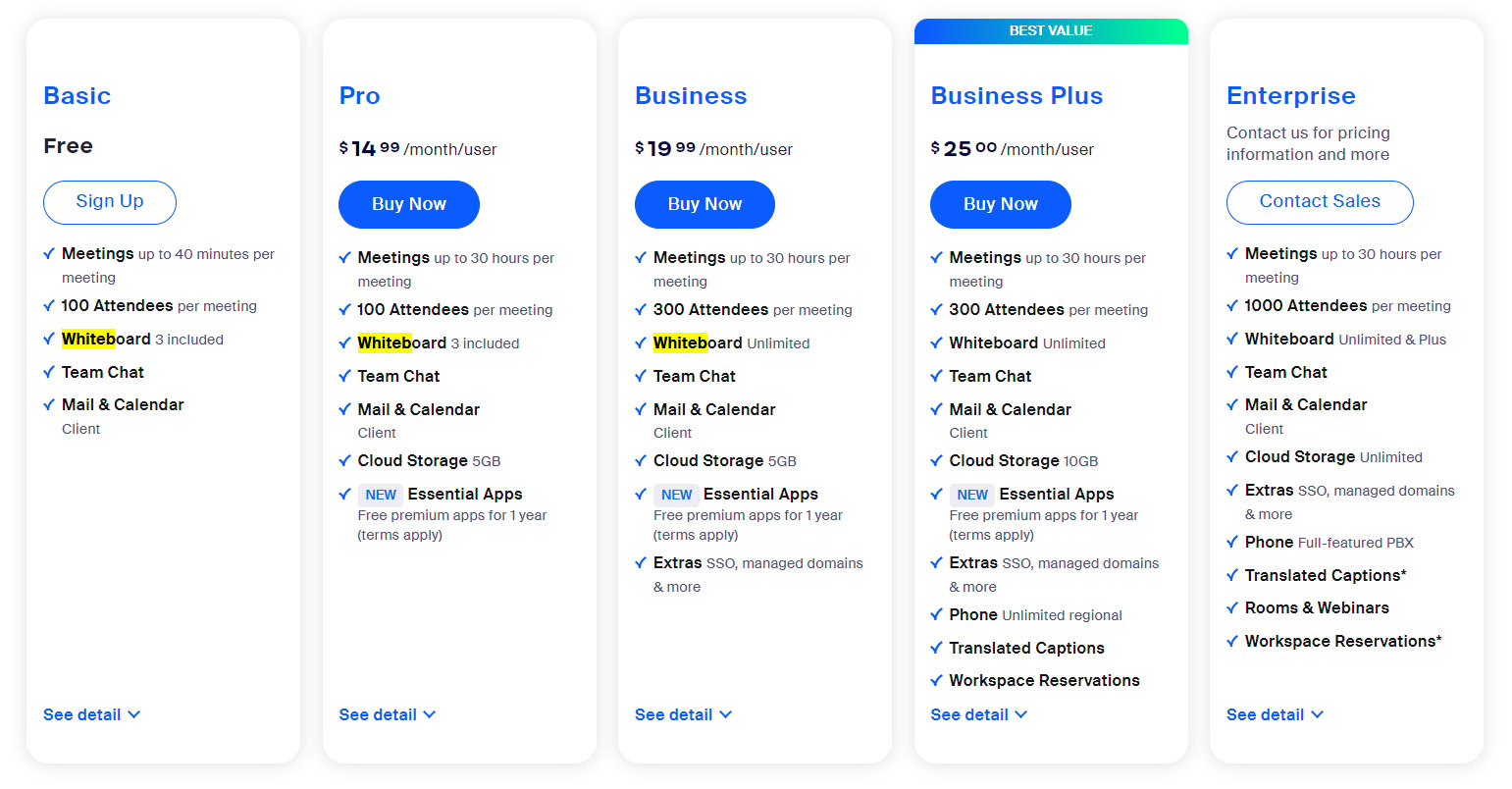
The Zoom Pro plan is typically the first step up for most users moving beyond the free tier. Priced competitively, often around $14.99 to $15.99 per month per host (or discounted significantly with an annual subscription), it offers a substantial upgrade in capabilities for a relatively modest financial outlay.
Key financial benefits and features include:
- Extended Meeting Duration: No time limit on group meetings (up to 30 hours per meeting). This eliminates the productivity drain of rejoining meetings, a direct saving of time and effort.
- Increased Participants: Up to 100 participants per meeting, suitable for most small to medium-sized teams and presentations.
- Cloud Recording: 5 GB of cloud recording, allowing meetings to be stored and accessed later. This is a crucial feature for training, record-keeping, and ensuring information is never lost, effectively providing a digital asset. The monetary value here lies in compliance, knowledge management, and reduced need for manual transcription.
- User Management: Basic administrative controls, allowing for simplified billing and account management for small teams, saving administrative overhead.
For freelancers, startups, small businesses, and dedicated professionals, Zoom Pro represents an excellent balance of cost and functionality. It provides the core tools necessary for uninterrupted, professional virtual communication without a prohibitive financial burden.
Zoom Business: Scaling Communications for Growing Enterprises
As organizations grow, their communication needs become more complex, requiring enhanced features and greater scalability. The Zoom Business plan, typically priced around $19.99 to $20.99 per month per host (with a minimum of 10 hosts required), is tailored for these expanding entities. This minimum host requirement signifies a larger financial commitment but comes with commensurate benefits.
From a financial perspective, Business plans are an investment in organizational efficiency and brand consistency:
- Larger Participant Capacity: Up to 300 participants per meeting, accommodating larger departmental meetings, webinars, or company-wide announcements.
- Branding: Company branding on meeting rooms, enhancing professional appearance and reinforcing corporate identity. This has an indirect marketing and branding value, supporting the company’s image.
- Admin Dashboard: More robust administrative controls and reporting features, crucial for managing a larger user base, monitoring usage, and ensuring financial accountability.
- Dedicated Phone Support: Access to dedicated support channels, minimizing downtime and ensuring quick resolution of issues, which directly impacts operational continuity and reduces potential losses from communication breakdowns.
- Managed Domains and Single Sign-On (SSO): Enhances security and streamlines user access, reducing IT administration costs and bolstering data protection.
The Business plan’s financial implications extend beyond just the monthly fee; it’s an investment in robust, scalable communication infrastructure that supports growth and professional operations.
Zoom Enterprise: Comprehensive Solutions for Large-Scale Corporate Needs
For very large corporations, educational institutions, or government entities, Zoom Enterprise offers a custom-priced solution designed for massive scale and highly specific requirements. Pricing for Enterprise accounts is not publicly listed and is negotiated directly with Zoom, reflecting the bespoke nature of these deployments. The financial commitment here is substantial, often involving annual contracts and dedicated account management.
Enterprise features, which justify the significant monetary investment, include:
- Massive Participant Capacity: Up to 500 or even 1,000 participants per meeting.
- Unlimited Cloud Storage: Essential for high-volume recording and compliance. This eliminates concerns about data storage costs and capacity limits.
- Dedicated Customer Success Manager: Personalized support and strategic guidance, optimizing the platform’s utilization and ensuring the organization maximizes its return on investment.
- Bundled Solutions: Often includes Zoom Rooms, Zoom Phone, and Zoom Webinars as part of a comprehensive package, providing a unified communication ecosystem.
- Advanced Security & Analytics: Meeting analytics, robust security controls, and integrations with enterprise systems, all of which contribute to data security, operational intelligence, and reduced risk—critical for large organizations.
The financial decision to opt for an Enterprise plan is a strategic one, often part of a broader IT budget, designed to empower global teams, ensure seamless internal and external communication, and manage complex compliance requirements, where the total cost of ownership is weighed against the immense value derived.
Add-ons and Ancillary Costs: Beyond the Core Subscription
The base subscription fee for any Zoom plan is often just the starting point. Several add-ons and additional services can significantly impact the total financial outlay for a Zoom account. These include:
- Large Meeting Add-on: For Pro and Business users who occasionally need to host more participants than their base plan allows (e.g., up to 500 or 1,000 participants). This is a cost-effective alternative to upgrading the entire plan if large meetings are infrequent.
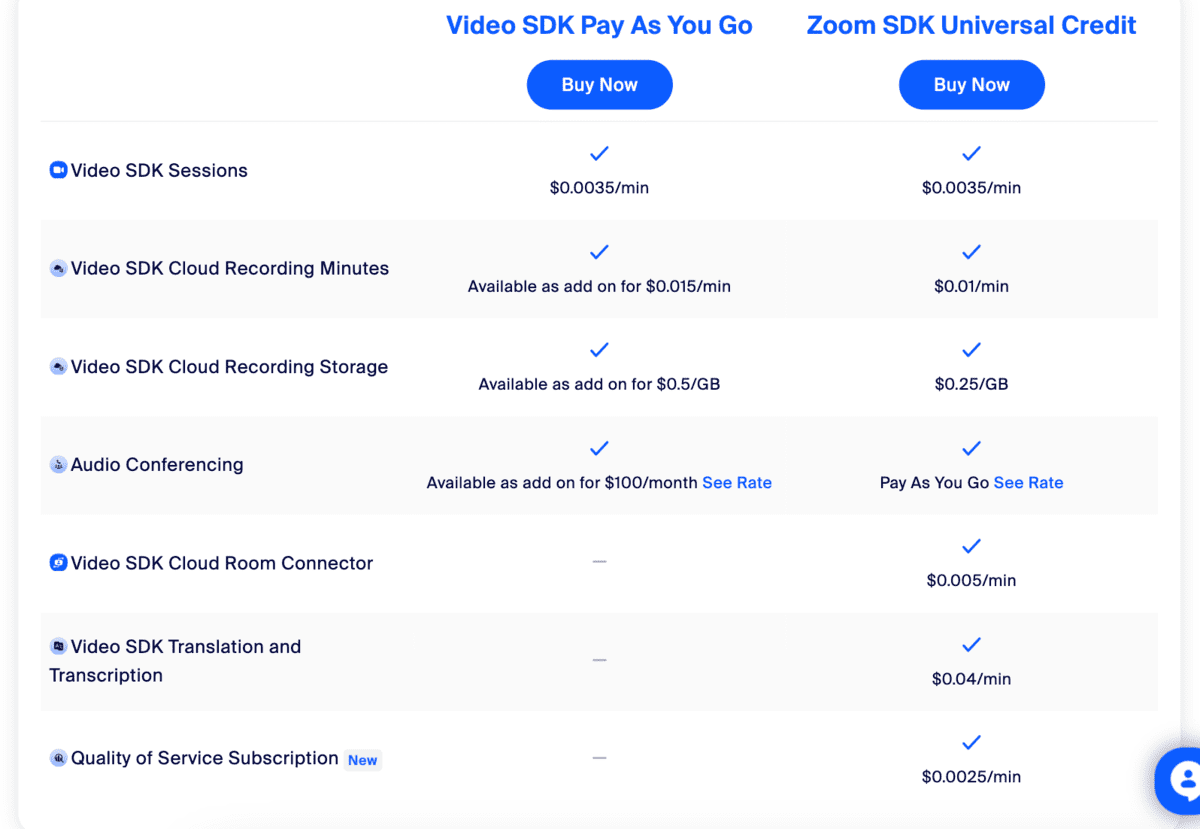
- Zoom Webinars: A separate product for hosting large-scale broadcasts, priced based on attendee capacity. Essential for marketing, training, and large virtual events, this adds a significant, yet often justifiable, cost for organizations utilizing it for revenue generation or broad outreach.
- Zoom Phone: A cloud phone system that integrates with the Zoom platform, replacing traditional PBX systems. This offers a unified communication experience but introduces per-user calling plan costs.
- Additional Cloud Storage: If the included cloud recording storage is insufficient, extra storage can be purchased, adding to the monthly or annual bill.
- Zoom Rooms: Dedicated conference room systems that require specific hardware and a separate subscription per room, representing a notable capital and operational expense for equipping physical meeting spaces.
These add-ons highlight that the “cost of a Zoom account” can fluctuate significantly based on an organization’s specific feature demands, making a granular needs assessment critical for accurate financial planning.
Strategic Financial Planning for Your Zoom Investment
Beyond understanding the price list, savvy financial planning involves optimizing your Zoom investment for maximum value and cost-effectiveness.
Annual vs. Monthly Billing: Optimizing Your Budget
Zoom, like many SaaS providers, typically offers a discount for annual subscriptions compared to monthly payments. While monthly billing provides greater flexibility, allowing users to cancel at any time, an annual commitment usually translates to a 10-20% saving over 12 months.
- Financial Benefit of Annual: For individuals or organizations with a confirmed, long-term need for Zoom, paying annually upfront represents a direct cost saving. This can free up budget for other tools or initiatives.
- Financial Benefit of Monthly: For those uncertain about their long-term usage or operating with very tight, fluctuating budgets, monthly payments offer better cash flow management and lower short-term financial commitment, despite the higher overall cost.
The choice between annual and monthly should be a deliberate financial decision based on forecasted usage and budget stability.
Assessing True Value: ROI and Cost-Benefit Analysis
The monetary investment in a Zoom account should be viewed through the lens of Return on Investment (ROI) and a comprehensive cost-benefit analysis.
- Reduced Travel Costs: For businesses with geographically dispersed teams or clients, Zoom significantly reduces the need for physical travel, saving substantial amounts on flights, accommodation, and per diems. This is a direct, measurable financial benefit.
- Increased Productivity: Eliminating meeting time limits, improving collaboration tools, and facilitating easy screen sharing can lead to more efficient meetings and faster project completion, translating to higher output per employee hour.
- Enhanced Employee Engagement & Retention: Providing tools that enable flexible work arrangements can contribute to employee satisfaction and reduce turnover, indirectly saving recruitment and training costs.
- Market Reach: Features like webinars enable businesses to reach larger audiences for marketing, sales, and training, potentially generating revenue or expanding market share at a fraction of the cost of physical events.
Calculating the ROI requires quantifying these benefits against the subscription cost, demonstrating how the investment in Zoom delivers tangible financial returns beyond simply paying for a service.
Budgeting for Digital Communication Infrastructure
For businesses, Zoom shouldn’t be an afterthought expense but a budgeted line item within their IT or operational budget. This involves:
- Forecasting Usage: Accurately predicting the number of hosts, meeting frequency, participant numbers, and need for add-ons helps in selecting the correct tier and avoiding unnecessary expenditures or costly upgrades mid-term.
- Consolidating Communication Tools: For organizations already using separate tools for video conferencing, VoIP, and webinars, transitioning to an integrated Zoom ecosystem (with Zoom Phone, Webinars, etc.) can often lead to cost savings through vendor consolidation and simplified management.
- Reviewing and Auditing: Regularly reviewing Zoom usage and subscription tiers ensures that the organization isn’t paying for unused licenses or features, allowing for adjustments to optimize costs.
Proactive budgeting ensures that the investment in Zoom is strategically aligned with business goals and offers the best possible financial outcome.
Making an Informed Financial Decision: Is Zoom Worth It For You?
Ultimately, the question of “how much is a Zoom account” transforms into “what is the financial value of Zoom for my specific needs?” Making an informed decision requires careful introspection and financial planning.
Identifying Your Core Communication Requirements
Before committing any money, objectively assess your communication needs:
- How frequently do you host meetings, and for how long?
- How many participants typically join your meetings?
- Do you require recording, and if so, how much storage?
- Are branding, admin controls, or advanced security features critical?
- Do you need integrated phone services or webinar capabilities?
Answering these questions helps pinpoint the exact tier and add-ons required, preventing overspending on unnecessary features or under-investing in critical functionalities that might lead to future costs.
Comparative Cost Analysis: Zoom vs. Competitors
While this article focuses exclusively on Zoom’s financial aspects, a prudent financial decision often involves comparing Zoom’s pricing and feature set against competitors like Microsoft Teams, Google Meet, Cisco Webex, and others. Evaluate not just the sticker price, but the total cost of ownership, including integration with existing tools, scalability, and the perceived value proposition offered by each platform in terms of features relevant to your specific financial and operational needs.
Future-Proofing Your Investment
Consider your future growth. Will your needs scale in the next 1-3 years? Choosing a platform that can grow with you, or at least one where upgrading is financially viable, ensures that your initial investment isn’t quickly outmoded. Planning for scalability minimizes disruptive and potentially costly migrations down the line.
Conclusion
The cost of a Zoom account is not a fixed number but a variable equation influenced by individual and organizational needs. From the free tier serving basic connectivity to custom-negotiated Enterprise solutions for global corporations, Zoom offers a spectrum of options, each with distinct financial implications. Understanding these tiers, assessing the true value beyond the price tag through ROI analysis, and engaging in strategic financial planning are paramount. For any user or business, the “right” price for a Zoom account is the one that aligns perfectly with their communication requirements, maximizes efficiency, and ultimately delivers a positive return on their digital communication investment.
aViewFromTheCave is a participant in the Amazon Services LLC Associates Program, an affiliate advertising program designed to provide a means for sites to earn advertising fees by advertising and linking to Amazon.com. Amazon, the Amazon logo, AmazonSupply, and the AmazonSupply logo are trademarks of Amazon.com, Inc. or its affiliates. As an Amazon Associate we earn affiliate commissions from qualifying purchases.