
In an era increasingly dominated by digital transactions and paperless communication, the humble check might seem like an artifact from a bygone age. Yet, for various specific scenarios – from paying rent to sending a thoughtful gift, or fulfilling certain business obligations – physical checks remain an indispensable tool. Recognizing this enduring need, modern financial institutions have seamlessly integrated traditional banking functions into their advanced digital platforms. Among these, the Chase mobile app stands out as a paragon of convenience, transforming what was once a trip to the bank or a phone call into a few taps on your smartphone.
This guide delves deep into the technological prowess of the Chase app, specifically focusing on its intuitive process for ordering new checks. We’ll explore not just the step-by-step instructions, but also the underlying technological advancements that make such convenience possible, the security protocols in place, and how this feature integrates into a broader suite of digital financial management tools. For anyone keen on harnessing the full potential of their banking app, understanding this functionality is a testament to how technology continues to simplify our financial lives.
The Evolution of Banking Technology: Embracing Digital Convenience
The journey of banking from brick-and-mortar institutions to pocket-sized digital powerhouses is a fascinating narrative of technological innovation. What began with rudimentary online banking portals has blossomed into sophisticated mobile applications that offer an unparalleled level of financial control and accessibility. The Chase app is a prime example of this evolution, encapsulating complex banking operations within a user-friendly interface.
From Teller Lines to Touchscreens: A Paradigm Shift
Not long ago, ordering checks involved a visit to a branch, navigating an automated phone system, or perhaps even mailing in a request form. Each method carried its own set of time-consuming hurdles, from waiting in queues to deciphering complex IVR menus. The advent of mobile banking apps fundamentally reshaped this landscape. By leveraging smartphone technology – high-resolution touchscreens, secure biometric authentication, and robust data encryption – banks could empower customers to manage their accounts with unprecedented autonomy. This wasn’t merely about digitizing existing processes; it was about reimagining the user experience, making banking more immediate, transparent, and personally controlled. The shift signified a profound change in consumer expectation, where instant access and intuitive design became non-negotiable aspects of a modern banking relationship. This paradigm shift underscores the broader trend of consumer technology influencing service industries, pushing them towards more agile, user-centric models.
The Chase App: A Hub for Modern Financial Management
The Chase app is more than just a tool for checking balances; it’s a comprehensive digital financial ecosystem. Engineered with a deep understanding of user needs and the latest in mobile technology, it serves as a central hub for everything from depositing checks via photo capture to transferring funds, paying bills, managing investments, and, crucially for our discussion, ordering checks. Its design prioritizes a seamless user journey, employing clean aesthetics, logical navigation paths, and responsive elements. Beneath its sleek surface lies a robust architecture that integrates various backend banking systems, ensuring real-time data synchronization and secure transaction processing. This architectural complexity, hidden behind a simple tap, is what defines a truly powerful financial app. It’s a testament to how advanced software engineering can democratize access to financial services, offering capabilities that once required specialized knowledge or direct human intervention. The app’s continuous updates and feature enhancements reflect an ongoing commitment to leveraging technology to meet evolving customer demands and security challenges.
Demystifying the Check Ordering Process within the Chase App
Navigating complex financial tasks through a digital interface can sometimes feel daunting. However, the Chase app’s design philosophy shines brightest in simplifying such processes. Ordering checks, often perceived as a bureaucratic chore, becomes an effortless task, thanks to a carefully engineered user flow.
Pre-Requisites and Initial Setup: Ensuring a Smooth Start
Before diving into the ordering process, a few foundational steps ensure a smooth experience. Firstly, you need to have the Chase Mobile app installed on your smartphone or tablet, readily available from your device’s respective app store (App Store for iOS, Google Play Store for Android). Secondly, you must have an active Chase checking account linked to your online banking profile. Accessing the app requires your Chase Online username and password. For enhanced security and convenience, many users opt to enable biometric authentication, such as fingerprint ID or Face ID, allowing for quick and secure logins without repeatedly typing credentials. This feature, built on sophisticated biometric recognition technology, adds an extra layer of protection while significantly improving the user experience. Ensuring your app is updated to the latest version is also crucial, as updates often include performance enhancements, security patches, and new features, guaranteeing optimal functionality and access to the most current user interface.
Step-by-Step Guide: Navigating the App to Order Checks
The actual process of ordering checks through the Chase app is remarkably straightforward, a testament to thoughtful UI/UX design. Here’s a detailed walkthrough:
- Log In Securely: Open the Chase Mobile app and log in using your credentials or biometric authentication. The app’s security framework immediately goes to work, encrypting your data and verifying your identity.
- Access Account Details: Once logged in, you’ll land on your account summary screen. Select the specific checking account for which you wish to order checks. This will take you to the account’s details page.
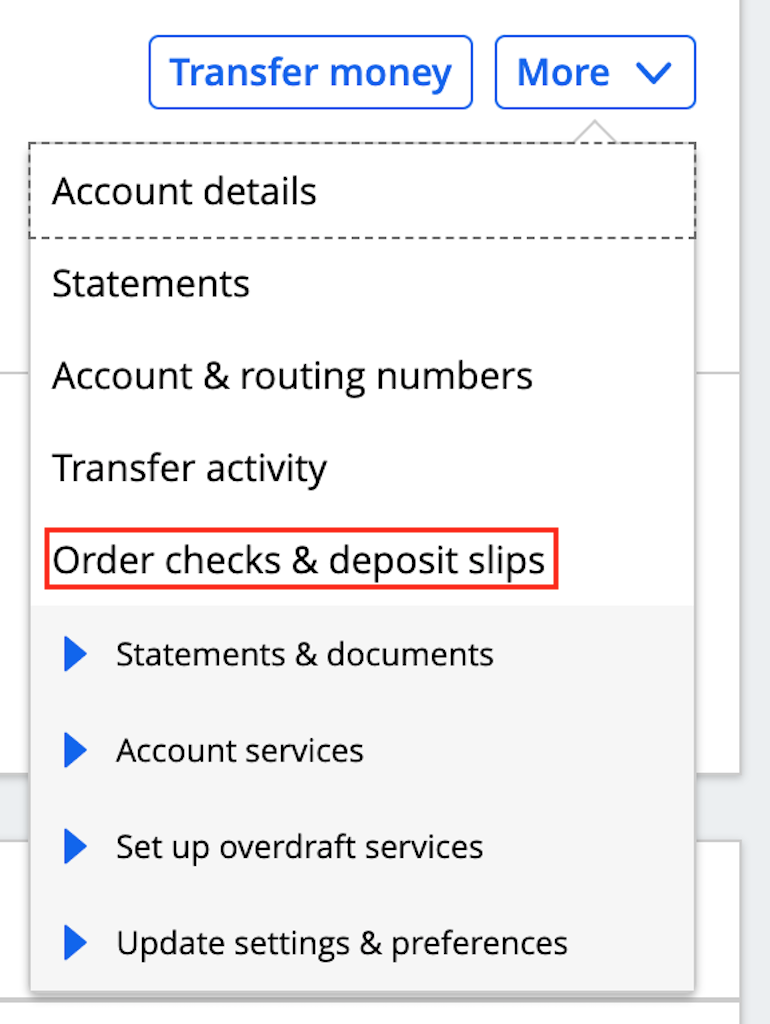
- Locate Ordering Options: On the account details screen, you’ll need to scroll down or look for options related to account management. Typically, you’ll find a section or button labeled “Order Checks,” “Manage Checks,” or something similar. This is often intuitively placed under a “Services” or “More” menu to keep the main screen uncluttered. The placement is a key UI decision designed to guide users efficiently.
- Initiate Order: Tap on the “Order Checks” option. The app will then guide you to either a dedicated check ordering portal within the app or will link out to a secure, integrated third-party vendor (like Harland Clarke, often Chase’s partner for checks) that provides customization options. The seamless transition between the Chase app interface and the vendor’s portal is a critical technical achievement, maintaining a consistent user experience despite underlying system integrations.
- Confirm Account Information: The system will typically pre-populate your account and routing numbers. Verify that these details are correct to prevent errors. This automation minimizes manual input, reducing the risk of human error.
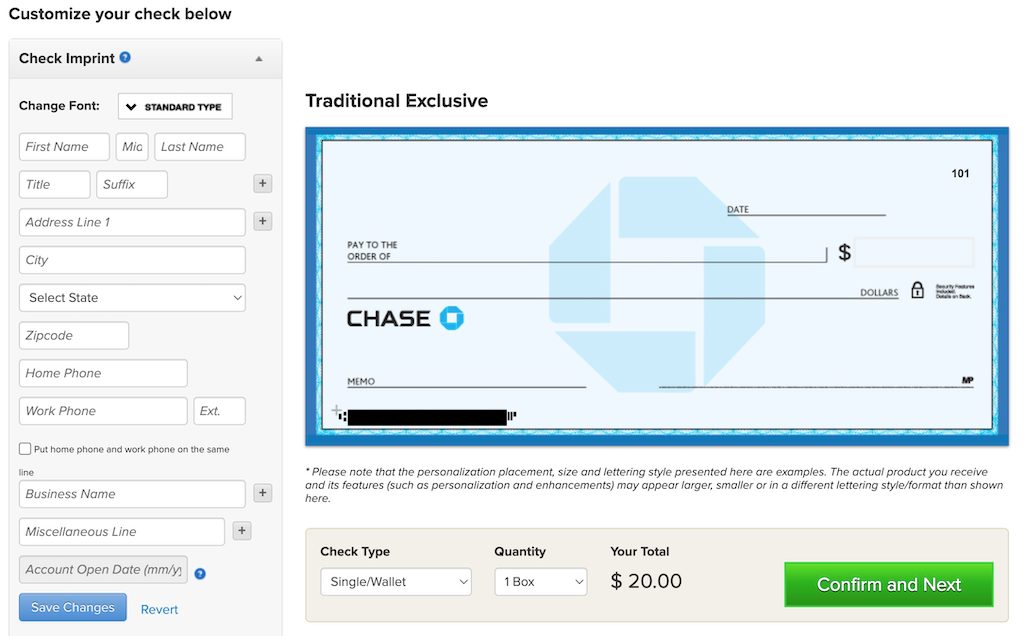
- Select Check Design and Quantity: This is where you can personalize your checks. The app interface will present various design options, from standard blue safety checks to more elaborate decorative themes. You’ll also select the quantity of checks you need (e.g., 1 box, 2 boxes) and potentially choose options like duplicate checks or specialty checks. The digital catalog allows for visual previews, enhancing the user’s ability to make informed choices.
- Review and Confirm Shipping Details: Your registered mailing address will usually be pre-filled as the shipping destination. Always review this carefully. If you need to ship to an alternative address, the app provides an option to modify it. This step highlights the importance of data accuracy in digital transactions.
- Final Review and Payment: Before finalizing, the app will present a comprehensive summary of your order, including the chosen design, quantity, shipping address, and total cost. Review all details meticulously. The payment for the checks is typically debited directly from your selected Chase checking account, an integrated financial transaction that showcases the app’s full capabilities.
- Place Order: Once everything is confirmed, tap the “Place Order” or “Submit” button. You’ll usually receive an order confirmation number and an estimated delivery date directly within the app and/or via email.
This entire process, designed for maximum efficiency and clarity, underscores the app’s robust backend infrastructure and a frontend crafted for user empowerment.
Customization Options and Review: Personalizing Your Checks
The Chase app doesn’t just facilitate ordering; it empowers users with choice. Through its integrated interface (or the linked vendor portal), you can often:
- Choose Designs: Select from a range of check designs, from professional to thematic, allowing for a degree of personal expression.
- Add Accessories: Options for checkbook covers, registers, and other accessories are typically available, turning a functional item into a personalized toolkit.
- Customize Text: Add personalized information beyond your name and address, such as a business name or a secondary address line, directly through the app’s text fields.
- Verify Order Accuracy: The final review screen is a critical feature, offering a last chance to catch any errors before the order is submitted. This digital proofing process is a significant advantage over traditional paper-based ordering, where errors might only be discovered upon delivery.
This level of customization, seamlessly integrated into the digital workflow, elevates the check-ordering experience beyond a mere transaction, making it a more personal and controlled process, driven by intuitive app technology.
Beyond Ordering: Leveraging the Chase App for Holistic Account Management
The utility of the Chase app extends far beyond the initial act of ordering checks. It integrates this specific function into a broader ecosystem of financial management tools, enhancing the overall user experience and providing continuous support.
Tracking Your Order and Delivery Expectations
Once your check order is placed, the digital convenience doesn’t end. Most check ordering systems, including those integrated with the Chase app, provide tracking information. While the app itself might not host a real-time GPS tracker for your checks, it usually offers an order status or a link to the vendor’s tracking portal. You’ll receive an estimated delivery window, and often a shipping confirmation email with a tracking number, allowing you to monitor your package’s journey. This transparency in logistical management is a key technological advantage, mitigating the uncertainty that once accompanied physical mail orders and providing peace of mind to the customer. This integration of third-party logistics data directly or indirectly into the banking app ecosystem demonstrates a sophisticated level of API (Application Programming Interface) integration, a hallmark of modern tech platforms.
Digital Alternatives to Physical Checks: A Tech Perspective
While this article focuses on ordering physical checks, it’s crucial from a tech perspective to acknowledge the app’s role in offering powerful digital alternatives that often negate the need for checks entirely. The Chase app empowers users to:
- Send Money with Zelle®: Instantly send money to friends, family, or small businesses using just an email address or mobile number, leveraging real-time payment technology.
- Pay Bills Online: Set up one-time or recurring payments to thousands of billers directly from your checking account, eliminating paper statements and checks. This uses sophisticated payment gateways and scheduling algorithms.
- Transfer Funds Electronically: Easily move money between your Chase accounts or to accounts at other financial institutions, relying on secure interbank transfer protocols.
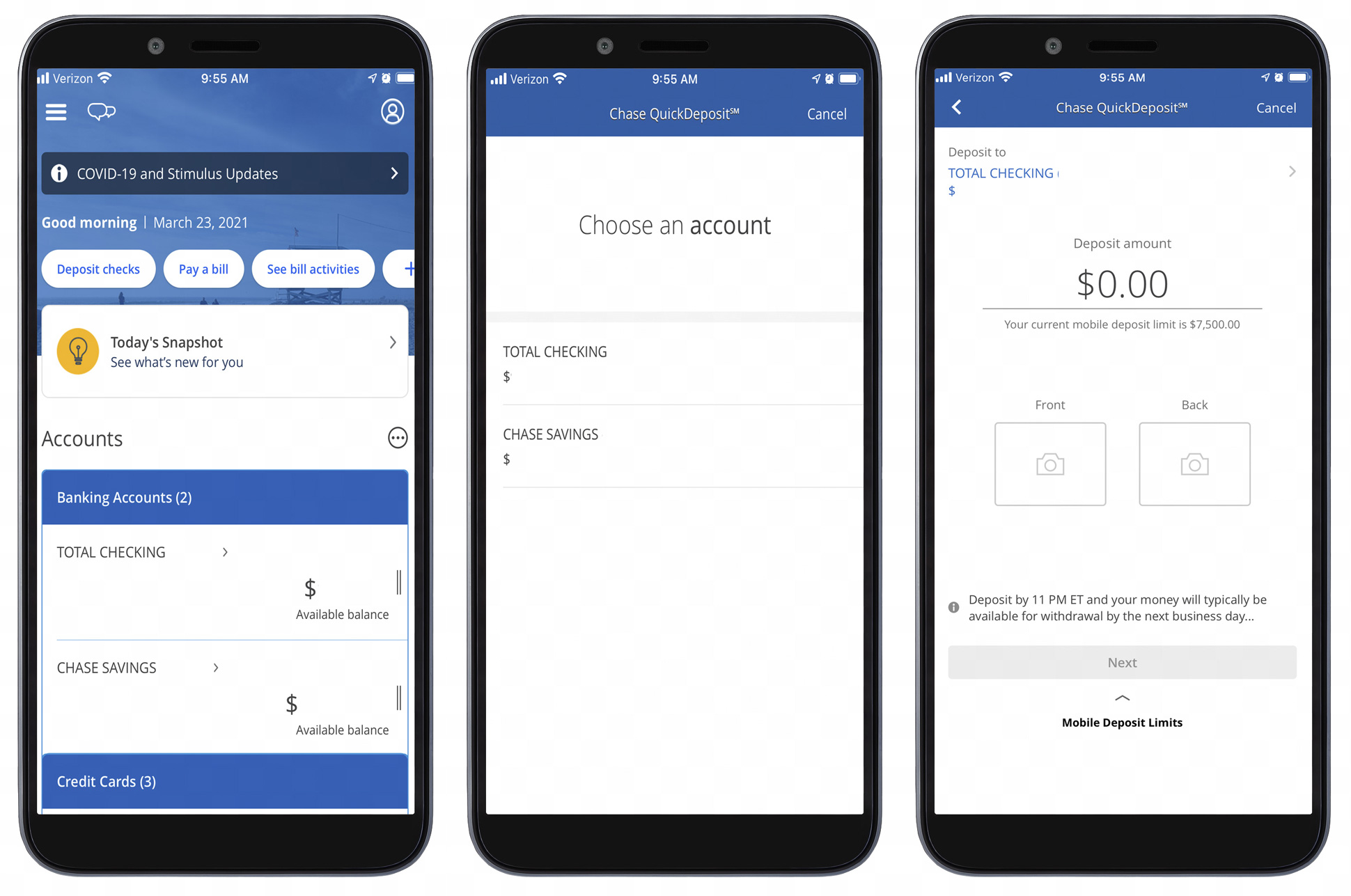
- Deposit Checks Remotely: Use the app’s camera to capture images of physical checks for deposit, a brilliant application of optical character recognition (OCR) and image processing technology.
These features showcase the app’s advanced capabilities, offering faster, more secure, and environmentally friendly alternatives to paper checks. Understanding these digital options is key for anyone looking to fully optimize their financial management within the digital realm. It highlights the app’s role not just as a tool for traditional banking, but as an engine driving the transition towards a more cashless and digitally integrated financial future.
Enhancing Security: The App’s Role in Protecting Your Financial Data
Security is paramount in digital banking, and the Chase app employs a multi-layered approach to protect your sensitive financial information throughout the check ordering process and beyond.
- Encryption: All data transmitted between your device and Chase’s servers is encrypted using industry-standard protocols (e.g., TLS/SSL), rendering it unreadable to unauthorized parties.
- Biometric Authentication: Features like fingerprint and facial recognition provide a highly secure and convenient method for logging in, reducing reliance on easily compromised passwords.
- Session Timeouts: Automatic logouts after periods of inactivity prevent unauthorized access if your device is left unattended.
- Fraud Monitoring: Chase employs sophisticated AI and machine learning algorithms to continuously monitor transactions for unusual activity, flagging potential fraud in real-time.
- Secure Environment: The app operates in a sandboxed environment on your device, preventing other applications from accessing its data.
- Device Enrollment: Linking your device to your Chase account adds another layer of security, recognizing trusted devices and alerting you to logins from unfamiliar ones.
These technological safeguards are not just features; they are foundational to building trust and ensuring the integrity of your financial transactions within the digital space.
Troubleshooting Common Issues and Optimizing Your App Experience
Even with the most advanced technology, occasional hiccups can occur. Understanding how to troubleshoot common issues and optimize your app usage is key to a consistently smooth banking experience.
Addressing Technical Glitches and Login Challenges
- App Not Responding/Crashing: Often, a simple force close and restart of the app resolves minor software glitches. If issues persist, clearing the app’s cache (in your device settings) or reinstalling the app might be necessary. This resets the application state and can fix corrupted files.
- Login Issues: Double-check your username and password. If you’ve forgotten them, use the “Forgot Username” or “Forgot Password” links, which are designed with secure recovery protocols. Ensure your internet connection is stable, as weak signals can interfere with authentication. If biometric login fails, ensure your device’s biometric sensors are clean and calibrated.
- Feature Not Appearing: Verify that your app is updated to the latest version. New features, or changes to existing ones, are often rolled out with app updates.
These troubleshooting steps, common across most mobile applications, empower users to resolve minor issues independently, reinforcing the user’s control over their digital tools.
Seeking Support: In-App Assistance and Customer Service Integration
For issues that can’t be resolved through basic troubleshooting, the Chase app provides multiple avenues for support:
- In-App Help/FAQ: Many common questions are answered within the app’s integrated help section, saving you time.
- Secure Messaging: The app often includes a secure messaging feature, allowing you to communicate directly with customer service representatives within a protected environment. This prevents sensitive information from being shared over less secure channels like email.
- Phone Support: Direct links or phone numbers for customer service are readily available within the app, ensuring that help is just a tap away if a live conversation is needed.
- Branch Locator: For complex issues requiring in-person assistance, the app’s branch locator helps you find the nearest Chase branch.
The seamless integration of these support channels highlights the app’s comprehensive design, ensuring that users are never left without assistance, regardless of the complexity of their issue.
Future-Proofing Your Banking: Staying Updated with App Innovations
The world of financial technology is constantly evolving. To truly optimize your Chase app experience and ensure future-proofing, consider the following:
- Enable Automatic Updates: This ensures you always have the latest features, security patches, and performance improvements without manual intervention.
- Explore New Features: Periodically browse the “What’s New” section or notifications within the app to discover new functionalities that can further simplify your financial life.
- Utilize Notifications: Customize push notifications to receive alerts for transactions, balance changes, or important account updates, keeping you informed in real-time.
- Provide Feedback: Many apps offer avenues for users to provide feedback. Sharing your thoughts can influence future app development, contributing to a better user experience for everyone.
By actively engaging with these aspects of the app, you not only stay current but also contribute to the ongoing refinement of a powerful financial tool, aligning with the dynamic nature of the tech landscape.
The Chase app exemplifies how sophisticated technology can transform traditional banking tasks into highly efficient and user-friendly digital experiences. Ordering checks, once a minor inconvenience, has become a seamless operation, integrated within a comprehensive suite of financial management tools. From the secure login process to customizable order options and robust post-order support, every aspect is engineered to provide convenience, control, and peace of mind. By embracing and understanding the technological capabilities of the Chase app, users can not only order checks with ease but also unlock a new level of efficiency and security in managing their entire financial lives in the digital age.
aViewFromTheCave is a participant in the Amazon Services LLC Associates Program, an affiliate advertising program designed to provide a means for sites to earn advertising fees by advertising and linking to Amazon.com. Amazon, the Amazon logo, AmazonSupply, and the AmazonSupply logo are trademarks of Amazon.com, Inc. or its affiliates. As an Amazon Associate we earn affiliate commissions from qualifying purchases.