
Changing your billing address with your financial institutions, especially a major one like Chase, is more than just a bureaucratic chore; it’s a critical step in safeguarding your financial security, ensuring uninterrupted access to your services, and maintaining the health of your credit profile. Whether you’ve moved to a new home, changed your P.O. box, or simply identified an outdated record, updating your address promptly with Chase is paramount. This comprehensive guide will walk you through the various methods available, underscore the importance of this simple action, and provide best practices to ensure a smooth transition, all within the context of sound personal financial management.

Why Updating Your Chase Billing Address is Crucial for Your Finances
In the realm of personal finance, diligence pays off. Updating your billing address might seem minor, but its implications are far-reaching, touching upon fraud prevention, credit accuracy, and the seamless operation of your accounts. Neglecting this simple step can lead to significant financial headaches and potential risks.
Preventing Identity Theft and Fraud
Your billing address is a key piece of personal information linked to your financial accounts. If an unauthorized individual gains access to outdated address information, they could potentially intercept sensitive mail, such as new credit cards, bank statements, or other financial communications. This opens the door to identity theft, where criminals can use your information to open new accounts, make fraudulent purchases, or access existing funds. By keeping your address current with Chase, you significantly reduce this vulnerability, ensuring that all correspondence reaches you and not a potential fraudster.
Ensuring Timely Statement Delivery
Credit card statements, bank account summaries, and other important financial notices contain critical information about your spending, balances, interest accrued, and payment due dates. Timely receipt of these documents is essential for effective budget management and avoiding late payments. If your statements are being sent to an old address, you might miss vital information, leading to missed payments, late fees, and potential damage to your credit score—all direct financial impacts. For those managing business finances through Chase, this is even more critical for reconciliation and cash flow monitoring.
Avoiding Account Freezes or Service Interruptions
Financial institutions are mandated to comply with “Know Your Customer” (KYC) regulations, which require them to have accurate and up-to-date information about their account holders. If Chase identifies discrepancies in your personal information, especially your primary address, it could trigger security flags. In severe cases, this might lead to temporary freezes on your accounts or limitations on certain services until your identity and address can be verified. Such interruptions can be highly disruptive, particularly for urgent transactions or bill payments, directly affecting your financial liquidity and planning.
Maintaining Credit Score Accuracy
Your credit report is inextricably linked to your personal identifying information, including your current and past addresses. Creditors, including Chase, report your account activity to credit bureaus using this information. An outdated or inconsistent address across your various financial accounts can create confusion on your credit report, potentially leading to inaccuracies. While not a direct cause of a lower score, discrepancies can make it harder for lenders to verify your identity, which might indirectly impact future credit applications or lead to delays. A clean and consistent credit profile is a cornerstone of robust financial health.
Seamless Transaction Approvals
When making purchases, particularly large ones or those online, merchants often verify your billing address against the address on file with your credit card issuer (Address Verification System – AVS). If the addresses don’t match, the transaction could be declined, even if you have sufficient funds or credit. This can be frustrating and inconvenient, especially during critical purchases or travel. Keeping your Chase billing address updated ensures that your transactions go through smoothly, preventing unnecessary hassle and maintaining your purchasing power.
Step-by-Step Guide: Changing Your Address Online with Chase
For most Chase account holders, the most convenient and efficient way to update your billing address is through their secure online banking portal. This method offers instant confirmation and eliminates the need for phone calls or branch visits.
Logging into Your Chase Online Account
The first step is to securely log in to your Chase online banking account. Navigate to the official Chase website (chase.com) and enter your User ID and Password. Always ensure you are on the legitimate Chase domain to avoid phishing scams, which are common threats to personal finance security. Two-factor authentication, if enabled, will provide an additional layer of security for your login.
Navigating to Profile & Settings
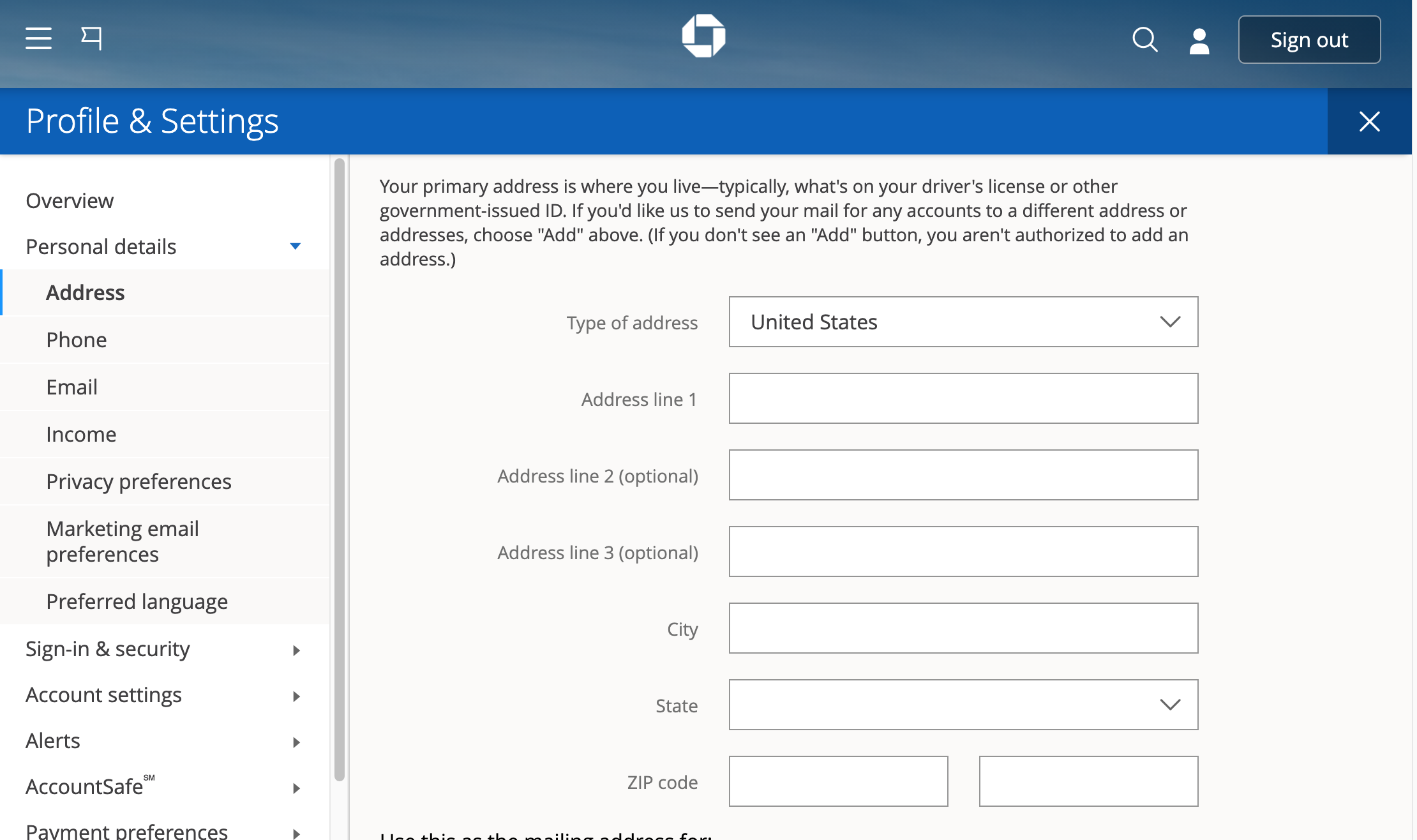
Once logged in, look for a section typically labeled “Profile & Settings,” “My Profile,” or similar. This is usually accessible from the main dashboard or via a dropdown menu associated with your name or account icon. The exact wording may vary slightly depending on updates to the Chase online platform interface. This section is where you manage all your personal information linked to your Chase accounts.
Locating the Address Update Section
Within the “Profile & Settings” area, you’ll need to find the specific option for updating your address. It might be under “Contact Information,” “Personal Information,” or directly as “Change Address.” Click on this link to proceed. Chase’s system is generally user-friendly, guiding you through the process clearly.
Entering and Verifying Your New Address
You will be prompted to enter your new billing address details. This typically includes street number and name, apartment/suite number, city, state, and zip code. Take extreme care to enter all information accurately. Double-check for typos or errors, as even a small mistake can lead to the issues discussed earlier. Some systems may ask you to confirm your old address first or provide additional security verification, such as a code sent to your registered phone number or email, to ensure it’s truly you making the change.
Confirming the Change and Acknowledging Notifications
After entering your new address, you will typically be asked to review the information and confirm the change. Once confirmed, Chase will usually send a confirmation email or a secure message to your online inbox, acknowledging the successful update. It’s crucial to retain this confirmation for your records. This immediate digital paper trail is a significant advantage of online address changes from a financial record-keeping perspective.
Alternative Methods for Address Updates
While online is often preferred, Chase understands that not all customers can or wish to use digital platforms. They offer several alternative methods to accommodate diverse needs, ensuring that everyone can maintain accurate financial records.

Via the Chase Mobile App
For those who manage their finances on the go, the Chase Mobile App offers similar functionality to the online banking portal. After logging into the app, navigate to the “Profile & Settings” section. The steps to find and update your address within the app mirror the online process, providing a convenient mobile solution. Ensure your app is updated to the latest version for optimal security and functionality.
Calling Chase Customer Service
If you prefer speaking to a representative or encounter issues online, you can call Chase Customer Service. The phone number is typically found on the back of your Chase credit card, debit card, or on the official Chase website. Be prepared to provide personal identifying information (e.g., account number, date of birth, Social Security Number, security questions) to verify your identity. The representative will then guide you through the process of updating your address over the phone. This method can be reassuring for those who want direct confirmation from a human.
Visiting a Local Chase Branch
For a more personal touch, or if you require assistance with other banking matters, visiting a local Chase branch is an option. A bank representative will be able to assist you with updating your billing address. Remember to bring a valid government-issued ID (e.g., driver’s license, passport) and potentially your Chase card or account number, as they will need to verify your identity in person. This method can be particularly useful if you have complex account structures or prefer face-to-face interaction for sensitive financial updates.
Mailing a Written Request
While less common in the digital age, Chase generally offers the option to update your address by mailing a written request. This method is usually detailed on their website or can be clarified by calling customer service. A written request should include your full name, old address, new address, account numbers for all relevant Chase accounts, and a signature. It’s advisable to send such requests via certified mail with a return receipt requested to ensure delivery and have a record of your communication. This method requires more time and patience but serves as a viable alternative.
What Happens After You Change Your Address?
Changing your address with Chase isn’t always an isolated action. It often has ripple effects that you should be aware of to ensure all your financial ducks are in a row. Proactive monitoring and subsequent actions are key to complete financial organization.
Updating Linked Accounts and Services
While changing your address with Chase updates their records, it doesn’t automatically update other services or accounts that might be linked to your Chase accounts. This includes third-party payment apps (e.g., PayPal, Venmo), subscription services, utility companies, or other financial institutions where you might have your Chase card stored as a payment method. Make a checklist of all services linked to your Chase cards and accounts and update them individually to prevent transaction issues or service interruptions.
Receiving Confirmation from Chase
As mentioned, Chase typically sends a confirmation via email or secure message after an address change. This is your official record that the update has been processed. Keep this confirmation for your files. In some cases, especially for credit cards, Chase might send a physical letter to your new address to further confirm the change, acting as an additional security measure and verification that mail is now reaching the correct location.
Understanding the Impact on New Cards or Checks
If you’ve recently moved and are expecting a new credit card, debit card, or checkbook from Chase, ensure your address is updated before these items are shipped. If they are mailed to an old address, it poses a significant security risk. If you update your address after a card or checkbook has been dispatched, you might need to contact Chase to have a new one reissued to your correct address.
Monitoring Your Account for Changes
After any significant change to your financial accounts, including an address update, it’s a good practice to monitor your account activity more closely for a few weeks. Check your online statements, transaction history, and ensure that all communications are now directed to your new address. This vigilance helps catch any potential errors or unauthorized activity quickly, reinforcing your financial security.
Common Pitfalls and Best Practices
Navigating financial administrative tasks efficiently requires awareness of potential pitfalls and adherence to best practices. These insights will help you avoid common issues and ensure a seamless address change process with Chase.
The Importance of Timeliness
One of the most critical best practices is to update your address with Chase as soon as possible after moving or realizing an inaccuracy. Procrastination significantly increases the risks of missed communications, transaction declines, and potential fraud. Make it one of your top priorities when relocating your residence or business.
Verifying All Affected Accounts (Credit Cards, Checking, Savings)
Chase is a large institution, and you might have multiple types of accounts with them (e.g., several credit cards, checking, savings, investment accounts). When you update your address, ensure it’s applied to all relevant accounts. While online systems often prompt you to update all accounts, always double-check. A billing address for a credit card might be distinct from the mailing address for a savings account. Clarify with Chase if the change is universal or account-specific.
Keeping Records of Your Update
Maintain a digital or physical record of your address change. This includes the date of the change, the method used (online, phone, branch), any confirmation numbers received, and a copy of the confirmation email or letter. These records are invaluable if any issues arise later, providing proof that you initiated and completed the update.
International Moves and Special Considerations
If you’re moving internationally, the process can be more complex. Chase might have specific procedures for international address changes, including additional documentation requirements due to international banking regulations. It’s crucial to contact Chase customer service directly well in advance of an international move to understand their specific requirements and timeline. Currency changes, tax implications, and international mail delivery can all add layers of complexity.
What to Do if You Encounter Issues
Despite your best efforts, sometimes issues arise. If your address update doesn’t seem to have taken effect, you’re still receiving mail at the old address, or you encounter difficulties with the online process, don’t hesitate to contact Chase customer service. Be prepared with your account details and the records of your initial attempt to change the address. Persistence and clear communication are key to resolving any lingering problems.
In conclusion, updating your billing address with Chase is a straightforward yet profoundly important aspect of managing your personal finances. By understanding the ‘why,’ knowing the ‘how,’ and following best practices, you can ensure your financial life remains secure, organized, and free from unnecessary complications. This proactive approach not only protects your assets but also contributes to your overall financial peace of mind.
aViewFromTheCave is a participant in the Amazon Services LLC Associates Program, an affiliate advertising program designed to provide a means for sites to earn advertising fees by advertising and linking to Amazon.com. Amazon, the Amazon logo, AmazonSupply, and the AmazonSupply logo are trademarks of Amazon.com, Inc. or its affiliates. As an Amazon Associate we earn affiliate commissions from qualifying purchases.