
Percentages are the universal language of finance. From understanding discounts on a new purchase to analyzing investment returns, calculating interest on a loan, or budgeting your monthly income, a solid grasp of percentage calculations is indispensable. While the concept might seem daunting to some, your everyday calculator is a powerful, yet simple, tool for mastering these financial essentials. This guide will demystify percentage calculations, equipping you with the knowledge to wield your calculator with confidence and make smarter financial decisions.
Understanding the Fundamentals: What is a Percentage?
Before we dive into the mechanics of calculation, it’s crucial to solidify our understanding of what a percentage truly represents. In essence, a percentage is a way of expressing a number as a fraction of 100. The word “percent” literally means “per hundred” or “out of 100.” So, if you hear “50 percent,” it means 50 out of every 100, which can also be written as the fraction 50/100 or the decimal 0.50.
Why Percentages Matter in Your Financial Life
In the realm of personal and business finance, percentages are the backbone of countless calculations and comparisons.
- Discounts and Sales: When a store advertises “30% off,” you need to calculate the actual savings.
- Interest Rates: Whether it’s the interest you earn on savings or the interest you pay on a loan or credit card, percentages determine the cost or return of borrowing and lending money.
- Taxes: Sales tax, income tax, property tax – all are expressed as percentages of a base amount.
- Investment Returns: Evaluating the growth of your investments often involves calculating percentage increases over time (e.g., Return on Investment).
- Budgeting and Expense Analysis: Understanding what percentage of your income goes towards housing, food, or entertainment helps you manage your spending effectively.
- Inflation: The rate at which prices rise is expressed as a percentage, impacting your purchasing power.
The ability to quickly and accurately calculate percentages on a calculator isn’t just a mathematical skill; it’s a fundamental financial literacy tool that empowers you to take control of your money.
Mastering Basic Percentage Calculations on Your Calculator
Your calculator, whether it’s a basic model, a smartphone app, or a sophisticated financial calculator, can handle percentage operations with ease. Let’s break down the most common scenarios.
1. Finding a Percentage of a Number (e.g., Calculating a Discount or Sales Tax)
This is perhaps the most frequent percentage calculation you’ll encounter. You want to find out what a certain percentage of a total value is.
Scenario: You want to buy a jacket that costs $150, and it’s on sale for 20% off. How much is the discount?
Method 1: Convert Percentage to Decimal
The most straightforward method is to convert the percentage to a decimal by dividing by 100 (or moving the decimal point two places to the left) and then multiplying.
- 20% becomes 0.20
- Calculation: $150 * 0.20 = $30
- The discount is $30. So, the jacket will cost $150 – $30 = $120.
Using a Calculator:
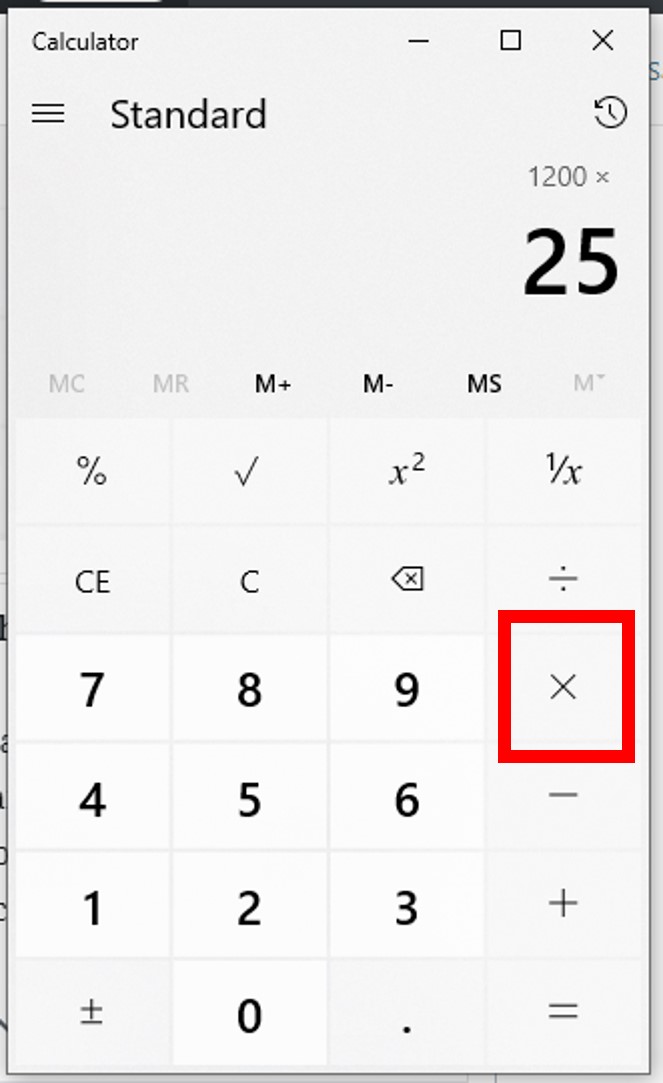
- Enter the total value:
150 - Press the multiplication key:
* - Enter the percentage as a decimal:
0.20 - Press the equals key:
=- Result:
30
- Result:
Method 2: Using the Percentage Key (%)
Many calculators have a dedicated percentage key (%). Its function can vary slightly between models, so it’s good to test it. Generally, it works like this for finding a percentage of a number:
- Enter the total value:
150 - Press the multiplication key:
* - Enter the percentage:
20 - Press the percentage key:
%- Result:
30 - Some calculators might directly give you the discounted price if you type
150 - 20%. It’s worth experimenting with your specific calculator.
- Result:
Practical Application:
- Sales Tax: If an item is $50 and sales tax is 8%, calculate
50 * 0.08 = $4in tax. - Tips: For a $75 restaurant bill, a 15% tip is
75 * 0.15 = $11.25.
2. Calculating the Percentage One Number Is of Another (e.g., Profit Margins, Expense Ratios)
This calculation helps you understand what proportion one value represents in relation to a larger total.
Scenario: You spent $300 on groceries last month, and your total monthly income is $4000. What percentage of your income did you spend on groceries?
Formula: (Part / Whole) * 100
Calculation: ($300 / $4000) * 100 = 0.075 * 100 = 7.5%

Using a Calculator:
- Enter the “part” (the smaller number):
300 - Press the division key:
/ - Enter the “whole” (the total number):
4000 - Press the equals key:
=(Result:0.075) - Press the multiplication key:
* - Enter
100 - Press the equals key:
=- Result:
7.5
- Result:
Practical Application:
- Profit Margin: If an item costs you $60 to produce and you sell it for $100, your profit is $40. Your profit margin is
(40 / 100) * 100 = 40%. - Expense Ratios: If your total business expenses are $5,000 and marketing expenses are $1,000, marketing is
(1000 / 5000) * 100 = 20%of your total expenses.
3. Calculating Percentage Increase or Decrease (e.g., Investment Growth, Inflation)
This is crucial for tracking changes over time, whether it’s the growth of your investments, the rise in prices due to inflation, or a change in your salary.
Formula: ((New Value – Old Value) / Old Value) * 100
Scenario (Increase): Your investment portfolio was worth $10,000 last year and is now worth $12,000. What is the percentage increase?
- New Value = $12,000
- Old Value = $10,000
- Increase = $12,000 – $10,000 = $2,000
- Percentage Increase: ($2,000 / $10,000) * 100 = 0.20 * 100 = 20%
Using a Calculator:
- Enter the New Value:
12000 - Press the minus key:
- - Enter the Old Value:
10000 - Press the equals key:
=(Result:2000) - Press the division key:
/ - Enter the Old Value again:
10000 - Press the equals key:
=(Result:0.2) - Press the multiplication key:
* - Enter
100 - Press the equals key:
=- Result:
20
- Result:
Scenario (Decrease): The price of a stock dropped from $50 to $45. What is the percentage decrease?
- New Value = $45
- Old Value = $50
- Decrease = $45 – $50 = -$5 (The negative indicates a decrease)
- Percentage Decrease: ((-$5) / $50) * 100 = -0.10 * 100 = -10% (or a 10% decrease)
Using a Calculator:
- Enter the New Value:
45 - Press the minus key:
- - Enter the Old Value:
50 - Press the equals key:
=(Result:-5) - Press the division key:
/ - Enter the Old Value again:
50 - Press the equals key:
=(Result:-0.1) - Press the multiplication key:
* - Enter
100 - Press the equals key:
=- Result:
-10
- Result:
Advanced Financial Applications of Percentage Calculations
Beyond basic scenarios, percentages are at the heart of more complex financial concepts. Understanding these will significantly enhance your financial acumen.
1. Interest Calculations: Simple vs. Compound Interest
- Simple Interest: This is the easiest to calculate. Interest is earned only on the principal amount.
- Formula:
Interest = Principal * Rate * Time - Example: You invest $1,000 at 5% simple interest for 3 years.
Interest = $1000 * 0.05 * 3 = $150- Total after 3 years: $1000 + $150 = $1150
- Calculator:
1000 * 0.05 * 3 = 150
- Formula:
- Compound Interest: Often called “interest on interest,” this is where your initial principal and the accumulated interest from previous periods both earn interest. This is crucial for understanding savings growth and loan costs.
- Formula:
A = P(1 + r/n)^(nt)- Where: A = amount after time t, P = principal, r = annual interest rate (as a decimal), n = number of times interest is compounded per year, t = number of years.
- Example: You invest $1,000 at 5% interest compounded annually for 3 years.
- Year 1: $1000 * (1 + 0.05) = $1050
- Year 2: $1050 * (1 + 0.05) = $1102.50
- Year 3: $1102.50 * (1 + 0.05) = $1157.63
- Calculator: For the entire formula, you’ll need to use parentheses and the power function (
^ory^xorx^y) on a scientific/financial calculator.1000 * ( (1 + (0.05 / 1)) ^ (1 * 3) )1000 * (1.05 ^ 3)1000 * 1.157625 = 1157.625
- Formula:
2. Investment Returns and Growth Rates
- Return on Investment (ROI): Measures the profitability of an investment relative to its cost.
- Formula:
ROI = ((Current Value - Initial Cost) / Initial Cost) * 100 - Example: You bought stock for $5,000 and sold it for $6,500.
ROI = (($6,500 - $5,000) / $5,000) * 100 = ($1,500 / $5,000) * 100 = 30%
- Formula:
- Compound Annual Growth Rate (CAGR): Represents the mean annual growth rate of an investment over a specified period longer than one year, assuming the profits are reinvested.
- Formula:
CAGR = ((Ending Value / Beginning Value)^(1 / Number of Years)) - 1 - Example: An investment grew from $10,000 to $16,000 over 5 years.
CAGR = (($16,000 / $10,000)^(1/5)) - 1CAGR = (1.6 ^ 0.2) - 1CAGR = 1.09856 - 1 = 0.09856 = 9.86%
- Calculator: This requires the power function
y^xfor the^(1/N)part.
- Formula:
3. Budgeting and Expense Analysis
Percentages are invaluable for creating and sticking to a budget.
- Income Allocation: If your take-home pay is $3,500, and you allocate 50% to needs, 30% to wants, and 20% to savings, you can quickly calculate the dollar amounts:
- Needs:
3500 * 0.50 = $1750 - Wants:
3500 * 0.30 = $1050 - Savings:
3500 * 0.20 = $700
- Needs:
- Expense Breakdown: By categorizing your spending and calculating what percentage each category represents of your total expenses, you can identify areas where you might be overspending.
Leveraging Your Calculator for Smart Financial Decisions
The true power of knowing how to calculate percentages on a calculator lies in its application to real-world financial scenarios.
- Comparing Deals: Which is better: “25% off” or “$50 discount on a $200 item”?
200 * 0.25 = $50. They are equivalent. Your calculator helps you quickly compare diverse offers.
- Understanding Loan Costs: When considering a loan, knowing how to calculate interest on different principal amounts or over varying terms can reveal the true cost of borrowing.
- Retirement Planning: Projecting the growth of your retirement savings using compound interest calculations helps you visualize your future financial security.
- Evaluating Mortgage Payments: While complex, even understanding the percentage of your payment going to principal vs. interest helps demystify the process.
Tips for Accuracy and Efficiency
- Double-Check Your Inputs: The most common source of error is simply typing in the wrong numbers. Take an extra second to verify what you’ve entered.
- Understand Decimal Places and Rounding: Especially in financial calculations, precision matters. Decide on a consistent rounding rule (e.g., two decimal places for currency) and stick to it.
- Utilize Memory Functions: For multi-step calculations, your calculator’s M+, M-, MR, and MC keys can save time and prevent errors by storing intermediate results.
- Know Your Calculator: Different calculators (basic, scientific, financial) have different functionalities. Experiment with your specific model to understand its percentage key behavior and advanced features. Financial calculators, for instance, have built-in functions for time value of money (TVM) calculations that streamline compound interest and loan amortization.
In conclusion, your calculator is an invaluable financial partner. By mastering the basic and advanced percentage calculations, you transform it from a simple number-crunching device into a powerful tool for informed financial decision-making, helping you navigate everything from daily spending to long-term investment strategies.
aViewFromTheCave is a participant in the Amazon Services LLC Associates Program, an affiliate advertising program designed to provide a means for sites to earn advertising fees by advertising and linking to Amazon.com. Amazon, the Amazon logo, AmazonSupply, and the AmazonSupply logo are trademarks of Amazon.com, Inc. or its affiliates. As an Amazon Associate we earn affiliate commissions from qualifying purchases.