
In the evolving landscape of personal finance, digital payment platforms have become indispensable tools for managing money, splitting costs, and making everyday purchases. Among these, Venmo stands out for its peer-to-peer payment simplicity and its widely adopted Venmo Debit Card. This card bridges the gap between your digital Venmo balance and the traditional world of physical transactions, allowing you to spend your Venmo funds wherever Mastercard is accepted. However, a common query for many users, especially new ones, revolves around the practicalities of consistently funding this card. Understanding the various methods to add money to your Venmo card is crucial for seamless financial management and maximizing the convenience it offers.
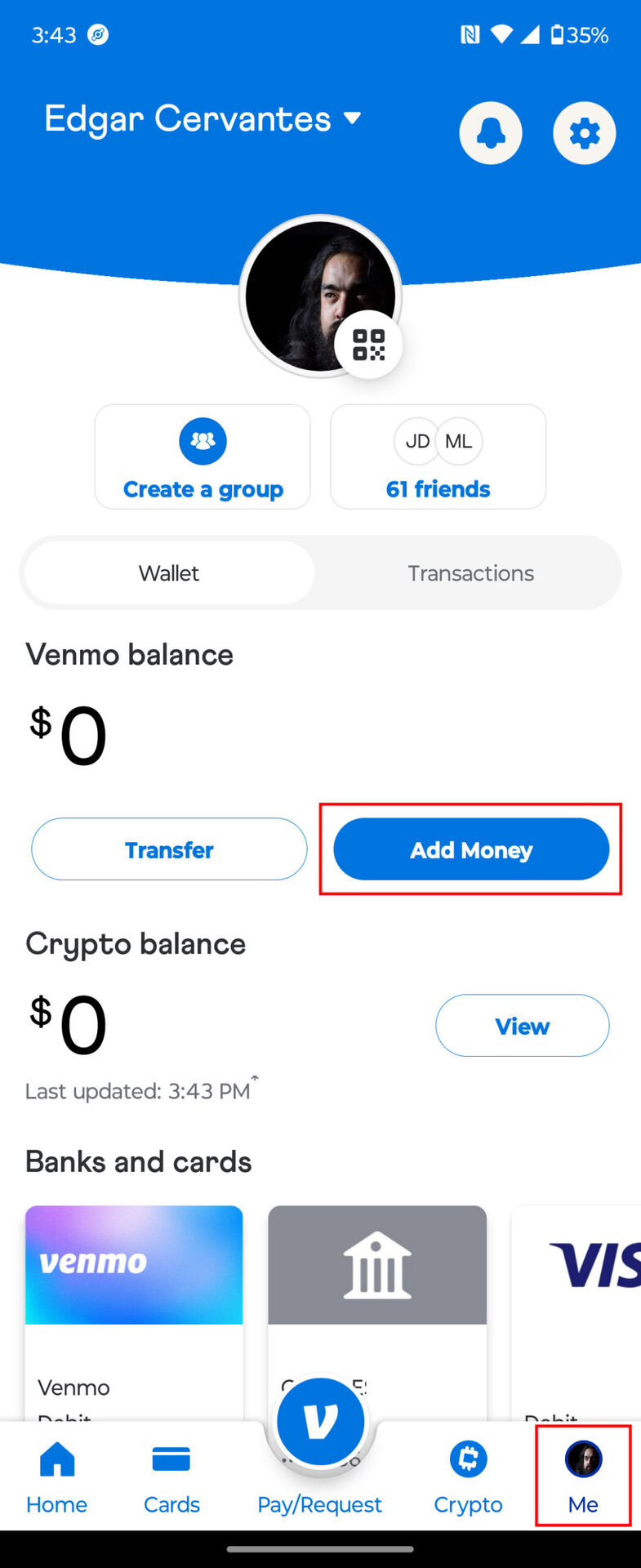
This guide delves into the intricate mechanisms of funding your Venmo card, exploring both direct and indirect avenues, while offering insights into optimizing your financial practices with this versatile tool. From linking traditional bank accounts to leveraging direct deposits and understanding the nuances of digital wallet integration, we aim to provide a professional, insightful, and engaging overview to empower your financial journey with Venmo.
Understanding the Venmo Card Ecosystem
Before delving into the “how-to,” it’s essential to grasp what the Venmo Card is and why it has become a popular financial instrument. This foundational understanding will illuminate why certain funding methods are available and how they integrate into your broader financial picture.
What is the Venmo Debit Card?
The Venmo Debit Card is a physical Mastercard debit card that is directly linked to your Venmo balance. Unlike a credit card, it draws funds directly from the money you hold in your Venmo account. If your Venmo balance is insufficient for a purchase, the card can be configured to automatically pull the remaining amount from a linked bank account or debit card, preventing transactions from being declined. This feature offers a seamless spending experience, effectively turning your Venmo balance into a fully functional checking account accessible worldwide. Venmo also offers a virtual card option, which provides instant access to your funds for online purchases even before your physical card arrives.
Benefits of Using Your Venmo Card
The appeal of the Venmo card lies in its integration with the popular Venmo app and its unique features. Firstly, it offers unparalleled convenience, allowing you to spend your Venmo balance directly at millions of merchants. This eliminates the need to transfer funds to a traditional bank account before spending, saving time and potential transfer fees. Secondly, it provides a clear record of your spending within the Venmo app, facilitating easy budgeting and expense tracking. Users can categorize transactions, view spending habits, and even split purchases with friends directly from their transaction history. Lastly, for many, it serves as an excellent tool for managing peer-to-peer funds, transforming money received from friends or family into spendable cash without additional steps.
Direct Methods to Fund Your Venmo Card
The most straightforward and commonly used methods for adding money to your Venmo card directly involve linking external financial accounts or setting up automated deposits. These methods ensure a steady flow of funds, keeping your Venmo balance ready for use.
Linking Your Bank Account
The primary method for adding money to your Venmo card is by linking it to your personal bank account. This process typically involves a one-time verification step where Venmo makes small deposits to your bank account, which you then confirm within the app. Once linked, you have two main options for transferring funds:
- Standard Transfers: These transfers are usually free and take 1-3 business days to process. They are ideal for non-urgent funding needs and larger sums. The money moves directly from your bank account to your Venmo balance, which is then available for use with your Venmo card.
- Instant Transfers: For a small fee (typically 1.75% with a minimum fee of $0.25 and maximum fee of $25), you can instantly transfer money from your linked bank account to your Venmo balance. This option is perfect when you need funds immediately to make a purchase with your Venmo card or send money to a friend. The fee is clearly displayed before you confirm the instant transfer.
Linking your bank account provides the most flexibility and control over your Venmo card’s funding, serving as the backbone for most users’ financial interactions with the platform.
Direct Deposit
For those who rely heavily on their Venmo card for everyday spending, setting up direct deposit offers an incredibly convenient and consistent funding solution. Venmo provides unique account and routing numbers that function much like a traditional bank account for receiving payroll, government benefits, or other regular payments.
To set up direct deposit:
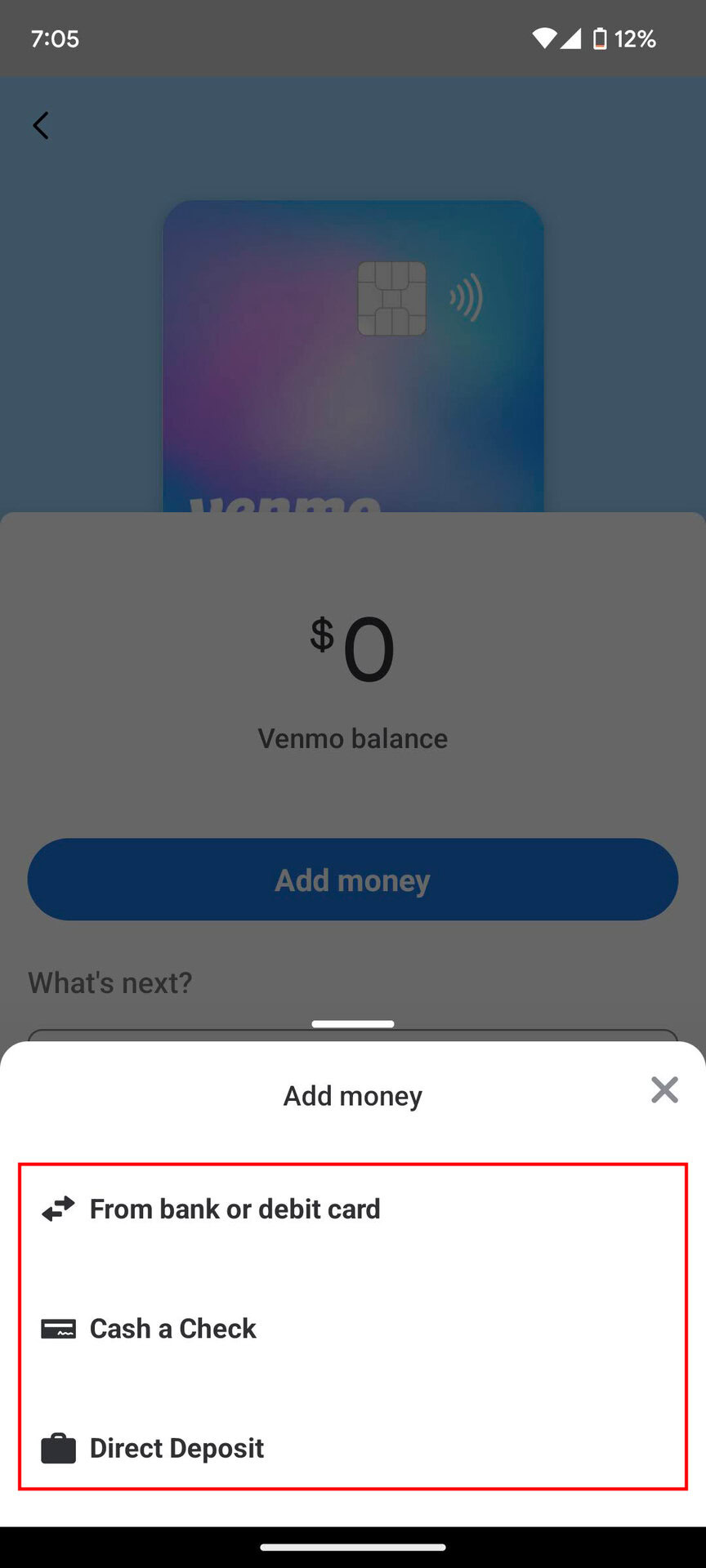
- Navigate to the “Direct Deposit” section within the Venmo app.
- Locate your Venmo account and routing numbers.
- Provide these details to your employer’s payroll department, government agency, or any other institution that issues your regular payments.
Funds deposited via direct deposit usually become available in your Venmo balance on the scheduled payday, often up to two days early, depending on the payer and bank processing times. This method essentially turns your Venmo balance into a primary checking account, streamlining your finances by consolidating income directly into your spending wallet.
Using a Debit Card from Another Bank
While linking a bank account is the most robust method, you can also add funds to your Venmo balance using another debit card. This option is particularly useful if you want to quickly add a specific amount from an account that isn’t your primary linked bank account, or if you prefer not to share your main bank account details directly with Venmo for smaller, ad-hoc transfers.
The process is similar to linking a bank account but often bypasses the micro-deposit verification. You simply add the debit card details, and once verified (sometimes through a small, temporary authorization charge), you can initiate transfers. Similar to bank transfers, instant transfers from a linked debit card also incur a fee, while standard transfers may not be available for all debit card types. This method offers quick top-ups for immediate needs.
Indirect and Alternative Funding Options

Beyond direct transfers from linked accounts, several other methods can indirectly or alternatively contribute to your Venmo balance, enhancing the flexibility of your digital wallet.
Receiving Money from Other Venmo Users
One of the core functionalities of Venmo is its peer-to-peer payment system. When friends, family, or even clients send you money via Venmo, these funds are automatically deposited into your Venmo balance. This is arguably the most organic way many users first accumulate funds in their Venmo account. These received funds are immediately available for use with your Venmo card, for sending to others, or for transferring out to a linked bank account. This seamless integration makes Venmo an excellent tool for splitting bills, collecting reimbursements, or receiving casual payments.
Cashing a Check with Venmo
Venmo has introduced a feature that allows users to cash checks directly within the app, providing another avenue for funding your account. This service is facilitated through a third-party partner and involves taking a photo of your check using your smartphone’s camera.
Key considerations for cashing a check with Venmo:
- Fees: There is typically a fee associated with instant check cashing (a percentage of the check amount), especially for non-government or payroll checks. A standard processing option might be available with lower or no fees, but it takes longer (usually several days).
- Eligibility: Not all checks are eligible, and there may be limits on the check amount.
- Processing Time: While instant options exist, standard processing can take several business days for the funds to clear and be added to your Venmo balance.
This feature can be a lifesaver for those who receive paper checks but prefer to manage their funds digitally through Venmo.
Transferring Funds from Other Digital Wallets (Indirectly)
While Venmo doesn’t allow direct transfers from other digital wallets like PayPal or Cash App, you can employ an indirect method to consolidate funds. This typically involves a two-step process:
- Transfer from other wallet to your bank account: Initiate a transfer from the other digital wallet (e.g., PayPal) to your linked traditional bank account.
- Transfer from your bank account to Venmo: Once the funds have cleared in your bank account, you can then use one of the direct methods mentioned earlier (linking your bank account) to transfer the money to your Venmo balance.
While this adds an extra step and takes more time, it provides a viable workaround for centralizing funds from various digital sources into your Venmo account for use with your Venmo card. This method emphasizes the interoperability, albeit indirect, within the broader digital finance ecosystem.
Managing Your Venmo Card Funds Wisely
Effective money management extends beyond simply knowing how to add funds; it involves understanding the limitations, protecting your assets, and troubleshooting common issues.
Understanding Limits and Fees
Like most financial tools, the Venmo card comes with certain limits and potential fees.
- Spending Limits: There are daily spending limits for purchases made with your Venmo card, which can vary based on your account verification status.
- ATM Withdrawal Limits: If you use your Venmo card for cash withdrawals at ATMs, there will be daily limits and potential ATM operator fees in addition to any Venmo fees.
- Transfer Limits: Instant transfers from your bank account or debit card to Venmo often have transaction limits.
- Fees: Be aware of instant transfer fees, check cashing fees, and out-of-network ATM fees. Standard transfers from a bank account to Venmo are typically free, as are receiving money from other Venmo users.
Regularly reviewing Venmo’s fee schedule and limits within the app or on their website is crucial for avoiding surprises and managing your funds efficiently.
Security Best Practices
Protecting your Venmo account and card from unauthorized access is paramount.
- Strong, Unique Password: Always use a complex password that is unique to your Venmo account.
- Two-Factor Authentication (2FA): Enable 2FA for an added layer of security. This requires a code sent to your phone in addition to your password for login.
- Monitor Transactions: Regularly check your Venmo transaction history for any suspicious activity.
- Be Wary of Scams: Venmo is a common target for phishing attempts and scams. Never share your password, PIN, or sensitive information with unsolicited requests.
- Protect Your Physical Card: Treat your Venmo Debit Card like any other bank card; report it lost or stolen immediately through the app.
Troubleshooting Funding Issues
Occasionally, you might encounter issues when trying to add money to your Venmo card. Common problems include:
- Incorrect Bank or Card Details: Double-check that all account and routing numbers, or debit card information, are entered correctly.
- Insufficient Funds in Linked Account: Ensure there are sufficient funds in your linked bank account or debit card to cover the transfer amount.
- Bank Restrictions: Some banks might have internal limits or security protocols that temporarily block transfers to external platforms like Venmo. Contact your bank directly if you suspect this.
- Venmo Account Limits/Holds: If you’re a new user or have recently made significant changes, Venmo might place temporary limits or holds on transfers for security purposes. Verify your identity thoroughly within the app.
- App Glitches: Sometimes, a simple app update or restart can resolve minor technical issues.
If issues persist, Venmo’s customer support is available to assist with specific account problems and troubleshoot funding challenges.
Conclusion
The Venmo card stands as a powerful tool in the arsenal of modern personal finance, offering unparalleled convenience for spending digital funds. By understanding the diverse methods available for funding your Venmo balance – from direct bank links and direct deposits to peer-to-peer transfers and even check cashing – users can ensure their card is always ready for use. Effectively managing your Venmo card involves not just knowing how to add money, but also being aware of limits, fees, and crucial security practices. With these insights, you can harness the full potential of your Venmo card, integrating it seamlessly into your daily financial routine and making the most of your digital wallet.
aViewFromTheCave is a participant in the Amazon Services LLC Associates Program, an affiliate advertising program designed to provide a means for sites to earn advertising fees by advertising and linking to Amazon.com. Amazon, the Amazon logo, AmazonSupply, and the AmazonSupply logo are trademarks of Amazon.com, Inc. or its affiliates. As an Amazon Associate we earn affiliate commissions from qualifying purchases.