
In an age dominated by smartphones and advanced computing, the humble calculator often goes overlooked. Yet, this ubiquitous device, whether a simple pocket model or a sophisticated graphing calculator, represents a remarkable confluence of hardware design and algorithmic ingenuity. Far from being a mere button-presser that spits out answers, a calculator is a miniature marvel of engineering, meticulously designed to perform complex mathematical operations with speed and precision. Understanding how these tools function offers a fascinating glimpse into the foundational principles of digital technology, from binary logic to intricate processing algorithms. This article delves into the inner workings of calculators, dissecting their hardware architecture, the software logic that drives their computations, their evolutionary journey, and the inherent limitations that govern their accuracy.
The Fundamental Building Blocks: Hardware Architecture
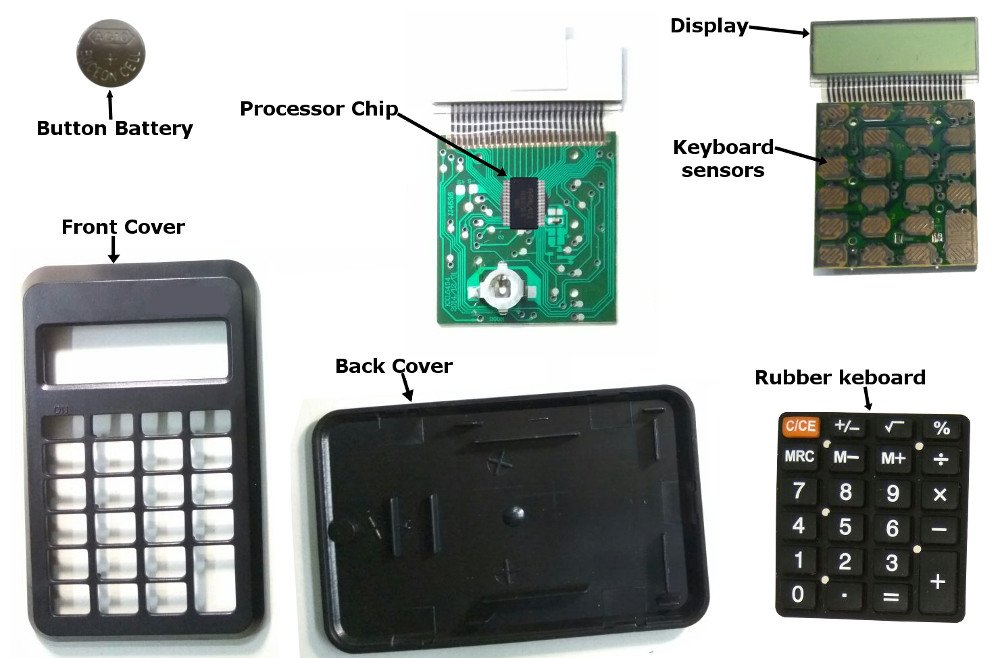
At its core, a calculator is a specialized computer. While it lacks the versatility of a general-purpose PC, it possesses all the essential components necessary to receive input, process information, store data, and display results. These components work in concert to translate human-readable numbers and operations into machine-executable tasks.
Input and Display Systems
The most immediate interaction points with a calculator are its keypad and display. The keypad isn’t just a collection of buttons; it’s typically a matrix of rows and columns. When a key is pressed, it completes an electrical circuit at a specific intersection of a row and column. The calculator’s internal processor constantly scans this matrix to detect which circuit has been closed, thereby identifying the pressed key. This allows for a simple and efficient input mechanism with minimal wiring.
The display, conversely, is how the calculator communicates its state and results back to the user. Most modern calculators use a Liquid Crystal Display (LCD) due to its low power consumption. Earlier models might have used Light Emitting Diodes (LEDs). Both technologies rely on segments that can be individually turned on or off to form numbers and symbols. A display driver integrated circuit (IC) receives signals from the main processor and activates the appropriate segments to render the numerical output or operational indicators.
The Microcontroller: The Calculator’s Brain
The true intelligence of a calculator resides within its microcontroller unit (MCU), often simply referred to as the CPU (Central Processing Unit) in this context. This single integrated circuit houses the core processing capabilities. The MCU contains several critical sub-components:
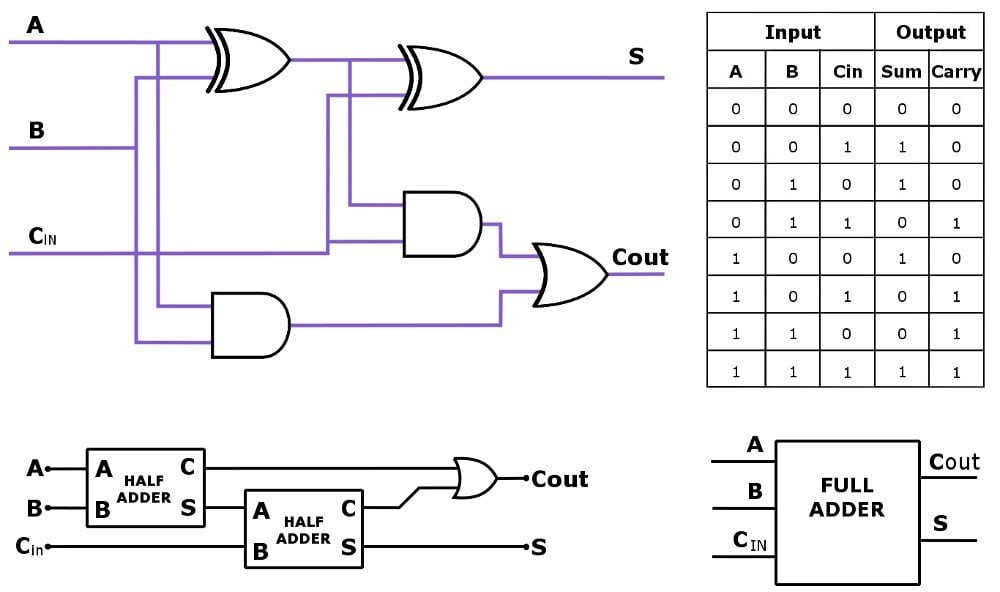
- Arithmetic Logic Unit (ALU): This is the part responsible for executing all arithmetic operations (addition, subtraction, multiplication, division) and logical operations (such as comparing two numbers). The ALU operates on binary numbers, performing calculations at a fundamental level.
- Control Unit: The control unit manages and coordinates all the other components of the calculator. It interprets instructions from the program stored in memory, directs data flow, and sequences operations.
- Registers: These are small, high-speed storage locations within the CPU used for temporary storage of data and instructions during processing. They hold operands for the ALU, intermediate results, and memory addresses.
Memory: ROM and RAM
Calculators require memory to store their operating instructions and handle temporary data.
- Read-Only Memory (ROM): This memory stores the calculator’s firmware – its operating system, pre-programmed functions, and all the algorithms necessary to perform calculations (like how to compute a square root or a sine function). ROM is non-volatile, meaning its contents are retained even when the power is off.
- Random Access Memory (RAM): RAM is volatile memory used for temporary storage. It holds the numbers currently being input, intermediate results during a complex calculation, memory variables (like ‘M+’ or ‘STO’), and the display buffer. When the calculator is turned off (or reset), the contents of RAM are typically cleared.
Power Source
The power source is crucial for any electronic device. Most calculators are powered by small batteries (like button cells or AA/AAA batteries), often supplemented by solar cells. Solar cells convert ambient light into electrical energy, reducing reliance on batteries and extending their life. Power management circuitry ensures efficient energy usage, automatically turning off the display or the entire device after a period of inactivity to conserve power.
The Logic Behind the Numbers: Software and Algorithms
While hardware provides the physical platform, it is the sophisticated software and algorithms embedded within the ROM that truly define a calculator’s functionality. These programs dictate how numbers are represented, how operations are executed, and how complex mathematical functions are evaluated.
Binary Representation and Arithmetic
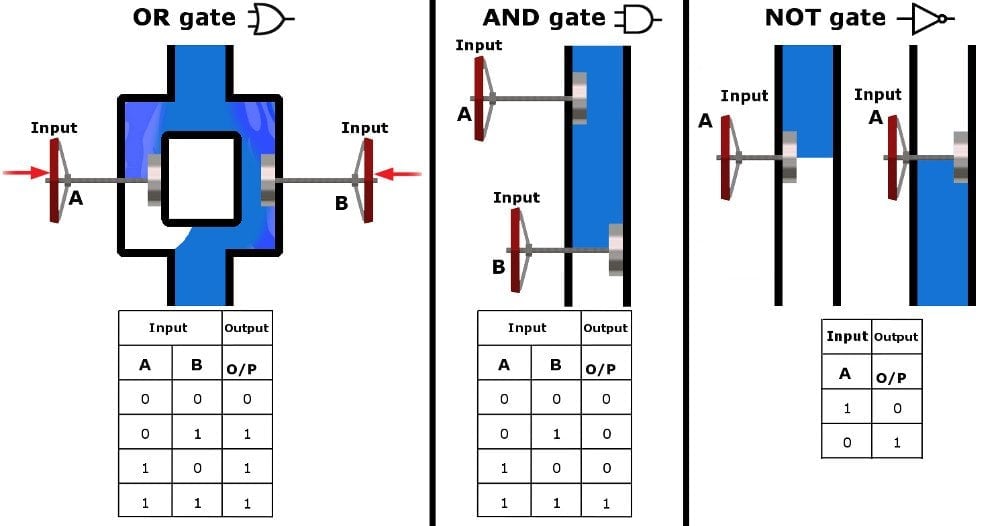
At its most fundamental level, a calculator, like any digital computer, operates using binary numbers (0s and 1s). Every number you input, every result you see, is internally converted into a sequence of binary digits. For decimal numbers, calculators often use Binary-Coded Decimal (BCD) representation, where each decimal digit is encoded separately into a 4-bit binary number. This makes conversion between decimal and binary easier and helps avoid some common binary rounding issues for financial calculations, though it can be less efficient for pure arithmetic.
The ALU performs all its operations on these binary representations. Addition is straightforward, mirroring longhand addition with carries. Subtraction is often performed by adding the negative equivalent of a number (using two’s complement representation). Multiplication can be implemented through repeated addition and bit shifting, while division involves repeated subtraction and bit shifting.
Handling Complex Functions: Algorithms in Action
Simple arithmetic is only one aspect. Scientific and graphing calculators are capable of far more, thanks to a rich library of algorithms.
- Square Roots: One common method for square roots is the Babylonian method or Newton’s method, which involves iterative approximations to converge on the correct value.
- Trigonometric Functions (Sine, Cosine, Tangent): These are often computed using polynomial approximations (Taylor series expansions) or the CORDIC (COordinate Rotation DIgital Computer) algorithm. CORDIC is particularly efficient as it only requires additions, subtractions, and bit shifts, making it suitable for hardware implementation without needing complex multiplication circuits.
- Logarithms and Exponentials: Similar to trigonometric functions, these are typically calculated using series expansions or by leveraging the CORDIC algorithm with appropriate transformations.
The precision of these algorithms, and thus the calculator’s output, depends on the number of iterations performed and the internal bit depth used for calculations.
Order of Operations
When you enter an expression like 2 + 3 * 4, the calculator doesn’t simply process it from left to right. It strictly adheres to the order of operations (commonly remembered by acronyms like PEMDAS/BODMAS: Parentheses/Brackets, Exponents/Orders, Multiplication and Division, Addition and Subtraction). The calculator’s control unit, guided by its firmware, parses the expression, identifies the operations, and executes them in the correct sequence. This often involves temporarily storing intermediate results and prioritizing certain operations over others.
From Basic to Scientific: Evolution and Capabilities
The journey of the calculator has seen it evolve from rudimentary adding machines to sophisticated computational powerhouses, each category serving distinct user needs.
Basic Calculators
These are the simplest forms, designed for everyday arithmetic. They typically handle addition, subtraction, multiplication, division, percentages, and perhaps a square root function. Their internal logic is streamlined, focusing on speed and accuracy for fundamental operations. They often use fixed-point arithmetic for simplicity, meaning numbers have a fixed number of digits after the decimal point, which is sufficient for most general ledger and simple calculations.
Scientific Calculators
A significant leap forward, scientific calculators introduce a broad array of advanced functions crucial for students and professionals in STEM fields. These include:
- Trigonometric functions (sin, cos, tan, and their inverses)
- Logarithmic and exponential functions (log, ln, e^x, 10^x)
- Powers and roots
- Statistical functions (mean, standard deviation)
- Unit conversions
- Complex number calculations
- Parentheses for intricate expressions and memory functions for storing values.
Scientific calculators generally employ floating-point arithmetic to handle a wider range of numbers (very large and very small) with varying degrees of precision.
Graphing Calculators
Representing the pinnacle of standalone calculator technology, graphing calculators are essentially specialized portable computers. Beyond all the functions of a scientific calculator, they offer:
- Graphical display: Capable of plotting functions, statistical data, and geometric shapes.
- Advanced programming capabilities: Users can write and store programs to solve specific problems or automate tasks.
- Matrix operations: Essential for linear algebra.
- Symbolic manipulation: Some advanced models can perform symbolic differentiation or integration.
- Connectivity: Often able to connect to computers for data transfer or to other graphing calculators for sharing programs and data.
These devices often feature more powerful microcontrollers, larger memory capacities, and more complex operating systems to support their extensive features.
Software Calculators
With the rise of personal computers and smartphones, software calculators have become incredibly prevalent. From the basic calculator app on Windows or macOS to advanced mathematical software like Wolfram Alpha or dedicated mobile apps, these tools leverage the full power of the underlying operating system and hardware. While the user interface differs, the core algorithms for performing calculations (binary representation, order of operations, complex function approximations) remain fundamentally the same as their hardware counterparts, often executed with even greater speed and precision due to superior processing power and memory.
Precision, Errors, and Limitations
Despite their incredible utility, calculators are not infallible and operate within certain inherent limitations that are crucial to understand for accurate scientific and engineering work.
Floating-Point Arithmetic and Representation
Most scientific and graphing calculators use floating-point arithmetic to represent real numbers. A floating-point number is stored as a mantissa (the significant digits of the number) and an exponent (which determines the position of the decimal point). This system allows for a vast range of numbers (from extremely small to extremely large) to be represented. However, it’s an approximation. Just as 1/3 cannot be perfectly represented in decimal form (0.333…), many fractions or irrational numbers cannot be perfectly represented in binary floating-point format. This leads to slight, unavoidable rounding errors.
Rounding Errors and Significance
These minuscule rounding errors can accumulate, especially during long sequences of calculations or iterative processes. For instance, repeatedly adding a number that isn’t perfectly representable can lead to a noticeable deviation from the true mathematical result. The precision of a calculator (the number of significant digits it can store and process) dictates how small these errors are. While often negligible for everyday tasks, they become critical in fields requiring high-precision computations. Understanding significant figures and error propagation is vital for interpreting calculator outputs correctly.
Display Limitations
A calculator’s display also has a finite number of digits it can show, typically 10 to 12. Even if the internal calculation maintains higher precision, the displayed result is rounded to fit the screen. This means the number displayed is often an approximation of the calculator’s internal, more precise value. Advanced calculators often have an “ANS” function that uses the full internal precision of the last result in subsequent calculations, mitigating display rounding issues.
Conclusion
The calculator, from its simplest form to its most advanced, is a testament to human ingenuity in simplifying complex tasks. Far from being magic boxes, they are intricate systems where hardware precisely executes instructions dictated by sophisticated algorithms. Behind every press of a button, a silent ballet of electrical signals, binary conversions, and iterative computations unfolds, delivering results with remarkable speed and accuracy. Understanding “how do calculators work” not only demystifies these everyday devices but also provides a foundational appreciation for the core principles of digital computing and the meticulous engineering that underpins our technological world. As technology continues to advance, the underlying principles of calculators will undoubtedly continue to evolve, offering even greater power and precision in the palm of our hands.
aViewFromTheCave is a participant in the Amazon Services LLC Associates Program, an affiliate advertising program designed to provide a means for sites to earn advertising fees by advertising and linking to Amazon.com. Amazon, the Amazon logo, AmazonSupply, and the AmazonSupply logo are trademarks of Amazon.com, Inc. or its affiliates. As an Amazon Associate we earn affiliate commissions from qualifying purchases.