
In the rapidly evolving landscape of digital finance, peer-to-peer (P2P) payment applications have become indispensable tools for managing personal transactions. Among these, Cash App stands out as a prominent platform, offering a streamlined approach to sending and receiving money, investing, and even managing direct deposits. Understanding how to effectively utilize its features, particularly for receiving funds, is crucial for anyone looking to harness its technological convenience. This guide delves into the mechanics of receiving money on Cash App, focusing on its functionalities, security protocols, and integration within your broader digital environment, all from a technological perspective.

Understanding Cash App: A Technological Overview
Cash App, developed by Block, Inc. (formerly Square, Inc.), is more than just a money transfer service; it’s a multifaceted financial technology platform designed for mobile-first users. At its core, it simplifies financial interactions through an intuitive app interface, transforming complex banking operations into simple taps and swipes.
What is Cash App and How Does it Work?
At its heart, Cash App operates on a secure, encrypted network that facilitates the instant transfer of funds between users. When money is sent, the transaction is processed through a series of digital protocols that verify identities, authenticate requests, and update account balances in near real-time. This technological architecture relies heavily on robust server infrastructure and sophisticated algorithms to ensure both speed and security. Users link their bank accounts or debit cards to their Cash App profile, enabling funds to be drawn from or deposited into these traditional financial institutions seamlessly. The app acts as an intermediary, providing a digital wallet that bridges the gap between your bank and other Cash App users or merchants. The “how it works” aspect is less about the financial implications and more about the underlying software and network processes.
Key Features for Receiving Funds
Cash App provides several technological avenues for users to receive money, each designed for different scenarios:
- Cashtags: A unique identifier (e.g.,
$YourName) assigned to each user, acting much like a personalized digital address for receiving payments. Instead of sharing sensitive bank details, users can simply provide their Cashtag, which the app translates into their associated account. - Phone Number/Email: The most common and straightforward method, allowing senders to locate and pay recipients using their registered phone number or email address, linked directly to their Cash App account.
- Payment Requests: This feature enables users to send a specific request for money to another Cash App user. The recipient receives a notification within the app, which, upon acceptance, triggers the fund transfer. This reduces manual input errors and streamlines the request process.
- Direct Deposit: A significant feature that allows users to receive their paychecks, tax refunds, or other regular payments directly into their Cash App balance. The app provides unique routing and account numbers, essentially mimicking a traditional bank account from a technological standpoint, making it compatible with standard Automated Clearing House (ACH) network processes.
System Requirements and Compatibility
To ensure optimal performance and security, Cash App has specific system requirements. The application is primarily designed for mobile devices, available on both iOS (Apple App Store) and Android (Google Play Store) platforms. It requires a relatively modern operating system version to support its features and security updates. Stable internet connectivity (Wi-Fi or cellular data) is fundamental for real-time transaction processing and account synchronization. While available on tablets, its primary design intent is for smartphones, leveraging features like biometrics (fingerprint/face ID) for enhanced security, which are standard on contemporary mobile devices. The app’s design is responsive and adapts to various screen sizes, ensuring a consistent user experience across compatible devices.
The Step-by-Step Guide to Receiving Money
Receiving money on Cash App is designed to be intuitive, yet understanding the nuances of each method ensures a smooth transaction every time. This section provides a procedural walkthrough for various receiving scenarios.
Receiving Funds via Cashtag or Phone Number/Email
The most common method of receiving funds involves the sender initiating a payment to your Cashtag, phone number, or email.
- Verification (Initial Setup): Ensure your Cash App account is fully set up and verified. This involves linking a debit card or bank account, which is crucial for moving funds out of Cash App and often required for receiving certain payment types.
- Provide Your Identifier: Share your unique Cashtag (e.g.,
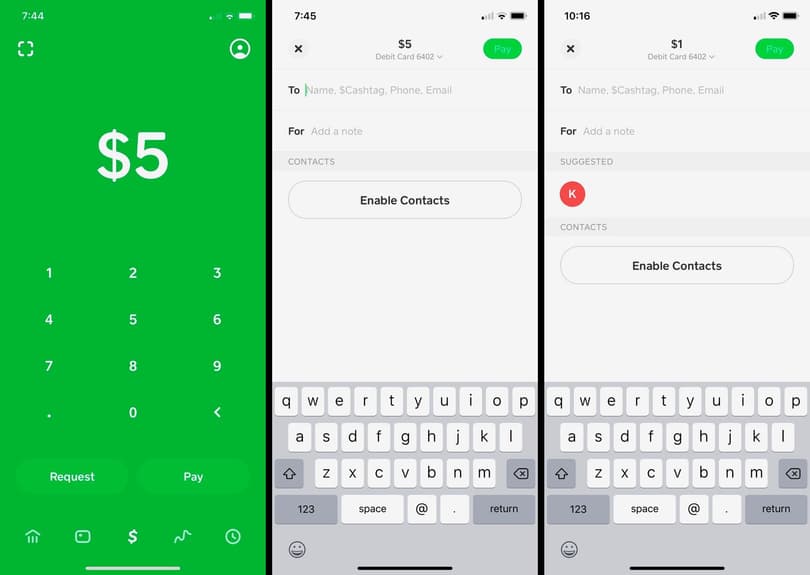
$YourName), the phone number associated with your Cash App account, or the email address linked to it with the sender. - Sender Initiates Payment: The sender opens their Cash App, taps the “Pay” button, enters the amount, enters your identifier, adds an optional memo, and taps “Pay.”
- Notification and Confirmation: You will receive a notification within the Cash App and potentially a text message or email confirming the incoming payment. The funds are typically available in your Cash App balance almost instantly.
Accepting a Payment Request
If you’ve been sent a payment request, the process for receiving funds is slightly different:
- Receive Notification: You will get a notification on your device and within the Cash App interface that you have a pending payment request.
- Navigate to Activity Tab: Open Cash App and tap the “Activity” tab (the clock icon).
- Review Request: Locate the payment request from the sender. Review the amount and sender’s details to ensure it’s legitimate.
- Accept Payment: Tap the “Accept” button next to the request. The funds will then be added to your Cash App balance. Some payment requests may not require explicit acceptance if the sender has sent the money directly rather than requesting it, in which case it will appear automatically.
Setting Up Direct Deposit
For recurring payments like salaries or government benefits, setting up direct deposit into your Cash App account is an efficient technological solution:
- Access Direct Deposit Info: On the Cash App home screen, tap the “Banking” tab (the house icon or dollar amount). Scroll down and tap “Direct Deposit.”
- Retrieve Account Details: Here you will find your unique Cash App routing number and account number. These are distinct from your personal bank account numbers and are specific to your Cash App balance.
- Provide to Payer: Give these routing and account numbers to your employer’s payroll department, government agency, or any other entity that processes direct deposits. They will typically require you to fill out a direct deposit form.
- Confirm Deposit: Once set up, funds will automatically appear in your Cash App balance on the scheduled payment date.
Troubleshooting Common Receiving Issues
Occasionally, you might encounter issues when trying to receive money. From a tech perspective, these often relate to network connectivity, app versions, or system glitches:
- Pending Payments: Funds may sometimes show as “pending.” This can occur due to network delays, security reviews (especially for large or unusual transactions), or the sender’s bank processing times. Ensure your app is updated to the latest version, as older versions might experience synchronization issues.
- Declined Payments: If a payment is declined, it’s often due to issues on the sender’s side (insufficient funds, incorrect card details, bank restrictions). Less commonly, it could be a security flag on your account or a limit being reached. Check your transaction history and notifications for specific error messages.
- Missing Payments: If you don’t receive funds you expect, first confirm with the sender that the payment was successfully initiated to the correct Cashtag/phone number/email. If confirmed, check your “Activity” tab. If still not visible, there might be a system-wide delay or a specific account issue requiring Cash App support intervention. Ensure your device’s date and time settings are accurate, as discrepancies can sometimes affect app functionality.
Enhancing Your Security on Cash App
Digital security is paramount for any financial application. Cash App employs various security features, and users also play a critical role in protecting their accounts from unauthorized access and scams.
Implementing Two-Factor Authentication (2FA)
Two-factor authentication adds an essential layer of security by requiring a second form of verification beyond just your password or PIN.
- Enable Security Lock: Within Cash App, navigate to your profile icon, then to “Privacy & Security.” Enable “Security Lock.”
- PIN/Biometrics: This requires you to set up a PIN, or use your device’s biometric features (Face ID or Touch ID), for every transaction.
- Login Verification: When logging into a new device or after an extended period, Cash App will send a verification code to your registered phone number or email address. This ensures that even if someone has your password, they cannot access your account without access to your registered contact method. This multi-layered approach makes unauthorized access significantly more difficult.
Recognizing and Avoiding Scams
Scammers often exploit social engineering tactics rather than directly breaching technological defenses. Awareness is your best defense:
- Phishing Attempts: Be wary of suspicious emails, texts, or calls purporting to be from Cash App, asking for your login credentials, PIN, or other sensitive information. Cash App will never ask for your full PIN or sign-in code outside of the app. Always verify the sender’s identity.
- “Payment Pending” Scams: Scammers might send fake notifications claiming a payment is pending and requires you to send money first to “verify” your account. Legitimate payments do not require you to send money to receive it.
- “Unexpected” Money: If you receive a large, unexpected sum of money, be extremely cautious. This is a common tactic where scammers send money, then ask for it back, or claim to have sent it by mistake. If you return it, they might then reverse their original fraudulent transaction, leaving you out of pocket. Contact Cash App support immediately if this occurs.
Protecting Your Account Information
Your personal and financial data linked to Cash App needs vigilant protection:
- Strong, Unique PIN: Use a PIN that is not easily guessable (avoid birthdays, sequential numbers).
- Biometric Security: Enable Face ID or Touch ID on your device for quick and secure access to your app, making it much harder for someone else to open your Cash App.
- Secure Device: Keep your mobile device locked with a strong password, PIN, or biometric security. If your device is lost or stolen, immediately log out of Cash App remotely (if possible via another device) or contact Cash App support to temporarily lock your account.
- Public Wi-Fi Caution: Avoid accessing Cash App or performing transactions over unsecured public Wi-Fi networks, as these can be vulnerable to eavesdropping. Use a VPN or wait until you are on a secure network.
Reporting Suspicious Activity
If you suspect your account has been compromised or you encounter a scam:
- Contact Cash App Support: Use the in-app support feature or visit the official Cash App website for assistance. Provide as much detail as possible about the suspicious activity.
- Block Sender: If a specific user is sending unwanted or suspicious requests, you can block them within the app.
- Report Fraud: Cash App provides mechanisms to report fraudulent transactions, which can help in investigations and potential fund recovery, though recovery is not always guaranteed.
Integrating Cash App into Your Digital Ecosystem
Cash App isn’t a standalone island; it’s designed to connect with your other digital financial tools and behaviors, enhancing its utility from a technological standpoint.
Linking Bank Accounts and Debit Cards
The ability to seamlessly link external financial instruments is foundational to Cash App’s functionality. This technical integration allows for the fluid movement of funds between your traditional bank account and your Cash App balance.
- Adding a Bank Account: Users can link their bank account by providing their bank’s login credentials (using secure third-party integration like Plaid) or manually entering their account and routing numbers. This establishes an ACH connection, enabling transfers.
- Adding a Debit Card: Linking a debit card provides an immediate funding source for sending money and also facilitates instant transfers from your Cash App balance to your bank account, often for a small fee. The card details are encrypted and stored securely within the app’s infrastructure.
This integration effectively extends the reach of your existing banking setup into the Cash App environment, providing a digital bridge for funds.
Utilizing Notifications and Transaction History
Cash App leverages notification technology and comprehensive record-keeping to keep users informed and in control:
- Real-time Notifications: The app provides push notifications for incoming payments, completed transactions, and security alerts. This real-time feedback loop is critical for user awareness and immediate action.
- Detailed Transaction History: Every transaction, whether incoming or outgoing, is meticulously recorded in the “Activity” tab. This digital ledger serves as an invaluable tool for tracking spending, reconciling balances, and verifying payments. Each entry includes details such as sender/recipient, amount, date, and transaction ID, all searchable and filterable within the app interface. This data is critical for personal financial management, even if the primary focus of this article is tech.
Exploring Other Cash App Features
While the core focus here is receiving money, Cash App’s platform offers a broader suite of tech-enabled features that contribute to its utility:
- Bitcoin Trading: Users can buy, sell, and send Bitcoin directly within the app. This feature integrates cryptocurrency exchange capabilities, allowing users to engage with digital assets, all managed through the same secure platform.
- Stock Investing: Cash App also allows for fractional share trading in major stocks, democratizing access to the stock market through a mobile interface. This integrates micro-investment tools, managed with simplicity for the average user.
These additional features demonstrate Cash App’s ambition to be a comprehensive financial technology hub, continuously evolving beyond basic P2P payments.
The Future of P2P Payments and Cash App’s Role
The landscape of digital payments is in a constant state of flux, driven by technological advancements and shifting consumer expectations. Cash App, as a leading innovator, plays a significant role in shaping this future.
Evolution of Mobile Payment Technology
Mobile payment technology has come a long way from simple SMS-based transfers. Today, it leverages sophisticated encryption, biometric authentication, artificial intelligence for fraud detection, and cloud-based infrastructure to deliver secure and instantaneous transactions. The trend is towards greater integration with daily life, embedded payments within social media, and seamless cross-platform functionality. The underlying technology continues to push boundaries in speed, security, and user experience, moving towards a truly cashless and frictionless economy.
Cash App’s Continuous Feature Development
Cash App remains at the forefront by continually introducing and refining its features. This includes enhancing existing functionalities, such as direct deposit speeds, expanding investment options, and exploring new financial products. Its agile development cycle ensures that the app remains competitive and responsive to user needs and market trends. Future developments are likely to focus on even tighter integration with e-commerce, more personalized financial insights driven by AI, and potentially deeper ventures into decentralized finance (DeFi) technologies, further solidifying its position as a comprehensive financial technology platform.
The Impact on Digital Transactions
Cash App and similar platforms are fundamentally reshaping how individuals interact with money. They are reducing reliance on traditional banking services for day-to-day transactions, accelerating the adoption of digital currencies, and providing financial tools to underserved populations. The ease of receiving money instantly, managing funds within a single app, and accessing diverse financial services contributes to a more efficient and accessible digital economy. The technological innovations within these apps are not just conveniences; they are catalysts for broader financial inclusion and modernization.
aViewFromTheCave is a participant in the Amazon Services LLC Associates Program, an affiliate advertising program designed to provide a means for sites to earn advertising fees by advertising and linking to Amazon.com. Amazon, the Amazon logo, AmazonSupply, and the AmazonSupply logo are trademarks of Amazon.com, Inc. or its affiliates. As an Amazon Associate we earn affiliate commissions from qualifying purchases.