
In an increasingly data-driven world, the ability to quickly and accurately analyze changes in figures is paramount. Whether you’re tracking sales performance, monitoring stock fluctuations, assessing project budgets, or simply managing personal data, understanding percentage decrease is a fundamental skill. While the calculation itself is straightforward, the efficiency and precision offered by a dedicated percent decrease calculator, particularly in its digital forms, can be a game-changer. This guide delves into the tech landscape to show you how to find, evaluate, and effectively use these invaluable digital tools.
The Digital Utility of Percent Decrease Calculators
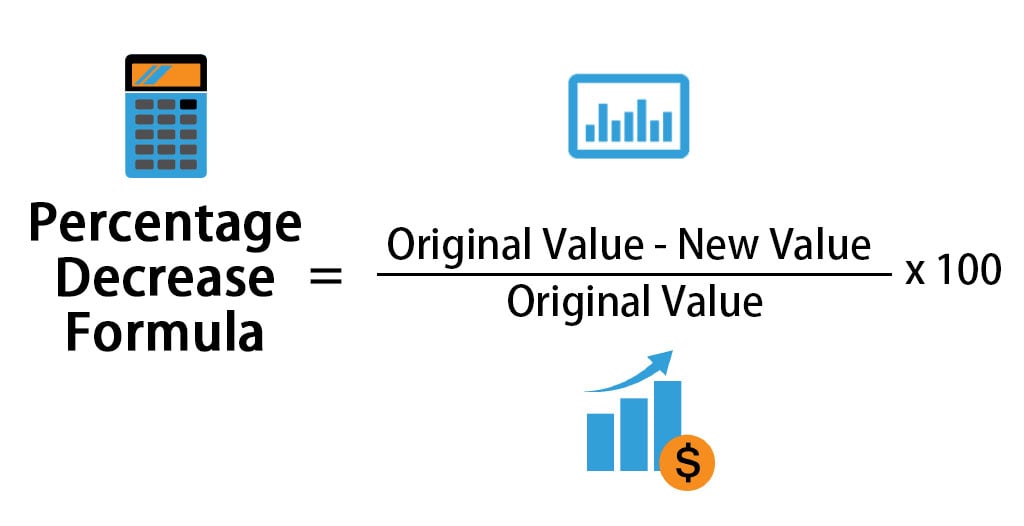
At its core, a percent decrease calculator is designed to quantify the proportional reduction between an original value and a new, smaller value. The formula ((Original Value - New Value) / Original Value) * 100 is simple enough, but manual computation, especially with complex figures or repetitive tasks, is prone to error and time-consuming. This is where digital tools step in, transforming a potentially cumbersome process into an instant, accurate operation.

Why Digital Tools Outperform Manual Calculations
The primary advantage of digital percent decrease calculators lies in their speed, accuracy, and ease of use. For individuals and businesses alike, time is a precious commodity. Manually entering numbers into a standard calculator and executing multiple steps not only consumes valuable time but also introduces the risk of human error at each stage—from transcription mistakes to misplacing decimal points. Digital calculators automate this process, requiring only the input of the two core values and instantly furnishing the correct percentage decrease. This automation ensures consistency across multiple calculations, a crucial factor in data analysis where comparability is key. Moreover, many digital tools offer features like history logs, currency conversions, and integration with other financial or analytical tools, further enhancing their utility beyond simple arithmetic.
Core Applications in Data-Driven Decisions
While the concept of percent decrease has broad applications, its utility within data-driven decision-making processes is particularly noteworthy for technology users. For instance, in website analytics, a percent decrease calculator can quickly show the drop in traffic month-over-month, or the reduction in conversion rates after a design change. Software developers might use it to track the decrease in reported bugs after a patch update. E-commerce platforms can monitor the percentage drop in abandoned carts following UX improvements. Project managers can assess the percentage reduction in project delays after implementing new agile methodologies. In each scenario, the calculator acts as a rapid analytical tool, providing immediate insights that inform subsequent actions and strategic adjustments. It’s not just about the number; it’s about what that number tells you about performance, efficiency, and trends, all facilitated by a technological aid.
Discovering Your Ideal Percent Decrease Calculator
The digital realm offers a plethora of options for percent decrease calculators, ranging from simple web-based tools to sophisticated integrated software features. The key is knowing where to look and what type of tool best fits your specific needs and workflow.
Top Online Calculator Platforms and Websites
For quick, on-the-fly calculations without the need for downloads or installations, online web-based calculators are often the go-to solution. A simple search query like “percent decrease calculator online” will yield numerous results. Reputable financial and mathematical websites (e.g., Calculator.net, Omni Calculator, Investopedia’s tools) frequently host these utilities. These platforms are typically user-friendly, requiring only two input fields for the original and new values. They are excellent for casual users, students, or professionals needing a rapid calculation without integrating it into a larger workflow. Many also provide a brief explanation of the calculation process, offering an educational benefit. When choosing an online platform, look for a clean interface, quick loading times, and the absence of intrusive ads that might disrupt your focus.
Mobile Applications for On-the-Go Analysis
The ubiquity of smartphones and tablets has led to a surge in mobile applications designed for various calculations. For those who need to perform calculations away from a desktop, mobile percent decrease calculators offer unparalleled convenience. App stores (Google Play Store, Apple App Store) host numerous calculator apps, many of which include percentage functions. Some apps are dedicated percentage calculators, offering various percentage operations beyond just decrease. Others are comprehensive scientific or business calculators with percentage capabilities. The advantages of mobile apps include offline functionality (for some), integration with mobile operating system features (like sharing results), and often a more refined user interface optimized for touchscreens. When selecting a mobile app, consider reviews, ratings, permissions requested, and whether it’s regularly updated for compatibility and security.
Leveraging Built-in Software Functions
Beyond standalone web pages and mobile apps, many widely used software applications already possess the capability to perform percent decrease calculations. Spreadsheet programs like Microsoft Excel, Google Sheets, and LibreOffice Calc are prime examples. These tools are incredibly powerful for managing and analyzing data sets, and calculating percent decrease is a native function. For example, if your original value is in cell A1 and your new value is in B1, the formula =(A1-B1)/A1 formatted as a percentage will give you the percent decrease. This approach is ideal for professionals working with large datasets, as it allows for batch calculations, dynamic updates, and integration into complex reports and dashboards. Similarly, some business intelligence (BI) tools and specialized statistical software also include these functionalities, often with more advanced visualization options. Utilizing these built-in functions streamlines workflows, especially when calculations are part of a broader data analysis or reporting task.
Key Features and Considerations for Selection
With numerous options available, choosing the right percent decrease calculator involves more than just finding one that works. Evaluating its features, usability, and technical integrity ensures that the tool is not just functional but also enhances your productivity and data security.
User Interface and Experience (UI/UX)
A calculator, whether digital or physical, is fundamentally an interface for interaction. A well-designed User Interface (UI) and a smooth User Experience (UX) are crucial. Look for a clean, uncluttered layout where input fields are clearly labeled, and the ‘calculate’ button is easily identifiable. Intuitive navigation, clear fonts, and appropriate color contrasts contribute to reducing cognitive load and preventing errors. Features like real-time calculation (where the result updates as you type), clear error messages, and the ability to copy results to your clipboard significantly enhance the UX. Avoid tools with excessive pop-ups, confusing layouts, or tiny input fields that make data entry frustrating. A good UI/UX ensures that the tool serves as an invisible hand, assisting your work without drawing unnecessary attention to itself.
Functionality: Beyond Basic Decrease
While the core function is percent decrease, some calculators offer additional functionalities that can be highly beneficial. Consider if you need a tool that also calculates percent increase, net change, or allows for multiple sequential percentage calculations. Some advanced calculators might offer history logs, allowing you to review past computations, or even the ability to save frequently used scenarios. For those dealing with specific datasets, features like decimal precision control, rounding options, or direct integration with specific data formats could be valuable. While simplicity is often best, understanding your broader needs will help determine if a more feature-rich tool is justified. For example, a dedicated financial calculator might offer specific features relevant to investment performance, whereas a general-purpose scientific calculator might focus on unit conversions or complex mathematical operations.
Data Integrity and Security Aspects
In today’s digital environment, data security and integrity are paramount. When using online calculators or mobile apps, it’s essential to consider how your data is handled. For simple, non-sensitive calculations, this might not be a major concern. However, if you are inputting proprietary business figures, personal financial data, or any sensitive information, you need to ensure the platform or app upholds strong privacy standards. Reputable online services typically process calculations client-side (in your browser) without storing your data. For apps, check their privacy policy to understand what data they collect, how it’s used, and if it’s shared with third parties. Avoid apps that request unnecessary permissions (e.g., access to contacts for a simple calculator). For integrated software like spreadsheets, data security largely falls under the umbrella of your overall IT security practices and cloud storage provider’s policies. Always opt for tools from trusted developers and platforms known for their commitment to user privacy and data protection.
A Practical Guide to Using Digital Percent Decrease Tools
Once you’ve identified and selected your preferred percent decrease calculator, mastering its use is straightforward. The typical process involves a few simple steps, but understanding the nuances can ensure precision and efficiency.
Step-by-Step Inputting Data
Most digital percent decrease calculators follow a highly intuitive input process. You will typically find two clearly labeled fields:
- Original Value (or Starting Value): This is the initial figure before the decrease occurred. Input this number into the designated field.
- New Value (or Ending Value): This is the value after the decrease. Input this into its respective field.
After entering both values, simply click or tap the “Calculate” button. The tool will instantly display the percent decrease. Some advanced calculators might also offer fields for percentage change, where you input one value and the desired percentage to find the resulting value. Always double-check your input values to avoid errors, especially when dealing with long numbers or decimals.
Interpreting the Output with Precision
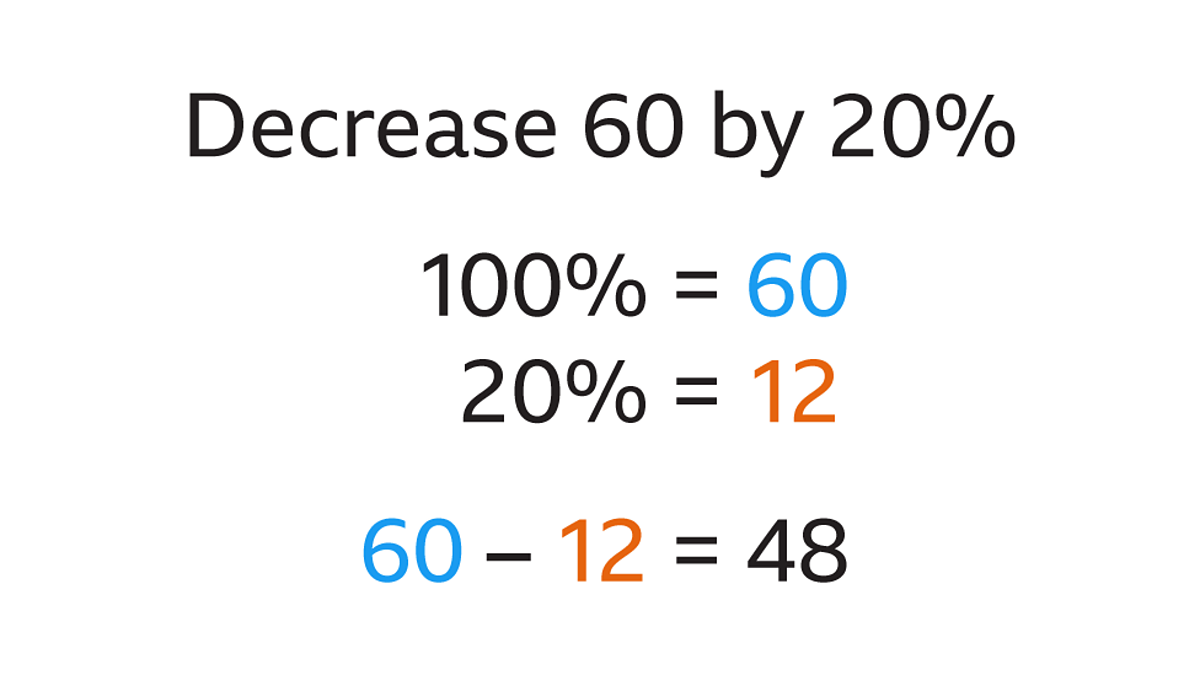
The output from a percent decrease calculator will typically be a negative percentage (e.g., -15%) or a positive percentage indicating the decrease (e.g., 15% decrease). Ensure you understand how the specific calculator presents its results. A decrease is always a positive number when stated as “a decrease of X%,” but it’s often represented as a negative value in percentage change calculations. For instance, if a stock price dropped from $100 to $80, the decrease is 20%. The calculator might show this as “-20%” or simply “20% Decrease.” Pay attention to the labels and context provided by the tool to avoid misinterpretation. Understanding the context of the numbers you are analyzing is also crucial; a 5% decrease in a multi-million dollar budget is significant, while a 5% decrease in a small, experimental metric might be negligible.
Troubleshooting Common Issues
While digital calculators are generally reliable, you might occasionally encounter issues.
- “Division by Zero” Error: This typically occurs if your original value is zero. Mathematically, a percentage decrease from zero is undefined. Ensure your original value is a positive number.
- Incorrect Results: This usually points to incorrect input. Double-check that you’ve entered the original value into the ‘original’ field and the new value into the ‘new’ field, and that both numbers are correct. Also, verify that the calculator is indeed set to calculate ‘decrease’ and not ‘increase’.
- Browser/App Glitches: If an online calculator isn’t responding, try refreshing the page or clearing your browser’s cache. For mobile apps, closing and reopening the app, or even reinstalling it, can resolve minor bugs.
- Inconsistent Decimal Precision: Some calculators may round results differently. If precision is critical, look for settings within the tool to adjust decimal places, or use a spreadsheet program for full control.
Future Trends and Advanced Integrations
The evolution of technology promises even more sophisticated and integrated tools for calculations like percent decrease. As software continues to become more intelligent and interconnected, these calculators will likely move beyond standalone functionality.
AI and Machine Learning in Calculation Tools
The integration of Artificial Intelligence (AI) and Machine Learning (ML) could revolutionize how we interact with calculation tools. Imagine a smart assistant that not only calculates percent decrease but also automatically identifies relevant data points from your documents or spreadsheets, analyzes historical trends, and even provides predictive insights based on the decrease. For example, an AI-powered financial tool might not just calculate a stock’s recent price drop but also suggest potential reasons based on news feeds and market data, or forecast future performance given similar historical decreases. Voice-activated commands for complex calculations and natural language processing for interpreting results are also on the horizon, making these tools more accessible and powerful.
API Integrations and Automation Workflows
For businesses and power users, the future of percent decrease calculators lies in deeper integration through Application Programming Interfaces (APIs). APIs allow different software applications to communicate and share data seamlessly. This means a percent decrease calculation could be automatically triggered within a larger automation workflow. For instance, a sales CRM system could use an API to feed monthly sales figures into a calculation engine, which then automatically computes the percent decrease, generates a report, and emails it to stakeholders. Data analysis platforms could pull real-time data from various sources, apply percent decrease calculations, and update dashboards without manual intervention. This level of automation not only saves immense amounts of time but also ensures that critical data analysis is consistently performed and disseminated, empowering faster, more informed decision-making across all technologically-enabled domains.
In conclusion, the journey to finding and mastering your percent decrease calculator is a step towards greater efficiency and analytical prowess. By understanding the digital landscape, evaluating features critically, and leveraging the power of integrated tools, you can transform a simple mathematical operation into a sophisticated data analysis capability that drives better outcomes in any tech-driven endeavor.
aViewFromTheCave is a participant in the Amazon Services LLC Associates Program, an affiliate advertising program designed to provide a means for sites to earn advertising fees by advertising and linking to Amazon.com. Amazon, the Amazon logo, AmazonSupply, and the AmazonSupply logo are trademarks of Amazon.com, Inc. or its affiliates. As an Amazon Associate we earn affiliate commissions from qualifying purchases.