
In the ever-expanding universe of streaming services, Paramount Plus has carved out a significant niche, offering a deep library of content ranging from iconic movies and beloved TV shows to exclusive originals, live sports, and local news. For many, the question isn’t just what Paramount Plus offers, but fundamentally, how one goes about accessing this rich digital entertainment hub. This guide will meticulously walk you through the technical process of acquiring, setting up, and optimizing your Paramount Plus experience, firmly within the realm of app functionality, platform compatibility, and digital service management.
Demystifying Paramount Plus: What It Is and Why You Might Want It
Before diving into the mechanics of subscription, it’s essential to understand the essence of Paramount Plus as a technological platform and its value proposition in the crowded streaming market. It’s not merely a content library; it’s a sophisticated application designed for seamless digital delivery.

A Legacy of Entertainment, Reimagined for Streaming
Paramount Plus represents the streaming evolution of ViacomCBS, bringing together content from CBS, Showtime (in its premium tier), Paramount Pictures, MTV, Comedy Central, BET, Nickelodeon, and the Smithsonian Channel. This unification under a single digital umbrella leverages decades of intellectual property into a modern, accessible format. The platform itself is a testament to how traditional media conglomerates are adapting to the digital-first consumption habits of contemporary audiences, transforming vast archives into an on-demand, app-driven experience. The underlying technology infrastructure supports this expansive content delivery, ensuring robust performance across diverse devices.
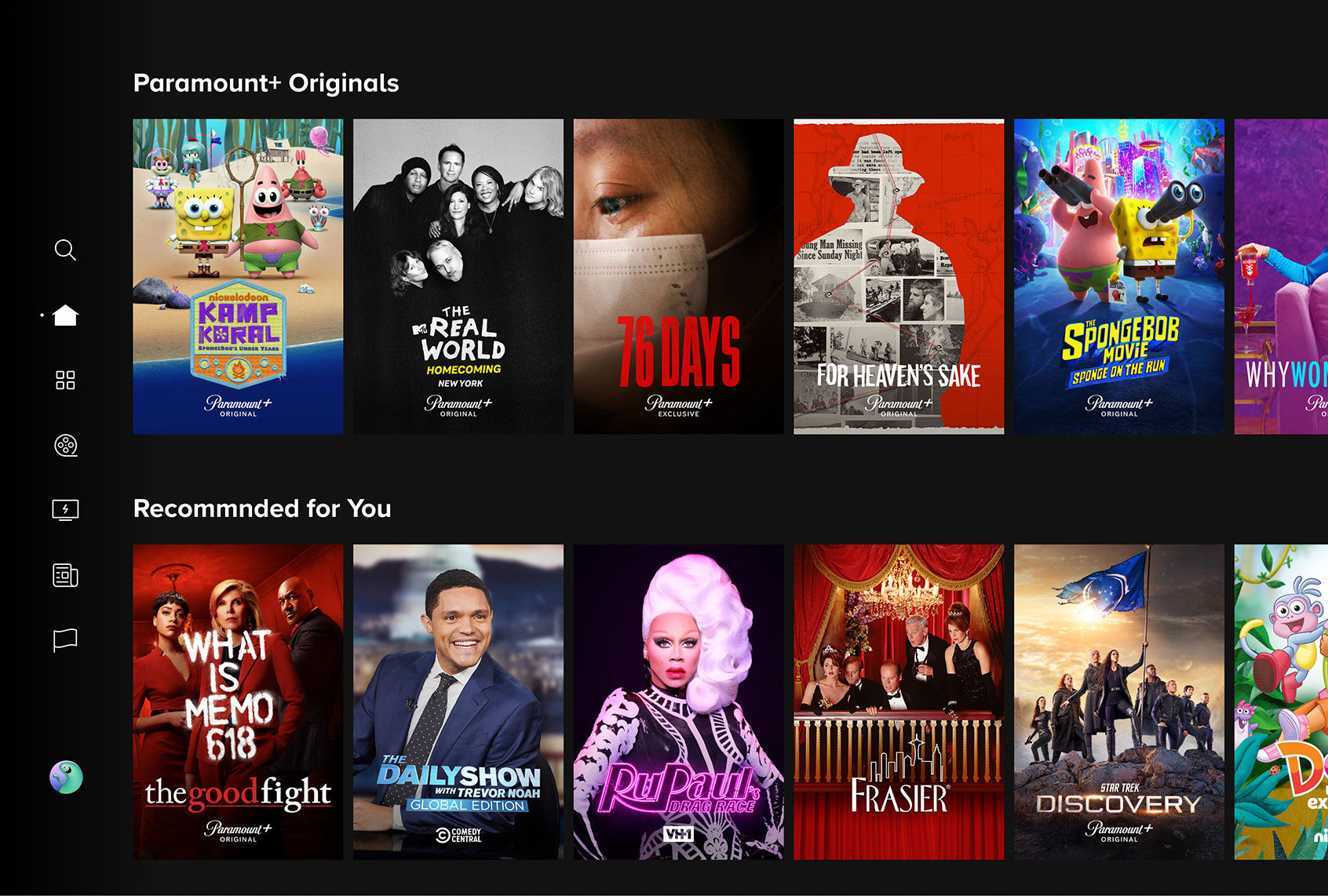
The Content Library: Exclusive Originals, Live Sports, and Iconic Franchises
From a technical perspective, the platform is engineered to categorize, recommend, and stream an enormous volume of content. This includes:
- Exclusive Originals: Shows like “1923,” “Tulsa King,” “Star Trek: Strange New Worlds,” and “Halo” are developed specifically for the streaming service, demonstrating a commitment to creating unique digital-first programming.
- Live Sports: The inclusion of live NFL games, UEFA Champions League, and other sports via CBS live feeds highlights the platform’s capability to handle real-time, high-bandwidth streaming events, a significant technical challenge.
- Iconic Franchises: Access to the full “Star Trek” universe, “Yellowstone” universe, “SpongeBob SquarePants,” and classic movies from Paramount’s vault showcases the platform’s ability to host and manage vast, interconnected content libraries, offering both on-demand and curated viewing experiences.
The user interface and backend algorithms are designed to facilitate discovery within this vast library, providing personalized recommendations and easy navigation.
Subscription Tiers: Essential vs. Premium (and Showtime Bundle)
Understanding the technical differences between subscription tiers is crucial as it directly impacts features and content access. Paramount Plus offers various plans, each with distinct technical specifications and user experiences:
- Paramount+ Essential: This tier typically includes access to the full on-demand library with limited commercial interruptions. It does not include live local CBS station feeds, but it offers news from CBSN and select live sporting events. From a technical standpoint, it manages ad insertion dynamically within the video stream.
- Paramount+ with Showtime (formerly Premium): This top-tier option offers ad-free streaming (with minor exceptions for live TV), your live local CBS station, and the entire Showtime catalog integrated seamlessly into the Paramount Plus app. Technically, this involves a more complex content rights management system and advanced ad-skipping functionalities where applicable. The integration of Showtime content into the core Paramount Plus application streamlines the user experience, eliminating the need to switch between separate apps. This tier often supports higher quality streaming (e.g., 4K HDR) on compatible devices, depending on the content and device capabilities, showcasing its advanced streaming codecs and adaptive bitrate technologies.
Choosing the right tier isn’t just about content preferences; it’s about selecting the technical feature set that best suits your viewing habits and desired level of interruption.
Your Comprehensive Guide to Subscribing and Setting Up Paramount Plus
Getting Paramount Plus is a straightforward process, primarily involving account creation and subscription activation. This section focuses on the technical pathways available for new users.
Navigating the Official Website: Your First Step
The most universal method to subscribe to Paramount Plus is through its official website. This process ensures you’re directly engaging with the service provider and typically offers the full range of subscription options.
- Open Your Web Browser: Navigate to paramountplus.com.
- Select Your Plan: Click on a prominent “Try Free” or “Subscribe Now” button. You will be presented with the available subscription tiers (Essential, Premium/with Showtime). Review the features and pricing to make an informed decision.
- Create Your Account: You’ll be prompted to enter your personal details, including your full name, email address, and a strong password. This creates your unique user profile on their backend system.
- Enter Payment Information: Provide your credit/debit card details or link a PayPal account. The website uses secure encryption protocols (SSL/TLS) to protect your financial data during this transaction. A free trial period is often offered before billing begins, which is automatically managed by their subscription system.
- Confirm and Start Streaming: Once your payment information is validated, your account will be activated, and you can immediately begin streaming content through the web browser or by logging into the app on any compatible device. The website acts as the central hub for managing your subscription, billing, and profile settings.
Subscribing via App Stores: Mobile and Smart TV Platforms
For users who prefer to manage subscriptions through their preferred device ecosystem, Paramount Plus is widely available for in-app subscriptions. This leverages the billing systems of platform providers like Apple, Google, Roku, and Amazon.
- Download the Paramount Plus App:
- Mobile Devices (iOS/Android): Open the Apple App Store (iOS) or Google Play Store (Android), search for “Paramount Plus,” and tap “Get” or “Install.”
- Streaming Devices/Smart TVs (Roku, Amazon Fire TV, Apple TV, Android TV, LG Smart TV, Samsung Smart TV): Navigate to your device’s app store or channel store, search for “Paramount Plus,” and select “Add Channel” or “Install App.”
- Open the App and Subscribe: Once the app is installed, open it. You’ll typically see an option to “Start Free Trial” or “Subscribe Now.”
- Follow On-Screen Prompts: The app will guide you through the account creation process, similar to the website method. When it comes to payment, it will likely default to using your device’s stored payment method (e.g., Apple ID, Google Play account, Roku account). This integrates your Paramount Plus subscription directly into your platform’s existing billing system, offering convenience for users already comfortable with those ecosystems.
- Log In and Stream: After successful subscription, you can log in and start watching. Future billing and subscription management will be handled through the respective app store.
Utilizing Third-Party Bundles and Promotions
Paramount Plus is also accessible through various third-party partnerships, offering alternative subscription avenues and potential cost savings.
- Amazon Prime Video Channels: If you’re an Amazon Prime member, you can subscribe to Paramount Plus as a Prime Video Channel. This allows you to watch all Paramount Plus content directly within the Prime Video app and interface, leveraging Amazon’s robust streaming infrastructure and billing system. This consolidates your viewing experience into one app.
- Telecom/Carrier Deals: Occasionally, mobile carriers or internet service providers offer promotional bundles that include Paramount Plus. These deals typically involve unique activation codes or direct integration through the carrier’s customer portal. Activating through these methods usually links your Paramount Plus account to your carrier’s billing.
- Bundles with Other Streaming Services: While less common for direct Paramount Plus subscriptions, sometimes broader entertainment bundles might include it. Keep an eye out for these promotions, as they can offer an economically attractive way to access multiple services.
Regardless of the method chosen, the end result is the same: an activated Paramount Plus account linked to your profile and payment information, ready for content consumption.
Creating Your Profile and Personalizing Settings
Once subscribed, the app facilitates personalization to enhance your viewing experience.
- Set Up Profiles: Paramount Plus supports multiple user profiles. This feature is crucial for families or shared accounts, allowing each user to maintain their watch history, recommendations, and parental control settings. Navigate to the profile icon (usually in the top corner) and select “Add Profile.”
- Adjust Playback Settings: Within the app’s settings, you can often control video quality (e.g., data saver vs. best quality), manage subtitles and audio tracks, and set parental controls. These options allow you to tailor the technical aspects of streaming to your internet connection speed and personal preferences.
- Manage Device Logins: The app also provides a section where you can view and manage all devices currently logged into your account, offering a security feature to log out any unauthorized access.
Accessing Paramount Plus Across Your Devices
Paramount Plus is designed for multi-device compatibility, ensuring you can pick up where you left off, whether you’re at home or on the go. The underlying technology synchronizes your watch progress across all logged-in devices.
Smart TVs and Streaming Devices: Seamless Big-Screen Viewing
For the ultimate cinematic experience, Paramount Plus is available on a wide array of smart TVs and streaming sticks/boxes.
- Supported Platforms: Roku, Amazon Fire TV, Apple TV, Android TV (including Google TV), Chromecast (with casting capabilities from mobile), LG Smart TVs (WebOS), Samsung Smart TVs (Tizen OS), Vizio SmartCast TVs, and Hisense Smart TVs (select models).
- Installation: Simply download the Paramount Plus app from your device’s app store, log in with your existing credentials, and start watching.
- Technical Considerations: Ensure your device’s operating system is up to date for optimal performance. High-speed internet (at least 25 Mbps for 4K streaming) is recommended for buffer-free viewing, especially for live content and high-resolution streams.
Mobile Freedom: Smartphones and Tablets
The Paramount Plus mobile apps for iOS and Android are robust, offering a full-featured streaming experience on smaller screens.
- Features: Beyond streaming, mobile apps often include features like offline downloads (for viewing without an internet connection), picture-in-picture mode, and casting capabilities.
- Optimizing for Mobile: Adjust video quality settings within the app to conserve data if you’re streaming over cellular networks. Downloading content via Wi-Fi before you leave home is an excellent strategy to avoid data overages.
Web Browser Convenience: Desktop and Laptop Access
For those who prefer watching on a computer, paramountplus.com provides a comprehensive web player.
- Compatibility: Works across all major web browsers (Chrome, Firefox, Safari, Edge).
- Functionality: Offers the same core streaming features as the apps, including profile selection, watch history, and content browsing.
- Tips: Ensure your browser is up to date, and consider clearing your browser’s cache if you experience playback issues. Ad-blockers can sometimes interfere with streaming services, so you might need to disable them for the Paramount Plus site.
Gaming Consoles: Integrating Entertainment into Your Setup
Modern gaming consoles are not just for games; they’re powerful media centers.
- Supported Consoles: PlayStation (PS4, PS5) and Xbox (Xbox One, Xbox Series X|S).
- Installation: Download the Paramount Plus app from the console’s respective store (PlayStation Store, Microsoft Store).
- Benefit: Allows gamers to switch seamlessly between gaming and streaming entertainment without changing devices.
Enhancing Your Paramount Plus Experience: Tips and Troubleshooting
Maximizing your enjoyment of Paramount Plus involves more than just knowing how to subscribe; it requires understanding how to manage your account and resolve common technical hitches.
Managing Your Subscription and Billing
- Website Central: The Paramount Plus website (paramountplus.com/account) is the primary portal for managing your subscription details, updating payment methods, changing tiers, or canceling your service.
- App Store Management: If you subscribed through an app store (Apple, Google, Roku, Amazon), you’ll need to manage your subscription directly through that platform’s account settings. This is a critical distinction, as Paramount Plus itself cannot directly modify subscriptions initiated via third-party billing.
- Cancellation: Canceling your subscription is typically straightforward but varies slightly based on your initial sign-up method. Ensure you follow the specific steps provided by your billing provider to avoid unexpected charges.
Optimizing Streaming Quality and Data Usage
- Adaptive Bitrate Streaming: Paramount Plus, like most modern streaming services, uses adaptive bitrate technology. This means the video quality automatically adjusts based on your internet speed to minimize buffering.
- Manual Quality Settings: Within the app settings, you might find options to manually limit video quality (e.g., “Data Saver” mode on mobile), which is useful for conserving mobile data or if you have a slow or capped internet connection.
- High-Speed Internet: For the best experience, especially for 4K HDR content (available with the Premium tier on compatible devices), a stable internet connection of at least 25 Mbps is recommended. For HD, 5-10 Mbps is usually sufficient.
Troubleshooting Common Access and Playback Issues
Encountering technical issues can be frustrating, but many are easily resolved.
- Login Problems:
- Double-check credentials: Ensure you’re using the correct email and password.
- Password Reset: If you’ve forgotten your password, use the “Forgot Password” link on the login page.
- Account Status: Verify your subscription is active and not paused or expired.
- Buffering or Poor Quality:
- Internet Connection: Test your internet speed.
- Restart Devices: Try restarting your router, modem, and streaming device.
- Close Other Apps: Close any other bandwidth-intensive applications or devices using your network.
- Clear Cache: Clear the cache on your app or web browser.
- App Not Working/Crashing:
- Update App: Ensure the Paramount Plus app is updated to the latest version.
- Restart App/Device: Force close the app and reopen it, or restart your streaming device.
- Reinstall App: As a last resort, try uninstalling and reinstalling the app.
- Error Codes: Note down any error codes displayed and check the Paramount Plus support website, as they often have specific solutions for common codes.
Parental Controls and Multiple Profiles: Family-Friendly Streaming
- Setting Up Controls: Within each profile’s settings, you can configure parental controls based on content ratings (G, PG, TV-Y, etc.). This ensures younger viewers only access age-appropriate content.
- PIN Protection: A four-digit PIN can be set to protect adult profiles or restrict access to certain content, adding an extra layer of security.
- Multiple Profiles: Encourage each family member to use their own profile to maintain personalized recommendations and watch histories, making the service more tailored for everyone.
Beyond the Basics: Making the Most of Paramount Plus
Once you’ve mastered the technical aspects of getting and troubleshooting Paramount Plus, explore its advanced features to truly enhance your viewing.
Discovering Hidden Gems and Curated Collections
The platform’s sophisticated recommendation engine constantly analyzes your viewing habits to suggest content. However, don’t shy away from manually exploring categories, genres, and curated collections (e.g., “Black Voices,” “Women’s History Month,” “Sci-Fi Favorites”) that the app highlights. These often surface excellent content you might otherwise miss.
Live TV and Sports Features: What to Expect
The “Live TV” section, especially for Premium subscribers, offers real-time streams of your local CBS station and dedicated channels like CBSN (news), CBS Sports HQ, and ET Live. Understand that live streams operate differently from on-demand content; they typically don’t allow pausing, rewinding, or fast-forwarding beyond a short buffer, akin to traditional broadcast television. This requires a robust, low-latency streaming infrastructure.
Downloading Content for Offline Viewing
A highly valued feature of the mobile app is the ability to download select content for offline viewing. This is perfect for travel, commutes, or areas with limited internet access. Look for the download icon (often an arrow pointing downwards) next to eligible titles. Downloaded content typically has an expiration window, after which you’ll need to reconnect to the internet to renew the license or re-download.

Staying Updated with New Releases and Platform Enhancements
Paramount Plus regularly adds new content and updates its app with new features and performance improvements.
- In-App Notifications: Enable notifications for new show releases or app updates.
- Check “New & Trending”: Periodically check the “New & Trending” or “Coming Soon” sections within the app.
- App Store Updates: Ensure automatic app updates are enabled on your devices to benefit from the latest features and bug fixes. These updates often include crucial security patches and performance optimizations that keep your streaming experience smooth and secure.
In conclusion, getting Paramount Plus is a straightforward process that integrates seamlessly into modern digital ecosystems. By understanding the different subscription methods, device compatibilities, and account management tools, you can unlock a vast library of entertainment with ease and confidence. The platform is designed for accessibility, ensuring that whether you’re a tech novice or a seasoned streamer, your journey into the world of Paramount Plus is as smooth and enjoyable as the content itself.
aViewFromTheCave is a participant in the Amazon Services LLC Associates Program, an affiliate advertising program designed to provide a means for sites to earn advertising fees by advertising and linking to Amazon.com. Amazon, the Amazon logo, AmazonSupply, and the AmazonSupply logo are trademarks of Amazon.com, Inc. or its affiliates. As an Amazon Associate we earn affiliate commissions from qualifying purchases.