
In an increasingly interconnected world, digital payment platforms have become indispensable tools for managing personal and business finances. Among these, PayPal stands as a pioneer, offering a robust, secure, and globally recognized system for online transactions. Far beyond a simple money transfer service, PayPal represents a sophisticated technological ecosystem designed to facilitate everything from e-commerce purchases to international remittances with unparalleled ease. This comprehensive guide will walk you through the technical intricacies of setting up a PayPal account, ensuring you harness its full potential as a powerful digital financial instrument.
Understanding PayPal: A Technological Overview
At its core, PayPal is a digital payment processing platform that acts as an intermediary between users and financial institutions. It leverages advanced cryptographic protocols and a vast network infrastructure to enable secure, real-time money transfers without directly sharing sensitive financial details with every recipient or merchant. Understanding the underlying technology behind PayPal is crucial for appreciating its capabilities and ensuring its secure usage.
What is PayPal and How Does it Work?
PayPal operates on a client-server architecture, allowing users to create virtual accounts linked to their bank accounts, debit cards, or credit cards. When a user initiates a transaction, PayPal’s system encrypts the payment information and securely transmits it to the recipient. This process abstracts the actual banking details, meaning only PayPal holds and processes your sensitive financial data, acting as a shielded conduit for your funds. The platform utilizes proprietary algorithms to detect and prevent fraudulent activities, continuously monitoring transactions for suspicious patterns. Its global server network ensures high availability and low latency, making international transactions almost as fast and simple as local ones. The elegance of its design lies in simplifying complex financial cryptography and network operations into an intuitive user experience.
Key Features and Benefits from a Tech Perspective
From a technological standpoint, PayPal offers a suite of features designed for efficiency, security, and broad applicability:
- Advanced Encryption: All data transmitted through PayPal’s platform is secured using industry-standard TLS (Transport Layer Security) and AES-256 encryption, protecting your personal and financial information from interception.
- Multi-Factor Authentication (MFA): Beyond traditional passwords, PayPal supports various MFA methods, including SMS codes, security keys, and app-based authenticators, significantly enhancing account security against unauthorized access.
- API Integrations: PayPal provides extensive APIs (Application Programming Interfaces) for developers, allowing businesses to integrate PayPal payment processing directly into their websites, mobile applications, and enterprise resource planning (ERP) systems. This developer-centric approach has made PayPal ubiquitous across the digital economy.
- Cross-Platform Accessibility: The service is accessible via web browsers, dedicated mobile applications (iOS and Android), and even through smart device integrations, ensuring users can manage their accounts and conduct transactions from virtually any internet-connected device.
- Fraud Detection Systems: Employing machine learning and artificial intelligence, PayPal’s fraud detection engines continuously analyze transaction data to identify and flag potential scams or unauthorized activities, offering a proactive layer of protection for users.
System Requirements and Compatibility
To ensure a smooth experience, PayPal has minimal yet important technical requirements:
- Internet Connection: A stable internet connection is paramount for accessing the service.
- Web Browser: Modern, up-to-date web browsers such as Chrome, Firefox, Edge, Safari, or Opera are recommended for optimal security and functionality. Older browsers may lack the necessary cryptographic support or render the interface incorrectly.
- Mobile Operating System: For mobile app users, the PayPal app typically requires recent versions of iOS or Android to ensure compatibility with security updates and feature enhancements. It’s always advisable to keep your device’s operating system updated.
- Email Address and Phone Number: A valid, active email address is essential for account verification and communication. A mobile phone number is increasingly critical for multi-factor authentication and security alerts.
The Step-by-Step Technical Setup Process
Setting up a PayPal account is a straightforward process, meticulously designed for user accessibility while upholding stringent security protocols. This section details the technical steps involved, from initial registration to linking your financial instruments.
Choosing Your Account Type: Personal vs. Business
PayPal offers two primary account types, each tailored to different user needs and technological functionalities:
- Personal Account: Ideal for individuals who wish to send and receive money from friends and family, shop online, or make donations. The technical setup for a personal account focuses on ease of use and individual security. It provides a simplified interface for everyday transactions.
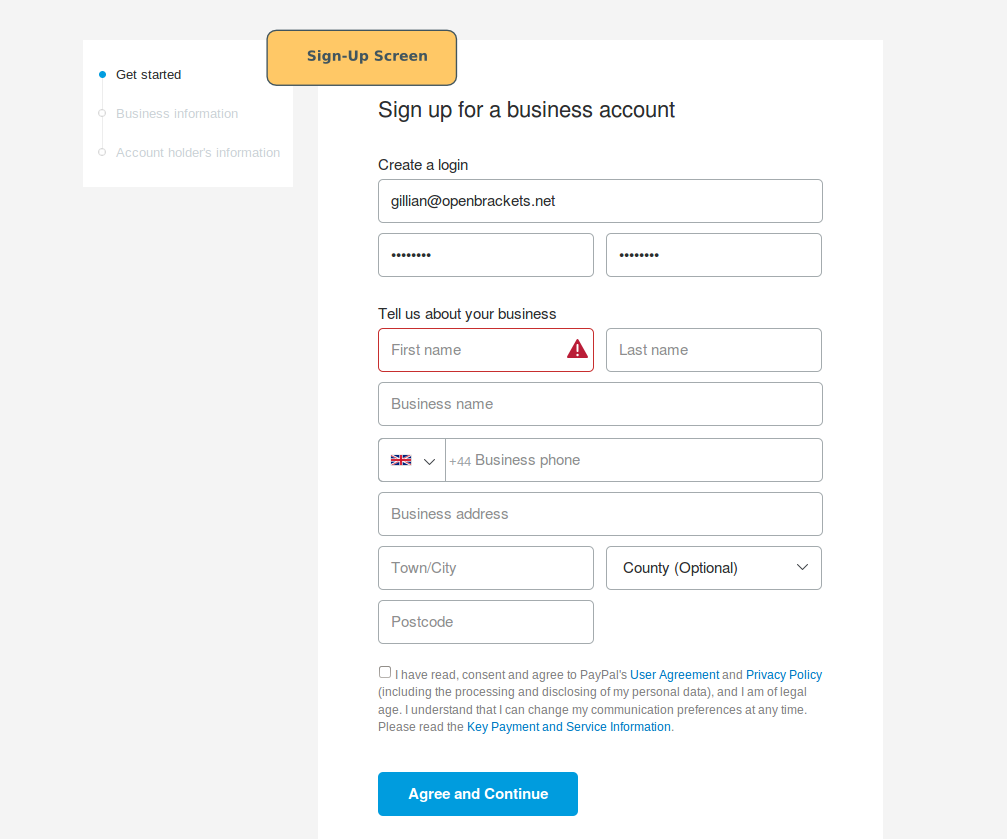
- Business Account: Designed for merchants, freelancers, and companies, this account type offers advanced features such as accepting payments from customers, generating invoices, managing multiple user access, and integrating with e-commerce platforms. The technical requirements and administrative interface for a business account are more complex, offering robust reporting tools, API access for developers, and dispute resolution mechanisms. Choosing the correct account type initially streamlines future technical integrations and compliance.
Navigating the Registration Interface
The registration process begins by visiting the PayPal website or downloading the mobile app.
- Start the Sign-Up: Click “Sign Up” or “Create Account.” You’ll be prompted to choose between a Personal and Business account.
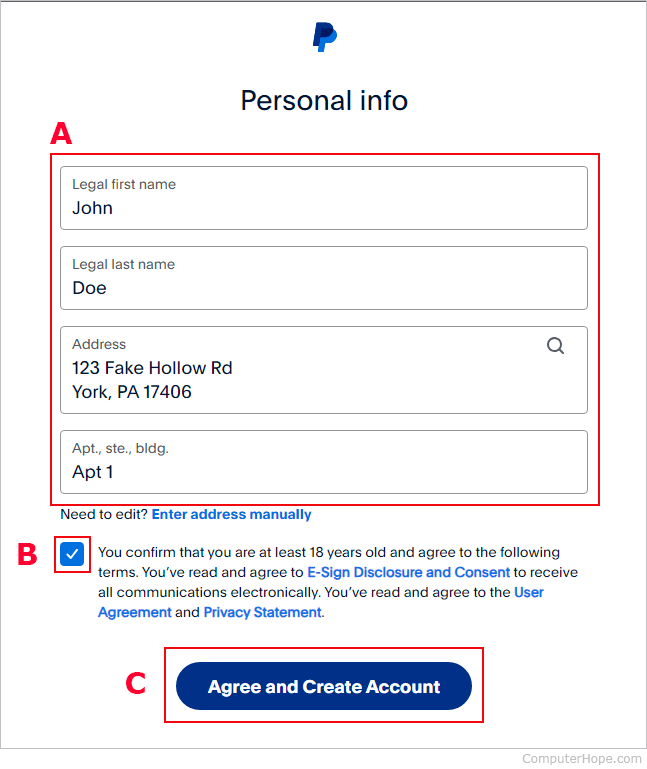
- Enter Core Information: Provide your country, mobile phone number (for verification), full name, email address, and a strong password. PayPal’s system will validate these inputs in real-time. A strong password, typically enforced by password strength indicators, is crucial. It should combine uppercase and lowercase letters, numbers, and symbols.
- Address and Agreement: Enter your residential address. This is a crucial step for KYC (Know Your Customer) regulations, which are a technological and legal requirement for financial service providers to prevent fraud and money laundering. You’ll then review and agree to PayPal’s User Agreement and Privacy Policy, which detail the technical parameters of service, data handling, and security measures.
- Email Verification: PayPal sends a verification link to your registered email address. Clicking this link authenticates your email, a critical security measure to ensure you control the associated email account. This also activates your account within their system.
Linking Financial Instruments: Cards and Bank Accounts
After account creation, linking a funding source is the next technical hurdle. This enables you to add funds to your PayPal balance or draw directly from your bank or card for transactions.
-
Link a Debit/Credit Card:
- Navigate to the “Wallet” or “Money” section.
- Select “Link a Card.”
- Enter your card number, expiration date, and CVV (Card Verification Value). PayPal’s system will perform a secure tokenization of your card data, storing it in an encrypted format and often making a small, temporary authorization charge (e.g., $1.95). This charge will appear on your statement with a unique 4-digit code.
- You’ll then return to PayPal and enter this 4-digit code to complete the verification. This mechanism verifies that you are the legitimate cardholder, ensuring that unauthorized cards cannot be linked.
-
Link a Bank Account:
- Go to the “Wallet” or “Money” section and select “Link a Bank Account.”
- You’ll be prompted to either log in directly to your bank via a secure portal (an instant verification method that uses secure APIs to connect to your bank, typically through services like Plaid) or manually enter your bank’s routing and account numbers.
- For manual linking, PayPal will send two small deposits (micro-deposits) to your bank account, typically within 2-3 business days. These deposits are usually a few cents (e.g., $0.05 and $0.12).
- Once these deposits appear on your bank statement, you return to PayPal, enter the exact amounts, and verify your bank account. This process confirms the authenticity of your bank account and ownership.
Setting Up Security Features: Two-Factor Authentication
Enhancing your account security beyond a strong password is paramount. Two-Factor Authentication (2FA), also known as multi-factor authentication (MFA), adds an extra layer of protection.

- Enable 2FA: In your PayPal settings, locate the “Security” section.
- Choose a Method: PayPal typically offers SMS-based 2FA (a code sent to your registered phone number) or Authenticator App 2FA (using apps like Google Authenticator or Authy to generate time-based one-time passwords – TOTPs). Authenticator app methods are generally more secure as they do not rely on cellular networks which can be vulnerable to SIM swap attacks.
- Setup and Backup: Follow the on-screen instructions to link your phone or authenticator app. You’ll be provided with backup codes; store these in a secure, offline location. These codes are critical for regaining access if you lose your phone or device. Enabling 2FA means that every time you log in or perform a sensitive action, PayPal’s system will require not only your password but also the second factor, significantly thwarting unauthorized access attempts.
Maximizing Your PayPal Experience: Advanced Tech & Security Considerations
Beyond the initial setup, understanding and leveraging PayPal’s advanced technological capabilities and maintaining robust security practices are vital for a seamless and protected digital financial journey.
Understanding PayPal’s Security Infrastructure
PayPal invests heavily in its security infrastructure, utilizing a multi-layered approach to protect user data and transactions:
- Data Encryption: All sensitive data at rest and in transit is encrypted. PayPal uses secure data centers with physical and digital access controls.
- Fraud Detection Algorithms: Sophisticated machine learning algorithms analyze millions of transactions daily, identifying unusual patterns or behaviors indicative of fraud. These systems learn and adapt to new threats in real-time.
- Buyer and Seller Protection: From a technical perspective, these programs involve a series of automated checks and dispute resolution workflows. For buyers, it ensures that if an item isn’t received or is significantly not as described, PayPal’s system facilitates a secure refund process. For sellers, it protects against unauthorized transactions and chargebacks, provided they follow specific technical requirements like proof of delivery.
- PCI DSS Compliance: PayPal adheres to the Payment Card Industry Data Security Standard (PCI DSS), a set of security standards designed to ensure that all companies that accept, process, store, or transmit credit card information maintain a secure environment.
Managing Privacy Settings and Data Permissions
Your PayPal account settings provide granular control over your privacy and data. It’s crucial to review these periodically:
- Notification Preferences: Manage how PayPal communicates with you. You can enable or disable email, SMS, and push notifications for transactions, security alerts, and promotional offers. This ensures you only receive critical information, reducing digital noise.
- Automatic Payments: Review and manage recurring payments or subscriptions linked to your PayPal account. This allows you to technically revoke permission for vendors to automatically charge your account, preventing unwanted deductions.
- Data and Privacy Settings: Access and understand what data PayPal collects and how it’s used. You can often download your data or manage consent for certain data processing activities, aligning with global data protection regulations like GDPR.
- Connected Apps and Websites: If you’ve granted permission for third-party applications or websites to access your PayPal account (e.g., for faster checkout), you can revoke these permissions, limiting potential security vulnerabilities from external services.
Integrating PayPal with Other Platforms
One of PayPal’s significant technological advantages is its extensive integration capabilities, making it a cornerstone of the digital economy:
- E-commerce Platforms: PayPal is a standard payment gateway for platforms like Shopify, WooCommerce, Magento, and Etsy. Businesses can integrate PayPal’s SDKs (Software Development Kits) or plugins to offer secure checkout options.
- Subscription Services: Many online services, from streaming platforms to software subscriptions, utilize PayPal for recurring payments. This relies on PayPal’s secure tokenization and billing agreement APIs.
- Peer-to-Peer Sending: The PayPal app and website facilitate instant peer-to-peer transfers, leveraging its global network for rapid fund movement.
- Invoicing Tools: Business accounts offer integrated invoicing tools, technically generating and sending electronic invoices directly from the PayPal platform, often with tracking and payment reminders.
Troubleshooting Common Technical Issues
Even with robust technology, users might encounter occasional technical glitches. Here are common issues and their resolutions:
- Login Problems:
- Forgotten Password: Use the “Forgot Password” link to initiate a secure password reset process, often involving email or SMS verification.
- 2FA Issues: If you’ve lost access to your 2FA device, use your backup codes or contact PayPal support to undergo an identity verification process.
- Account Lockout: Multiple failed login attempts can trigger a temporary lockout. Wait for the specified period or contact support for manual unlocking after identity verification.
- Transaction Errors:
- Payment Declined: This often indicates insufficient funds, an expired card, or a security flag from your bank or PayPal’s fraud detection system. Check with your bank or try an alternative funding source.
- Pending Transactions: Some transactions, especially international or larger ones, might be held for review by PayPal’s security systems. This is an automated process to prevent fraud.
- Verification Glitches:
- Micro-deposits Not Arriving: Ensure you’ve waited the full 2-3 business days. If not, re-initiate the verification or confirm your bank account details.
- Card Verification Code Issues: Double-check the 4-digit code on your statement. If issues persist, try linking a different card or contact support.
The Future of Digital Payments and PayPal’s Role
The landscape of digital payments is in constant evolution, driven by technological advancements. PayPal, as a leading innovator, continues to adapt and shape this future.
Emerging Payment Technologies
The digital payments sector is rapidly incorporating new technologies:
- NFC (Near Field Communication) and QR Codes: PayPal’s mobile app increasingly supports these technologies for contactless payments in physical stores, streamlining transactions by leveraging smartphone hardware.
- Cryptocurrency Integration: PayPal has begun integrating certain cryptocurrencies (like Bitcoin, Ethereum, Litecoin, and Bitcoin Cash) into its platform, allowing users to buy, hold, and sell digital assets directly through their accounts. This represents a significant technological leap, bridging traditional finance with decentralized ledger technologies.
- AI in Fraud Prevention: The use of artificial intelligence and machine learning is becoming more sophisticated in predicting and preventing fraud, moving beyond rule-based systems to adaptive, real-time threat detection.
PayPal’s Evolution and Innovation
PayPal continues to innovate, expanding its technological footprint and service offerings:
- Enhanced Global Reach: Continuous expansion into new markets requires complex technical adaptations, including currency conversion mechanisms, compliance with local financial regulations, and integration with diverse banking systems worldwide.
- Digital Wallet Features: Beyond payments, PayPal is evolving into a comprehensive digital wallet, integrating features like bill pay, budgeting tools, and even direct deposit capabilities, all powered by its robust backend infrastructure.
- Partnerships and Acquisitions: PayPal frequently partners with or acquires tech companies to integrate new capabilities, such as buy-now-pay-later (BNPL) solutions or specialized payment processing services, reinforcing its position at the forefront of financial technology.
Staying Secure in an Evolving Digital Landscape
As technology advances, so do the methods of cybercriminals. Staying secure requires continuous vigilance from users:
- Practice Strong Password Hygiene: Use unique, complex passwords for all online accounts, especially financial ones, and consider a password manager.
- Enable and Utilize 2FA: This remains one of the most effective deterrents against unauthorized account access.
- Be Wary of Phishing and Scams: Understand that PayPal will never ask for your password or sensitive information via unsolicited emails or texts. Always verify the sender and URL before clicking links.
- Keep Software Updated: Regularly update your operating system, web browser, and PayPal mobile app. These updates often include critical security patches that protect against newly discovered vulnerabilities.
- Monitor Account Activity: Regularly review your PayPal transaction history for any unauthorized activity. Report suspicious transactions immediately.
Setting up a PayPal account is more than just creating an online profile; it’s configuring your access to a sophisticated technological framework designed to make digital transactions secure, efficient, and globally accessible. By understanding its technical underpinnings, diligently following the setup steps, and continuously practicing good digital security hygiene, you can fully leverage PayPal as an indispensable tool in your personal and professional digital life.
aViewFromTheCave is a participant in the Amazon Services LLC Associates Program, an affiliate advertising program designed to provide a means for sites to earn advertising fees by advertising and linking to Amazon.com. Amazon, the Amazon logo, AmazonSupply, and the AmazonSupply logo are trademarks of Amazon.com, Inc. or its affiliates. As an Amazon Associate we earn affiliate commissions from qualifying purchases.