
In the intricate landscape of modern personal finance, managing an array of bills, due dates, and varying payment amounts can feel like a perpetual juggling act. The consequence of a missed payment, whether a utility bill, loan installment, or credit card statement, extends beyond a mere late fee, potentially impacting credit scores and overall financial well-being. This is where the strategic power of autopay comes into play, transforming a potential source of stress into a cornerstone of robust financial organization. For millions of Americans, Bank of America serves as a primary financial institution, making the understanding of its autopay functionalities a critical skill for effective money management.
Autopay, at its core, is the automation of recurring payments from your bank account or credit card to a service provider or lender. It’s a mechanism designed to ensure that your financial obligations are met punctually, without manual intervention. Beyond the immediate benefit of avoiding late fees, integrating autopay into your financial routine with a trusted institution like Bank of America offers profound advantages for budgeting, credit health, and long-term financial planning. This comprehensive guide will navigate you through the process of setting up and managing autopay via Bank of America’s various platforms, illuminate its strategic financial benefits, and equip you with best practices to leverage this powerful tool effectively within your personal finance ecosystem.
The Strategic Importance of Autopay in Personal Finance
Autopay is far more than a convenience; it’s a strategic financial instrument that underpins responsible money management. Its value transcends the simple act of transferring funds, embedding itself into the very fabric of financial stability and future planning. For individuals and families navigating the complexities of modern economics, understanding and utilizing autopay judiciously can be a game-changer.
Mitigating Late Fees and Credit Score Impact
One of the most immediate and tangible benefits of autopay is its ability to eliminate late fees. These penalties, often small individually, can accumulate quickly, eroding your disposable income and hindering your progress towards financial goals. Beyond the monetary cost, a missed payment, especially on credit accounts, is a significant red flag for credit bureaus. Payment history accounts for a substantial portion of your credit score, making punctual payments paramount. Even a single late payment reported to credit agencies can cause a noticeable dip in your score, affecting your ability to secure favorable interest rates on future loans, mortgages, or even impact rental applications and insurance premiums. By automating payments through Bank of America, you create a robust defense against these financial repercussions, ensuring your credit history remains pristine and your hard-earned money isn’t lost to avoidable charges. This consistent, on-time payment record is a cornerstone for building and maintaining an excellent credit score, a vital asset in today’s economy.
Cultivating Financial Discipline and Peace of Mind
The mental load of remembering numerous due dates for utilities, subscriptions, insurance premiums, and loan payments can be considerable. Autopay significantly reduces this cognitive burden, freeing up mental energy that can be redirected to more productive financial activities like budgeting, saving, or investing. This automation instills a passive form of financial discipline, ensuring that even amidst life’s inevitable distractions, your core financial responsibilities are met. The peace of mind derived from knowing your bills are consistently paid on time is invaluable. It reduces stress, prevents anxious last-minute scrambles, and allows you to focus on broader financial goals without the looming threat of an overlooked bill. Bank of America’s secure and reliable system provides the infrastructure for this peace, allowing you to trust that your financial commitments are handled efficiently and effectively, contributing to a calmer and more controlled financial life.
Optimizing Cash Flow and Budgeting Efficiency
Integrating autopay into your financial strategy also enhances your ability to manage cash flow and refine your budget. When you know exactly when and how much money will be debited for recurring expenses, you gain a clearer picture of your available funds. This predictability allows for more accurate budgeting, as fixed expenses are accounted for automatically. For variable expenses, you can then allocate remaining funds with greater confidence. Many service providers and lenders allow you to choose your autopay date, offering an opportunity to align payment schedules with your income cycles. For instance, if you get paid on the 1st and 15th of the month, you might schedule major loan payments for a few days after each payday to ensure funds are available. This proactive management of payment dates, facilitated through Bank of America’s flexible autopay options, helps prevent overdrafts and ensures that your checking account maintains a healthy balance, avoiding unnecessary fees and financial disruptions. It transforms budgeting from a reactive exercise into a proactive, strategic component of your financial success.
Navigating Bank of America’s Platforms for Autopay Setup
Bank of America offers multiple convenient avenues for setting up autopay, ensuring accessibility regardless of your preferred method of banking. Whether you prefer the comprehensive control of online banking or the on-the-go efficiency of a mobile app, the process is designed to be intuitive and secure.
Online Banking: Step-by-Step Walkthrough
For many, Bank of America’s online banking portal is the primary hub for managing finances. Setting up autopay through this platform offers a detailed and guided experience.
- Log In Securely: Begin by visiting the official Bank of America website and logging into your account using your User ID and Passcode. Always ensure you are on the legitimate Bank of America site to protect your financial information.
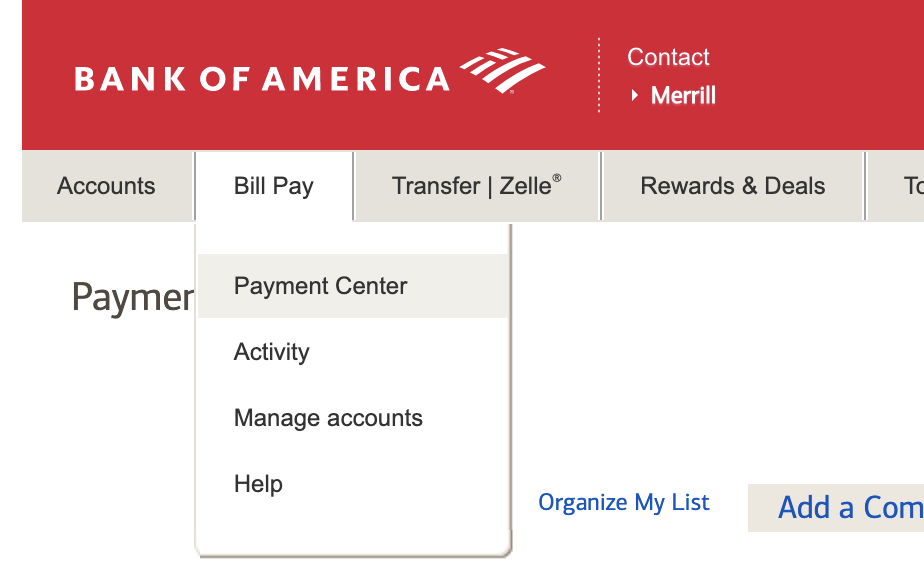
- Access Bill Pay or Specific Account: Once logged in, navigate to the “Bill Pay” section. This is typically found in the main menu or dashboard. Alternatively, if you want to set up autopay for a specific Bank of America account (e.g., a Bank of America credit card or loan), you can navigate directly to that account’s details page and look for a “Payments” or “Manage Payments” option.
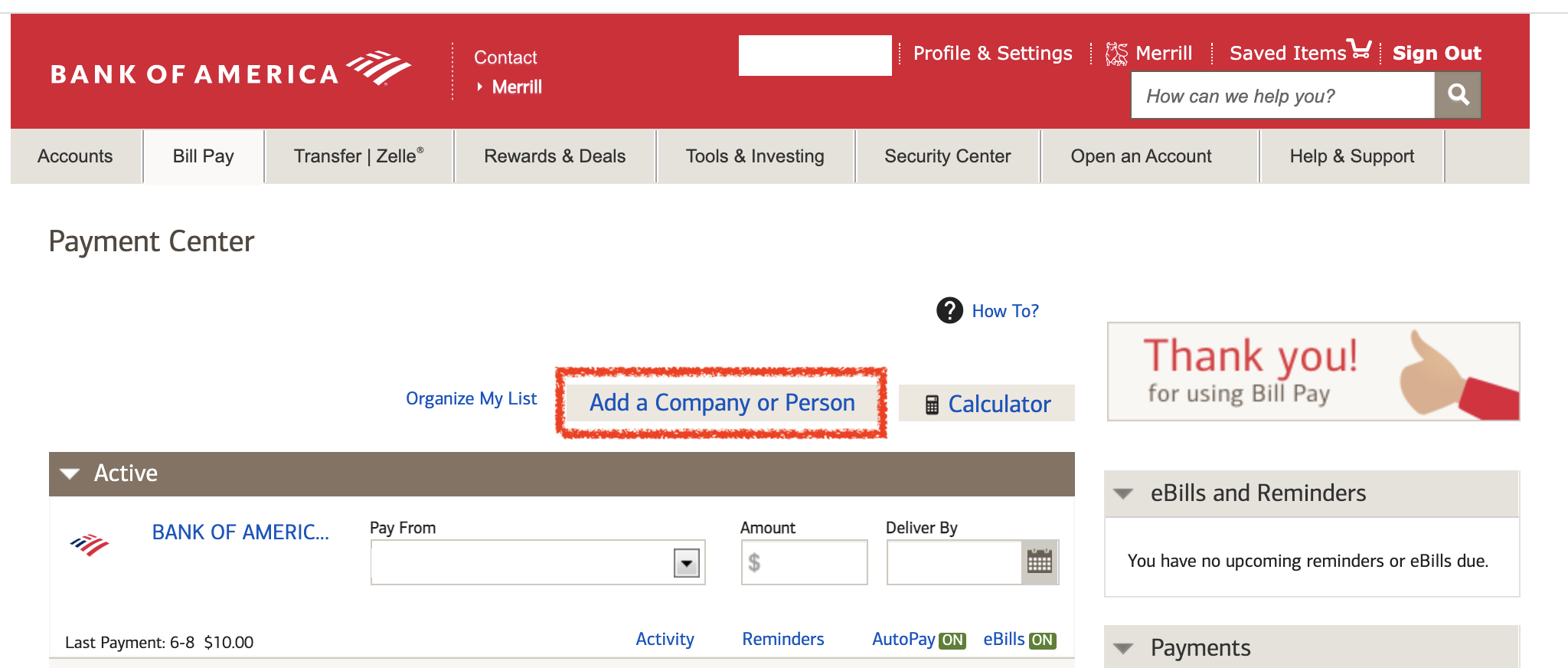
- Select the Bill/Payee: Within the Bill Pay section, you’ll see a list of payees you’ve already set up. If the bill you want to autopay is not listed, you will need to “Add a company or person” as a new payee. This usually requires the payee’s name, address, account number with them, and sometimes their payment address.
- Initiate Autopay Setup: Once the payee is selected or added, look for an option to “Set up autopay,” “Schedule recurring payments,” or similar wording.
- Configure Payment Details:
- Amount: Choose between paying the “Statement Balance,” “Minimum Payment Due,” or a “Fixed Amount.” For most debts like credit cards, paying the statement balance in full is advisable to avoid interest. For utilities or loans, a fixed amount might be appropriate.
- Frequency: Select how often the payment should occur (e.g., monthly, bi-weekly, weekly).
- Start Date: Specify the first date the autopay should be initiated. It’s wise to set this a few days before the actual due date to allow for processing time.
- Payment Account: Select the Bank of America checking or savings account from which the funds will be debited. Ensure this account consistently has sufficient funds.
- End Date (Optional): For subscriptions or loans with a finite term, you might set an end date. For ongoing bills, this can be left open-ended.
- Review and Confirm: Carefully review all the details you’ve entered. Confirm that the payee, amount, date, frequency, and payment account are all correct.
- Submit: Once satisfied, confirm the setup. You should receive a confirmation message or email from Bank of America.
Mobile App: Convenience at Your Fingertips
The Bank of America mobile app offers a streamlined experience for managing your finances on the go, including autopay setup.
- Launch and Log In: Open the Bank of America mobile app on your smartphone or tablet and log in using your credentials, Face ID, or fingerprint.
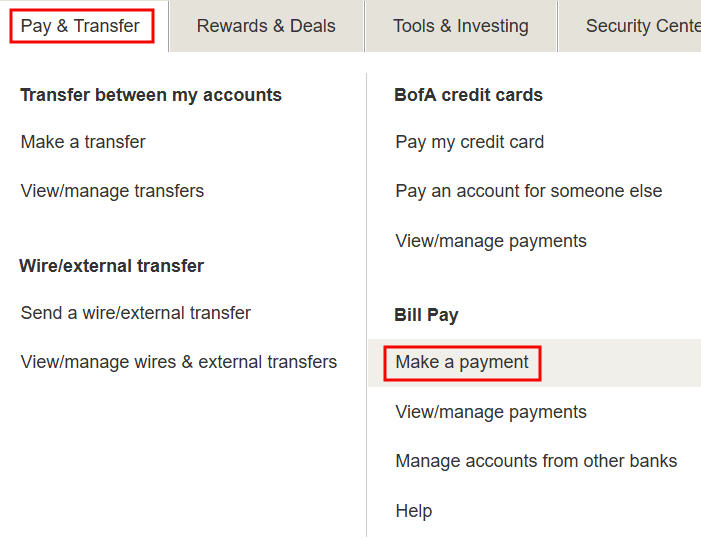
- Navigate to Bill Pay: From the app’s main dashboard, tap on the “Pay & Transfer” menu item, then select “Bill Pay.”
- Choose or Add Payee: Select an existing payee from your list or tap “Add a company or person” to set up a new one, following similar input requirements as the online portal.
- Set Up Recurring Payments: For the chosen payee, look for an option to “Set up recurring payment” or “Autopay.”
- Define Payment Parameters: Input the payment amount (statement balance, minimum, or fixed), frequency, start date, and select the Bank of America account for debit.
- Review and Authorize: Double-check all entered information. The mobile app often features a clear summary screen before final authorization.
- Confirm: Tap to confirm the autopay setup. You will receive an in-app confirmation and potentially an email.
Alternative Setup Methods: Phone and In-Person
While online and mobile app methods are the most common, Bank of America also provides traditional channels for assistance with autopay setup.
- Phone Support: You can call Bank of America’s customer service number. A representative can guide you through the process or, in some cases, help you set it up directly after verifying your identity. This can be particularly useful if you encounter technical difficulties or have complex questions.
- In-Person at a Branch: For those who prefer face-to-face assistance, visiting a Bank of America financial center allows you to speak with a banking specialist. They can help you navigate the online system on a branch computer or provide direct assistance in setting up autopay. Remember to bring any relevant bill statements or account information.
Best Practices for Managing Your Bank of America Autopay
Setting up autopay is just the first step. Effective management is crucial to ensure it consistently serves its purpose without creating new financial headaches. Adhering to best practices will help you maximize the benefits and avoid potential pitfalls.
Selecting the Right Payment Accounts and Dates
The choice of which Bank of America account to use for autopay and the specific date of payment are critical decisions that directly impact your financial stability.
- Dedicated Checking Account: Consider using a primary checking account that receives your regular income and is specifically monitored for sufficient funds. Avoid linking autopay to an account you rarely check or one with a low balance, as this increases the risk of overdrafts.
- Buffer Funds: Always maintain a healthy buffer in your autopay-linked account, ideally an amount exceeding your total monthly automated debits. This acts as a safety net against unexpected expenses or slight variations in bill amounts.
- Strategic Payment Dates: Align your autopay dates with your income cycle. If you’re paid bi-weekly, schedule major payments a few days after your paychecks clear. This ensures funds are available and prevents the account from running low prematurely in the month. For credit cards, setting the autopay date to pay the statement balance in full a few days before the due date is ideal to avoid interest charges entirely.
Monitoring Payments and Transaction History
Automation should never lead to complacency. Regular monitoring is essential to catch errors, discrepancies, or potential issues before they escalate.
- Regular Review: Periodically review your Bank of America transaction history, either through online banking or the mobile app, to confirm that all autopayments have been processed correctly and on time. Check that the debited amounts match your expected bills.
- Statement Reconciliation: When you receive statements from your service providers (e.g., utility companies, credit card companies), reconcile them with the corresponding autopay transactions in your Bank of America account. This helps identify billing errors from the payee’s side or any issues with your autopay setup.
- Notifications and Alerts: Utilize Bank of America’s alert system. You can set up notifications for large transactions, low balances, or even specific payments to be made. This provides an additional layer of oversight and keeps you informed in real-time.
Modifying or Canceling Autopay Arrangements
Financial circumstances and service providers can change, necessitating adjustments to your autopay setup. Bank of America makes it straightforward to modify or cancel these arrangements.
- Online Banking/Mobile App: The easiest way to make changes is through the same online banking portal or mobile app where you set up the autopay. Navigate to the “Bill Pay” section, find the specific recurring payment, and look for options to “Edit,” “Modify,” or “Cancel.” You can typically adjust amounts, dates, or even switch the payment account.
- Timely Changes: Make any modifications or cancellations well in advance of the next scheduled payment date. There’s usually a cutoff time (e.g., 2-3 business days before the payment) to ensure the changes take effect.
- Confirmation: Always confirm that your modifications or cancellations have been successfully processed. Check your transaction history and, if applicable, contact the service provider to confirm they’ve received notice of the change from Bank of America or that they will no longer attempt to debit your account.
Integrating Autopay into a Holistic Financial Strategy
While autopay is commonly associated with paying bills, its principles of automation extend much further, playing a pivotal role in a comprehensive financial strategy that goes beyond mere expense management to include savings and wealth creation.
Automating Savings and Investment Contributions
One of the most powerful applications of autopay is in automating your journey towards financial growth. Just as you pay your bills, you should “pay yourself first.”
- Regular Savings Transfers: Set up recurring transfers from your Bank of America checking account to your Bank of America savings account. Even small, consistent transfers (e.g., $50 every payday) can accumulate significantly over time. This makes saving a non-negotiable part of your budget, rather than an afterthought.
- Automated Investment Contributions: Many brokerage firms and investment platforms allow you to set up recurring contributions directly from your Bank of America account. By automating transfers to your retirement accounts (e.g., 401(k), IRA) or taxable investment accounts, you consistently participate in dollar-cost averaging, reducing the impact of market volatility and systematically building your wealth over the long term. This strategy leverages the power of compound interest and consistent contributions, which are cornerstones of successful investing.
Leveraging Bill Pay for Comprehensive Expense Management
Bank of America’s Bill Pay service, intertwined with autopay, offers a centralized platform for managing nearly all your outgoing financial obligations.
- Consolidated View: Instead of logging into multiple vendor websites, you can manage a vast majority of your bills directly from your Bank of America account. This provides a consolidated overview of your expenses, making budgeting and tracking simpler.
- Scheduled One-Time Payments: Beyond autopay, you can schedule one-time payments for bills that aren’t recurring or that vary significantly. This ensures you still pay on time without needing to remember to initiate the payment manually on the due date.
- eBills Integration: Many payees offer eBills directly within Bank of America’s Bill Pay system. This means your bill statements arrive digitally in your banking portal, making it even easier to review and pay them, further streamlining your financial oversight.
Advanced Strategies for Debt Reduction and Wealth Accumulation
Autopay can be a tactical weapon in your financial arsenal for both debt reduction and accelerating wealth accumulation.
- Debt Snowball/Avalanche Method: If you’re using a debt reduction strategy like the snowball or avalanche method, you can automate minimum payments on all debts and then set up additional autopayments (or manual payments) for the targeted debt. For example, once one debt is paid off, you can re-route that autopay amount to the next debt in your chosen sequence, accelerating its payoff without requiring manual intervention each time.
- Overpayment Automation: For loans with fixed payments (e.g., mortgages, car loans), consider setting up an autopay for slightly more than the required minimum. Even an extra $25 or $50 per month can significantly reduce the principal balance over the life of the loan, saving thousands in interest and shortening the repayment period. Bank of America often allows custom autopay amounts for their own loan products, making this an easy strategy to implement.
- Future Financial Goals: Automate contributions towards specific future goals like a down payment on a home, a child’s education fund, or a dream vacation. By setting up recurring transfers to dedicated savings accounts, you ensure consistent progress toward these aspirations, turning abstract goals into concrete financial actions.
Common Pitfalls and How to Avoid Them
While autopay is a powerful tool, it’s not foolproof. Awareness of potential pitfalls and implementing proactive measures can prevent common issues that might arise when relying on automated financial transactions.
Insufficient Funds: The Peril of Overdrafts
The most common and disruptive issue with autopay is insufficient funds in the linked account. This can lead to a cascade of negative consequences.
- Overdraft Fees: Bank of America, like most financial institutions, charges overdraft fees when a transaction goes through without enough money in the account. These fees can quickly accumulate, turning a small bill into a much larger expense.
- Returned Payment Fees: The payee (e.g., utility company, credit card issuer) may also charge a “returned payment” or “NSF” (Non-Sufficient Funds) fee, further compounding your costs.
- Late Fees and Credit Damage: If the payment is returned and not subsequently covered, you could still incur late fees from the service provider, and your credit score might be negatively impacted if the payment is for a credit account and remains outstanding past its due date.
How to Avoid:
- Maintain a Buffer: Always keep a comfortable buffer of funds in your autopay account, especially considering any variable bills.
- Low Balance Alerts: Set up low balance alerts with Bank of America so you are notified if your account balance dips below a certain threshold, giving you time to transfer funds.
- Link to Savings/Overdraft Protection: Consider linking your checking account to a Bank of America savings account or a line of credit for overdraft protection. While these might incur transfer fees, they are usually less than multiple overdraft and returned payment fees.
Overlooking Payment Changes and Service Updates
Autopay, once set up, can operate in the background for extended periods. However, complacency can lead to issues if changes occur without your notice.
- Variable Bill Amounts: Bills for utilities, credit cards (if you only pay the minimum), or certain subscriptions can change. If your autopay is set for a fixed amount, it might not cover the full outstanding balance, leading to interest charges or partial payments.
- Account Number Changes: Service providers sometimes change account numbers, or you might switch to a new provider for a specific service. If your autopay details aren’t updated, payments will fail.
- Bank Policy Changes: While less frequent, financial institutions can update their terms and conditions or autopay policies.
How to Avoid:
- Regular Review: Periodically review your autopay settings within Bank of America and reconcile them with your incoming bills and statements from service providers.
- Read Notices: Pay attention to emails and postal mail from your service providers and Bank of America regarding account changes, policy updates, or changes to your bill amounts.
- Update Promptly: If you change service providers, account numbers, or if you notice a significant shift in a variable bill, update your autopay settings in Bank of America immediately.
Cybersecurity Best Practices for Automated Transactions
While Bank of America employs robust security measures, your vigilance is also crucial when managing automated financial transactions.
- Secure Logins: Always use strong, unique passwords for your Bank of America online banking and mobile app. Enable multi-factor authentication (MFA) or two-factor authentication (2FA) if available, which adds an extra layer of security.
- Phishing Awareness: Be wary of suspicious emails or messages claiming to be from Bank of America or your service providers asking for personal or login information. Always access your accounts directly through the official website or app, not through links in unsolicited emails.
- Public Wi-Fi Caution: Avoid accessing your banking information or setting up autopay on unsecured public Wi-Fi networks, as these can be vulnerable to eavesdropping. Use a secure, private network or a Virtual Private Network (VPN).
- Monitor for Unauthorized Activity: Regularly check your Bank of America statements and transaction history for any unauthorized or suspicious activity. Report any anomalies immediately to Bank of America.
By understanding and actively mitigating these common pitfalls, you can harness the full power of Bank of America’s autopay feature, transforming it into a seamless and secure component of your streamlined financial management system.
aViewFromTheCave is a participant in the Amazon Services LLC Associates Program, an affiliate advertising program designed to provide a means for sites to earn advertising fees by advertising and linking to Amazon.com. Amazon, the Amazon logo, AmazonSupply, and the AmazonSupply logo are trademarks of Amazon.com, Inc. or its affiliates. As an Amazon Associate we earn affiliate commissions from qualifying purchases.