
In an increasingly digital world, managing your finances effectively requires tools that bridge the gap between traditional banking and the vast landscape of online transactions. Among these tools, PayPal stands out as a global leader, facilitating everything from shopping on e-commerce sites to sending money to family across borders, and even receiving payments for your side hustle or business ventures. For many, opening a PayPal account is a foundational step towards greater financial flexibility and participation in the digital economy. This guide will walk you through the process, emphasizing PayPal’s pivotal role in your personal financial ecosystem.
Understanding PayPal’s Role in Your Financial Ecosystem
PayPal is far more than just a payment processor; it’s a comprehensive financial tool that integrates seamlessly into various aspects of your economic life. Its robust features and widespread acceptance make it an indispensable asset for navigating modern money management, whether for personal use or income generation.
The Ubiquity of Digital Payments
The transition from physical cash to digital transactions has been relentless, with online payments becoming the norm for countless daily activities. PayPal emerged as a pioneer in this revolution, offering a secure and convenient alternative to traditional banking methods for online purchases and transfers. Its early adoption and continuous innovation have cemented its status as a trusted platform worldwide. For consumers, PayPal simplifies online shopping by allowing secure payments without directly sharing credit card or bank details with every merchant. This layer of security is a significant advantage, reducing the risk of fraud and streamlining checkout processes. For individuals involved in international transactions, PayPal offers a straightforward method for sending and receiving money across borders, often simplifying complex currency conversions and international banking protocols. This global reach makes it an essential tool for anyone with international financial dealings, be it personal remittances or business transactions.
Personal Finance Management Through PayPal
While primarily known for its payment processing, PayPal also serves as a subtle, yet powerful, tool for personal finance management. By linking your bank accounts and credit/debit cards, PayPal acts as a central hub for your online spending. This integration allows users to track their online expenditures more effectively, providing a clear record of where and when money is spent. For those keen on budgeting, the transaction history within PayPal can be exported or reviewed, offering valuable insights into spending patterns related to online shopping, subscriptions, and digital services. Furthermore, features like “Pay in 4” (a buy now, pay later option) or PayPal Credit, while requiring responsible use, offer flexible payment solutions that can be integrated into a broader financial strategy for managing larger purchases without immediate full payment. When used judiciously, these tools can help individuals spread out costs, making certain purchases more manageable within their monthly budget.
Enabling Online Income and Side Hustles
For the growing legion of freelancers, independent contractors, small business owners, and e-commerce entrepreneurs, PayPal is often the backbone of their financial operations. It provides a reliable and universally accepted method for receiving payments from clients, customers, and various online platforms. Whether you’re selling handmade crafts on Etsy, offering services on Upwork, or running an eBay store, PayPal facilitates the crucial transfer of funds from buyer to seller.
Its invoicing features allow service providers to create professional invoices, track payments, and send reminders, all within the platform. For those with international clients, PayPal simplifies cross-border payments, making it easier to expand one’s market reach without the complexities and high fees often associated with traditional wire transfers. This capability is particularly empowering for individuals building an online income stream or managing a side hustle, as it democratizes access to global commerce and provides a secure conduit for earning money digitally. PayPal’s Seller Protection policies also offer a degree of security for those selling goods and services, helping to mitigate risks associated with disputes and fraudulent claims, which is vital for maintaining financial stability in online business ventures.
Step-by-Step Guide to Opening Your PayPal Account
Opening a PayPal account is a straightforward process, but understanding the initial choices and requirements can ensure a smooth setup. The journey begins with selecting the right account type and providing necessary personal and financial information for verification.
Choosing the Right Account Type: Personal vs. Business
Before you even start filling out forms, the first crucial decision is whether you need a Personal or a Business account. This choice dictates the features available to you and aligns with your primary usage of the platform.
- Personal Account: This is ideal for most individual users. If your primary needs involve shopping online, sending money to friends and family, or occasionally receiving payments for small, non-commercial activities (e.g., splitting a dinner bill), a Personal account is sufficient. It’s designed for simplicity and ease of use, focusing on consumer-centric transactions. There are no fees for sending money to friends and family within your country (when using your PayPal balance or linked bank account) or for making purchases.
- Business Account: A Business account is tailored for individuals and entities that regularly sell goods or services, operate an e-commerce store, need to accept payments from customers, send invoices, or manage multiple users for financial operations. It offers features like enhanced reporting tools, options for accepting payments on websites, managing refunds, and access to PayPal’s seller protection policies. While it incurs transaction fees for receiving payments, these are standard for commercial transactions and offset by the additional functionality and protections offered. If you plan to earn income consistently through PayPal, even as a sole proprietor or freelancer, a Business account is the appropriate choice to ensure compliance and leverage professional tools.
The Registration Process: What You’ll Need
Once you’ve decided on the account type, the registration process itself is intuitive. You’ll need a few essential pieces of information and items readily available:
- A Valid Email Address: This will be your primary identifier for logging in and receiving transaction notifications. Choose an email you check regularly.
- A Phone Number: PayPal requires a phone number for verification and security purposes, often used for two-factor authentication.
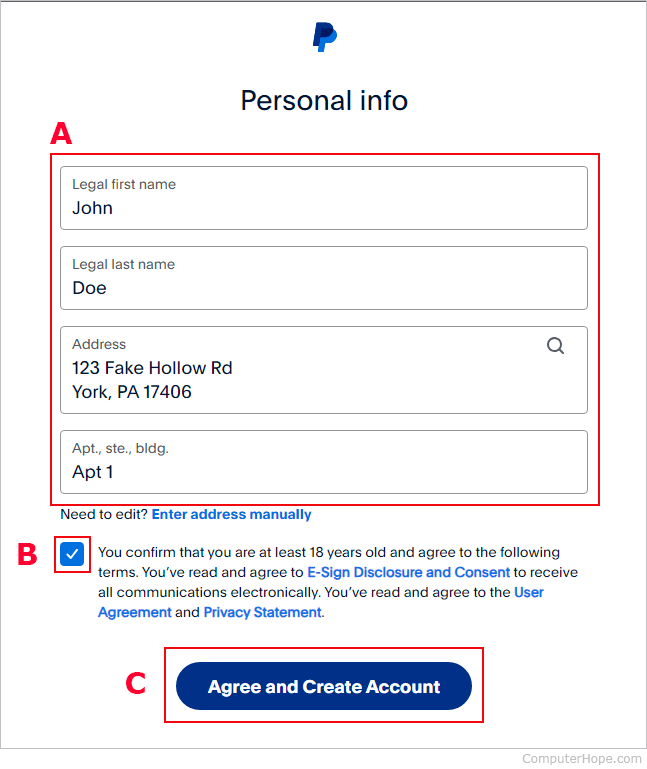
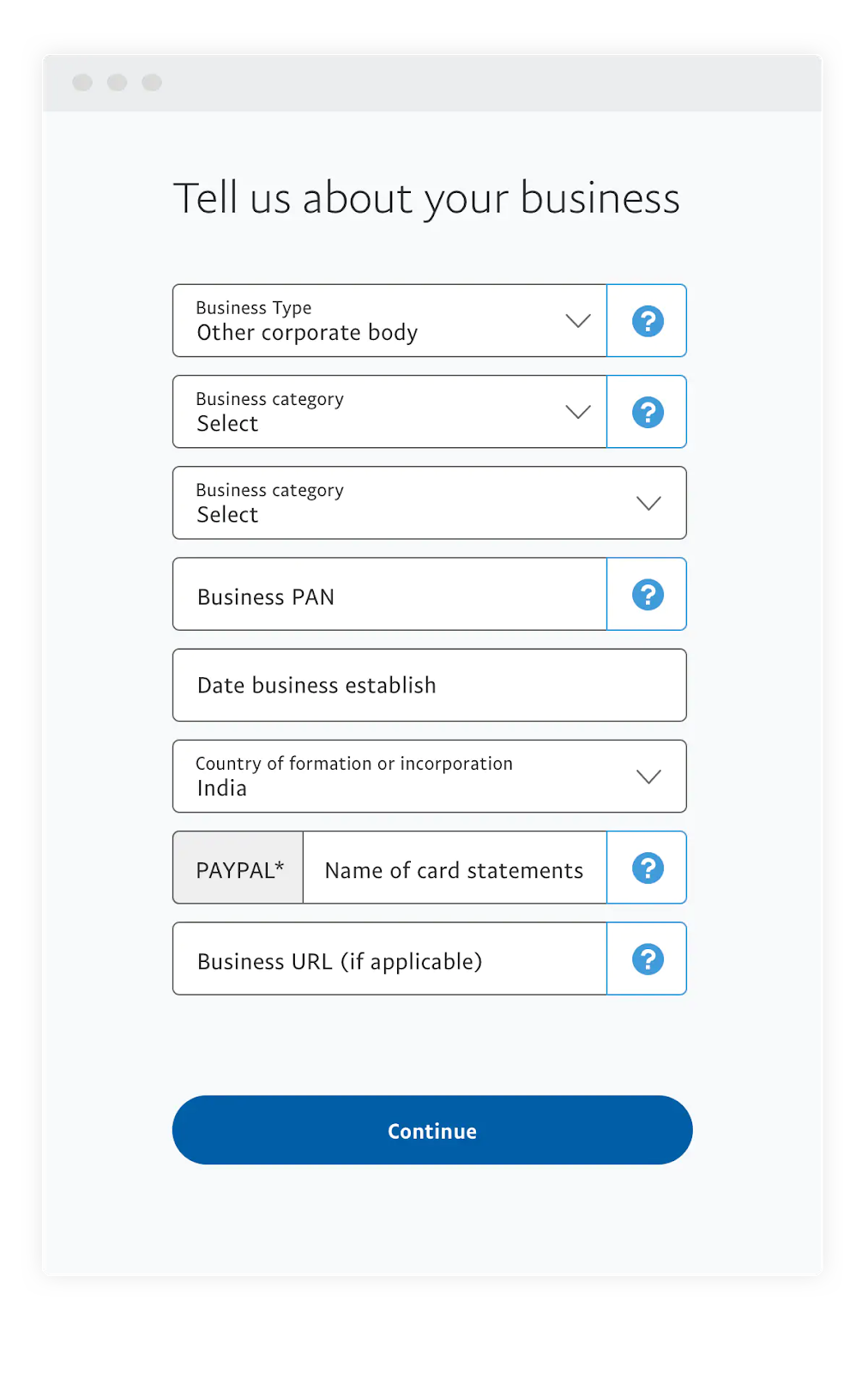
- Personal Details: You’ll need to provide your legal name, physical address, and date of birth. This information is crucial for identity verification and compliance with financial regulations. For business accounts, you’ll also need business-specific details like your business name, type, and sometimes a tax ID number.
- Financial Instruments (for linking): To fully utilize PayPal for sending and receiving money, you’ll need to link at least one financial instrument. This can be:
- A Bank Account: The most common method. You’ll usually provide your bank name, account number, and routing number.
- A Debit Card: Link a debit card associated with your bank account.
- A Credit Card: Link a credit card for purchases or as a backup funding source.
The initial steps involve going to the PayPal website (paypal.com), clicking “Sign Up,” selecting your account type, and then following the on-screen prompts to input your details.
Verifying Your Account for Full Functionality
Simply creating an account isn’t enough to unlock PayPal’s full potential. Verification is a critical step that enhances security, removes sending/receiving limits, and allows you to seamlessly transfer funds between your PayPal balance and your linked bank account.
The verification process typically involves:
- Email Verification: After signing up, PayPal will send an email to the address you provided. You’ll need to click a link within this email to confirm your address.
- Phone Verification: You may be asked to enter a code sent via SMS to your registered phone number.
- Linking and Confirming a Bank Account: This is often the most significant part of the verification process. PayPal will typically make two small deposits (e.g., $0.01 to $0.99) into your bank account. You’ll then log back into PayPal, navigate to your Wallet, and enter the exact amounts of these deposits. This confirms that you own the bank account. Alternatively, some banks allow instant verification by logging into your online banking through PayPal.
- Linking and Confirming a Debit/Credit Card: Similar to bank accounts, you might be asked to confirm ownership of a card. PayPal will make a small temporary charge (e.g., $1.95) to your card, which will appear on your card statement with a unique 4-digit code. You then enter this code into PayPal to confirm the card. The charge is usually refunded within a few days.
Completing these verification steps is essential. Unverified accounts often have strict limits on how much money can be sent or received, and may not be able to withdraw funds to a bank account. Verification not only lifts these limits but also adds a layer of security, making your account more trustworthy for both you and those you transact with.
Maximizing Your PayPal Account: Beyond the Basics
Once your PayPal account is open and verified, the real utility begins. Understanding how to manage your financial instruments, maintain security, and utilize its diverse features will empower you to fully leverage PayPal for your personal and business finance needs.
Linking and Managing Financial Instruments
Your PayPal Wallet is the central hub for all your linked financial instruments. Efficiently managing these connections is key to smooth transactions.
- Adding Accounts and Cards: From your PayPal dashboard, navigate to the “Wallet” section. Here, you’ll find options to “Link a Bank” or “Link a Card.” Follow the prompts, providing the necessary details (routing/account numbers for banks, card number, expiry, CVV for cards). Remember to complete the verification steps for each new instrument as described earlier.
- Setting a Preferred Payment Method: You can designate a primary method for your purchases or money transfers. When you make a payment, PayPal will default to this method, but you always have the option to change it at checkout. This is particularly useful if you prefer to draw from your PayPal balance first, or from a specific bank account or credit card.
- Removing or Updating Information: If a card expires, or you close a bank account, it’s crucial to update your PayPal Wallet. Simply select the instrument in your Wallet and choose the option to remove or edit its details. Keeping this information current prevents declined transactions and enhances security.
Security Best Practices for Your PayPal Account
Given that PayPal handles your money, its security is paramount. While PayPal employs robust security measures, your proactive steps are equally vital in protecting your account from unauthorized access or fraud.
- Strong, Unique Passwords: Use a complex password that combines uppercase and lowercase letters, numbers, and symbols. Crucially, do not reuse this password on any other website or service. A password manager can help you create and store strong, unique passwords for all your online accounts.
- Two-Factor Authentication (2FA): Enable 2FA immediately. This adds an extra layer of security by requiring a second form of verification (like a code sent to your phone or generated by an authenticator app) in addition to your password when you log in or make certain transactions.
- Beware of Phishing Scams: PayPal is a frequent target for phishing attempts. Legitimate PayPal emails will never ask for your password, bank account number, or full credit card details. Always check the sender’s email address and hover over links to see their true destination before clicking. If in doubt, log directly into your PayPal account through your browser (by typing paypal.com yourself) to check for messages or alerts.
- Monitor Transaction History: Regularly review your PayPal transaction history for any unfamiliar activity. If you spot an unauthorized transaction, report it to PayPal immediately through their Resolution Center.
- Secure Your Devices: Ensure your computer and mobile devices have up-to-date antivirus software and strong screen lock passcodes. Avoid accessing your PayPal account on public Wi-Fi networks without a VPN.
Exploring Key Features: Sending, Receiving, and Shopping
PayPal’s core functionality revolves around facilitating financial transactions. Understanding how to use these features efficiently is central to maximizing your account.
- Sending Money:
- Friends and Family: For personal transfers (e.g., splitting a bill), choose the “Send to friends and family” option. This typically incurs no fees for the sender if funded by PayPal balance or bank account within the same country. However, there is no Buyer Protection with this option.
- Goods and Services: When purchasing items or paying for services, always select the “Paying for an item or service” option. This activates PayPal’s Buyer Protection, offering recourse if an item isn’t received or is significantly not as described. Sellers pay a fee for these transactions.
- Receiving Money:
- Personal Use: If someone is sending you money, they can simply use your email address linked to your PayPal account. The funds will appear in your PayPal balance.
- For Business/Services: Use PayPal’s invoicing feature to send professional invoices to clients. You can also create payment links or buttons for your website. Remember that receiving payments for goods and services will incur seller fees.
- Shopping Online: When checking out at millions of online retailers, look for the PayPal button. Clicking it allows you to log into your PayPal account to complete the purchase without entering your financial details directly onto the merchant’s site, adding an extra layer of security.
- PayPal Credit and Pay in 4: These are embedded financial tools that offer flexibility. PayPal Credit is a reusable credit line for PayPal purchases, while Pay in 4 allows you to split eligible purchases into four interest-free payments. While convenient, always assess your ability to repay before utilizing such credit options.
Common Challenges and Troubleshooting
Even with a smooth setup, users might encounter issues. Knowing how to address common challenges ensures your PayPal account remains a reliable financial tool.
Account Limitations and How to Resolve Them
Occasionally, PayPal may place limitations on an account, restricting certain activities like sending, receiving, or withdrawing money. This can happen for several reasons:
- New Accounts: To mitigate risk, new accounts often have initial limits until more trust is established.
- Unusual Activity: Large or frequent transactions that deviate from your typical patterns might trigger security reviews.
- Failure to Verify: Incomplete account verification is a common cause for persistent limits.
- Policy Violations: Using PayPal for prohibited transactions or violating terms of service can lead to limitations or even permanent suspension.
To resolve limitations, PayPal will typically notify you with specific instructions, usually found in your Resolution Center. This often involves:
- Providing Identity Verification: Uploading government-issued ID (driver’s license, passport).
- Proof of Address: Submitting utility bills or bank statements showing your current address.
- Proof of Business: For business accounts, this might include business registration documents, invoices, or supplier information.
- Explaining Transaction Activity: Providing details about specific transactions that raised red flags.
Promptly providing the requested information is key to lifting limitations and restoring full account functionality.
Dealing with Unauthorized Transactions and Disputes
One of PayPal’s strong points for financial safety is its protection policies for buyers and sellers. However, knowing how to use them is essential.
- Unauthorized Transactions: If you see a transaction you didn’t make, report it immediately. Log into your PayPal account, go to the Resolution Center, and report the unauthorized activity. PayPal will investigate and, if confirmed, will typically refund the money.
- Buyer Protection: If you purchase an item and it doesn’t arrive, or arrives significantly not as described, you can open a dispute through the Resolution Center. You’ll detail the issue, communicate with the seller, and if unresolved, escalate it to a claim for PayPal to review. Buyer Protection covers eligible purchases paid via PayPal.
- Seller Protection: For sellers, PayPal offers protection against claims of unauthorized transactions and “item not received” claims, provided you meet certain eligibility requirements (e.g., shipping to the confirmed address, providing tracking information). This helps mitigate risks for those running online businesses.
Understanding these protections is a critical part of managing your financial risk when using PayPal for transactions, ensuring that you have recourse if things go wrong.
Contacting PayPal Support
While PayPal’s platform is largely self-service, there are times when direct assistance is necessary. Knowing how to contact support efficiently can save time and frustration.
- Help Center: The first stop should always be PayPal’s comprehensive Help Center, accessible through the “Help” link on their website. It contains a vast database of FAQs, guides, and troubleshooting steps for most common issues.
- Community Forum: PayPal also hosts a community forum where users can ask questions and share solutions. It’s a good resource for peer-to-peer advice.
- Direct Contact: For account-specific issues, sensitive matters, or when self-help options are exhausted, direct contact is best. PayPal typically offers several channels:
- Message Center: You can often send secure messages directly through your PayPal account.
- Phone Support: Check the “Contact Us” section on the PayPal website for the relevant phone number and operating hours in your region.
- Social Media: Sometimes, their social media channels can offer guidance or direct you to the correct support path.
When contacting support, be prepared with your account details and clear descriptions of your issue to facilitate a quicker resolution.

Conclusion
Opening a PayPal account is more than just signing up for another online service; it’s an essential step towards embracing and mastering modern digital finance. From enabling secure online shopping and personal money transfers to powering entrepreneurial ventures and side hustles, PayPal serves as a versatile and indispensable financial tool in today’s interconnected world.
By carefully choosing the right account type, diligently completing the verification process, and proactively managing your security settings, you lay a solid foundation for seamless financial operations. Furthermore, by understanding and utilizing its extensive features – whether sending money to friends, receiving payments for services, or navigating its robust protection programs – you can maximize PayPal’s benefits while safeguarding your financial interests. In an era where digital transactions are king, having a well-managed PayPal account is not just convenient; it’s a fundamental component of effective personal and business finance.
aViewFromTheCave is a participant in the Amazon Services LLC Associates Program, an affiliate advertising program designed to provide a means for sites to earn advertising fees by advertising and linking to Amazon.com. Amazon, the Amazon logo, AmazonSupply, and the AmazonSupply logo are trademarks of Amazon.com, Inc. or its affiliates. As an Amazon Associate we earn affiliate commissions from qualifying purchases.