
In an increasingly digitized world, subscription services have become integral to how we consume media, shop, and manage our daily lives. Amazon Prime stands as a prominent example, evolving from a simple fast-shipping service into a vast digital ecosystem offering a myriad of benefits. For many, the question isn’t if they should join, but how to navigate the registration process to unlock this powerful suite of features. This guide will walk you through the technical steps of registering for Amazon Prime, delve into the digital benefits it provides, and offer insights into optimizing your experience within this expansive technological framework.

Understanding Amazon Prime: More Than Just Fast Shipping
Before diving into the mechanics of registration, it’s crucial to grasp what Amazon Prime represents within the tech landscape. It’s not merely a delivery upgrade; it’s a sophisticated software and services bundle, an entire digital infrastructure designed to integrate seamlessly into a subscriber’s life, primarily through Amazon’s various platforms and applications.
The Core Value Proposition: A Digital Ecosystem
At its heart, Amazon Prime is a gateway to a comprehensive digital ecosystem. When you subscribe, you’re not just signing up for quicker parcel delivery; you’re gaining access to a suite of interconnected digital services that span entertainment, productivity, and convenience. This integration is a hallmark of modern tech platforms, where a single subscription opens doors to multiple applications and content libraries. From streaming high-definition video on Prime Video to ad-free music on Amazon Music, cloud storage for photos, and exclusive gaming content, Prime leverages Amazon’s technological prowess to deliver a multi-faceted digital experience. It’s a prime example of how bundling diverse digital offerings can create compelling value and sticky user engagement within a centralized platform.
Key Benefits Overview: Beyond the Delivery Truck
While the iconic “free two-day shipping” (and increasingly, same-day or one-day delivery in many areas) remains a cornerstone, the true technological breadth of Prime lies in its digital components. These include:
- Prime Video: An expansive streaming service offering thousands of movies, TV shows, and Amazon Originals, accessible via a dedicated app on smart TVs, mobile devices, computers, and gaming consoles.
- Amazon Music Prime: Ad-free access to millions of songs and thousands of stations and playlists, integrating with Amazon’s Alexa-enabled devices and standalone apps.
- Prime Reading: A rotating selection of free ebooks, magazines, and comics from Kindle Unlimited, accessible on Kindle e-readers, Fire tablets, and the Kindle app across various devices.
- Amazon Photos: Unlimited full-resolution photo storage in the cloud, along with 5 GB for videos and other files, offering secure backup and easy sharing features.
- Prime Gaming (formerly Twitch Prime): Free games, in-game content, and a free channel subscription on Twitch, catering to the digital gaming community.
- Exclusive Deals and Early Access: Digital discounts and early access to Lightning Deals on Amazon.com, leveraging Amazon’s e-commerce platform.
- Prime Try Before You Buy: A service allowing customers to try on clothing, shoes, and accessories at home before purchasing, streamlining the online shopping experience.
Understanding these benefits from a technological perspective highlights how Prime functions as a digital hub, providing diverse functionalities through a unified subscription.
The Step-by-Step Registration Process: A Digital Walkthrough
Registering for Amazon Prime is a straightforward digital process designed for user accessibility. Whether you’re a seasoned Amazon shopper or new to the platform, the steps are intuitive and secure.
Initiating Your Prime Journey: Account Creation or Login
The first step is to establish your presence on Amazon’s platform. Navigate to Amazon.com in your web browser or open the Amazon Shopping app on your mobile device.
- Existing Amazon Customers: If you already have an Amazon account (even if you haven’t used it recently), simply click “Sign in” (often found in the top right corner on desktop or via the main menu in the app) and enter your email/phone number and password. This links your Prime membership to your existing digital identity on the platform.
- New Amazon Customers: If you’re new to Amazon entirely, you’ll first need to create a free Amazon account. Look for “Start here” next to “New customer?” or “Create your Amazon account.” You’ll be prompted to enter your name, email address, and create a secure password. This foundational account serves as your digital gateway to all Amazon services, including Prime.
Navigating to the Prime Enrollment Page
Once logged in or after creating your account, the next step is to find the Prime enrollment section.
- Desktop: On the Amazon.com homepage, you’ll often see “Try Prime” or “Prime” in the top navigation bar. Clicking this will lead you to the Prime landing page, which details the benefits and offers subscription options. Alternatively, you can typically find a “Prime” link in the footer or through a search.
- Mobile App: In the Amazon Shopping app, tap the menu icon (usually three horizontal lines) to open the main navigation. Look for “Prime” or “Try Prime” in the list. This will direct you to the Prime sign-up interface within the app.
On the Prime landing page, you’ll usually find a prominent button like “Start your 30-day free trial” or “Join Prime.” Most new members are eligible for a free trial period, allowing you to experience the full suite of digital benefits before committing financially.
Selecting Your Membership Plan: Monthly vs. Annual
Amazon typically offers a choice between two primary subscription models for Prime:
- Monthly Membership: This offers flexibility, allowing you to pay month-to-month. It’s often preferred by users who want to try Prime for a shorter period or manage their subscriptions on a more granular basis.
- Annual Membership: This option typically provides a discount compared to paying monthly over a year, making it the more cost-effective choice for long-term users.
Carefully review the pricing for each option and select the plan that best suits your needs. The interface will clearly display the costs and any associated trial periods.
Providing Payment Information Securely
For both free trials and immediate paid memberships, Amazon requires you to provide valid payment information. This is a standard security protocol, ensuring that if you continue beyond a free trial, there’s a method for billing.
- You’ll be prompted to enter your credit card or debit card details, including the card number, expiration date, and security code (CVV). Amazon employs robust encryption and security measures to protect this sensitive financial data.
- If you have existing payment methods saved to your Amazon account, you may be able to select one of those, streamlining the process.
- It’s important to ensure your billing address matches the address associated with your payment method to prevent any processing issues.
Confirming Your Membership and Accessing Benefits
After entering your payment details, you’ll typically see a “Confirm” or “Start your free trial” button. Clicking this finalizes your registration.
- You’ll receive an email confirmation from Amazon, officially welcoming you to Prime and detailing your membership start date and chosen plan.
- Your Amazon account will immediately reflect your Prime status. You’ll see “Prime” badges next to eligible products, and you can instantly start accessing digital benefits like Prime Video, Prime Music, and Prime Reading through their respective apps or the Amazon website.
- Take a moment to verify your Prime status within your account settings to ensure everything is active. This digital confirmation provides peace of mind and signals that your access to the Prime ecosystem is live.
Optimizing Your Amazon Prime Experience: Leveraging Digital Features
Once registered, the true power of Prime lies in actively utilizing its diverse digital features. Understanding how to navigate and manage these services will maximize your subscription’s value.

Mastering Prime Video: Streaming and Device Compatibility
Prime Video is a cornerstone of the Prime experience, offering a vast library of content. To get the most out of it:
- Accessing Content: You can stream Prime Video directly through the Amazon.com website, via the dedicated “Prime Video” app on smartphones, tablets, and smart TVs (Samsung, LG, Sony, etc.), streaming devices (Fire TV Stick, Roku, Apple TV, Chromecast), gaming consoles (PlayStation, Xbox), and even set-top boxes.
- Device Management: Ensure your devices are registered to your Amazon account for seamless access. The Prime Video app typically guides you through this login process.
- Downloading for Offline Viewing: Many titles can be downloaded to mobile devices and Fire tablets, allowing for offline viewing without an internet connection – ideal for travel. Look for the download icon within the Prime Video app.
- Watchlists and Profiles: Utilize the “Watchlist” feature to keep track of content you want to see. Set up individual user profiles for family members to personalize recommendations and track viewing history separately.
- 4K UHD and HDR: If your TV and internet connection support it, many Prime Video titles are available in stunning 4K Ultra HD and HDR for an enhanced visual experience. Check the settings within the app or on specific content pages.
Exploring Prime Music and Amazon Photos: Digital Media Management
These services provide significant digital utility for media consumption and storage.
- Amazon Music Prime: Download the “Amazon Music” app to your smartphone or tablet, or access it via the web player. You can create playlists, explore curated stations, and download music for offline listening. Integrate it with Alexa-enabled devices for voice-controlled playback.
- Amazon Photos: This is a crucial benefit for digital photo management. Download the “Amazon Photos” app to automatically back up photos from your phone. You can access your photos from any device, share albums with family and friends, and order prints directly. The unlimited full-resolution storage for photos is a significant cloud storage advantage for Prime members. Remember to check your upload settings to ensure optimal backup.
Understanding Prime Reading and Gaming Benefits
- Prime Reading: Access this through the Kindle app or on Kindle devices. The selection refreshes periodically, so keep an eye on new additions. It’s a great way to discover new books without additional cost, offering a taste of the broader Kindle Unlimited library.
- Prime Gaming: Link your Amazon Prime account to your Twitch account. This unlocks a free channel subscription every month, allowing you to support your favorite streamers, along with free games and in-game content that are updated regularly. This is a significant tech perk for the gaming community.
Managing Your Prime Settings and Subscription
Effective management of your subscription is key to a smooth digital experience.
- Accessing Your Account: Navigate to “Your Account” on Amazon.com, then select “Prime Membership.” This central hub allows you to view your membership details, see the next billing date, and manage your benefits.
- Updating Payment Information: Should your credit card expire or change, update your payment method promptly in the “Manage Prime Membership” section to avoid service interruptions.
- Canceling Your Membership: If you decide Prime is not for you, you can easily cancel your membership from the “Manage Prime Membership” page. Amazon provides clear options to end your free trial or paid membership, with prorated refunds often available for annual plans.
Digital Security and Troubleshooting for Prime Members
In the digital realm, security and problem-solving are paramount. As a Prime member, taking proactive steps to secure your account and knowing how to troubleshoot common issues will enhance your overall experience.
Protecting Your Amazon Account: Best Practices
Your Amazon Prime account acts as a gateway to your personal information, payment details, and digital content. Protecting it is crucial:
- Strong, Unique Passwords: Always use a complex password that is unique to your Amazon account. Avoid reusing passwords from other sites. A strong password combines uppercase and lowercase letters, numbers, and symbols.
- Two-Factor Authentication (2FA): Enable 2FA on your Amazon account immediately. This adds an extra layer of security, requiring a code sent to your phone or a verification app in addition to your password when you log in from an unrecognized device. This significantly reduces the risk of unauthorized access. You can set this up in “Your Account” under “Login & Security.”
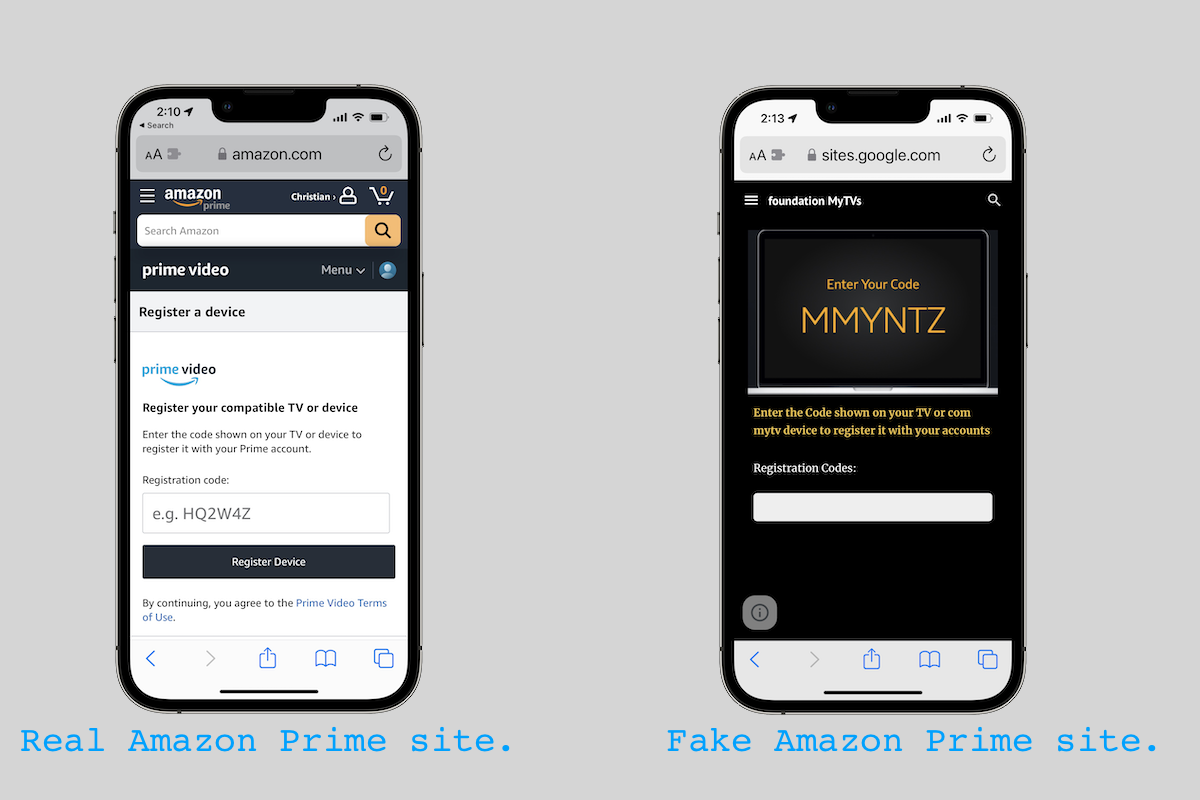
- Be Wary of Phishing Attempts: Amazon will never ask for your password, credit card number, or other sensitive information via email or text message. Be extremely cautious of suspicious emails or messages purporting to be from Amazon, especially those with links asking you to “verify your account.” Always go directly to Amazon.com to log in.
- Monitor Account Activity: Regularly review your order history and login activity (accessible in “Login & Security”) for any unfamiliar transactions or access attempts.
Common Registration Issues and Solutions
While the registration process is generally smooth, you might encounter minor technical glitches:
- Payment Method Declined:
- Solution: Double-check that all card details (number, expiration date, CVV) are entered correctly. Ensure your billing address matches the one associated with your card. Verify that the card is active and has sufficient funds or credit. Sometimes, a temporary hold by your bank can trigger a decline; contacting your bank might resolve this.
- “We Could Not Verify Your Account” Error:
- Solution: This might occur if there’s a mismatch between the information provided and what Amazon has on file, or if there’s a security flag. Try again, ensuring all details are accurate. If the issue persists, contact Amazon Customer Service directly.
- Free Trial Not Showing/Being Charged Immediately:
- Solution: Confirm you selected the free trial option. Sometimes promotional terms can vary. If you believe you were incorrectly charged, check your “Manage Prime Membership” page and contact Amazon support with your billing details.
- Browser Compatibility Issues:
- Solution: Ensure you are using an updated version of a standard web browser (Chrome, Firefox, Edge, Safari). Clear your browser’s cache and cookies, or try using an incognito/private browsing window. Sometimes browser extensions can interfere with web forms.
Contacting Amazon Support: Technical Assistance Channels
If you encounter persistent technical issues or have specific questions about your Prime account, Amazon provides several support channels:
- Help & Customer Service Page: Navigate to Amazon.com and look for “Help” or “Customer Service” in the footer or top navigation.
- Chat Support: This is often the quickest way to get assistance for account-specific issues.
- Phone Support: Amazon offers callback services or direct phone numbers for more complex problems.
- Email Support: For non-urgent inquiries, email is an option, though response times can be longer.
When contacting support, be prepared with your account details, the specific error message you’re receiving, and any steps you’ve already taken to troubleshoot. This helps the support agent diagnose and resolve your technical issue more efficiently.
The Future of Amazon Prime: Evolving Digital Services
Amazon Prime is not a static offering; it’s a dynamic digital product that continuously evolves. As technology advances, so too do the features and integrations within the Prime ecosystem.
Integration with Smart Home Ecosystems
The synergy between Amazon Prime and Amazon’s smart home devices, particularly those powered by Alexa, is set to deepen. Prime members already benefit from voice-controlled access to Prime Music and Prime Video through Echo devices and Fire TV. Future integrations could include more advanced smart home routines triggered by Prime-related activities, personalized content delivery to various screens and speakers based on user preferences, and even more seamless interaction with Amazon Fresh and Whole Foods deliveries via smart appliances. The vision is to create a truly connected home where Prime services are at the core of daily digital interactions.
AI-driven Personalization and Recommendations
Artificial intelligence and machine learning are already foundational to Amazon’s recommendation engines, influencing everything from product suggestions to Prime Video content. We can anticipate even more sophisticated AI-driven personalization within Prime. This could manifest as highly tailored content suggestions across Prime Video, Music, and Reading based on nuanced user behavior, contextual recommendations for exclusive deals, and predictive services that anticipate user needs. AI will play a critical role in making the vast Prime ecosystem feel more intuitive and individually curated for each member, leveraging data to enhance the user experience across all digital touchpoints.
Expanding Digital Content and Feature Sets
Amazon continuously invests in its digital content libraries and introduces new features. This trajectory is expected to continue, with potential expansions into new forms of digital media, more interactive content, and enhanced connectivity features. For instance, we might see more immersive gaming experiences integrated with Prime Gaming, advanced collaborative features for Amazon Photos, or innovative tools that leverage Prime’s logistics network for new types of digital-physical services. The competitive landscape of subscription services will also drive Amazon to innovate, ensuring Prime remains at the forefront of digital convenience and entertainment, constantly pushing the boundaries of what a single subscription service can offer.
By understanding the registration process and actively engaging with its digital features, you can unlock the full potential of Amazon Prime, making it a valuable technological asset in your daily life.
aViewFromTheCave is a participant in the Amazon Services LLC Associates Program, an affiliate advertising program designed to provide a means for sites to earn advertising fees by advertising and linking to Amazon.com. Amazon, the Amazon logo, AmazonSupply, and the AmazonSupply logo are trademarks of Amazon.com, Inc. or its affiliates. As an Amazon Associate we earn affiliate commissions from qualifying purchases.