
In the rapidly evolving digital frontier of Web3, the ability to control your own digital assets is paramount. While centralized cryptocurrency exchanges like Coinbase.com offer convenience, a self-custodial wallet empowers users with true ownership and direct access to the decentralized web. Coinbase Wallet stands out as a robust, user-friendly, and secure gateway to this exciting ecosystem. It’s more than just a place to store crypto; it’s a comprehensive tool designed for exploring decentralized applications (DApps), managing non-fungible tokens (NFTs), engaging with decentralized finance (DeFi), and much more.
This comprehensive guide will walk you through the intricacies of Coinbase Wallet, from initial setup to advanced usage, ensuring you harness its full potential while prioritizing the security of your digital assets. Whether you’re a seasoned crypto enthusiast or a curious newcomer, understanding how to effectively use a self-custodial wallet like Coinbase Wallet is a crucial step towards navigating the decentralized future with confidence and autonomy.

Demystifying Coinbase Wallet: Beyond the Exchange
The first step to effectively using Coinbase Wallet is to understand what it is and, crucially, what it is not. While sharing a name with the popular Coinbase exchange, Coinbase Wallet operates on fundamentally different principles, granting users unprecedented control over their digital wealth.
What is Coinbase Wallet?
Coinbase Wallet is a self-custodial cryptocurrency wallet that allows you to store, send, and receive a wide array of cryptocurrencies and tokens, as well as manage NFTs across various blockchain networks. Unlike a centralized exchange where your assets are held by the company (Coinbase.com, for instance), with Coinbase Wallet, you alone hold the keys to your funds. This means you have complete control and responsibility. It’s your personal portal to the entire decentralized internet, often referred to as Web3. It functions as an interface between you and the blockchain, allowing you to sign transactions, interact with smart contracts, and prove ownership of your digital assets without intermediaries.
The Core Value Proposition: True Ownership and Web3 Access
The primary advantage of Coinbase Wallet, and indeed any self-custodial wallet, is the concept of “true ownership.” When your crypto is on an exchange, you effectively have an IOU from that exchange. If the exchange faces issues, your funds could be at risk. With Coinbase Wallet, your assets are directly on the blockchain, and only you possess the private keys (represented by a seed phrase) that can access them. This mitigates third-party risk and places you squarely in charge. Furthermore, Coinbase Wallet is specifically designed to facilitate interaction with the burgeoning Web3 ecosystem. It includes an integrated DApp browser, allowing you to seamlessly connect to decentralized applications, participate in DeFi protocols, and explore the vast world of NFTs directly from your wallet, without needing to transfer funds back and forth to an exchange.
Key Features at a Glance
Coinbase Wallet is packed with features designed to enhance your Web3 experience:
- Self-Custody: You control your private keys, ensuring maximum security and autonomy.
- Multi-Chain Support: Compatibility with Ethereum, Polygon, Solana, Avalanche, BNB Chain, and many other EVM-compatible networks, enabling a broader range of asset management and DApp interaction.
- DApp Browser: An integrated browser allows direct interaction with decentralized applications across various blockchains.
- NFT Management: View, store, and manage your digital collectibles and NFTs securely within the wallet.
- DeFi Integrations: Seamlessly swap tokens, provide liquidity, and engage with various decentralized finance protocols.
- WalletConnect: A standard protocol that enables you to securely connect your mobile wallet to desktop DApps.
- Fiat On-Ramps: Ability to purchase crypto directly within the wallet using fiat currency in supported regions.
- Secure Enclave Support: On compatible devices, private keys are stored within a secure hardware module for enhanced protection.
Setting Up Your Digital Stronghold: Getting Started
Embarking on your Web3 journey with Coinbase Wallet begins with a straightforward setup process. However, this initial phase is perhaps the most critical for the long-term security of your digital assets.
Installation and Initial Setup
Coinbase Wallet is available as a mobile application for iOS and Android devices, and as a browser extension for Chrome and Brave.
- Mobile App: Search for “Coinbase Wallet” in your device’s app store. Ensure it’s the official app published by Coinbase Inc. Once downloaded, open the app.
- Browser Extension: Visit the Chrome Web Store or Brave Store, search for “Coinbase Wallet,” and add the extension to your browser. Again, verify the publisher.
Upon launching, you’ll be prompted to either “Create a new wallet” or “Import an existing wallet.” For most new users, “Create a new wallet” is the correct choice. You’ll be asked to choose a username (this is public and optional) and set a secure password or PIN for local access to the app/extension. This password only unlocks the application on your device; it does not recover your wallet if your device is lost.
The Critical Seed Phrase: Creation and Security
This is the most crucial step. After setting your local password, the wallet will generate a 12-word recovery phrase, often called a “seed phrase” or “mnemonic phrase.” This phrase is the master key to your entire wallet. It is the only way to recover your funds if you lose your device, forget your password, or need to access your wallet from another device.
Absolute Security Best Practices for Your Seed Phrase:
- Write it Down: Do not screenshot it. Do not store it digitally (e.g., in a note app, email, or cloud storage). Write it down physically on paper.
- Multiple Copies: Make at least two physical copies.
- Secure Storage: Store these copies in separate, secure, and private locations (e.g., a home safe, a safety deposit box).
- Never Share: Anyone who has your seed phrase has full control over your funds. Never share it with anyone, under any circumstances, even if someone claims to be from Coinbase support. Coinbase will never ask for your seed phrase.
- Order Matters: The order of the words is critical. Ensure you copy them accurately and in the correct sequence.
After writing it down, the wallet will ask you to confirm a few words from your seed phrase to ensure you’ve recorded it correctly. Take your time with this step; it is non-reversible once your wallet is created.
Adding Funds and Exploring Assets

Once your wallet is set up and your seed phrase is securely stored, you can begin adding funds.
- Receiving Crypto: On your wallet’s home screen, select “Receive.” You’ll see your public wallet addresses for various networks (e.g., Ethereum, Polygon). Copy the appropriate address and paste it into the “send” field on an exchange (like Coinbase.com) or another wallet from which you wish to transfer funds. Always double-check that the network of the sending transaction matches the network of the receiving address. Sending funds on the wrong network is one of the most common ways people lose crypto.
- Buying Crypto: Coinbase Wallet often includes an option to “Buy” crypto directly within the app using fiat currency (e.g., USD) via various payment methods. This can be a convenient way to get started if you don’t have existing crypto on an exchange.
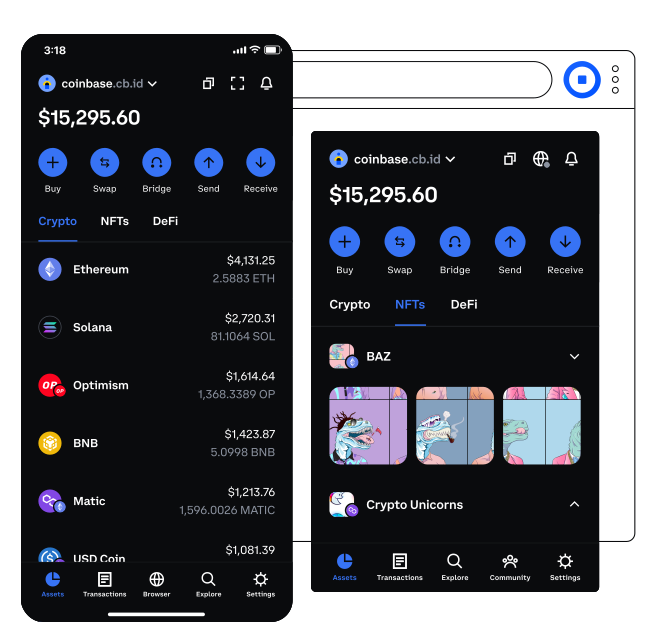
- Viewing Assets: Your wallet’s main screen will display a list of your cryptocurrencies and NFTs, along with their current values.
Navigating the Web3 Landscape: Core Functions in Practice
With your Coinbase Wallet set up and funded, you’re ready to dive into the vibrant world of Web3. The wallet’s intuitive interface makes interacting with decentralized protocols relatively straightforward.
Sending and Receiving Cryptocurrencies and Tokens
This is a fundamental operation for any crypto wallet.
- Receiving: As mentioned, select “Receive” from the home screen, choose the asset and network, and copy your public address to share with the sender.
- Sending: Select “Send” from the home screen.
- Choose Asset: Select the cryptocurrency or token you wish to send.
- Enter Recipient Address: Paste or scan the recipient’s public wallet address. Verify this address meticulously. A single incorrect character can send your funds to an unrecoverable address.
- Enter Amount: Specify the amount you want to send.
- Review Network Fees (Gas): The wallet will estimate the network transaction fee (often called “gas” on Ethereum and similar blockchains). You may have options to adjust this fee for faster or slower transaction processing. Higher fees typically mean faster confirmation. Ensure you have enough of the native blockchain’s currency (e.g., ETH for Ethereum, MATIC for Polygon) to cover these fees.
- Confirm: Review all details carefully before confirming the transaction. Once broadcasted to the blockchain, transactions are irreversible.
Interacting with Decentralized Applications (DApps)
Coinbase Wallet provides a built-in DApp browser, allowing you to directly connect to and use various decentralized applications.
- Access DApp Browser: On mobile, you’ll typically find a “DApp Browser” or “Explore” icon. On the browser extension, click the extension icon and often there’s a DApp section or direct links.
- Navigate to DApp: You can type the URL of the DApp you want to use (e.g.,
app.uniswap.org,opensea.io) or select from popular DApps listed in the wallet. - Connect Wallet: Once on the DApp’s website, look for a “Connect Wallet” button. Click it, and select “Coinbase Wallet” or “WalletConnect” (if Coinbase Wallet isn’t directly listed, WalletConnect is a universal option). Your wallet will prompt you to approve the connection. This grants the DApp permission to see your public address and propose transactions for your approval, but never to move funds without your explicit confirmation.
- Approve Transactions: When you perform an action on the DApp (e.g., swapping tokens, buying an NFT, providing liquidity), your Coinbase Wallet will pop up to ask for your signature and confirmation of the transaction, including the gas fee. Review these details carefully before approving.
Managing and Showcasing NFTs
Coinbase Wallet is an excellent tool for viewing and managing your digital collectibles.
- Viewing NFTs: Within the wallet’s main interface, there’s usually a dedicated “NFTs” or “Collectibles” tab. Here, you can see all the NFTs associated with your wallet address across supported networks, complete with their images and metadata.
- Transferring NFTs: You can send NFTs to another wallet address just like you send cryptocurrency, following similar steps of selecting the NFT, entering the recipient’s address, and paying the network gas fee.
- Exploring Marketplaces: Use the DApp browser to visit popular NFT marketplaces like OpenSea, Rarible, or SuperRare. Connect your Coinbase Wallet to these platforms to browse, buy, sell, or list your NFTs directly.
Diving into Decentralized Finance (DeFi)
DeFi allows you to access financial services without traditional intermediaries. Coinbase Wallet facilitates this access:
- Token Swaps: The wallet often has an integrated “Swap” feature, allowing you to exchange one cryptocurrency for another directly within the app, leveraging decentralized exchanges (DEXs) like Uniswap or SushiSwap in the background. This saves you from needing to visit a separate DApp.
- Providing Liquidity/Staking: For more advanced DeFi interactions, use the DApp browser to connect to specific DeFi protocols (e.g., Aave for lending/borrowing, Curve for stablecoin swaps, Lido for liquid staking). You can deposit assets into these protocols, earn interest, or participate in governance, all managed and approved through your Coinbase Wallet. Always research and understand the risks associated with any DeFi protocol before committing funds.
Advanced Practices and Fortifying Your Security
As you become more comfortable with Coinbase Wallet, you can explore advanced functionalities and enhance your security posture. The decentralized nature of Web3 places the onus of security squarely on the user.
Multi-Chain Exploration and Custom Networks
While Coinbase Wallet supports many networks by default, the Web3 landscape is constantly expanding.
- EVM Compatibility: Many blockchains are “EVM-compatible,” meaning they function similarly to Ethereum and can often be added to wallets like Coinbase Wallet.
- Adding Custom Networks: In some cases, for lesser-known chains or testnets, you might need to manually add a custom network by entering its RPC URL, Chain ID, and other parameters. This feature is typically found in the wallet’s settings under “Networks” or “Developer Settings.” This flexibility allows you to interact with a wider range of blockchain ecosystems.
Understanding and Optimizing Gas Fees
Transaction fees on many blockchains, particularly Ethereum, are dynamic and can fluctuate significantly based on network congestion. These are known as “gas fees.”
- How Gas Works: Gas fees are paid in the native currency of the blockchain (e.g., ETH on Ethereum). They compensate miners/validators for processing and securing transactions.
- Optimizing Fees: When sending transactions or interacting with DApps, Coinbase Wallet will provide a recommended gas fee. You often have the option to set a “lower” or “higher” fee. A lower fee means your transaction might take longer to confirm, or could even fail during periods of high congestion. A higher fee prioritizes your transaction for faster processing. Understanding when the network is less congested (e.g., late at night or early morning UTC) can help you pay lower fees. Utilizing Layer 2 (L2) solutions like Polygon, Arbitrum, or Optimism, which are supported by Coinbase Wallet, offers significantly lower and faster transactions compared to the Ethereum mainnet.
Advanced Security Protocols
While your seed phrase is the ultimate key, continuous vigilance and additional measures are vital.
- Hardware Wallet Integration: For the highest level of security, consider integrating your Coinbase Wallet with a hardware wallet (e.g., Ledger, Trezor). This keeps your private keys offline, requiring physical confirmation on the hardware device for every transaction, making it virtually impossible for online attackers to steal your funds.
- Phishing Prevention: Be extremely wary of unsolicited messages, emails, or websites asking for your seed phrase or private keys. Always double-check URLs for DApps and services before connecting your wallet. Malicious sites often mimic legitimate ones to trick users into revealing sensitive information.
- Regular Software Updates: Keep your Coinbase Wallet app and browser extension updated to the latest version. Updates often include critical security patches and new features.
- Be Mindful of Permissions: When connecting your wallet to a DApp, carefully review the permissions it requests. Some DApps might ask for permission to spend certain tokens on your behalf (e.g., for swaps). Understand what you are approving before signing.
- Backup Your Wallet: While the seed phrase is the primary backup, ensuring your local password for the app/extension is also robust and memorable is important for daily access.
Conclusion
Coinbase Wallet is a powerful and indispensable tool for anyone serious about engaging with the decentralized web. By providing self-custody and direct access to DApps, NFTs, and DeFi, it places the power of digital ownership directly in your hands. However, this power comes with significant responsibility. Understanding its functionalities, mastering its features, and, most importantly, rigorously adhering to security best practices for your seed phrase are not just recommendations – they are requirements for a safe and empowering Web3 experience.
As the Web3 ecosystem continues to expand and innovate, so too will the capabilities of wallets like Coinbase Wallet. By embracing this technology and educating yourself on its proper usage, you are not just managing digital assets; you are actively participating in the evolution of the internet, securing your digital future, and unlocking a new realm of possibilities. Use it wisely, secure it diligently, and explore the decentralized world with confidence.
aViewFromTheCave is a participant in the Amazon Services LLC Associates Program, an affiliate advertising program designed to provide a means for sites to earn advertising fees by advertising and linking to Amazon.com. Amazon, the Amazon logo, AmazonSupply, and the AmazonSupply logo are trademarks of Amazon.com, Inc. or its affiliates. As an Amazon Associate we earn affiliate commissions from qualifying purchases.