
In an age dominated by digital convenience and personalized experiences, the way we consume television has undergone a revolutionary transformation. The traditional model of linear broadcasting, dictated by rigid schedules and expensive cable packages, is rapidly being supplanted by streaming – a dynamic, on-demand paradigm that puts the viewer firmly in control. Understanding “how to stream television” is no longer just a niche interest; it’s a fundamental skill for anyone looking to navigate the modern media landscape, unlock a vast universe of content, and tailor their entertainment to their lifestyle.
This comprehensive guide will demystify the art and science of television streaming. We’ll explore the underlying technology, guide you through selecting the right devices and services, and equip you with the knowledge to optimize your setup for an unparalleled viewing experience. Whether you’re a complete novice looking to cut the cord or a seasoned streamer aiming to refine your digital setup, prepare to embark on a journey that will redefine your relationship with television.
Understanding the Fundamentals of Television Streaming
Before diving into the specifics of devices and services, it’s crucial to grasp the foundational concepts that power television streaming. At its core, streaming is the continuous transmission of audio and video files from a server to a client (your device) over the internet, allowing playback to begin almost immediately without needing to download the entire file first.
What is Streaming? A Technical Overview
Unlike traditional broadcast television, which sends a signal over the air or via cable lines, streaming relies on your internet connection. Data packets containing small chunks of the video or audio are sent sequentially. Your device then reconstructs these packets and plays them back in real-time. This process requires sufficient bandwidth to ensure a smooth, uninterrupted flow of data. If the data arrives faster than it’s played, it’s stored in a buffer; if it arrives slower, you experience the dreaded “buffering” pause.
The magic behind this continuous delivery is a combination of sophisticated compression algorithms (like H.264 or H.265/HEVC), adaptive bitrate streaming (which adjusts video quality based on your internet speed), and content delivery networks (CDNs) that cache content geographically closer to users to minimize latency.
Essential Requirements for a Seamless Streaming Experience
To truly enjoy the benefits of streaming, a few technical prerequisites are paramount:
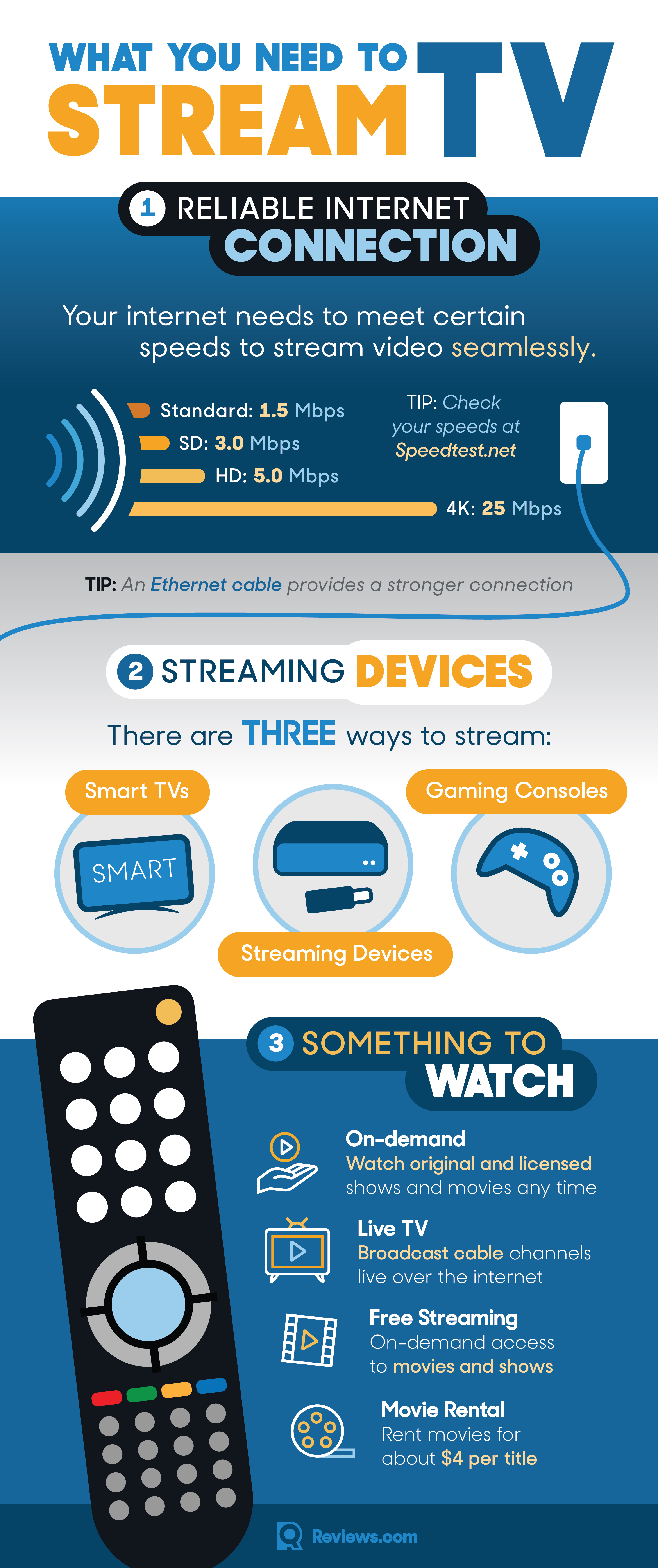
- High-Speed Internet Connection: This is the absolute bedrock. For standard definition (SD) content, 3-5 Mbps (megabits per second) might suffice. However, for high-definition (HD) streaming, you’ll need at least 5-8 Mbps, and for pristine 4K Ultra HD, 25 Mbps or more is recommended. If multiple devices in your home are streaming simultaneously or engaging in other bandwidth-intensive activities like online gaming, these figures should be scaled up significantly.
- Reliable Wi-Fi Network or Wired Connection: While Wi-Fi offers convenience, a wired Ethernet connection often provides superior stability and speed, especially for your primary streaming device. If using Wi-Fi, ensure your router is modern (Wi-Fi 5 or Wi-Fi 6), centrally located, and free from interference. A strong, consistent signal is critical to prevent drops and slowdowns.
- Sufficient Data Allowance (if applicable): If your internet plan has data caps, be mindful of how much you stream. HD and 4K content consume vast amounts of data. An hour of HD streaming can use 3 GB, while 4K can consume 7 GB or more. Unlimited data plans are ideal for avid streamers.
Key Components of Your Streaming Setup
Your basic streaming setup typically involves three core elements:
- An Internet Service Provider (ISP): The company that provides your home internet connection.
- A Streaming Device: The hardware that connects to your TV and runs streaming applications.
- A Streaming Service: The platform or app that provides the content (e.g., Netflix, Hulu, YouTube TV).
Understanding these interdependencies is the first step towards building a robust and enjoyable streaming ecosystem.
Choosing Your Streaming Arsenal: Devices and Platforms
The beauty of modern streaming lies in its flexibility; you’re no longer confined to a single device or a handful of channels. The market is saturated with options, each offering a unique blend of features, performance, and user experience. Selecting the right hardware is crucial to tailor your setup to your specific needs and preferences.
Dedicated Streaming Devices: The Specialized Powerhouses
These compact gadgets are designed solely for streaming and excel at it. They plug into your TV’s HDMI port and connect to your Wi-Fi network, transforming any “dumb” TV into a smart entertainment hub.
- Roku Devices (e.g., Roku Streaming Stick, Roku Ultra): Known for their incredibly simple, intuitive interface and vast channel selection. Roku offers a wide range of devices at different price points, from entry-level sticks to powerful boxes with advanced features like Ethernet ports and voice remotes.
- Amazon Fire TV Devices (e.g., Fire TV Stick 4K Max, Fire TV Cube): Integrated deeply with Amazon’s ecosystem, these devices feature Alexa voice control and often offer a snappy user experience. The Fire TV Cube combines a streaming player with an Echo smart speaker.
- Apple TV (e.g., Apple TV 4K): Premium devices known for their seamless integration with Apple’s ecosystem, robust app support, excellent video and audio quality, and strong focus on user privacy. Ideal for those invested in Apple products.
- Chromecast with Google TV: Google’s reimagined Chromecast now comes with a remote and a full Google TV interface, offering content aggregation and Google Assistant integration. It combines the push-casting functionality of original Chromecasts with a traditional streaming box experience.
Considerations: Look at user interface preferences, ecosystem integration (Apple, Amazon, Google), remote control features (voice control, TV controls), and support for advanced video/audio formats (4K, HDR, Dolby Atmos).
Smart TVs: The Integrated Solution
Many modern televisions come with “smart” capabilities built-in, meaning they have an operating system and pre-installed streaming apps. Brands like Samsung (Tizen OS), LG (webOS), Sony (Android TV/Google TV), and Vizio (SmartCast) offer their own smart TV platforms.
Pros: No extra boxes or cables, convenient, often integrate well with other smart home devices.
Cons: User interfaces can vary widely in responsiveness and update frequency. Some built-in app stores might be less comprehensive than dedicated devices. Hardware often becomes outdated before the TV itself, leading to slower performance over time.
Mobile Devices and Computers as Streaming Hubs
Your smartphone, tablet, or laptop can also serve as powerful streaming devices. Most streaming services offer dedicated apps for iOS and Android, allowing you to watch content on the go or cast it to a larger screen using technologies like Chromecast or AirPlay. Similarly, web browsers on laptops and desktops provide access to virtually any streaming service.
Pros: Ultimate portability, no extra hardware cost, great for personal viewing.
Cons: Smaller screens (for phones/tablets), can drain battery quickly, potential for distracting notifications, may require adapters for TV connection.
Gaming Consoles: More Than Just Games
Modern gaming consoles like the PlayStation (PS4, PS5) and Xbox (Xbox One, Xbox Series X/S) are robust media centers. They offer a wide array of streaming apps, often with powerful processors capable of handling 4K HDR content.
Pros: High performance, often already owned by gamers, can double as a Blu-ray player.
Cons: Can be more expensive than dedicated streaming devices if purchased solely for streaming, may consume more power, interface sometimes optimized for gaming rather than pure media consumption.
Navigating the World of Streaming Services and Content
Once you have your streaming device, the next step is choosing the content. The landscape of streaming services is vast and ever-expanding, offering everything from blockbuster movies and original series to live sports and niche documentaries. Understanding the different types of services will help you curate the perfect entertainment library.
Subscription-Based Video-on-Demand (SVOD)
These are the most popular type of streaming services, offering unlimited access to a library of movies and TV shows for a recurring monthly fee.
- Netflix: A pioneer in streaming, known for its extensive library of original series, films, and documentaries across diverse genres. Offers various tiers based on resolution and number of concurrent streams.
- Hulu: Features current and past seasons of TV shows from major broadcast networks, along with a growing library of original content.
- Disney+: Home to content from Disney, Pixar, Marvel, Star Wars, and National Geographic. A must-have for families and fans of these franchises.
- Max (formerly HBO Max): Offers premium content from HBO, Warner Bros., DC, and other brands. Known for high-quality, critically acclaimed series and films.
- Amazon Prime Video: Included with an Amazon Prime membership, offering a large library of movies, TV shows, and award-winning originals. Also provides options for renting/buying additional content.
- Apple TV+: Apple’s premium content service focusing exclusively on high-quality original series and films.
Considerations: Evaluate content libraries for shows/movies you want to watch, check for 4K/HDR support, and compare pricing tiers. Many services offer free trials.
Live TV Streaming Services (vMVPDs)
Virtual Multichannel Video Programming Distributors (vMVPDs) aim to replace traditional cable TV by offering live channels over the internet, often including local broadcast networks, sports, and cable channels, complete with cloud DVR functionality.
- YouTube TV: Comprehensive channel lineup, unlimited cloud DVR, and good sports coverage.
- Sling TV: A more à la carte approach, allowing users to choose smaller bundles of channels, making it a more budget-friendly option.
- Hulu + Live TV: Combines Hulu’s on-demand library with a broad selection of live TV channels.
- FuboTV: Heavily focused on sports, offering an extensive array of sports channels alongside general entertainment.
Considerations: Compare channel lineups (especially for local sports and news), DVR features, and pricing.
Free Ad-Supported Streaming Television (FAST)
FAST services provide content free of charge, supported by commercials. They offer a mix of licensed movies, TV shows, and often curated “channels” that mimic traditional linear TV.
- Pluto TV: Features hundreds of live, curated channels across various genres, along with an on-demand library.
- Tubi: Offers a large library of movies and TV shows, particularly strong in older films and niche genres.
- Freevee (Amazon): A free service from Amazon with a selection of movies, TV shows, and some original content.
- The Roku Channel: Available on Roku devices and other platforms, offering a mix of live channels and on-demand content.
Considerations: Great for casual viewing and discovering new content without an additional subscription cost. The trade-off is ads.
On-Demand Rentals and Purchases (TVOD/PVOD)
Transactional Video-on-Demand (TVOD) allows you to rent movies or TV show episodes for a limited time. Premium Video-on-Demand (PVOD) refers to renting new theatrical releases very shortly after or even concurrent with their cinema debut. Purchase Video-on-Demand (PVOD also) allows you to buy digital copies of movies or entire TV show seasons, granting permanent access.
- Apple TV (iTunes Store): Vast library for renting and purchasing.
- Google Play Movies & TV: Similar offerings, integrated with the Google ecosystem.
- Vudu: Known for its extensive catalog and support for various video qualities.
- Amazon Prime Video Store: Also offers rentals and purchases separate from Prime membership.
Considerations: Useful for accessing new releases or specific titles not available on subscription services.
Optimizing Your Streaming Experience and Troubleshooting Common Issues
Getting the basic setup running is one thing; optimizing it for peak performance and knowing how to troubleshoot common snags ensures a truly enjoyable and frustration-free streaming journey. Technical finesse in your home network and device settings can significantly enhance video quality and responsiveness.
Internet Speed and Network Optimization
Your internet connection is the backbone of your streaming experience.
- Test Your Speed: Regularly use online speed tests (e.g., Speedtest.net) to verify you’re getting the speeds you pay for and that they meet the recommendations for your desired streaming quality.
- Ethernet Over Wi-Fi: Wherever possible, connect your primary streaming device (e.g., smart TV, dedicated streaming box, gaming console) directly to your router via an Ethernet cable. This bypasses Wi-Fi interference and often provides faster, more stable speeds.
- Router Placement: If relying on Wi-Fi, place your router in a central location, elevated, and away from obstructions (walls, large appliances) and interference sources (cordless phones, microwaves).
- Mesh Wi-Fi Systems: For larger homes or areas with Wi-Fi dead zones, a mesh Wi-Fi system can significantly improve coverage and consistency by creating a seamless network throughout your home.
- Quality of Service (QoS) Settings: Many modern routers allow you to prioritize certain types of traffic, like video streaming, ensuring that other network activities (downloads, gaming) don’t hog bandwidth.
- Router Firmware Updates: Keep your router’s firmware updated. Manufacturers frequently release updates that improve performance, stability, and security.
Maximizing Video Quality Settings
Streaming services dynamically adjust video quality based on your internet speed. However, you can often manually influence this.
- Device Settings: Ensure your streaming device and TV are configured to output the highest resolution they support (e.g., 4K/2160p). Check settings like “Display” or “Picture” on both.
- App Settings: Within individual streaming apps, there may be “Playback” or “Data Usage” settings that allow you to select your preferred video quality (e.g., “High,” “Best,” “Auto”). Be aware that higher quality consumes more data.
- HDR and Dolby Vision: If your TV and streaming device support High Dynamic Range (HDR) or Dolby Vision, make sure these features are enabled in your device settings for richer colors and contrast.
Audio Considerations for Immersive Viewing
Great visuals are often complemented by great audio.
- Soundbars and Surround Sound: For a significant upgrade over built-in TV speakers, consider a soundbar or a full surround sound system. Ensure your streaming device and TV are configured to pass through advanced audio formats like Dolby Digital, Dolby Atmos, or DTS:X to your audio system.
- Audio Passthrough: In your streaming device’s audio settings, look for options like “HDMI Passthrough” or “Bitstream” to send the raw audio track to your receiver or soundbar for decoding.
- Headphones: For personal, immersive listening without disturbing others, high-quality wired or Bluetooth headphones can provide an excellent experience.
Common Streaming Problems and Quick Fixes
Even with the best setup, issues can arise. Here are quick solutions for frequent problems:
- Buffering/Lag:
- Check your internet speed.
- Restart your router and modem.
- Connect via Ethernet if possible.
- Close other bandwidth-intensive applications.
- Reduce video quality settings.
- App Crashes/Freezes:
- Restart the streaming app.
- Restart the streaming device.
- Check for app and device software updates.
- Clear the app’s cache (if your device allows).
- No Sound/Picture:
- Check all HDMI cables are securely connected.
- Ensure the correct HDMI input is selected on your TV.
- Verify TV and streaming device volume levels are up.
- Restart devices.
- Remote Not Working:
- Replace batteries.
- Check for obstructions between remote and device.
- If a Bluetooth remote, try re-pairing it.
Digital Security and Privacy in Streaming
While streaming is generally safe, it’s wise to be mindful of digital security.
- Strong, Unique Passwords: Use complex passwords for all your streaming service accounts and never reuse them. Consider a password manager.
- Two-Factor Authentication (2FA): Enable 2FA on any streaming service that offers it for an extra layer of security.
- Be Wary of Phishing: Be cautious of emails or messages asking for your login credentials. Always go directly to the service’s website to manage your account.
- VPN Use: A Virtual Private Network (VPN) can encrypt your internet traffic, enhancing your privacy. Some users also employ VPNs to access geo-restricted content, though this often violates terms of service for streaming platforms. Ensure you understand the implications and choose a reputable VPN provider if you decide to use one.
- Software Updates: Keep your streaming devices, smart TVs, and browser software updated. Updates often include security patches.
The Future of Television: Trends and Innovations
The streaming revolution is far from over. Technological advancements continue to reshape how content is created, delivered, and consumed. Staying abreast of these trends offers a glimpse into the evolving landscape of digital entertainment.
Personalization and AI-Driven Recommendations
The days of aimlessly flipping through channels are gone. AI algorithms now analyze your viewing habits, watch history, and even the time of day to suggest content that’s uncannily tailored to your tastes. This hyper-personalization extends beyond simple recommendations, influencing everything from dynamic ad insertion to user interface layouts. Expect even more sophisticated AI to curate entire viewing experiences, anticipating your mood and preferences.
Interactivity and Social Viewing Features
Streaming is becoming increasingly interactive. Features allowing viewers to participate in polls, access real-time statistics during live events, or even influence narrative choices are emerging. Social viewing features, such as watch parties that sync playback across different locations and integrate live chat, are also gaining traction, bridging the gap between solitary streaming and communal television watching. The integration of augmented reality (AR) could also transform how we engage with content, layering digital information and experiences onto the real world.
The Rise of 8K and Advanced HDR Technologies
While 4K Ultra HD is now common, 8K resolution televisions are slowly making their way to the market. As bandwidth infrastructure improves and content production scales up, 8K streaming will offer an even more breathtakingly detailed visual experience. Alongside this, advancements in High Dynamic Range (HDR) technologies like Dolby Vision IQ and HDR10+ Adaptive are making picture quality smarter, automatically adjusting brightness and contrast based on ambient room light, ensuring optimal viewing conditions regardless of your environment.
Further Cord-Cutting and Bundling Strategies
The initial wave of cord-cutting saw many abandon cable for individual streaming services. However, the proliferation of services has led to “streaming fatigue” and a desire for simplified billing. The future will likely see more strategic bundling of services, possibly offered by ISPs or integrated through smart TV platforms, aiming to provide a more cohesive and cost-effective entertainment package. We may also see an increased convergence of streaming platforms with other digital services, creating super-apps that cater to a broader range of user needs.

Conclusion
The journey of understanding “how to stream television” is one of empowerment and choice. By embracing the technological underpinnings, selecting the right devices, navigating the vast universe of content services, and optimizing your setup, you unlock an unprecedented level of control over your entertainment. From the foundational requirements of internet speed to the nuances of video and audio optimization, every step contributes to a more fulfilling viewing experience.
As technology continues to evolve, pushing the boundaries of resolution, interactivity, and personalization, the future of television promises to be even more engaging and tailored. The era of passive consumption is over; welcome to a dynamic, user-centric world where you are the master of your entertainment destiny. So, go forth, explore, and stream television on your terms.
aViewFromTheCave is a participant in the Amazon Services LLC Associates Program, an affiliate advertising program designed to provide a means for sites to earn advertising fees by advertising and linking to Amazon.com. Amazon, the Amazon logo, AmazonSupply, and the AmazonSupply logo are trademarks of Amazon.com, Inc. or its affiliates. As an Amazon Associate we earn affiliate commissions from qualifying purchases.