
In an increasingly digitized world, entertainment often comes with a subscription tag. Among the myriad options, YouTube TV has emerged as a formidable player in the live TV streaming landscape, offering a compelling alternative to traditional cable television. For many consumers, the primary question isn’t just “What is it?” but rather, “How much does it cost, and is it a financially sound decision for my household?” This article will meticulously dissect the financial aspects of a YouTube TV subscription, guiding you through its pricing structure, potential hidden costs, value proposition, and how it fits into a comprehensive personal finance strategy.
Deconstructing the Core YouTube TV Subscription Cost
Understanding the fundamental cost of YouTube TV is the first step in assessing its impact on your personal finances. Unlike the often convoluted pricing models of legacy cable providers, YouTube TV aims for a more straightforward approach, though nuances still exist.
The Standard Monthly Fee Explained
As of recent updates, YouTube TV typically offers one primary base plan. This plan bundles together a substantial number of live channels, including major broadcast networks (ABC, CBS, FOX, NBC, PBS, The CW), a wide array of popular cable channels (ESPN, TNT, CNN, HGTV, FX, etc.), and local sports channels in many markets. The monthly fee for this base plan is the cornerstone of your expenditure. It’s crucial to note that this figure is subject to change. Like many subscription services, YouTube TV has periodically adjusted its pricing to reflect increasing content costs, expanded channel lineups, and market dynamics. Therefore, while we discuss current figures, always verify the latest pricing directly on the YouTube TV website for the most accurate information relative to your sign-up date. This base fee represents your minimum monthly outlay for access to their core service.
Initial Promotional Offers and Their True Value
YouTube TV frequently entices new subscribers with promotional offers, which can include discounted rates for the first one to three months, extended free trials, or even bundled device incentives. From a financial perspective, these promotions can be incredibly attractive, offering a temporary reduction in expenditure. However, it’s vital to look beyond the initial savings. A common mistake is to factor these temporary discounts into a long-term budget without accounting for the eventual price increase to the standard rate.
When evaluating these offers, consider them as a bonus rather than a permanent price reduction. Calculate your budget based on the full standard monthly fee that will apply after the promotional period ends. This prevents financial surprises and ensures your entertainment budget remains sustainable. Use the promotional period to thoroughly test the service, ensuring it meets your needs before committing to the full price.
Understanding Tax Implications
An often-overlooked component of subscription costs is sales tax. Depending on your state, county, and even city of residence, you may be subject to sales tax on your YouTube TV subscription. This can add a few extra dollars to your monthly bill, pushing the total cost slightly higher than the advertised base price. While seemingly minor, these small additions accumulate over time and should be factored into your overall budget. Always review the final price at checkout, which typically includes any applicable taxes, to get an accurate representation of your actual monthly financial commitment. Neglecting sales tax can lead to a slight underestimation of your true monthly expenditure, potentially impacting your budgeting accuracy.
Navigating Additional Costs: Add-ons and Bundles
Beyond the base subscription, YouTube TV offers a range of add-ons and premium packages that can significantly enhance your viewing experience but also inflate your monthly bill. Understanding these options is key to controlling your overall streaming expenditure.
Premium Channel Add-ons: A La Carte vs. Bundled Savings
YouTube TV provides the flexibility to subscribe to various premium channels directly through its platform, such as Max (formerly HBO Max), Showtime, Starz, and Paramount+ with Showtime. Each of these typically carries its own separate monthly fee, added on top of your base YouTube TV subscription. For consumers who only desire one or two specific premium channels, the a la carte option through YouTube TV can be convenient. You receive a consolidated bill, and managing subscriptions is simplified.
However, from a financial perspective, it’s always wise to compare the cost of subscribing to these premium services directly with their standalone apps versus adding them through YouTube TV. Sometimes, the standalone services offer their own bundles or promotional pricing that might be more cost-effective. Conversely, YouTube TV occasionally bundles multiple premium channels together at a slight discount, which could offer savings if you intended to subscribe to several of them anyway. The key is to assess your true need for each premium channel and compare the total cost across different subscription methods to identify the most financially prudent option.
4K Plus: Is the Upgrade a Financially Sound Decision?
YouTube TV offers an “4K Plus” add-on, which provides enhanced resolution for certain content, offline downloads, and unlimited simultaneous streams at home. While the allure of higher quality and greater flexibility is strong, the financial decision to subscribe to 4K Plus warrants careful consideration.
The primary question is: do you truly utilize these features enough to justify the additional monthly cost? If you have multiple household members who frequently stream simultaneously, especially away from home, or if you are a demanding cinephile with a 4K television who watches a lot of supported content, the value proposition might be clear. However, if your viewing habits are primarily singular, or if your internet speed doesn’t consistently support 4K streaming, or if the available 4K content doesn’t align with your preferences, then this add-on might represent an unnecessary expenditure. Evaluate your device capabilities, household viewing patterns, and internet infrastructure before committing to this upgrade, ensuring it aligns with a responsible financial outlay for your entertainment.
The Impact of Geographic Location on Sports Packages
For sports enthusiasts, the financial implications of regional sports networks (RSNs) and specialized sports packages are particularly relevant. While YouTube TV’s base package includes many national sports channels and some RSNs, access to specific teams or leagues might require additional add-ons like the “Sports Plus” package, or even direct subscriptions to services like NBA League Pass or MLB.tv.
The availability and cost of RSNs within the base package can vary significantly by zip code due to complex broadcasting rights. This means your “base” sports offering might differ from someone in another state, potentially necessitating additional financial commitments if you want comprehensive coverage of your local teams. Before subscribing, use YouTube TV’s channel lookup tool with your specific zip code to understand exactly which sports channels are included. If crucial RSNs are missing, you must factor in the cost of an additional Sports Plus package or even a separate league pass when calculating your total entertainment budget, ensuring your financial planning covers your specific sports viewing needs.
Evaluating YouTube TV’s Financial Value Proposition
Beyond the raw cost, a crucial aspect of responsible financial management is assessing the value you receive for your money. Is YouTube TV a good investment for your entertainment budget, or are there more cost-effective alternatives?
Cost Per Channel vs. Traditional Cable
One of the most common arguments for cord-cutting is the potential for significant savings compared to traditional cable TV. When evaluating YouTube TV, it’s insightful to compare its cost per channel against what you might pay for a similar lineup from a cable provider. While YouTube TV’s monthly fee might seem substantial on its own, a direct comparison often reveals that cable packages offering a comparable number of channels, especially including premium ones and RSNs, can be significantly more expensive once all taxes, fees, and equipment rentals are factored in.
Furthermore, traditional cable often requires long-term contracts and can involve annual price hikes. YouTube TV, by contrast, is generally month-to-month, offering greater financial flexibility and control. This allows you to pause or cancel your subscription at any time without penalty, providing an agility that cable typically lacks, which is a valuable financial benefit.
Unlimited DVR: A Hidden Financial Perk
YouTube TV offers unlimited cloud DVR storage with recordings kept for nine months. This feature, often overlooked in initial cost comparisons, provides substantial financial and convenience value. With traditional cable, DVR services often come with additional monthly fees, storage limits, and specific hardware. The unlimited cloud DVR with YouTube TV is included in the base subscription, eliminating extra costs and the need for physical equipment.
This means you can record as much content as you desire without worrying about storage limits or incurring additional charges. For households with diverse viewing habits and busy schedules, this included feature represents a significant saving compared to what you might pay for equivalent DVR functionality elsewhere, effectively enhancing the overall value proposition of the base subscription.
Multi-User Profiles and Shared Costs

YouTube TV allows for up to six individual accounts (family members) within a single subscription, each with their own personalized library, recommendations, and unlimited DVR. Additionally, it generally allows three simultaneous streams, though the 4K Plus add-on increases this significantly at home. This multi-user functionality is a substantial financial benefit for households.
Instead of each family member needing separate subscriptions or fighting over DVR space, YouTube TV consolidates entertainment for the entire household under one fee. If the cost is shared among multiple adults, the individual financial burden can be significantly reduced, making the service highly cost-effective per user. This capacity for shared access maximizes the return on your investment, making it a more attractive option for families or shared living situations.
The Cord-Cutting Savings Myth vs. Reality
Many people cut the cord expecting massive financial savings, only to find their streaming bills eventually rival or even exceed their old cable bill. This “cord-cutting savings myth” often stems from underestimating the cumulative cost of multiple streaming services. While YouTube TV is designed to be a comprehensive cable alternative, many users also subscribe to Netflix, Hulu, Disney+, Max, and other niche services.
From a financial perspective, it’s crucial to create a holistic budget for all your streaming entertainment. YouTube TV might be a cost-effective alternative to cable, but if you layer on numerous other subscriptions, your total monthly outlay for entertainment could increase. Regularly review all your streaming subscriptions to ensure you’re not paying for services you rarely use, maintaining a balance between desired content and responsible financial management.
Budgeting for Streaming: YouTube TV in Your Financial Plan
Integrating a service like YouTube TV into your personal financial plan requires deliberate consideration, just like any other recurring expense. It’s not just about the cost, but how that cost fits into your broader financial picture.
Assessing Your Entertainment Budget Allocation
Before committing to YouTube TV, or any streaming service, take a critical look at your overall entertainment budget. What percentage of your disposable income are you allocating to movies, music, gaming, and television? Is this allocation sustainable and aligned with your financial goals? For some, entertainment is a high priority, justifying a larger spend, while others prioritize savings or debt repayment.
YouTube TV’s monthly fee, combined with any add-ons, should be viewed within this larger context. If it pushes your entertainment spending beyond a comfortable or planned limit, you might need to make adjustments elsewhere in your budget, or consider if YouTube TV is truly the best fit for your financial priorities. Remember, financial health is about balance, and every recurring expense warrants scrutiny.
Comparing YouTube TV to Other Live TV Streaming Services
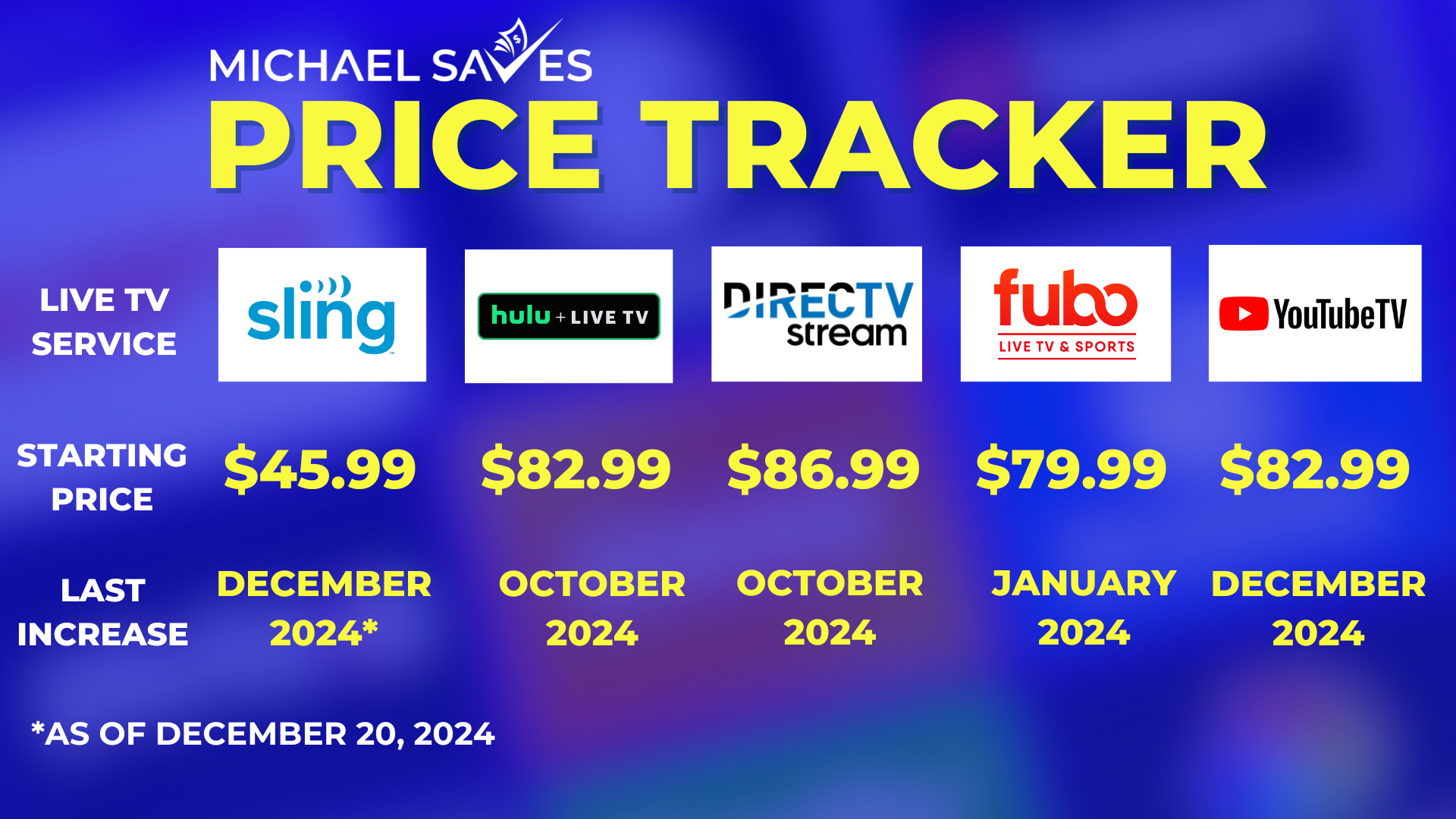
The live TV streaming market is competitive, with players like Hulu + Live TV, Sling TV, FuboTV, and DirecTV Stream. Each offers a different channel lineup, price point, and feature set. From a purely financial standpoint, it’s imperative to conduct a comparative analysis.
- Sling TV often has a lower base price but fewer channels, and its DVR might cost extra.
- Hulu + Live TV bundles live TV with Hulu’s extensive on-demand library, which might offer greater financial value if you were already paying for Hulu.
- FuboTV specializes in sports but may have higher costs and fewer non-sports channels.
- DirecTV Stream can be significantly more expensive but might offer more RSNs in certain areas.
By comparing the total monthly cost (including taxes and desired add-ons) and the channel lineup that truly matters to you across these services, you can identify the option that provides the best financial value and content fit for your specific needs. Don’t pay for channels you don’t watch; optimize your budget for what you truly consume.
The Financial Implications of Switching Services
One of the financial benefits of streaming services is the absence of long-term contracts, allowing you to switch providers relatively easily. However, frequent switching can have its own subtle financial implications. While you avoid cancellation fees, you might lose accumulated DVR recordings, forcing you to repurchase content or miss out on shows. You also spend time and effort learning new interfaces and features.
From a financial planning perspective, consider the “switching cost” in terms of convenience and potential content loss. While it’s wise to switch if a significantly better deal emerges, avoid impulsively jumping between services based on minor price differences. A stable, well-chosen service like YouTube TV, when it meets your needs, can provide predictable monthly expenditures and reduce cognitive overhead, which itself has a non-monetary value.
Maximizing Value and Minimizing Expenditure
Even after selecting YouTube TV, there are strategies you can employ to ensure you’re getting the most out of your subscription financially and avoiding unnecessary costs.
Leveraging Free Trials Effectively
Before committing your hard-earned money, take full advantage of YouTube TV’s free trial periods. This is not just about testing the interface; it’s a critical financial evaluation period. During the trial, actively use the service as you would if you were paying for it.
- Watch your favorite shows and channels.
- Test the DVR functionality.
- Explore the full channel lineup to ensure it meets your expectations.
- Check for buffering or other technical issues that might detract from your experience.
Mark your calendar for the trial’s end date. If you decide the service isn’t for you, cancel before you are charged. This discipline prevents accidental charges and ensures your decision to subscribe is an informed financial choice based on actual experience.
Periodic Reassessment of Your Subscription Needs
Your viewing habits and financial situation are not static. What was a great value proposition a year ago might not be today. Make it a practice to periodically reassess your YouTube TV subscription, perhaps annually or bi-annually.
Ask yourself:
- Am I still watching enough content to justify the monthly cost?
- Are there channels I’m paying for but never watch?
- Have new, more cost-effective alternatives emerged?
- Has my personal financial situation changed, requiring me to tighten my entertainment budget?
This periodic review can lead to several financially beneficial outcomes: recognizing you no longer need certain expensive add-ons, discovering you could downgrade to a cheaper service, or even realizing you could temporarily pause your subscription if your viewing time is limited (e.g., during a busy season). Proactive financial management of your subscriptions ensures you’re always getting the best value for your money.

Exploring Cheaper Alternatives or Supplementary Services
If YouTube TV’s cost eventually becomes a burden or simply no longer aligns with your financial priorities, don’t despair. The beauty of the streaming landscape is its flexibility. Consider:
- Free Over-the-Air (OTA) Antennas: For local channels, a one-time purchase of an OTA antenna can provide free access to major broadcast networks in high definition, completely eliminating a recurring cost for these channels.
- On-Demand Only Services: If live TV isn’t a critical need, pivoting to a combination of more affordable on-demand services (like Netflix, Hulu, Disney+) can significantly reduce your monthly outlay.
- Ad-Supported Free Streaming Services: Platforms like Tubi, Pluto TV, and The Roku Channel offer a vast amount of content at no charge, supported by commercials. These can serve as excellent supplementary options to fill gaps without adding to your bill.
By exploring these alternatives, you can tailor your entertainment portfolio to fit your exact budget and viewing preferences, ensuring that your financial commitment to television remains both responsible and enjoyable.
In conclusion, understanding “how much is a YouTube TV subscription” goes far beyond a single price tag. It involves a detailed financial analysis of base costs, potential add-ons, tax implications, and a rigorous evaluation of its value proposition against your personal financial goals and alternative options. By approaching this decision with a strategic and informed financial mindset, you can ensure your entertainment choices enhance rather than hinder your financial well-being.
aViewFromTheCave is a participant in the Amazon Services LLC Associates Program, an affiliate advertising program designed to provide a means for sites to earn advertising fees by advertising and linking to Amazon.com. Amazon, the Amazon logo, AmazonSupply, and the AmazonSupply logo are trademarks of Amazon.com, Inc. or its affiliates. As an Amazon Associate we earn affiliate commissions from qualifying purchases.