
In an increasingly digital world, the way we manage and transfer money has undergone a profound transformation. Gone are the days when physical cash or lengthy bank transfers were the sole options for moving funds between individuals. Today, peer-to-peer (P2P) payment apps have revolutionized personal finance, making transactions instant, intuitive, and often social. Among these innovations, Venmo has emerged as a powerhouse, becoming synonymous with casual money transfers, splitting bills, and settling debts among friends and family. This guide delves into the mechanics of sending money via Venmo, exploring not just the “how-to” but also the financial implications, security considerations, and best practices that empower users to manage their funds with confidence and efficiency.

Understanding Venmo’s Role in Modern Personal Finance
Venmo, a subsidiary of PayPal, has carved out a unique niche in the financial technology landscape. Its appeal lies in its simplicity, speed, and social-media-like interface, which has made it particularly popular among younger demographics. But beyond its cool factor, Venmo plays a critical role in facilitating everyday financial interactions, enabling users to sidestep the traditional complexities of banking for small to medium-sized transactions.
The Evolution of Digital Payments
The shift from cash to digital payments has been a gradual yet relentless process, driven by technological advancements and changing consumer expectations. Early forms of digital payments included online banking portals and card payments, but P2P apps like Venmo marked a significant leap forward. They democratized instant money transfers, making them accessible to anyone with a smartphone and a linked bank account or debit card. This evolution has not only streamlined personal transactions but has also fostered a greater sense of financial interconnectedness, allowing for seamless sharing of expenses and immediate payment for services.
Why Venmo Stands Out (Peer-to-Peer Focus)
While many platforms offer money transfer services, Venmo’s core strength lies in its explicit focus on peer-to-peer transactions. Its interface is designed to mimic a social feed, where users can see (or choose not to see) the payments their friends are making, often accompanied by emojis and brief descriptions. This social layer, while optional, adds a layer of engagement that differentiates it from more utilitarian banking apps. It fosters a community around money, making financial interactions less formal and more integrated into daily life. This emphasis on ease and social connection has cemented its place as the go-to app for splitting dinner tabs, sharing rent, or contributing to group gifts.
Key Features and Benefits for Personal Finance
Venmo offers a suite of features that contribute significantly to personal financial management. Beyond its primary function of sending and receiving money, users benefit from:
- Instant Transfers: While standard transfers to a bank account take 1-3 business days, Venmo offers an “Instant Transfer” option (for a small fee) that moves funds to a linked debit card or bank account typically within minutes.
- Payment Requests: Users can easily request money from others, simplifying bill splitting and debt collection.
- Business Profiles: Small businesses and freelancers can create business profiles to accept payments for goods and services, often at a lower transaction fee than traditional card processors.
- Venmo Debit Card: A physical debit card linked directly to a user’s Venmo balance, allowing spending anywhere Mastercard is accepted.
- Rewards Program: Select users may receive cashback or rewards for using their Venmo card at participating merchants.
- Cryptocurrency: More recently, Venmo has introduced the ability to buy, hold, and sell a selection of cryptocurrencies directly within the app, further expanding its utility as a financial tool. These features collectively empower users to manage their daily finances with unparalleled flexibility and convenience, making Venmo an indispensable tool in the modern financial toolkit.
A Step-by-Step Guide to Sending Money on Venmo
Sending money through Venmo is designed to be intuitive, but understanding each step ensures a smooth and secure transaction. Whether you’re a new user or just need a refresher, mastering this process is key to leveraging the app’s full potential for your personal finance needs.
Prerequisites for a Smooth Transaction
Before you can send money, ensure you have these essentials in place:
- A Venmo Account: Download the Venmo app from your device’s app store, sign up, and verify your email and phone number.
- Linked Funding Source: Connect a bank account, debit card, or credit card to your Venmo profile. While you can send money from your Venmo balance, most users link external accounts to ensure they always have funds available. Debit card transfers are free, but credit card transfers incur a 3% fee, making debit cards or bank accounts the preferred, cost-effective option for personal transfers.
- Sufficient Funds: Ensure you have enough money in your Venmo balance or linked funding source to cover the transaction.
Initiating a Payment
Once your account is set up, sending money is straightforward:
- Open the Venmo App: Tap the Venmo icon on your smartphone.
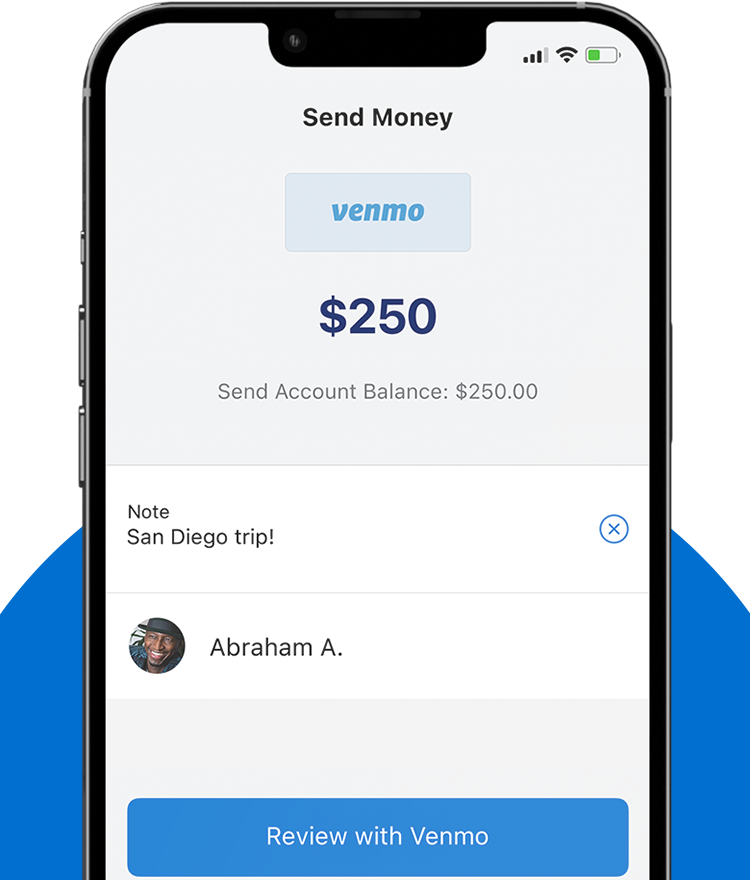
- Tap the Pay/Request Button: This is usually a blue button with a pen and paper icon, or a similar prominent payment option.
- Select the Recipient: You can search for the recipient by their Venmo username, phone number, or email address. If they are in your phone’s contacts and also use Venmo, they might appear automatically. Always double-check the username to ensure you’re sending money to the correct person to avoid irreversible mistakes.
- Enter the Amount: Input the exact amount of money you wish to send.
- Add a Note: Venmo requires a note for each transaction. This can be as simple as an emoji or a detailed description of what the payment is for (e.g., “Dinner,” “Rent,” “Concert Tickets”). This note is visible to the recipient and, depending on your privacy settings, to others on your Venmo feed.
Adding Context and Privacy Settings
Beyond the monetary value, Venmo allows you to customize the context and privacy of your transaction:
- Privacy Settings: Before confirming, you’ll have the option to set the transaction’s privacy level. Your choices are typically:
- Public: Visible to everyone on the Venmo feed.
- Friends: Visible only to your Venmo friends.
- Private: Visible only to you and the recipient.
For personal financial discretion, especially when dealing with sensitive payments, always opt for “Private.”
- Funding Source Selection: If you have multiple funding sources linked, you can select which one to use for the current transaction (e.g., Venmo balance, linked bank account, specific debit card).
Confirming and Completing the Transfer
The final steps involve reviewing and authorizing the payment:
- Review Details: Carefully review the recipient’s username, the amount, the note, and the selected privacy setting. This is your last chance to catch any errors.
- Tap “Pay”: Once you’re confident all details are correct, tap the “Pay” button to initiate the transfer.
- Confirmation: You’ll typically receive an immediate on-screen confirmation that the money has been sent, and the recipient will be notified.
Understanding these steps ensures that your Venmo transactions are not only successful but also align with your financial privacy and security preferences, contributing to overall better personal finance management.
Optimizing Your Venmo Experience for Financial Security and Efficiency
While Venmo simplifies money transfers, maximizing its benefits for personal finance requires attention to security, understanding its operational nuances, and proactive management of your account. Efficiency and security go hand-in-hand when dealing with digital money.
Linking and Managing Funding Sources
The backbone of your Venmo account is its linked funding sources.
- Bank Accounts: Linking your checking account directly via your bank’s login credentials or by manually entering routing and account numbers is the most common and fee-free way to add funds. This allows you to send money directly from your bank or transfer your Venmo balance to your bank without fees (standard transfer).
- Debit Cards: Linking a debit card provides a quick and free way to send money. It also enables Instant Transfers of your Venmo balance to your bank account, albeit for a 1.75% fee (minimum $0.25, maximum $25).
- Credit Cards: While you can link credit cards, be aware that Venmo charges a 3% fee for sending money from a credit card. This makes it a less ideal option for routine personal payments due to the added cost. Use it only when absolutely necessary and factor in the fee.
- Managing Sources: Regularly review your linked accounts. Remove any old cards or bank accounts you no longer use to minimize potential security risks and keep your payment options streamlined.
Understanding Transaction Limits and Fees
Venmo imposes limits on how much money you can send and receive, which are typically lower for unverified accounts.
- Sending Limits: Verified accounts generally have a weekly rolling limit of $6,999.99 for person-to-person payments. For authorized merchants, the weekly limit is usually $2,999.99. These limits are subject to change and may vary.
- Receiving Limits: While there isn’t a strict limit on how much you can receive, Venmo tracks total activity, and high volumes might trigger additional verification requests.
- Fees:
- Sending: Free from Venmo balance, linked bank account, or debit card. 3% fee for credit card transfers.
- Receiving: Free.
- Instant Transfer: 1.75% fee (minimum $0.25, maximum $25) to move funds instantly to a linked debit card or bank account. Standard transfers are free.
- Business Payments: Small fees apply when receiving payments through a business profile.
Awareness of these limits and fees is crucial for budget management and avoiding unexpected charges, especially for those who frequently use Venmo for larger transactions or business purposes.
Best Practices for Security
Protecting your financial information on Venmo is paramount.
- Strong, Unique Password: Use a password that combines letters, numbers, and symbols, and don’t reuse passwords from other accounts.
- Two-Factor Authentication (2FA): Enable 2FA for an extra layer of security. This requires a code from your phone in addition to your password when logging in, significantly reducing the risk of unauthorized access.
- PIN Code/Biometric Lock: Set up a PIN or use your phone’s fingerprint/face ID scanner to protect the app itself, preventing unauthorized payments if your phone falls into the wrong hands.
- Public Wi-Fi Caution: Avoid making financial transactions over unsecured public Wi-Fi networks, which can be vulnerable to data interception.
- Beware of Phishing: Be skeptical of suspicious emails or messages asking for your Venmo login credentials or personal information. Venmo will never ask for your password via email.
- Review Activity: Regularly check your transaction history for any unauthorized payments. Report suspicious activity immediately.
Receiving and Requesting Money
Venmo isn’t just for sending; it’s equally powerful for receiving and requesting funds.
- Receiving Money: When someone sends you money, it automatically appears in your Venmo balance. You’ll receive a notification and can see the transaction in your feed.
- Requesting Money: To request money, tap the “Pay/Request” button, enter the recipient’s details and the amount, then select “Request” instead of “Pay.” This sends a notification to the person, prompting them to send you the requested amount. This feature is invaluable for splitting group expenses or reminding friends of outstanding debts.
By adhering to these best practices, users can ensure their Venmo experience remains efficient, cost-effective, and most importantly, secure, integrating seamlessly into a robust personal finance strategy.
Beyond Sending: Integrating Venmo into Your Financial Ecosystem
Venmo’s utility extends far beyond simple peer-to-peer transfers, allowing it to become a more integral part of one’s broader financial management strategy. Understanding its expanded capabilities can unlock new ways to manage income, expenses, and even investments.
Using Venmo for Business Payments (Limitations and Considerations)
While Venmo’s primary design is for personal payments, it has evolved to support small business transactions. Users can create a “business profile,” which allows them to accept payments for goods and services.
- Benefits: Lower transaction fees compared to traditional credit card processors, ease of setup, and access to Venmo’s large user base. It’s particularly appealing for freelancers, small online sellers, or service providers.
- Limitations: Business transactions processed through personal profiles (using goods and services tags) will incur fees, and Venmo might flag accounts for commercial activity if payments seem suspicious. Furthermore, business profiles have their own set of terms and conditions, and while convenient, may not offer the full suite of accounting and dispute resolution features found in dedicated business payment platforms. It’s crucial to understand the distinction between personal and business use to ensure compliance and proper financial tracking for tax purposes.
Splitting Bills and Group Payments
One of Venmo’s most celebrated features is its seamless integration into social financial scenarios, especially for splitting bills.
- Easy Splits: When you pay for a group expense (like dinner or concert tickets), you can simply send requests to individual friends for their share. The ‘note’ feature makes it easy to specify what each person owes.
- Group Functionality: While Venmo doesn’t have a dedicated “group payment” feature in the same vein as some other apps, its request system effectively serves this purpose. One person can pay the total, and then easily request specific amounts from others, making the often-awkward task of splitting expenses simple and transparent. This greatly streamlines personal budgeting and shared living expenses, preventing one individual from carrying the entire load for extended periods.
Cashing Out Your Venmo Balance
Money in your Venmo balance isn’t doing much sitting there. You have two primary options for cashing it out:
- Standard Transfer to Bank: This is free and typically takes 1-3 business days. It’s the most common method for moving funds from Venmo into your primary bank account for saving or other financial uses.
- Instant Transfer to Bank/Debit Card: For a 1.75% fee (minimum $0.25, maximum $25), you can transfer your balance instantly to a linked eligible debit card or bank account. This is invaluable when you need immediate access to funds, perhaps for an unexpected expense or to avoid overdraft fees. Strategic use of this feature depends on the urgency of access versus the cost of the fee.
Advanced Features: Direct Deposit, Crypto
Venmo continues to expand its financial offerings:
- Direct Deposit: Eligible users can set up direct deposit of their paychecks directly into their Venmo account, effectively making Venmo a primary checking account for some. This can simplify budgeting and consolidate funds within one app.
- Cryptocurrency: Venmo now allows users to buy, hold, and sell popular cryptocurrencies like Bitcoin, Ethereum, Litecoin, and Bitcoin Cash. This foray into digital assets provides an accessible entry point for those interested in crypto investments, right within an app they already use for day-to-day transactions. While convenient, users should understand the inherent volatility and risks associated with cryptocurrency investments and consider how this fits into their overall financial planning.
By leveraging these advanced features, individuals can truly integrate Venmo into a comprehensive personal financial management system, moving beyond just simple transfers to manage earnings, savings, and even investments within a single, familiar platform.
Common Pitfalls and Troubleshooting for Venmo Users
Despite Venmo’s user-friendly interface, issues can arise. Understanding common pitfalls and how to troubleshoot them is crucial for maintaining financial peace of mind and ensuring your money management remains uninterrupted.
Addressing Payment Errors and Reversals
Accidental payments or transactions to the wrong person are common concerns.
- Sending to the Wrong Person: If you send money to the incorrect Venmo user, the unfortunate reality is that Venmo payments are typically instant and irreversible. Your best course of action is to immediately contact the person you accidentally paid and politely request they send the money back. If they refuse or are unresponsive, you can contact Venmo Support, but they cannot force the recipient to return the funds. Prevention is key: always double-check the recipient’s username before confirming a payment.
- Sending the Wrong Amount: If you send the wrong amount (too much or too little), you can either request the difference from the recipient or send an additional payment for the remaining balance. Again, direct communication with the recipient is usually the fastest resolution.
- Insufficient Funds: If a payment fails due to insufficient funds, you’ll receive a notification. You’ll need to add money to your Venmo balance or switch to a different linked funding source with adequate funds and then retry the transaction.
Dealing with Scams and Fraudulent Requests
The digital payment landscape is unfortunately fertile ground for scammers.
- Fake Payment Notifications: Be wary of emails or texts claiming you’ve received money on Venmo when you haven’t. Always open the Venmo app directly to verify your balance and transaction history. Scammers often use these to trick you into clicking malicious links or revealing personal information.
- “Accidental” Payments from Strangers: A common scam involves a stranger sending you money, then claiming it was an accident and asking you to send it back. Never send money back directly. If the payment was truly fraudulent, Venmo may eventually reverse the original payment, leaving you out of pocket if you sent money back. Report the incident to Venmo support, and let them handle any reversals.
- “Too Good to Be True” Offers: Be skeptical of requests for money in exchange for guaranteed high returns, lottery winnings, or job offers that require an upfront payment via Venmo. These are almost always scams designed to defraud you.
- Unsolicited Business Payments: If someone sends you a payment for goods or services you didn’t provide, treat it with extreme caution. It could be part of a larger scam where they later dispute the charge, leaving you liable.
Always practice extreme vigilance. If something feels off, it probably is.

Contacting Venmo Support
When you encounter issues that you can’t resolve on your own, contacting Venmo Support is essential.
- In-App Support: Venmo typically offers a support section within the app where you can browse FAQs or submit a support ticket.
- Help Center Website: Venmo’s official website has an extensive help center with articles covering most common issues.
- Phone/Email: For urgent matters or more complex issues, direct phone support or email contact options are usually available. Be prepared to provide account details and specific information about your issue.
Always ensure you’re contacting official Venmo channels to avoid falling victim to imposter support scams. Proactive engagement with support can prevent minor inconveniences from escalating into significant financial problems.
In conclusion, Venmo is a powerful tool for personal finance, simplifying everyday money transfers and offering an expanding suite of financial services. By understanding its core functionalities, optimizing for security and efficiency, integrating its advanced features, and knowing how to navigate potential issues, users can fully harness Venmo’s potential to manage their money effectively and confidently in the modern digital age.
aViewFromTheCave is a participant in the Amazon Services LLC Associates Program, an affiliate advertising program designed to provide a means for sites to earn advertising fees by advertising and linking to Amazon.com. Amazon, the Amazon logo, AmazonSupply, and the AmazonSupply logo are trademarks of Amazon.com, Inc. or its affiliates. As an Amazon Associate we earn affiliate commissions from qualifying purchases.