
In the contemporary financial landscape, the gig economy, independent contractors, and diverse income streams have become the norm, bringing with them a crucial but often daunting responsibility: filing Form 1099. For businesses engaging non-employee service providers and individuals receiving specific types of income, the 1099 form serves as an essential component of tax compliance, ensuring transparency and accuracy in reporting payments to the Internal Revenue Service (IRS). While historically a paper-intensive process, the advent of digital technology has revolutionized 1099 filing, making it more efficient, less prone to error, and accessible from anywhere.
This guide aims to demystify the online 1099 filing process, offering a clear, step-by-step roadmap for both businesses and individuals. We’ll delve into the intricacies of various 1099 forms, explore the myriad benefits of digital submission, outline the practical steps involved, and equip you with best practices to navigate potential challenges. By embracing online filing, you can transform a complex annual obligation into a streamlined, stress-free task, ensuring compliance and maintaining financial integrity.
Understanding the 1099 Landscape
Before diving into the mechanics of online filing, it’s crucial to grasp the fundamental concepts surrounding Form 1099. This understanding forms the bedrock of accurate and compliant reporting.
What is a 1099 and Who Needs It?
A Form 1099 is a series of information returns used by the IRS to track various types of income paid to individuals or entities that are not employees. Unlike W-2 forms, which report wages paid to employees, 1099s are primarily for independent contractors, freelancers, and other non-employee service providers. Businesses (the “payer”) are generally required to issue a 1099 if they pay $600 or more in a calendar year to an individual or unincorporated business for services rendered. Financial institutions also issue 1099s for interest, dividends, and other investment income.
There are several variations of Form 1099, each designed for specific types of income:
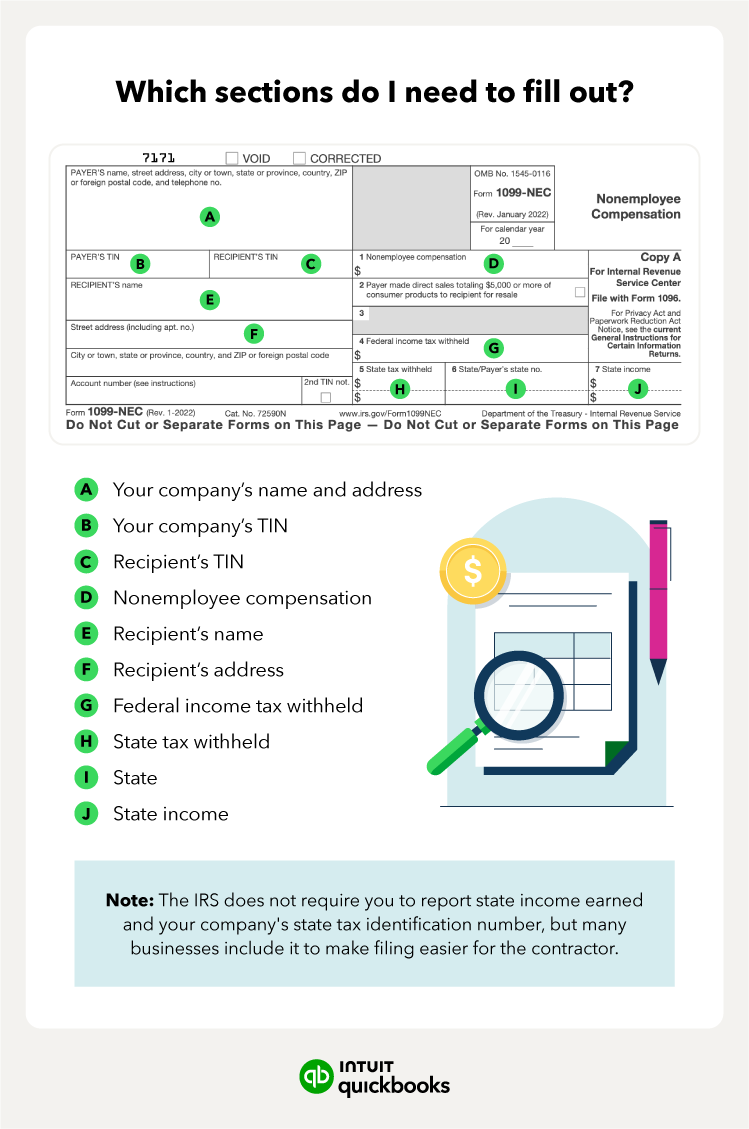
- Form 1099-NEC (Nonemployee Compensation): This is arguably the most common and reports payments of $600 or more to non-employees for services performed in the course of your trade or business. This largely replaced the use of 1099-MISC for contractor payments.
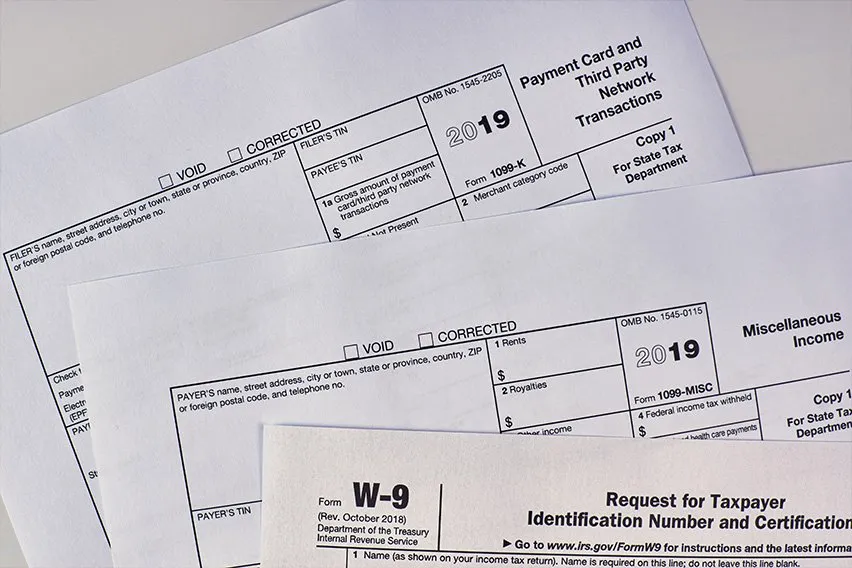
- Form 1099-MISC (Miscellaneous Information): Reports various types of miscellaneous income, such as rents, royalties, medical and healthcare payments, prizes and awards, or other income not covered by 1099-NEC.
- Form 1099-K (Payment Card and Third-Party Network Transactions): Reports payments made through credit/debit cards or third-party payment networks (like PayPal, Stripe, etc.) if certain thresholds are met (e.g., over $20,000 in gross payments and more than 200 transactions, though this threshold has seen legislative fluctuations and specific state requirements may differ).
- Form 1099-INT (Interest Income): Reports interest income paid by banks, brokerage firms, and other financial institutions.
- Form 1099-DIV (Dividends and Distributions): Reports dividends and other distributions paid by corporations and mutual funds.
- Form 1099-R (Distributions From Pensions, Annuities, Retirement or Profit-Sharing Plans, IRAs, Insurance Contracts, etc.): Reports distributions from retirement accounts.
Understanding which form applies to a specific payment is critical for accurate reporting and avoiding potential IRS scrutiny.
Key Deadlines and Penalties for Non-Compliance
Timely filing is paramount when it comes to 1099 forms. Missing deadlines can result in significant penalties from the IRS, which can escalate based on how late the forms are filed and the size of the business.
The primary deadlines to remember are:
- January 31st: This is the deadline to furnish recipient copies (Copy B, 2, and C) of Forms 1099-NEC to independent contractors and most other 1099 forms to their respective recipients.
- January 31st: This is also the deadline to file Copy A of Form 1099-NEC with the IRS, whether on paper or electronically.
- February 28th (paper filing) or March 31st (electronic filing): This is the deadline to file Copy A of most other 1099 forms (e.g., 1099-MISC, 1099-INT, 1099-DIV) with the IRS. Electronic filing is generally preferred and often carries a later deadline.
Penalties for late or incorrect filing can range from $60 to $310 per form, depending on how late it is filed and whether corrections are made promptly. Intentional disregard can lead to even higher penalties, reaching $630 per form or more. Given the ease of online filing, these penalties are largely avoidable with proper planning.
Information Required for 1099 Filing
To ensure a smooth filing process, you’ll need to gather specific information for both the payer and each payee:
Payer Information (Your Business):
- Legal name of the business
- Business address
- Employer Identification Number (EIN) or Social Security Number (SSN) if you are a sole proprietor
Payee Information (Recipient of Payment):
- Legal name of the individual or business
- Address
- Taxpayer Identification Number (TIN) – typically an SSN for individuals or an EIN for businesses. It is crucial to obtain this correctly, often via a Form W-9 from the payee.
- Total amount paid to the payee during the calendar year, broken down by category if necessary (e.g., nonemployee compensation, rent, etc.).
Ensuring all this information is accurate and readily available before you begin the online filing process will save you considerable time and prevent errors.
Benefits and Methods of Online 1099 Filing
The shift from manual paper forms to digital submission offers a wealth of advantages, making online filing the preferred method for modern businesses and individuals.
Advantages of Digital Submission
Online 1099 filing brings numerous efficiencies and benefits:
- Increased Accuracy: Online platforms often include built-in validation checks, flagging common errors like incorrect TIN formats or missing data, significantly reducing the chances of IRS rejections or penalties.
- Time and Cost Savings: Eliminates the need for printing, mailing, and postage costs. The process is typically faster than manual entry and mailing, freeing up valuable time.
- Enhanced Record-Keeping: Digital platforms create an electronic trail of your submissions, making it easy to access past forms, track statuses, and maintain organized records for audit purposes.
- Accessibility and Convenience: File from anywhere with an internet connection, at any time that suits your schedule, eliminating geographical and time constraints.
- Automated Distribution: Many online services can electronically deliver recipient copies, further simplifying the process and ensuring timely delivery.
- Environmental Friendliness: Reduces paper consumption, aligning with sustainable business practices.
Exploring Approved Online Filing Platforms
The IRS encourages electronic filing for information returns and even mandates it for certain filers (generally, if you file 250 or more of the same type of information return). There are primarily three avenues for online 1099 filing:
- IRS FIRE System (Filing Information Returns Electronically): This is the official IRS platform for electronic filing. It’s robust and free but designed for bulk filers and often requires a higher level of technical proficiency. It’s not typically user-friendly for small businesses or individuals filing only a few forms. To use FIRE, you must apply for a Transmitter Control Code (TCC).
- Third-Party Tax Software and Services: This is the most popular option for small to medium-sized businesses and individuals. Numerous accounting software providers (e.g., QuickBooks, Xero) and dedicated tax filing services (e.g., TaxAct, H&R Block, specialized 1099 filing services like eFileMyForms, Track1099) offer user-friendly interfaces, guided workflows, and often handle both IRS submission and recipient distribution. Many of these services integrate directly with existing accounting platforms.
- Payroll Providers: If you use a payroll service (e.g., ADP, Paychex, Gusto), they often offer 1099 filing as an add-on service. This can be convenient as they already have much of your payment data.
Choosing the Right Online Solution
Selecting the best online filing platform depends on several factors specific to your needs:
- Volume of Forms: If you file only a few forms, a simple, low-cost third-party service might suffice. For hundreds or thousands of forms, a more robust service or even the IRS FIRE system (if you have the technical capability) might be more cost-effective.
- Budget: Prices vary significantly, from free (for limited forms) to subscription models or per-form fees. Compare costs based on your expected filing volume.
- Ease of Use: Look for intuitive interfaces, clear instructions, and helpful customer support, especially if you’re new to online filing.
- Features: Consider features like automated recipient distribution, state filing capabilities (many states require separate 1099 filing), integration with existing accounting software, and secure data handling.
- Security: Ensure the platform uses strong encryption and follows industry best practices for data security to protect sensitive financial information.
- Customer Support: Responsive and knowledgeable customer support can be invaluable if you encounter issues during the filing process.
A Step-by-Step Guide to Online 1099 Filing
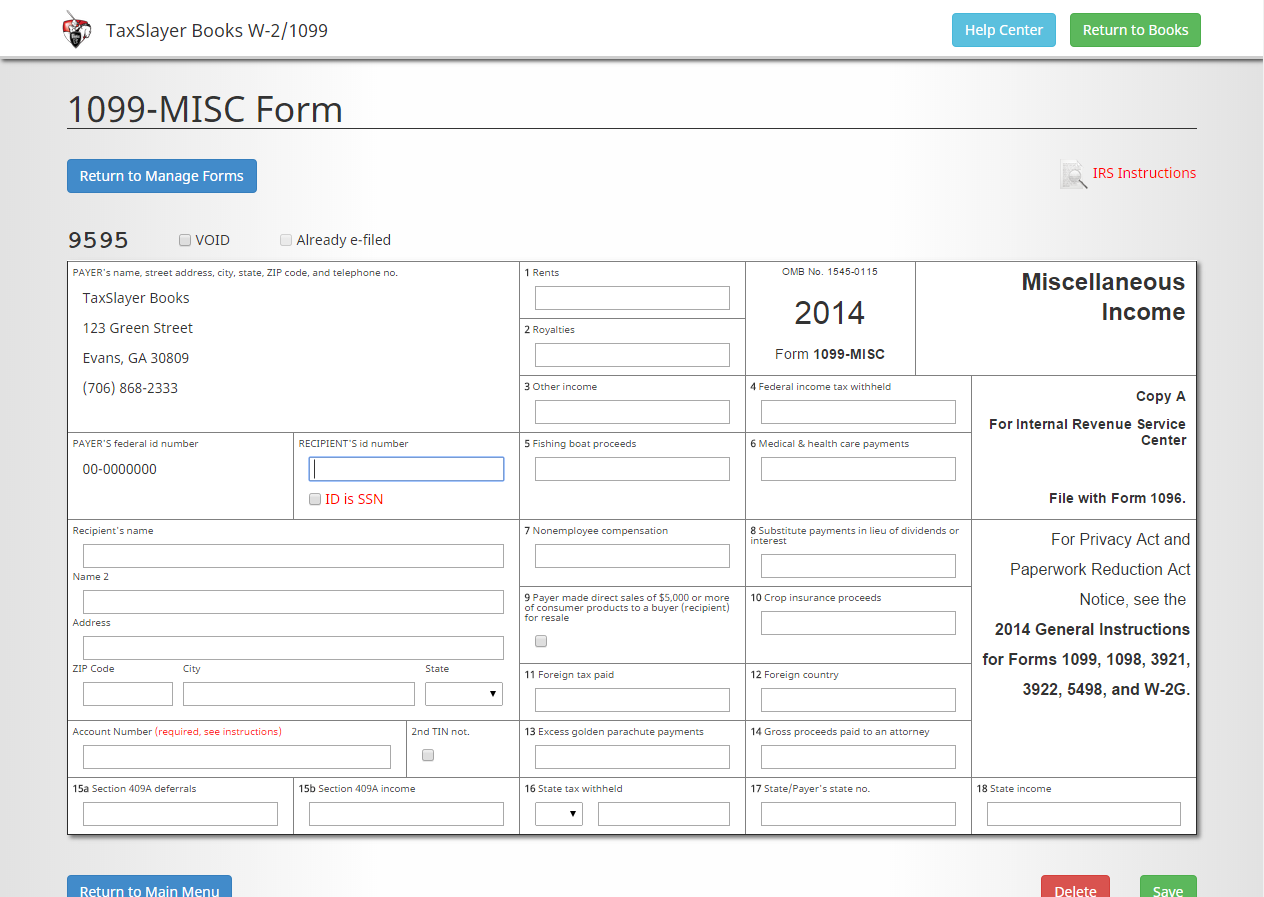
Once you’ve chosen your preferred online filing platform, the process generally follows a predictable sequence. This guide outlines the typical steps involved.
Preparation: Gathering Necessary Information
Before you even log into a filing platform, thorough preparation is key.
- Collect W-9 Forms: Request a Form W-9 (Request for Taxpayer Identification Number and Certification) from every independent contractor or vendor to whom you paid $600 or more in the calendar year. This form provides their legal name, address, and TIN (SSN or EIN), which are essential for accurate 1099 reporting.
- Summarize Payments: Compile a detailed record of all payments made to each contractor/vendor during the calendar year. Your accounting software should make this easy.
- Verify Information: Double-check all names, addresses, TINs, and payment amounts for accuracy. Even minor typos can lead to IRS rejections.
- Confirm Payer Details: Ensure you have your business’s legal name, address, and EIN readily available.
Account Setup and Payer Information
Most online filing services require you to set up an account if you don’t already have one.
- Create Account/Login: Register for a new account or log in to your existing one on your chosen platform.
- Enter Payer Information: Input your business’s legal name, address, and EIN (or SSN for sole proprietors). This information will be pre-filled on all the 1099 forms you generate.
- Select Tax Year: Confirm you are filing for the correct tax year.
Entering Payee Data and Payment Details
This is where you input the core information for each 1099 form.
- Add New Payee: For each recipient, you’ll typically click an “Add New Payee” button.
- Enter Payee Information: Input the payee’s legal name, address, and TIN exactly as it appears on their W-9.
- Select 1099 Form Type: Choose the appropriate 1099 form (e.g., 1099-NEC, 1099-MISC) for the payments being reported.
- Enter Payment Amounts: Input the total amount paid to the payee in the relevant box on the form (e.g., Box 1 for 1099-NEC). Some platforms also allow you to specify state income tax withheld, if applicable.
- Review Individual Forms: After entering data for each payee, take a moment to review the individual form for any errors before moving on.
- Bulk Upload (if applicable): If you have many forms, some services allow you to upload a spreadsheet with all your payee and payment data, significantly speeding up the process. Ensure your spreadsheet format matches the platform’s requirements.
Review, Verification, and Submission
This crucial stage ensures everything is correct before sending your forms to the IRS.
- Comprehensive Review: The platform will usually provide a summary or a final review screen where you can see all your generated 1099s. Scrutinize every detail: payer info, payee info, TINs, and payment amounts. This is your last chance to catch errors.
- Payment (if applicable): If using a paid service, you will typically be prompted to make a payment for the filing service at this stage.
- Submit to IRS: Once you confirm everything is accurate, click the “Submit” or “File” button. The platform will then electronically transmit the forms to the IRS. You should receive a confirmation email or message with a tracking number (like an “Acceptance ID” or similar) indicating successful submission. Keep this confirmation for your records.
Distributing Copies to Recipients
Filing with the IRS is only half the battle; you must also provide copies to your payees.
- Recipient Copies (Copy B, 2, C): Most online services offer options for distributing these copies:
- Electronic Delivery: The most efficient method. The service typically emails the payee a secure link to access and download their 1099. Ensure you have obtained consent from the payee for electronic delivery.
- Mail Service: The platform can print and mail the copies directly to your payees for an additional fee.
- Print and Mail Yourself: You can download printable PDFs of the recipient copies and mail them yourself.
- Ensure Timely Delivery: Remember the January 31st deadline for furnishing recipient copies.
Common Pitfalls and Best Practices for Seamless Filing
Even with the convenience of online tools, certain pitfalls can derail your 1099 filing efforts. Adhering to best practices can help you avoid these and ensure a smooth, compliant process.
Avoiding Common Errors
- Incorrect TINs/EINs: This is the most frequent cause of IRS rejections. Always verify TINs/EINs using Form W-9. If a payee provides an incorrect TIN, you must make a reasonable attempt to get a correct one.
- Mismatched Names and TINs: The name on the 1099 must exactly match the name associated with the TIN provided by the payee.
- Wrong Form Type: Using a 1099-MISC instead of a 1099-NEC for nonemployee compensation, or vice-versa, is a common mistake.
- Mathematical Errors: Simple addition or transcription errors in payment amounts.
- Missing Forms/Recipients: Forgetting to issue a 1099 to a qualifying recipient, or failing to file a generated form with the IRS.
- Missing Payer Information: Forgetting to include your business’s complete address or EIN.
Ensuring Data Security and Privacy
Filing 1099s involves sensitive financial and personal information. Prioritize security:
- Secure Platforms: Choose reputable online filing services that employ robust encryption (SSL/TLS), two-factor authentication (2FA), and adhere to data privacy regulations.
- Strong Passwords: Use unique, complex passwords for your filing accounts.
- Phishing Awareness: Be wary of suspicious emails or communications claiming to be from the IRS or your filing service. Always navigate directly to official websites.
- Data Minimization: Only collect the necessary information from payees via Form W-9. Store physical W-9s securely or use encrypted digital storage.
Record-Keeping and Audit Preparedness
Maintain meticulous records related to your 1099 filings:
- Retain W-9s: Keep copies of all W-9 forms received for at least three to four years (the IRS statute of limitations for audits).
- Filing Confirmations: Save all confirmation emails and receipts from your online filing service, including IRS acceptance IDs.
- Payment Records: Store detailed records of all payments made to contractors, which should align with the amounts reported on your 1099s.
- Digital Backups: Back up all your financial and tax documents to a secure, redundant location.
These records are invaluable if the IRS has questions or conducts an audit.
Staying Updated with IRS Regulations
Tax laws, particularly those concerning information returns, can change.
- IRS Website: Regularly check the IRS website (IRS.gov) for updates, new forms, and changes to filing requirements and deadlines.
- Tax Newsletters/Advisors: Subscribe to tax news services or consult with a tax professional to stay informed about relevant legislative changes that might impact your 1099 obligations. For example, thresholds for 1099-K reporting have been a subject of recent legislative discussion.
Conclusion
The obligation to file Form 1099 is an integral part of responsible financial management for businesses and individuals engaged with independent contractors and various income streams. While the complexity of navigating different forms, deadlines, and information requirements can seem overwhelming, the power of online filing has transformed this annual task into a far more manageable process.
By understanding the types of 1099 forms, embracing the efficiency of digital submission, carefully following a structured filing approach, and adhering to best practices, you can ensure accuracy, avoid penalties, and maintain impeccable financial records. Online 1099 filing isn’t just a convenience; it’s a strategic move towards smarter, more compliant, and stress-free tax season preparedness. Empower yourself with these tools and insights to navigate your 1099 obligations with confidence and ease, solidifying your commitment to sound financial stewardship.
aViewFromTheCave is a participant in the Amazon Services LLC Associates Program, an affiliate advertising program designed to provide a means for sites to earn advertising fees by advertising and linking to Amazon.com. Amazon, the Amazon logo, AmazonSupply, and the AmazonSupply logo are trademarks of Amazon.com, Inc. or its affiliates. As an Amazon Associate we earn affiliate commissions from qualifying purchases.