
In an era defined by seamless connectivity, the underlying architecture of our digital lives often remains invisible. We browse the web, stream high-definition content, and sync data across global clouds without a second thought. However, the moment a connection fails, a bill seems suspicious, or a security vulnerability is identified, the question arises: “Who is my service provider?”
Identifying your service provider is not always as straightforward as checking the logo on your router. In the modern tech ecosystem, your digital presence is supported by a multi-layered stack of Internet Service Providers (ISPs), Mobile Network Operators (MNOs), Cloud Hosting platforms, and Software-as-a-Service (SaaS) vendors. This guide provides a professional deep dive into identifying these entities, understanding their roles, and managing your technological footprint effectively.
Identifying Your Connectivity Partners: ISPs and Mobile Networks
The most immediate layer of your digital stack is the gateway to the internet itself. For most users, this is either a residential/commercial Internet Service Provider or a mobile data carrier.
Tracking Down Your Internet Service Provider (ISP)
Your ISP is the company that provides the physical or wireless link between your local network and the global internet backbone. If you are in a managed office space or a multi-family dwelling, you might not interact with the billing department directly, making identification difficult.
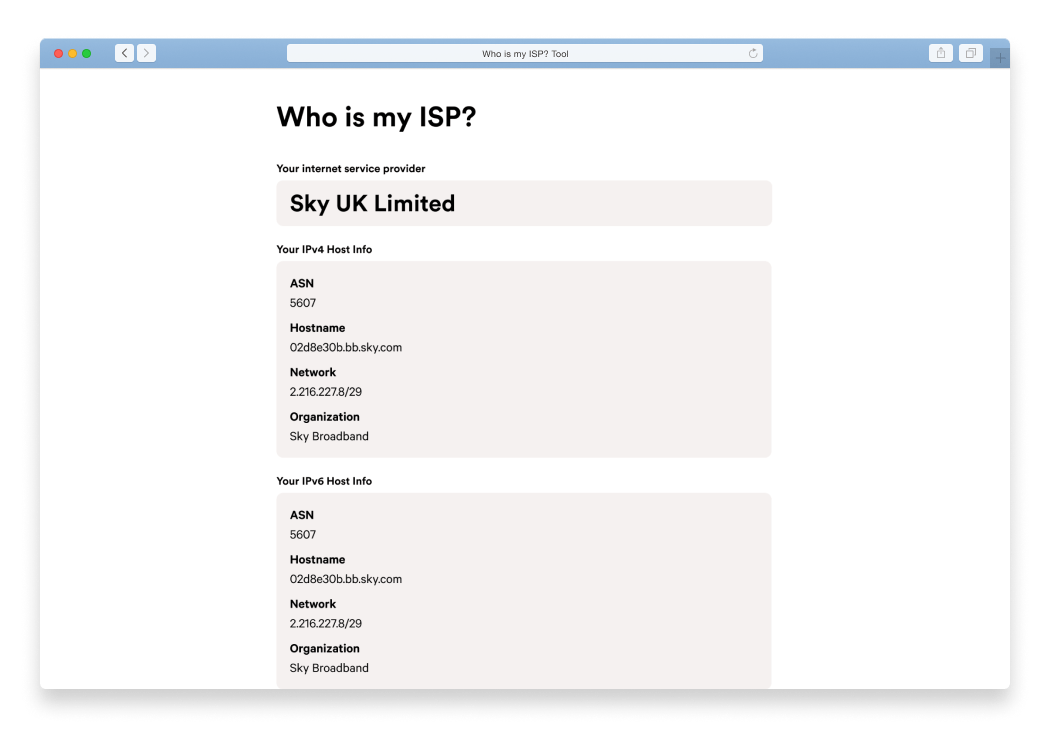
To identify your ISP through software, you can utilize “Whois” lookups or IP discovery tools. By visiting sites such as WhoIsMyISP.org or WhatIsMyIP.com, the site queries your public IP address. This address is leased to you by your provider. The metadata attached to that IP will typically list the organization name (e.g., Comcast Xfinity, AT&T, Verizon, or specialized fiber providers like Google Fiber).
Identifying Your Mobile Network Operator (MNO) vs. MVNO
On mobile devices, the provider listed in your top-left status bar is usually your Mobile Network Operator. However, the tech landscape is filled with Mobile Virtual Network Operators (MVNOs). Companies like Mint Mobile or Google Fi do not own the physical cell towers; instead, they lease bandwidth from “The Big Three” (T-Mobile, AT&T, and Verizon). Understanding whether you are on a primary carrier or an MVNO is critical for troubleshooting “de-prioritization”—a tech phenomenon where your data speeds are throttled during high-traffic periods in favor of the primary carrier’s direct customers.
Using Command Line Tools for Deep Diagnostics
For those who prefer a hands-on technical approach, your computer’s operating system offers built-in tools to identify network paths. By opening the Command Prompt (Windows) or Terminal (macOS/Linux) and typing tracert google.com (Windows) or traceroute google.com (Mac), you can see every “hop” your data takes. The first few hops after your local router will often reveal the hostnames of your ISP’s gateway servers, providing a clear picture of who is routing your traffic.
Unmasking the Layers of Web, Hosting, and Cloud Services
The question of “who is my provider” becomes more complex when dealing with websites, applications, and digital assets. If you own a website or manage a business’s digital presence, you are likely interacting with several distinct tech providers simultaneously.
Finding Your Domain Registrar vs. Web Host
One of the most common points of confusion in technology management is the distinction between a Domain Registrar and a Web Hosting provider.
- The Registrar: This is the entity where you purchased your domain name (e.g., GoDaddy, Namecheap, or Google Domains). They manage the “address” but not the “house.”
- The Web Host: This is the provider where your website’s actual files, images, and databases reside (e.g., SiteGround, Bluehost, or specialized WordPress hosts like WP Engine).
To identify these, you can use a “WHOIS” search tool (such as ICANN Lookup). The “Registrar” field identifies who manages the name, while the “Name Servers” (NS) records often point to the host. If the Name Servers point to ns1.digitalocean.com, for example, your service provider for hosting is DigitalOcean.
Determining Your Email Service Provider (ESP)
Email is the lifeblood of professional communication, yet many users are unaware of who actually handles their mail transport. You might use an @yourcompany.com address, but the “provider” is the engine behind it. By looking at the MX (Mail Exchange) records in your domain’s DNS settings, you can identify the provider. Common entries include ASPMX.L.GOOGLE.COM (indicating Google Workspace) or mail.protection.outlook.com (indicating Microsoft 365).
Cloud Infrastructure: Who Powers Your Apps?
Modern software rarely runs on a single physical server. Most apps are built on “The Cloud.” If you are a developer or a tech-savvy business owner, your service provider might be an Infrastructure-as-a-Service (IaaS) giant. The three dominant players are Amazon Web Services (AWS), Microsoft Azure, and Google Cloud Platform (GCP). Identifying which of these provides your backend infrastructure is essential for understanding uptime SLAs (Service Level Agreements) and geographic data redundancy.
The Role of Digital Security and Privacy in Provider Identification
In the realm of digital security, knowing your service provider is synonymous with knowing who has access to your data. Every provider in your chain represents a potential point of failure or a guardian of your privacy.
VPNs and Proxies: When the Provider is Masked
When you use a Virtual Private Network (VPN), you are essentially adding an intentional “middleman” service provider. To the outside world, your ISP is hidden, and your provider appears to be the VPN company (e.g., NordVPN, ExpressVPN). While this enhances privacy from your ISP, it shifts the trust to the VPN provider. In this scenario, your “service provider” for data transit becomes the VPN entity, making their “No-Logs” policy and jurisdictional headquarters a vital technical consideration.
Understanding DNS Providers and Their Impact
The Domain Name System (DNS) is the “phonebook” of the internet. By default, your ISP acts as your DNS provider. However, many tech professionals switch to third-party DNS providers like Cloudflare (1.1.1.1) or Google Public DNS (8.8.8.8) to increase resolution speeds and enhance security. If you find your internet is working but websites won’t load, the “provider” at fault is often the DNS resolver rather than the ISP itself.
Security Audits: Why Identity Matters
Knowing your providers is a prerequisite for a robust security audit. Each provider has its own compliance certifications (such as SOC2, HIPAA, or GDPR). If you are storing sensitive customer data, you must be able to identify every provider in the chain—from the data center (the physical provider) to the software layer (the application provider)—to ensure that your security posture is consistent across the entire stack.
Managing and Consolidating Your Tech Stack
As we accumulate more digital services, “provider bloat” becomes a significant challenge. Managing a fragmented list of vendors leads to inefficiencies, security gaps, and unnecessary costs.
Tools for Inventory Management
For professionals and IT managers, keeping track of service providers should not rely on memory. Utilizing IT Asset Management (ITAM) software or simple password managers (like 1Password or Bitwarden) allows you to categorize and document every service provider. These tools can store account numbers, support contact details, and renewal dates, ensuring that you are never left wondering who to call during an outage.
Avoiding “Shadow IT” and Subscription Bloat
“Shadow IT” refers to technical services or software used within an organization without the explicit knowledge or approval of the IT department. This often happens when a team signs up for a specialized SaaS tool (like a project management app or a niche AI tool) using a corporate credit card. Over time, these unmanaged providers create a “spaghetti” stack. Periodically auditing your outgoing payments and browser extensions can help identify these hidden providers and allow you to consolidate them into a more manageable tech ecosystem.
Best Practices for Documentation
The final step in mastering your digital infrastructure is documentation. Create a “Digital Service Map” that outlines:
- Connectivity: Primary ISP, Backup ISP, and Mobile Carrier.
- Hosting: Domain Registrar, DNS Provider, and Web Host.
- Productivity: Email provider and Cloud storage (e.g., Dropbox, iCloud).
- Security: VPN, Firewall provider, and Antivirus vendor.
By maintaining this clarity, you transform from a passive consumer of technology into an active manager of your digital environment. Whether you are troubleshooting a slow connection or scaling a global application, the answer to “who is my service provider” serves as the foundation for all subsequent technical decisions. In the complex web of the modern internet, visibility is the first step toward optimization and security.
aViewFromTheCave is a participant in the Amazon Services LLC Associates Program, an affiliate advertising program designed to provide a means for sites to earn advertising fees by advertising and linking to Amazon.com. Amazon, the Amazon logo, AmazonSupply, and the AmazonSupply logo are trademarks of Amazon.com, Inc. or its affiliates. As an Amazon Associate we earn affiliate commissions from qualifying purchases.