
In an era defined by constant connectivity and the relentless pace of global travel, knowing the precise status of your flight isn’t just a convenience – it’s a necessity. Whether you’re a seasoned globetrotter, a nervous first-time flyer, or simply picking up a loved one from the airport, up-to-the-minute flight information can be the difference between a smooth journey and unnecessary stress. Gone are the days of relying solely on airport announcement boards or making frantic phone calls to airlines. Today, technology has put an impressive array of tools and resources at our fingertips, empowering us with the ability to monitor flight movements, predict delays, and make informed decisions with unparalleled ease. This guide delves into the tech-driven strategies and essential applications that transform the potentially chaotic experience of air travel into a more predictable and controlled affair, ensuring you’re always one step ahead.
The Digital Arsenal: Essential Tools for Flight Status Monitoring
The digital age has equipped travelers with a powerful suite of applications and websites designed specifically for real-time flight tracking. Understanding which tools to use and how to maximize their potential is key to mastering flight status checks.
Airline-Specific Websites and Apps
The most direct and often the most reliable source for flight status information comes straight from the horse’s mouth: the airline itself. Every major airline now offers sophisticated digital platforms designed to keep passengers informed.
Why they are crucial: Airline websites and their corresponding mobile applications provide the most accurate and immediate updates. This is because they are directly linked to the airline’s operational systems, which monitor everything from aircraft positioning and gate assignments to baggage handling and crew schedules. When a delay or cancellation occurs, the airline’s own channels are typically the first to reflect these changes and often include specific reasons or next steps.
How to use them:
- Download the App: For frequent flyers or those with upcoming trips, downloading the specific airline’s app (e.g., United Airlines, Delta, Emirates, British Airways, Lufthansa) is highly recommended. These apps usually allow you to store your itinerary, receive push notifications, and even manage your booking directly.
- Visit the Website: Navigate to the airline’s official website. Look for sections like “Flight Status,” “Manage My Booking,” or “Travel Info.”
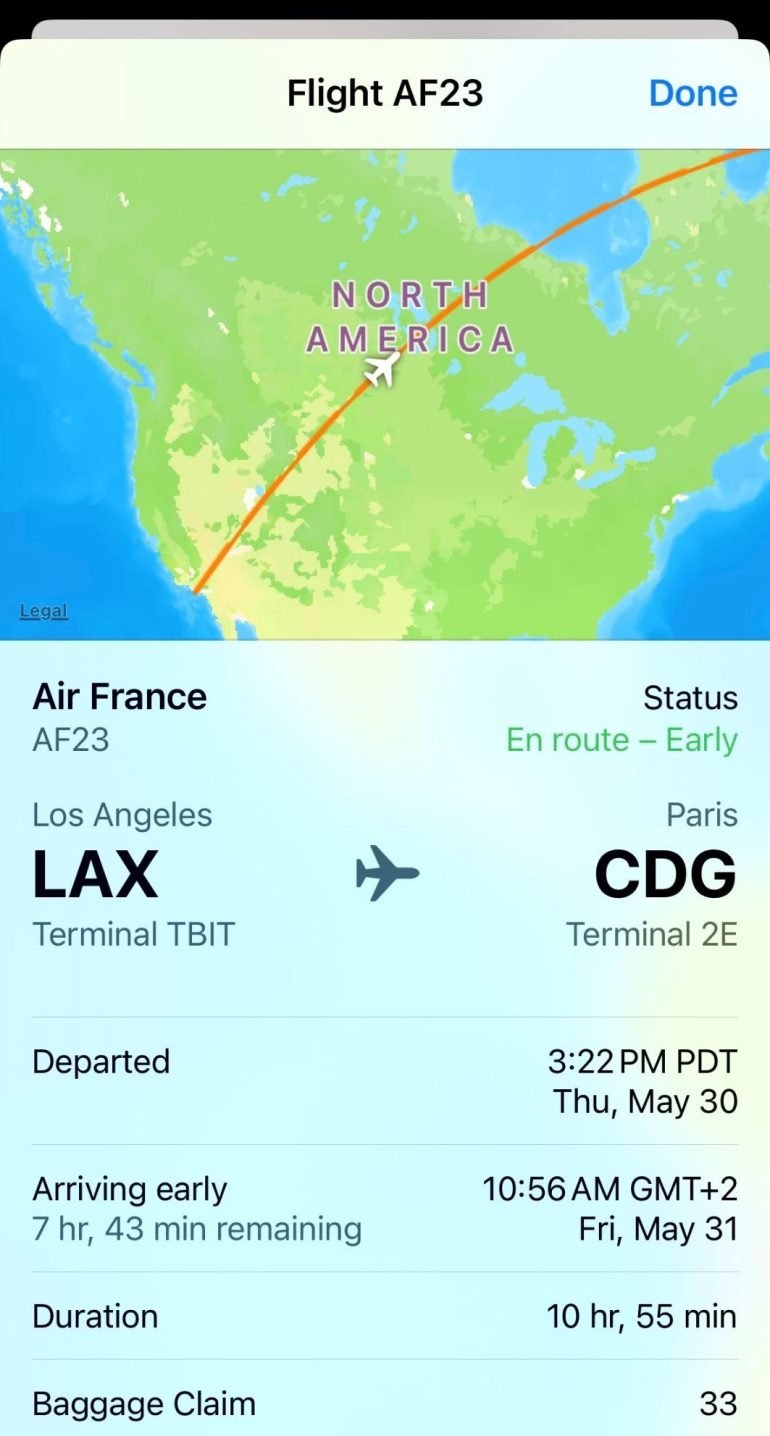
- Input Details: You’ll typically need to enter your flight number, departure and arrival airports, or your specific booking reference/ticket number. The system will then display the current status, including departure/arrival times (scheduled vs. actual/estimated), gate information, and any delay or cancellation notices.
- Personalized Alerts: Many airline apps and websites offer the option to sign up for personalized email, SMS, or in-app push notifications specific to your flight. This proactive approach ensures you’re updated without needing to constantly check manually.
Third-Party Flight Tracking Websites and Apps
While airline platforms are invaluable, third-party aggregators offer a broader, multi-airline perspective and often boast advanced features that enhance the tracking experience. These tools pull data from a multitude of sources, including airlines, air traffic control, and airport systems.
Why they are valuable: These platforms are particularly useful if you’re tracking multiple flights across different airlines, want to visualize flight paths on a map, or need predictive insights into potential delays. They provide a consolidated view, eliminating the need to jump between various airline apps.
Popular options and their features:
- FlightAware: One of the most comprehensive flight trackers, FlightAware provides real-time flight tracking maps, historical data, and even predictive analytics for potential delays (FlightAware’s “MiseryMap” is a popular feature). You can track by flight number, airline, or route.
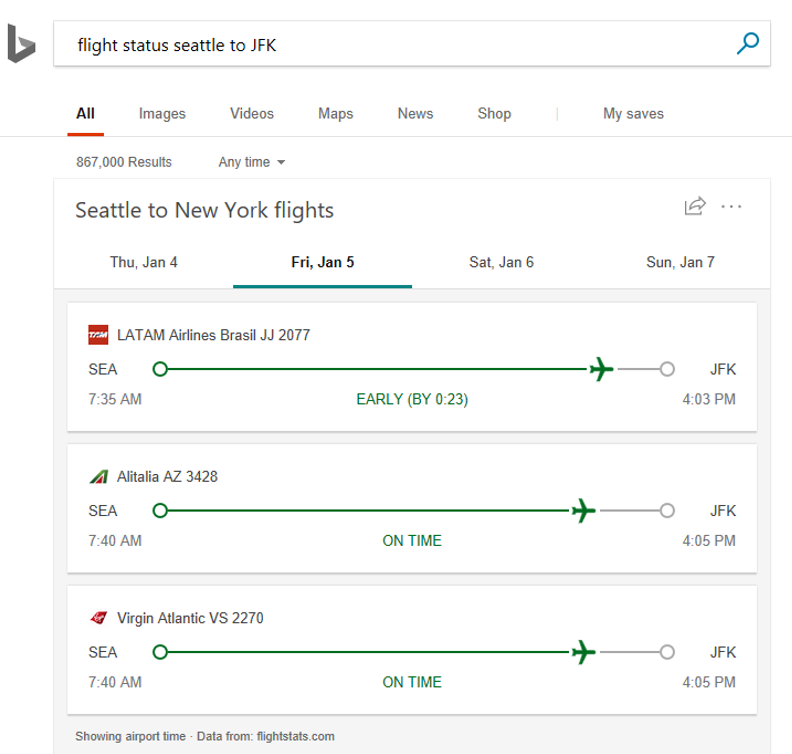
- FlightStats: Offering similar detailed tracking, FlightStats provides global flight status, airport delays, and on-time performance data. It’s often used by businesses in the travel industry for its robust data.
- FlightRadar24: Known for its captivating visual interface, FlightRadar24 displays aircraft moving in real-time on a map, complete with aircraft type, origin, destination, speed, and altitude. It uses ADS-B receivers to gather data directly from aircraft.
- Google Flights: While primarily a flight search engine, Google Flights also offers excellent real-time flight status updates. Simply search for a flight number or route, and Google will display its current status directly in the search results, often with helpful insights into typical delays for that route.
How to use them: Most of these platforms have intuitive search bars where you can enter your flight number, airport codes, or even specific aircraft registration (if you’re feeling particularly aviation-nerdy). They often provide options to save flights for ongoing monitoring and set up alerts.
Airport Websites and Information Displays
Don’t overlook the airport’s own digital presence as a reliable source of information. Airport websites and their physical display boards offer a centralized view of all operations.
Why they are useful: Airport websites provide a holistic view of all departures and arrivals, not just for a single airline. This is particularly helpful when picking someone up or if you’re looking for general airport operational updates. At the airport, large electronic display boards (FIDS – Flight Information Display Systems) provide dynamic updates on gates, boarding times, and any changes.
How to use them:
- Visit the Airport’s Official Website: Navigate to the website of your departure or arrival airport. Look for “Departures,” “Arrivals,” or “Flight Status” sections.
- Filter and Search: You can usually filter by airline, time of day, or search by flight number.
- On-Site Boards: At the airport, regularly check the large FIDS screens strategically placed throughout terminals. These are updated in real-time and are essential for last-minute gate changes or boarding announcements.
Leveraging Smart Technology for Proactive Updates
Beyond manually checking, modern technology allows for a more hands-off, proactive approach to flight status monitoring, integrating updates seamlessly into your digital life.
Setting Up Automated Notifications and Alerts
One of the most powerful features offered by both airlines and third-party apps is the ability to receive automated notifications. This eliminates the need for constant manual checking and delivers critical updates directly to you.
How to set them up:
- Airline Apps: Within your airline’s app, after booking a flight, you’ll often be prompted to opt-in for notifications. This usually includes push notifications, SMS alerts, and email updates for changes to your flight’s schedule, gate, or baggage claim.
- Third-Party Trackers: Apps like FlightAware, FlightStats, or FlightRadar24 allow you to “track” a specific flight and set up custom alerts for various events (e.g., departure, arrival, delay, cancellation, gate change).
- Google Flights: If you’ve searched for a flight on Google Flights, you can often “track” that flight and receive email notifications for status changes.
Benefits: Automated alerts provide peace of mind, ensuring you’re immediately aware of any critical developments without having to constantly refresh a screen. This is particularly useful during times of widespread travel disruption, allowing you to react quickly.
Integrating with Digital Assistants and Smart Devices
Our smart ecosystems are becoming increasingly capable of delivering travel insights. Digital assistants and smart devices can turn your flight status inquiry into a simple voice command or a quick glance at your wrist.
Digital Assistants (Alexa, Google Assistant, Siri):
- How it works: Many airlines and travel services can link to your digital assistant. For example, if your airline’s app or a travel management app (like TripIt) is connected, you can simply ask, “Hey Google, what’s the status of my flight?” or “Alexa, is my flight to London on time?”
- Setup: You might need to enable specific “skills” or “actions” for your digital assistant and link your travel accounts within the assistant’s companion app.
- Convenience: This offers hands-free updates, perfect when you’re busy packing, driving, or simply prefer a voice interface.
Smartwatches and Wearables:
- Push Notifications: If your airline app or a third-party tracker is installed on your smartphone, any notifications you’ve opted into will typically mirror on your smartwatch. This provides a discreet and immediate way to receive updates without pulling out your phone.
- Glanceable Information: Some apps even offer dedicated smartwatch complications or widgets that can display key flight information directly on your watch face.
Decoding Flight Status Terminology and Understanding Data
While “on time” is straightforward, other flight status terms can sometimes be confusing. Understanding the jargon and the nature of the data is essential for accurate interpretation.
Common Status Meanings and Their Implications
- On Time: The flight is expected to depart and arrive according to its published schedule.
- Delayed: The flight is expected to depart later than its scheduled time. The cause could be anything from maintenance issues, late arrival of the inbound aircraft, or air traffic control restrictions. Always look for an estimated new departure/arrival time.
- Cancelled: The flight will not operate. This usually necessitates rebooking passengers on an alternative flight or offering a refund.
- Departed: The aircraft has left the gate and is en route. Sometimes, this status will update to “Airborne” once it has taken off.
- Arrived: The aircraft has landed and is either at the gate or awaiting gate assignment.
- Boarding: Passengers are currently being called to board the aircraft.
- Gate Change: The assigned gate for departure has been changed. Crucial information, especially in large airports.
- Diverted: The flight has landed at an airport other than its intended destination, typically due to weather, medical emergency, or operational issues.
Understanding Data Sources and Accuracy Considerations
Flight status data is complex, originating from multiple sources:
- Airline Operational Systems: Provide updates on gate assignments, boarding status, and internal operational decisions.
- Air Traffic Control (ATC): Manages aircraft movement in the skies and on the ground, providing data on take-off, landing, and en-route positions.
- Airport Systems: Update public display boards and airport websites with information relevant to terminal operations.
- ADS-B Transponders: Aircraft transmit their position, altitude, and speed, which is picked up by ground receivers (used by services like FlightRadar24).
While these systems aim for real-time accuracy, minor discrepancies can occur. A common scenario is when an airline’s app updates slightly before a third-party tracker, or vice-versa. For critical decisions, especially during severe disruptions, it’s always wise to cross-reference information from at least two reputable sources (e.g., the airline’s official app and a major third-party tracker). “Estimated” times are projections and can change, while “Actual” times confirm events.
Advanced Tips and Best Practices for Tech-Savvy Travelers
To truly master flight status monitoring, a few advanced strategies can provide an extra layer of preparedness and insight.
Pre-Emptive Monitoring and Early Warning Systems
Don’t wait until the day of travel to start checking. Tech-savvy travelers begin monitoring their flights days, or even weeks, in advance.
- Track Connecting Flights: If you have connecting flights, track all segments, not just the first. A delay in an inbound flight can impact your outbound journey even if your specific flight appears “on time.”
- Observe Trends: Some third-party apps provide historical on-time performance for specific routes or flights. If a flight consistently experiences delays at a particular time or on certain days, it’s a valuable heads-up.
- Weather and ATC: External factors like severe weather at your origin, destination, or even along the flight path, as well as air traffic control restrictions, can cause widespread delays. Monitoring weather apps and major news outlets for these conditions can provide early warnings, even before the airline officially announces a delay.
Troubleshooting Common Issues and Connectivity
Technology is powerful, but not infallible. Being prepared for potential hiccups is part of being tech-savvy.
- Loss of Connectivity: Airport Wi-Fi can be unreliable, or you might be in an area with poor cell service. Before leaving home, download or screenshot your boarding pass, flight itinerary, and any critical contact numbers (airline, travel agent).
- App Glitches: If an app isn’t updating or seems stuck, try force-closing and restarting it, or clearing its cache. If issues persist, switch to a different reliable app or the airline’s website.
- Battery Life: Constant monitoring can drain your smartphone’s battery. Carry a portable power bank, especially for long travel days.
The Role of Social Media and Customer Service
While not primary flight status checkers, social media and direct customer service channels play crucial roles during significant disruptions.
- Airline Social Media: During major events (e.g., blizzards, technical outages), airlines often use Twitter or Facebook to post blanket updates, advice, and even respond to direct messages from affected passengers. It can be a faster way to get general information than waiting on hold.
- Direct Customer Service: For personalized issues, like rebooking a cancelled flight, the airline’s official customer service (via phone, chat, or in-app messaging) is your best bet. Be prepared with your booking reference and specific flight numbers.
The Future of Flight Status: AI, IoT, and Personalized Travel
The evolution of flight status checking is far from over. Emerging technologies promise even more intuitive, predictive, and personalized experiences for the traveler.
AI-Powered Predictions and Proactive Problem Solving
Artificial Intelligence is already at work behind the scenes, but its role in flight status will grow exponentially.
- Enhanced Predictive Analytics: AI algorithms can analyze vast datasets—including weather patterns, historical flight data, air traffic volume, and airline operational efficiency—to predict delays with even greater accuracy, sometimes hours or days before an official announcement.
- Proactive Rebooking: In the event of a predicted cancellation or significant delay, AI could automatically identify and suggest alternative flights, rebooking options, or even alternative modes of transport, often before you even realize your original plan is in jeopardy.
- Dynamic Routing: AI could optimize flight paths in real-time to avoid turbulence or congested airspace, subtly improving on-time performance.
IoT and Seamless Airport Experience
The Internet of Things (IoT) will intertwine physical airport infrastructure with digital information.
- Smart Gates and Baggage: IoT sensors at gates could provide hyper-accurate boarding times and automatically update status. RFID tags and smart baggage systems could allow you to track your luggage in real-time, from check-in to carousel.
- Personalized Wayfinding: Beacons and sensors could guide you through the airport, updating your departure gate and suggesting routes based on real-time traffic within the terminal, directly to your smartphone or even smart glasses.

Hyper-Personalized Updates and Predictive Itineraries
Imagine a future where your digital assistant knows your travel preferences, anticipates potential issues, and offers solutions before you even formulate the question.
- Contextual Awareness: Your smart assistant could cross-reference your flight status with your calendar, hotel booking, and ground transportation, offering holistic updates. “Your flight is delayed by an hour, but your connection is also delayed, so you should still make it. I’ve already notified your hotel of your late arrival.”
- Predictive Assistance: For example, if a flight is typically delayed due to morning fog, your assistant might suggest an earlier alarm or alternative route to the airport, knowing your specific flight. This level of personalized, predictive support transforms flight status from mere information into truly intelligent travel assistance.
The journey of checking flight status has transformed from a passive, often anxiety-inducing experience into an active, empowering one, thanks to technology. From the precision of airline-specific apps to the comprehensive insights of third-party trackers and the proactive reach of automated alerts and smart assistants, travelers today have an unparalleled arsenal at their disposal. Embracing these tech tools not only offers peace of mind but also enables agile decision-making in the face of the unpredictable nature of air travel. As AI and IoT continue to evolve, the future promises an even more integrated, intuitive, and stress-free way to stay connected to your journey, making “how do I check flight status?” a question with an ever-growing, sophisticated answer.
aViewFromTheCave is a participant in the Amazon Services LLC Associates Program, an affiliate advertising program designed to provide a means for sites to earn advertising fees by advertising and linking to Amazon.com. Amazon, the Amazon logo, AmazonSupply, and the AmazonSupply logo are trademarks of Amazon.com, Inc. or its affiliates. As an Amazon Associate we earn affiliate commissions from qualifying purchases.