
Opening a bank account is a foundational step in managing your personal finances, providing a secure place for your money, facilitating transactions, and often serving as the gateway to a broader suite of financial services. For many, Chase Bank, one of the largest and most recognized financial institutions in the United States, is a top choice due to its extensive network, diverse product offerings, and robust digital platforms. This comprehensive guide will walk you through the process of opening a Chase bank account, ensuring you have all the necessary information and steps to make an informed decision and seamlessly set up your new financial hub.

Understanding Your Banking Needs Before You Begin
Before diving into the application process, it’s crucial to assess your personal financial situation and determine what you expect from a banking relationship. Not all accounts are created equal, and choosing the right one can significantly impact your financial health.
Why Choose Chase?
Chase Bank boasts a long-standing reputation for reliability, innovation, and widespread accessibility. With thousands of branches and ATMs nationwide, coupled with a highly rated mobile app and online banking platform, Chase offers convenience whether you prefer in-person interactions or digital management. Their extensive range of products, from basic checking and savings to investment accounts and credit cards, allows for a consolidated banking experience, making it easier to manage all your financial needs under one roof. For many, the familiarity and perceived stability of a major institution like Chase provide significant peace of mind.
Types of Accounts Available
Chase offers a variety of account types, each designed to serve different financial purposes. Understanding these options is the first step in selecting the right fit:
- Checking Accounts: These are transactional accounts designed for everyday use, allowing you to deposit and withdraw money frequently, pay bills, and make purchases with a debit card. Chase offers several checking options, such as Chase Total Checking®, Chase Premier Plus Checking℠, and Chase Sapphire℠ Banking, each with varying features, fee structures, and benefits. Your choice might depend on your average balance, direct deposit frequency, and specific perks you desire, like waived ATM fees or higher interest rates on linked accounts.
- Savings Accounts: Designed for accumulating funds and earning interest, savings accounts are ideal for short-term and long-term financial goals. Chase Savings℠ is their standard offering, often paired with a checking account for easy transfers. While interest rates on traditional savings accounts might be modest, they provide a secure and accessible way to grow your money gradually.
- Youth & Student Accounts: Chase offers accounts tailored for younger individuals, often with reduced fees and specific features to help them learn financial responsibility. These accounts typically require a parent or guardian as a co-owner.
- Business Accounts: For entrepreneurs and small business owners, Chase provides a suite of business checking and savings accounts designed to manage business finances, process payments, and separate personal and professional expenses. These accounts have specific requirements related to business documentation.
Identifying Your Financial Goals
What do you primarily need a bank account for? Are you looking to:
- Receive direct deposits from your employer?
- Pay bills automatically or manually?
- Save for a specific goal, like a down payment or a vacation?
- Manage a budget and track spending?
- Access cash easily through ATMs?
- Start building an emergency fund?
Clearly defining these goals will help you narrow down the account types and features that are most relevant to your financial lifestyle, ensuring you select an account that genuinely serves your needs rather than becoming a source of frustration.
The Essential Documents and Information Required
Regardless of whether you choose to open your account online or in person, banks are legally required to verify your identity and gather certain information to comply with federal regulations, such as the Patriot Act, which aims to combat money laundering and terrorism financing. Having the following documents readily available will streamline your application process.
Proof of Identity
This is paramount. You will need at least one, and sometimes two, forms of government-issued identification. Ensure your ID is current (not expired) and includes a photo. Common acceptable forms include:
- A valid U.S. Driver’s License or State ID card
- A U.S. Passport or Passport Card
- A U.S. Military ID card
- A Permanent Resident Card (Green Card)
Proof of Address
Banks need to verify your current residential address. This helps in sending you important documents and ensures compliance. Acceptable documents typically include:
- A recent utility bill (electricity, water, gas, internet) in your name, dated within the last 60 days
- A lease agreement or mortgage statement
- A recent bank statement from another financial institution
- Vehicle registration or insurance card
The address on your proof of identity should ideally match your proof of address. If there’s a discrepancy, be prepared to provide additional documentation or explain the situation.
Social Security Number or ITIN
For U.S. citizens and residents, a Social Security Number (SSN) is required for tax reporting purposes (e.g., interest earned on savings accounts). If you are a non-resident alien living in the U.S. for tax purposes, an Individual Taxpayer Identification Number (ITIN) may be accepted. Chase, like most U.S. banks, cannot open accounts without one of these identification numbers.
Initial Deposit Funds
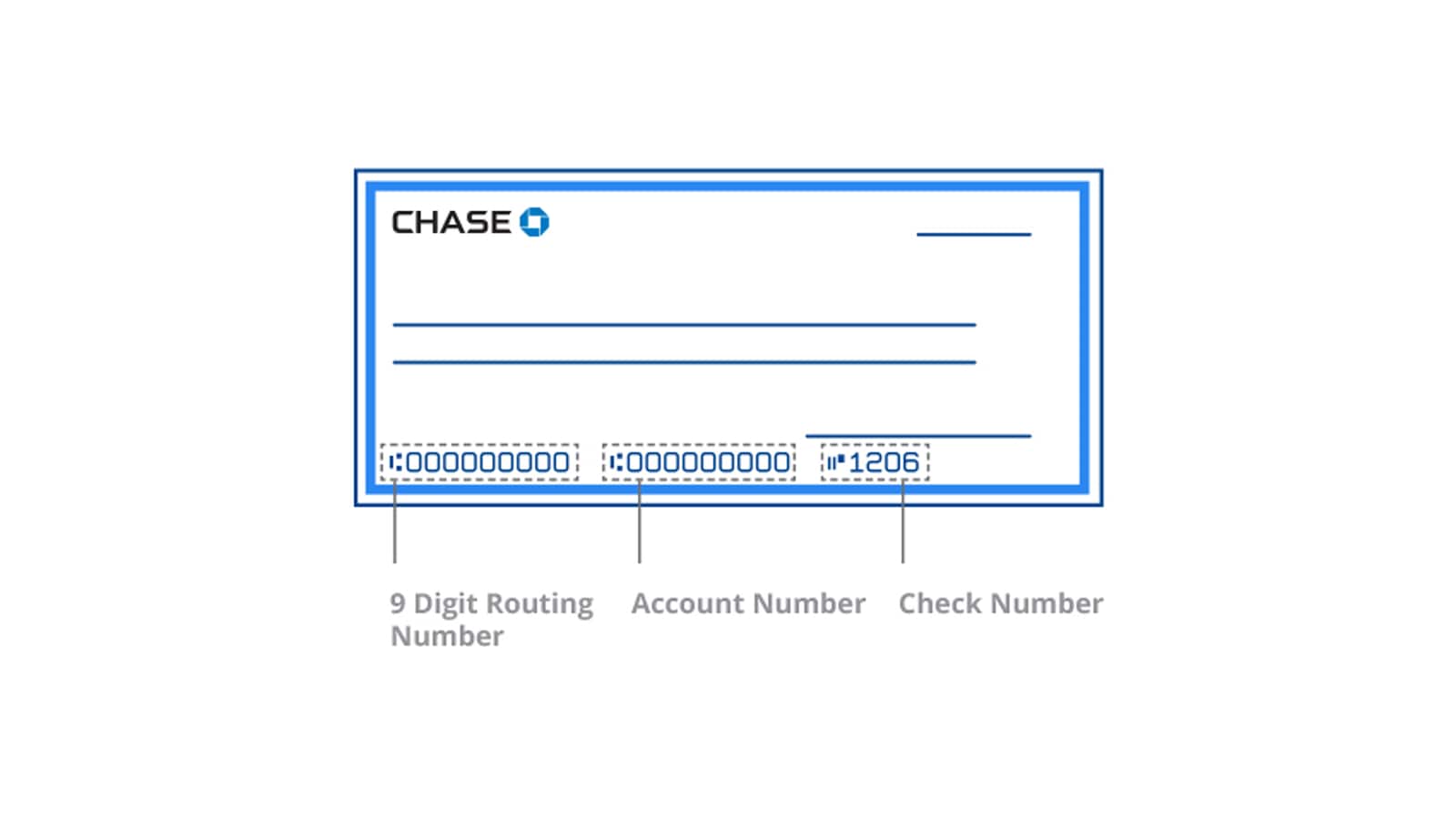
Most bank accounts require an initial deposit to activate them. The minimum amount varies by account type and can range from $0 (for some student accounts or promotions) to several hundred dollars. It’s wise to have these funds accessible, whether in cash, a check, or by knowing the routing and account number of an existing account for an electronic transfer.
Additional Information for Specific Accounts
If you’re opening a business account, you’ll need additional documentation, such as:
- Employer Identification Number (EIN)
- Business formation documents (e.g., Articles of Incorporation, LLC Operating Agreement)
- Business license
- Information on all beneficial owners and authorized signers.
For accounts opened on behalf of a minor, the minor’s SSN and a birth certificate might also be requested, in addition to the parent/guardian’s identification.
Step-by-Step Guide to Opening Your Account
Chase offers multiple convenient ways to open an account, catering to different preferences and needs.
Online Application: Convenience at Your Fingertips
Opening an account online is often the quickest and most popular method for individuals.
- Visit the Chase Website: Navigate to Chase.com and look for the “Open an Account” or “Banking” section.
- Select Your Account Type: Browse the available checking and savings accounts. Click on the one that best matches your needs. Pay close attention to monthly fees, minimum balance requirements, and any promotional offers.
- Initiate Application: Click “Open an Account Online” or a similar prompt.
- Provide Personal Information: You’ll be asked to input your full name, date of birth, SSN/ITIN, phone number, email address, and residential address.
- Review Terms and Conditions: Carefully read the account disclosures, fee schedules, and terms of service.
- Fund Your Account: You’ll typically be prompted to make your initial deposit. This can often be done via electronic transfer from another bank account, debit card, or credit card (though credit card funding for initial deposits might be treated as a cash advance).
- Submit Application: Once all information is entered and reviewed, submit your application.
- Verification: Chase may use third-party services to verify your identity electronically. In some cases, you might be asked to upload scans of your ID and proof of address.
In-Branch Application: Personalized Assistance
If you prefer face-to-face interaction, have complex questions, or need help with the application, visiting a Chase branch is an excellent option.
- Locate a Branch: Use the Chase website or app to find the nearest branch.
- Gather Documents: Bring all the essential documents mentioned earlier (ID, proof of address, SSN, initial deposit funds).
- Visit the Branch: You can often walk in, but scheduling an appointment beforehand can minimize wait times.
- Consult with a Banker: A Chase representative will guide you through the available account options, explain the features, and help you complete the application forms. This is a great opportunity to ask any specific questions you might have about fees, online banking, or linked services.
- Sign Documents: You will sign various forms, including the account agreement and signature cards.
- Make Initial Deposit: Provide your initial deposit to the banker.
What to Expect After Application
Once your application is submitted and approved:
- Instant Access (Online): For online applications, you might receive instant access to your account number and routing number, allowing you to set up direct deposits immediately.
- Welcome Kit: Chase will mail you a welcome kit containing important account information, including your debit card, PIN, and instructions on how to set up online banking. This typically arrives within 7-10 business days.
- Activate Debit Card: Follow the instructions to activate your debit card and set up your PIN (if not already done).
- Set Up Online Banking: Register for online banking and download the Chase Mobile® app to manage your account digitally.
Maximizing Your New Chase Account
Opening an account is just the beginning. To get the most out of your Chase banking relationship, proactive management and an understanding of its features are key.
Setting Up Online Banking and Mobile App
Chase’s digital platforms are robust and user-friendly. Immediately after opening your account, set up your online banking credentials and download the Chase Mobile® app. These tools allow you to:
- Monitor Transactions: Keep track of all deposits, withdrawals, and purchases.
- Pay Bills: Set up one-time or recurring bill payments.
- Transfer Funds: Easily move money between your Chase accounts or to external accounts.
- Mobile Deposit: Deposit checks using your smartphone camera.
- Zelle®: Send and receive money quickly with friends and family.
- Budgeting Tools: Utilize features that help categorize spending and track your budget.
- Security Alerts: Set up notifications for large transactions or unusual activity.
Understanding Fees and Account Requirements
Each Chase account comes with specific terms, including potential monthly service fees. However, Chase provides several ways to waive these fees:
- Direct Deposit: Often, a minimum monthly direct deposit (e.g., $500 or more) can waive the fee.
- Minimum Daily Balance: Maintaining a certain average daily balance across linked Chase accounts can also waive fees.
- Age-Related Waivers: Student accounts or accounts for seniors might have waived fees.
- Linked Accounts: Having specific linked Chase credit cards or investment accounts might qualify for fee waivers.
It’s crucial to read the account disclosures carefully to understand how to avoid fees, ensuring your account remains cost-effective.
Leveraging Chase’s Financial Tools and Services
Chase offers a comprehensive ecosystem of financial products. Once your checking or savings account is established, consider exploring:
- Credit Cards: Chase offers a wide array of credit cards, from cashback to travel rewards, often providing sign-up bonuses and ongoing benefits.
- Investment Services: Chase Private Client and J.P. Morgan Wealth Management provide investment advice and platforms for building wealth.
- Mortgages and Loans: Access to home loans, auto loans, and personal loans.
- Customer Support: Utilize Chase’s extensive customer service options, including phone support, secure messaging, and in-branch assistance.
Security Best Practices
Protecting your financial information is paramount.
- Strong Passwords: Use unique, complex passwords for your online banking and update them regularly.
- Monitor Transactions: Regularly review your account statements and transactions for any unauthorized activity.
- Fraud Alerts: Enroll in Chase’s fraud alert services, which notify you of suspicious activity.
- Two-Factor Authentication (2FA): Enable 2FA for an added layer of security when logging into your accounts.
- Beware of Scams: Be cautious of phishing emails, texts, or calls requesting personal information. Chase will never ask for your password or SSN via unsolicited communication.
Common Questions and Troubleshooting
Even with a clear guide, questions and challenges can arise. Here are answers to some frequently asked questions.
What if My Application is Denied?
If your application is denied, Chase will typically send you a letter explaining the reasons. Common reasons include:
- Negative Banking History: Issues reported through services like ChexSystems (which banks use to screen new applicants).
- Identity Verification Issues: Inability to verify your identity or address.
- Insufficient Information: Missing or incomplete details on the application.
- Previous Debts: Unpaid debts to another financial institution.
If denied, review the reason provided, address any issues (e.g., clear up old debts, provide missing documentation), and consider reapplying or exploring other banking options. Some institutions offer “second chance” checking accounts for those with past banking issues.
How Long Does it Take to Open an Account?
- Online: Often, online applications are approved instantly, and you receive your account number immediately. The debit card and welcome kit will arrive by mail within 7-10 business days.
- In-Branch: If all documents are in order, you can typically leave the branch with an activated account the same day, sometimes even a temporary debit card.
Can I Open an Account if I’m Not a US Citizen?
Yes, non-U.S. citizens can generally open a Chase bank account if they meet specific criteria. This typically includes:
- Having a valid passport and visa (if applicable).
- Providing a U.S. residential address.
- Possessing an Individual Taxpayer Identification Number (ITIN) or a Social Security Number (SSN) if eligible.
- Some branches may have specific requirements or preferences regarding documentation, so it’s advisable to call ahead.
Changing Account Types Later
Life circumstances change, and your banking needs may evolve. Chase generally allows you to upgrade or downgrade your checking or savings account type. You can usually initiate this by contacting customer service or visiting a branch. For example, if your direct deposit frequency increases or your balance grows significantly, you might upgrade to an account with more premium features or better fee waiver options.
Opening a Chase bank account is a straightforward process when you’re prepared. By understanding your needs, gathering the necessary documents, and following the steps outlined above, you can confidently establish a secure and convenient foundation for managing your personal finances with one of the nation’s leading banks.
aViewFromTheCave is a participant in the Amazon Services LLC Associates Program, an affiliate advertising program designed to provide a means for sites to earn advertising fees by advertising and linking to Amazon.com. Amazon, the Amazon logo, AmazonSupply, and the AmazonSupply logo are trademarks of Amazon.com, Inc. or its affiliates. As an Amazon Associate we earn affiliate commissions from qualifying purchases.