
In an increasingly digital financial landscape, peer-to-peer payment platforms like Venmo have become indispensable tools for managing everyday transactions. From splitting dinner bills with friends to paying rent or even receiving payments for freelance work, Venmo simplifies the exchange of funds. However, the ease and speed of these transactions can sometimes lead users to overlook a crucial aspect of sound financial management: maintaining comprehensive records. Accessing your Venmo statements is not merely a technicality; it’s a fundamental practice that underpins effective budgeting, meticulous tax preparation, and robust financial oversight.
This guide delves into the significance of Venmo statements within the broader context of personal and business finance, providing a detailed walkthrough on how to retrieve them. We’ll explore why these documents are invaluable for everyone from individual users tracking their spending to small business owners managing their cash flow. By understanding the ‘how’ and, more importantly, the ‘why,’ you can transform a simple payment app into a powerful financial management tool.
Understanding the Importance of Venmo Statements for Financial Management
While Venmo transactions often feel casual, the cumulative impact of these movements of money can significantly affect your financial health. Statements provide a structured, chronological record that is essential for a multitude of financial purposes, transitioning your understanding from anecdotal spending to concrete data.
Tracking Personal Expenses and Income
One of the most immediate benefits of accessing your Venmo statements is the ability to track your personal expenses and, for those who receive payments, their income. In an era where subscription services and impulsive online purchases can quickly erode a budget, a detailed transaction history from Venmo offers clarity. It helps you categorize spending, identify areas of overspending, and understand where your money is truly going. For individuals who use Venmo to receive payments for side gigs or reimbursements, these statements also serve as a vital record of incoming funds, contributing to a holistic view of personal cash flow. Without these statements, a significant portion of your financial activity might remain unaccounted for, creating blind spots in your personal finance management.
Simplifying Tax Preparation
Perhaps one of the most compelling reasons to regularly pull your Venmo statements relates to tax season. While Venmo is primarily known for personal transactions, it also facilitates payments that can have tax implications. Freelancers, gig workers, and small business owners often receive income via Venmo, which must be reported. Even personal transactions, if they involve significant reimbursements or gifts, might warrant documentation. Furthermore, new IRS regulations require Venmo and other third-party payment processors to report payments for goods and services totaling over $600 in a calendar year using Form 1099-K. Having easily accessible statements makes the process of reconciling income, identifying taxable revenue, and providing necessary documentation to your accountant or tax software significantly smoother. It transforms a potentially complex and stressful task into a manageable data retrieval exercise, ensuring compliance and accuracy.
Budgeting and Financial Planning
Effective budgeting is the cornerstone of financial stability, and Venmo statements are an invaluable asset in this endeavor. By reviewing your transaction history, you can gain insights into your spending habits over specific periods. This data allows you to create more realistic budgets, allocate funds more effectively, and set achievable financial goals. For instance, if your statements reveal a disproportionate amount spent on dining out or entertainment, you can consciously adjust your budget in those categories. For long-term financial planning, understanding consistent spending patterns through your statements can inform decisions about savings goals, investment strategies, and debt repayment plans. They provide the empirical evidence needed to move beyond guesswork and establish data-driven financial strategies.
Dispute Resolution and Record-Keeping
Beyond proactive financial management, Venmo statements serve a critical reactive function: dispute resolution and general record-keeping. In the event of an unauthorized transaction, a disagreement over a payment amount, or a need to prove a payment was made or received, your statements are your primary line of defense. They offer concrete proof that can be presented to Venmo support, banks, or even legal entities if necessary. For significant transactions, having a clear digital trail reinforces financial security and peace of mind. Moreover, simply maintaining organized financial records is a best practice, ensuring you have a complete history of your financial interactions, which can be invaluable for personal audits, loan applications, or even estate planning.
Step-by-Step Guide to Accessing Your Venmo Statements
Retrieving your Venmo statements is a straightforward process, accessible through both the mobile app and the Venmo website. The platform is designed to make this essential financial record easily available, catering to different user preferences and needs.
Via the Venmo Mobile App
For most users, the Venmo mobile app is the primary interface for managing transactions. Accessing your statements through the app is convenient and quick:
- Open the Venmo App: Launch the Venmo application on your smartphone or tablet.
- Navigate to the ‘Me’ Tab: Tap on the single person icon, usually located at the bottom right of the screen. This is your personal profile page.
- Access Settings: Tap the ‘Settings’ gear icon, typically found in the top right corner of the ‘Me’ tab.
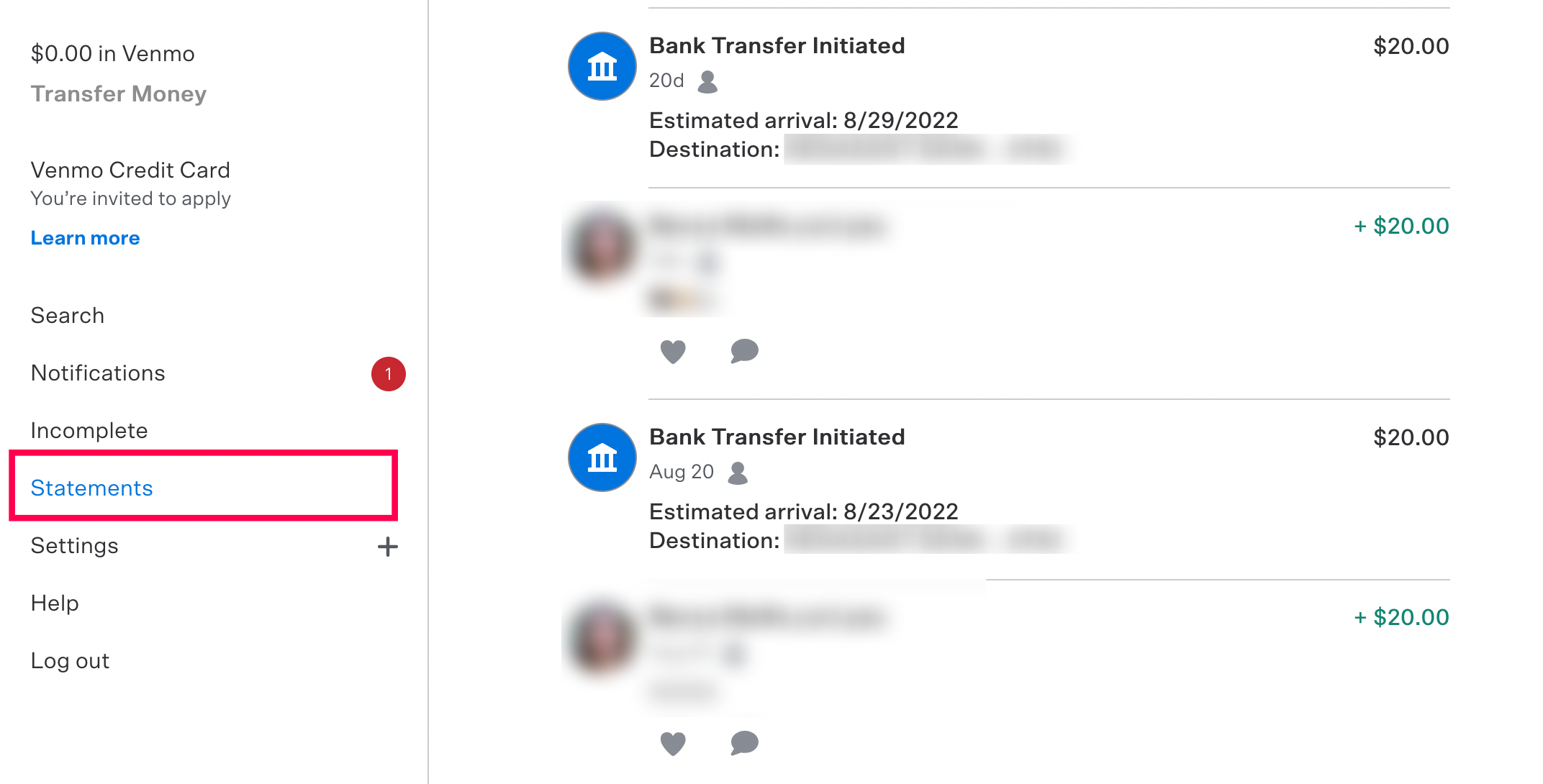
- Find ‘Statements & Taxes’: Scroll down within the settings menu until you locate “Statements & Taxes.” Tap on this option.
- Select ‘Monthly Statements’ or ‘Annual Statements’: Within “Statements & Taxes,” you’ll see options to view different types of statements. “Monthly Statements” allow you to download a PDF of your transactions for a specific month. “Annual Statements” will provide a summary for the entire year, which is particularly useful for tax purposes.
- Choose Your Desired Period: If you select “Monthly Statements,” you’ll be prompted to choose the specific month and year. For “Annual Statements,” you’ll select the relevant year.
- Generate and Download: After selecting the period, Venmo will generate a PDF document. You’ll typically have the option to view, share, or download this PDF to your device. Ensure you save it in a secure, organized location for future reference.
Through the Venmo Website
While the app is convenient, accessing Venmo statements via a web browser on a computer offers a broader view and often facilitates easier downloading and saving, especially for multiple periods.
- Log In to Your Venmo Account: Open a web browser and go to venmo.com. Log in using your credentials.
- Navigate to ‘Statements & Taxes’: Once logged in, click on your profile picture or name, typically located in the top right corner. From the dropdown menu, select “Statements & Taxes.”
- Choose Statement Type: Similar to the app, you’ll find options for “Monthly Statements” and “Annual Statements” (which may also be referred to as “Transaction History”).
- Specify Date Range: For monthly statements, select the desired month and year. For a comprehensive transaction history or annual statement, you might be able to specify a custom date range to capture all transactions within a particular fiscal year or another period of interest.
- Generate and Download: Click the “Download” or “Generate Statement” button. Venmo will typically provide the statement as a CSV (Comma Separated Values) file or a PDF. A CSV file is particularly useful if you wish to import your transaction data into a spreadsheet program for detailed analysis or categorization. Save the file to your computer.
Customizing Your Statement Period
Both the app and website generally allow you to select specific months or years. For more granular control or for periods that don’t align with calendar months (e.g., a specific project duration), the website often offers more flexibility to define a custom date range for your transaction history. This feature is particularly useful for tracking spending related to a specific event, a quarter, or a unique project that spans across different months. Always double-check the selected date range to ensure your statement encompasses all the transactions you intend to review.
Beyond Personal Use: Venmo Statements for Small Businesses and Freelancers

While Venmo started as a peer-to-peer payment app for friends, its widespread adoption has extended its utility into the realm of small businesses and freelance work. For these users, Venmo statements transcend simple record-keeping; they become integral to financial health and compliance.
Segregating Personal vs. Business Transactions
One of the foundational principles of sound business finance is the strict separation of personal and business finances. While it’s advisable for businesses to use a dedicated business Venmo profile (or other business payment solutions), the reality for many freelancers and small businesses, especially in their nascent stages, is that some business transactions might flow through a personal Venmo account. In such scenarios, Venmo statements become crucial for meticulously identifying and segregating business-related income and expenses from personal ones. This allows business owners to accurately calculate profits, track deductible expenses, and prevent commingling funds, which can complicate tax filing and obscure the true financial performance of the business.
Streamlining Business Expense Tracking
For small businesses and freelancers, every expense counts. Venmo statements provide a digital paper trail for payments made to vendors, contractors, or for specific business purchases. Whether it’s paying a graphic designer, reimbursing an employee for office supplies, or splitting the cost of a business lunch, these transactions are captured on your statement. This streamlined tracking helps in categorizing expenses for tax deductions, optimizing operational costs, and gaining a clearer picture of where business capital is being allocated. Instead of relying on manual receipts, which can be easily lost, the digital record from Venmo statements offers a robust and reliable system for expense management.
Facilitating Bookkeeping and Audits
Accurate bookkeeping is essential for any business, regardless of size. Venmo statements are a direct input into a business’s accounting system. Bookkeepers and accountants can use these statements to reconcile transactions, verify entries, and ensure the accuracy of financial records. In the unfortunate event of an audit, having comprehensive Venmo statements readily available can significantly ease the process, providing concrete evidence for all transactions related to income and expenses. This proactive approach to record-keeping not only ensures compliance but also instills confidence in the financial integrity of the business, making it easier to secure loans, attract investors, or simply monitor growth.
Leveraging Venmo Statement Data for Deeper Financial Insights
Simply downloading a statement is the first step; the real value lies in analyzing the data it contains. Venmo statements, particularly when downloaded as CSV files, can be powerful tools for gaining deeper financial insights that inform smarter decision-making.
Identifying Spending Patterns
Analyzing your Venmo statement over several months can reveal recurring spending patterns that you might not otherwise notice. Are you consistently spending a significant amount on certain categories like dining out, entertainment, or specific retail outlets? By visualizing this data, you can identify areas where you might be overspending compared to your budget or financial goals. This insight can empower you to make conscious adjustments, such as setting limits for discretionary spending or seeking more cost-effective alternatives. For businesses, identifying spending patterns can highlight areas of inefficiency or unexpected operational costs that need addressing.
Optimizing Cash Flow
For individuals, understanding when money is coming in and going out via Venmo can help optimize personal cash flow. If you consistently receive payments around a certain time of the month, you can plan your expenses accordingly. For businesses, especially those with variable income streams, analyzing Venmo statements can provide a snapshot of liquidity. It helps in forecasting future cash positions, ensuring there are sufficient funds to cover upcoming obligations, and making informed decisions about investments or expenditures. This proactive approach to cash flow management can prevent liquidity crises and promote financial stability.
Enhancing Financial Security
Regularly reviewing your Venmo statements is a crucial aspect of financial security. It allows you to quickly spot any unauthorized or erroneous transactions. Early detection of suspicious activity means you can report it to Venmo and your financial institution promptly, potentially preventing significant financial loss. This practice acts as an additional layer of defense against fraud and errors, reinforcing the overall security posture of your financial accounts. Beyond direct fraud, understanding your transaction history helps you identify and rectify mispayments or misunderstandings with other parties, thereby maintaining healthy financial relationships.
Troubleshooting Common Issues When Retrieving Statements
While the process of obtaining Venmo statements is generally smooth, users may occasionally encounter minor hurdles. Knowing how to address these common issues can save time and frustration.
Incorrect Date Ranges or Missing Transactions
One frequent issue is generating a statement that doesn’t seem to include all expected transactions or covers an incorrect date range. This often stems from an error in selecting the start and end dates. Always double-check the chosen period before generating the statement. If you’ve requested a specific month, ensure that month’s full range is covered. For annual statements, confirm the correct year is selected. If transactions are still missing after verifying the date range, consider the possibility that some transactions might have occurred outside of Venmo (e.g., direct bank transfers, credit card payments) or were processed under a different payment platform. It’s also worth noting that Venmo business profiles might have separate statement options for goods and services versus personal transactions.
App or Website Glitches
Occasionally, technical glitches with the Venmo app or website can prevent statements from loading or downloading correctly. If you experience an issue, try the following:
- Refresh: Reload the webpage or restart the app.
- Clear Cache: Clear your browser’s cache and cookies or the app’s cache (if available in your device settings).
- Try a Different Browser/Device: If you’re on the website, try a different web browser. If you’re on the app, try accessing the statements via the website on a computer.
- Update App: Ensure your Venmo app is updated to the latest version.
- Check Internet Connection: A stable internet connection is crucial for seamless data retrieval.
If the problem persists, it might indicate a broader issue with Venmo’s servers, in which case waiting a short period and trying again might resolve it.
Contacting Venmo Support
If you’ve exhausted troubleshooting steps and are still unable to retrieve your statements, or if you suspect a more serious issue like unauthorized activity, contacting Venmo’s customer support is the next logical step. Venmo provides various channels for support, including an in-app help center, email support, and sometimes phone support for urgent issues. When contacting them, be prepared to provide details such as your account information, the specific dates for which you need statements, and a clear description of the problem you’re encountering. Their support team can often assist with generating statements directly or troubleshooting persistent access issues, ensuring you gain access to your vital financial records.
In conclusion, accessing and understanding your Venmo statements is far more than a technical task; it’s a critical component of robust financial management. Whether you’re tracking personal spending, preparing for taxes, managing a small business, or simply striving for greater financial clarity, these digital records provide the data and transparency needed to make informed decisions and maintain fiscal health. By following the outlined steps and leveraging the insights gleaned from your statements, you can transform a convenient payment app into a powerful ally in your financial journey.
aViewFromTheCave is a participant in the Amazon Services LLC Associates Program, an affiliate advertising program designed to provide a means for sites to earn advertising fees by advertising and linking to Amazon.com. Amazon, the Amazon logo, AmazonSupply, and the AmazonSupply logo are trademarks of Amazon.com, Inc. or its affiliates. As an Amazon Associate we earn affiliate commissions from qualifying purchases.