
In an increasingly digital world, the way we manage and transfer money has evolved dramatically. Among the myriad of digital payment platforms, Venmo stands out as a household name, synonymous with quick, social, and convenient money transfers. For many, it’s become an indispensable tool for splitting dinner bills, paying rent to roommates, or even supporting small businesses. But for those new to the platform, or looking to maximize their usage, the question remains: “How do you pay with Venmo?” This article delves into the technological intricacies and user-friendly functionalities of Venmo, offering a comprehensive guide to mastering digital payments, securely and efficiently. We will explore everything from initial setup to advanced features, ensuring you can navigate the Venmo ecosystem with confidence and expertise.
The Venmo Foundation: Setting Up for Seamless Payments
Before you can send or receive money, establishing a robust Venmo profile is paramount. This initial setup is designed to be intuitive, guiding users through the necessary steps to create a secure and functional digital wallet. Understanding each component of this foundation is key to a smooth payment experience.
Account Creation and Verification
The journey begins by downloading the Venmo app, available on both iOS and Android platforms, or by visiting venmo.com. The registration process requires basic personal information: your name, email address, phone number, and a strong password. Critically, Venmo also requires users to verify their identity. This typically involves providing your date of birth and the last four digits of your Social Security Number (SSN). This verification step is not merely a formality; it’s a crucial security measure designed to prevent fraud, comply with financial regulations, and ensure that funds are being handled by legitimate users. For enhanced security, enabling multi-factor authentication (MFA) is highly recommended, adding an extra layer of protection to your account against unauthorized access.
Connecting Your Funding Sources
Once your account is active and verified, the next critical step is linking a funding source. This is how money gets into and out of your Venmo balance. The most common and recommended method is linking a bank account via instant verification (often through services like Plaid), which securely connects your bank credentials without sharing them directly with Venmo. Alternatively, you can manually enter your bank’s routing and account numbers, which will require small test deposits to confirm ownership.
Beyond bank accounts, you can also link debit cards and credit cards. Debit cards often allow instant transfers with no fees for standard payments, making them a popular choice. Credit cards, while offering convenience and potential rewards, typically incur a standard 3% fee when used to send money to friends and family. However, paying eligible businesses directly with a credit card usually does not incur this fee. Understanding the implications of each funding source regarding fees and transfer speeds is essential for making informed payment decisions.
Navigating Your Venmo Balance and Profile
Your Venmo account comes with an integrated balance, which can hold funds received from others or money added from a linked bank account. Funds in your Venmo balance can be used to make payments, or they can be transferred back to your linked bank account. Standard bank transfers are free but can take 1-3 business days. For those needing immediate access to funds, Venmo offers an “Instant Transfer” option for a small fee (typically 1.75%, with a minimum fee of $0.25 and a maximum fee of $25), which deposits money into your linked debit card or eligible bank account within minutes.
Your profile page serves as your central hub, displaying your transaction history, allowing you to manage funding methods, update privacy settings, and access support. Customizing your profile picture and username can also enhance the social aspect of Venmo, making it easier for friends to find and identify you. Regularly reviewing your transaction history is a good practice for financial oversight and detecting any unauthorized activity.
Mastering Payments: Sending and Receiving Money on Venmo
At its core, Venmo is about the seamless transfer of funds. Whether you’re sending money to a friend, paying a business, or requesting your share of a bill, the platform is designed for intuitive interaction. Understanding the nuances of each transaction type is key to leveraging Venmo’s full potential.
Step-by-Step: Sending Payments to Friends
Sending money to another Venmo user is remarkably straightforward. From the app’s home screen, tap the “Pay & Request” button (often represented by a pencil and paper icon or a dollar sign with a plus). You can then search for the recipient by their username, phone number, or email address. If you’ve transacted with them before, they’ll likely appear in your recent contacts.
Once you’ve selected the recipient, enter the amount you wish to send. This is followed by a crucial step: adding a note or description for the payment. Venmo is famously social, and these notes are often visible to your friends (or even public, depending on your privacy settings). Be descriptive but mindful of what you share. Below the note, you’ll select your preferred funding source. As mentioned, using a Venmo balance, bank account, or debit card for person-to-person payments typically incurs no fees, while credit cards carry a 3% fee. Review the details carefully, then tap “Pay.” The money is usually transferred instantly, and both parties receive notifications.
Transacting with Businesses and Merchants
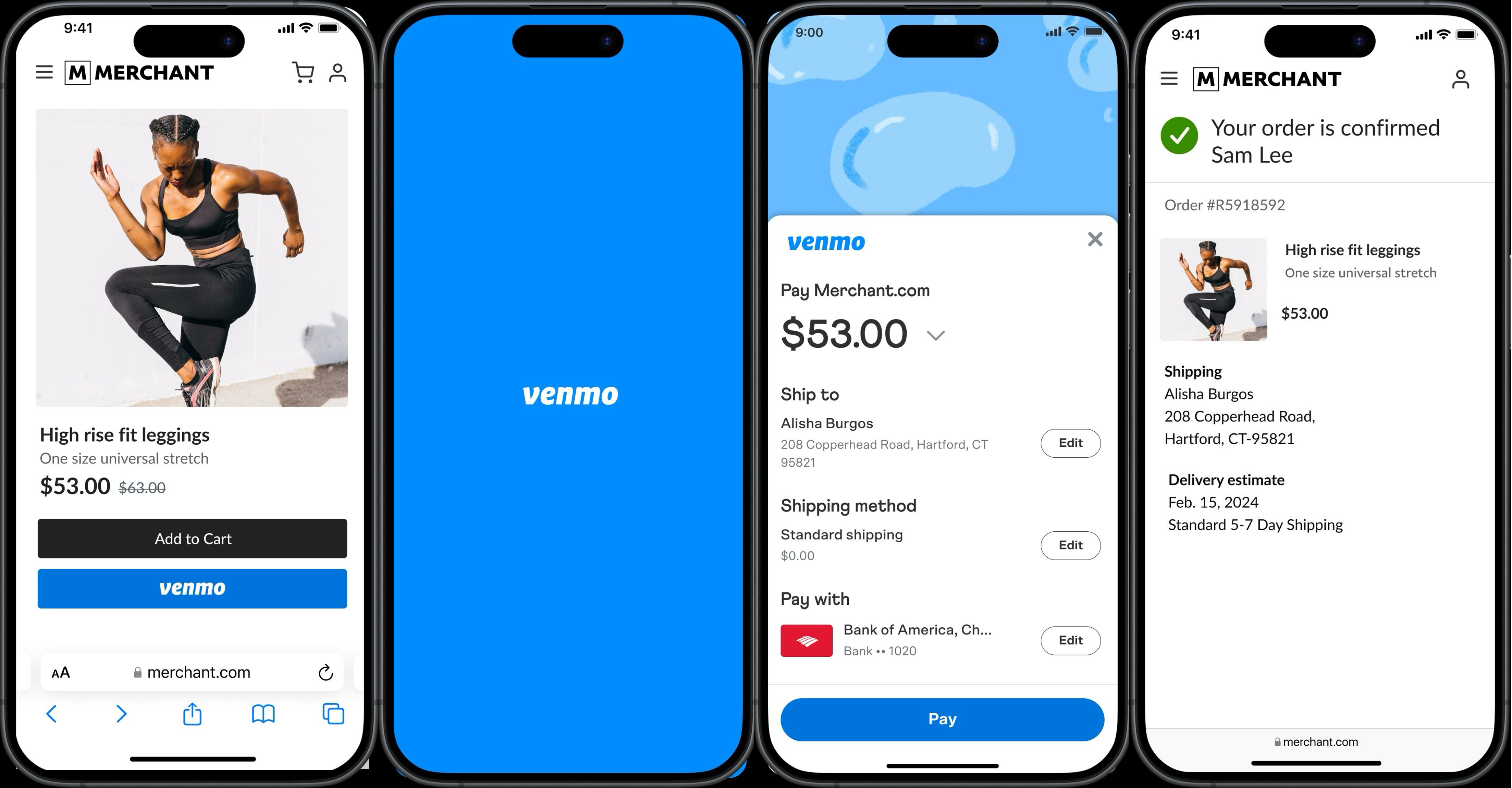
Venmo has expanded beyond peer-to-peer payments to become a viable option for paying eligible businesses and merchants. Many online retailers and brick-and-mortar stores now accept Venmo as a payment method, particularly popular among smaller businesses and those catering to a younger demographic.
When shopping online, you might see “Pay with Venmo” as an option at checkout. Selecting this will typically redirect you to the Venmo app to authorize the payment. In physical stores, merchants may display a QR code or allow you to pay directly through their point-of-sale system if they’ve integrated Venmo. The process often involves scanning a QR code with the Venmo app’s built-in scanner, entering the amount, and confirming the payment. Payments to businesses are typically free for the sender, regardless of the funding source (though some specific business transactions might have different fee structures, always check the details). This expansion into merchant payments significantly broadens Venmo’s utility, making it a versatile tool for daily spending.
The Art of Requesting Money and Splitting Bills
Venmo isn’t just for sending money; it’s equally effective for getting paid. The “Request” feature is invaluable for ensuring you get reimbursed for shared expenses. The process mirrors sending money: tap “Pay & Request,” find the person or people you’re requesting from, enter the amount, and add a note. Hit “Request,” and they’ll receive a notification. Once they pay, the funds will appear in your Venmo balance.

For group expenses, Venmo’s “Split” feature (found within the “Pay & Request” interface or after a transaction) is a lifesaver. You can enter the total amount of a bill, select the friends you want to split it with, and Venmo will automatically calculate each person’s share. You can even adjust individual amounts if someone owes more or less. This eliminates awkward conversations and manual calculations, making it easy to manage shared costs for dinners, trips, or household utilities.
Expanding Your Payment Horizons: Venmo’s Diverse Features
Venmo continually evolves, introducing new features that extend its utility beyond basic peer-to-peer transfers. These additions cater to a broader range of financial needs, cementing Venmo’s position as a comprehensive digital payment platform.
The Venmo Debit and Credit Cards
For users who want to leverage their Venmo balance for everyday spending without constant transfers to a bank account, Venmo offers both a debit card and a credit card. The Venmo Debit Card, issued by Mastercard, is directly linked to your Venmo balance. It functions like any standard debit card, allowing you to make purchases anywhere Mastercard is accepted, and withdraw cash from ATMs (with associated fees). Any money received on Venmo is instantly accessible via the debit card, providing a seamless way to spend funds.
The Venmo Credit Card, issued by Synchrony Bank and powered by Visa, is a more traditional credit card that integrates with your Venmo experience. It offers dynamic cash back rewards based on your top spending categories, and you can manage your card, view transactions, and make payments directly within the Venmo app. Rewards are automatically loaded back into your Venmo balance, making it a convenient option for maximizing savings while still engaging with the Venmo ecosystem. These cards extend Venmo’s reach from a peer-to-peer app to a more holistic payment solution.
In-Store and QR Code Payments
Beyond online checkouts, Venmo has made significant strides in facilitating in-person transactions. Many businesses, from food trucks to retail stores, now utilize QR codes generated directly from the Venmo app or printed signage. To pay, simply open the Venmo app, tap the scan icon (usually in the top right corner), and point your phone at the merchant’s QR code. The app will automatically populate the business name, allowing you to enter the amount and confirm the payment. This method offers a fast, touchless, and secure way to complete transactions without needing to pull out a physical card or cash.
Furthermore, Venmo has integrated with certain point-of-sale systems, allowing users to pay directly through the merchant’s terminal using a generated QR code or a unique payment code. This enhances the flexibility and acceptance of Venmo in various retail environments, bridging the gap between digital wallets and traditional shopping experiences.
Direct Deposit and Cash a Check
Expanding its financial utility, Venmo now offers features that border on traditional banking services. With Direct Deposit, users can set up their Venmo account to receive their paycheck or government payments directly. Venmo provides unique routing and account numbers, allowing employers to deposit funds straight into your Venmo balance. This is particularly beneficial for those who primarily use Venmo for transactions or prefer to manage their funds within the app before spending or transferring.
The Cash a Check feature (powered by First Century Bank, N.A. and Ingo Money) allows eligible users to photograph and deposit checks directly into their Venmo balance. While there’s typically a fee for instant access to funds (1% for payroll and government checks with a pre-printed signature, 5% for all other checks), it offers a convenient way to digitize physical checks without needing a traditional bank account or ATM visit. These features underscore Venmo’s ambition to be more than just a payment app, evolving into a more comprehensive financial tool.
Securing Your Transactions: Privacy and Safety on Venmo
While Venmo offers unparalleled convenience, understanding and utilizing its security and privacy features is paramount to protecting your financial information. Digital security is a shared responsibility, and Venmo provides the tools for users to safeguard their transactions.
Understanding Privacy Settings
Venmo’s social feed, which displays anonymized transactions by default, is a core feature but also a critical privacy consideration. By default, most person-to-person transactions are set to “Friends” visibility, meaning only your Venmo friends can see them. However, users can also choose “Public” (visible to everyone) or “Private” (visible only to the sender and recipient). It is crucial to review and adjust these settings according to your comfort level. For sensitive transactions, always opt for “Private.” You can also set a default privacy preference for all future payments, which can be overridden for individual transactions. Regularly auditing your privacy settings ensures your financial interactions remain as discreet as you desire.
Safeguarding Your Account from Fraud
The digital landscape, unfortunately, is also a hunting ground for fraudsters. Venmo, like any financial platform, can be a target. It’s vital to be vigilant against phishing attempts, which are fraudulent emails or messages designed to trick you into revealing your login credentials. Always verify the sender of any communication claiming to be from Venmo and never click on suspicious links or provide your password outside the official app or website.
Another common scam involves “overpayment” or “accidental payment” schemes, where a scammer sends more money than requested, then asks for the difference back. Often, the initial payment is fraudulent or will later be reversed, leaving the victim out of pocket for the amount they sent back. Always be suspicious of such requests. Furthermore, only send money to people you know and trust. Venmo is primarily designed for transactions between friends and family, and its buyer protection policies are limited for transactions outside of eligible businesses.
Best Practices for Secure Venmo Usage
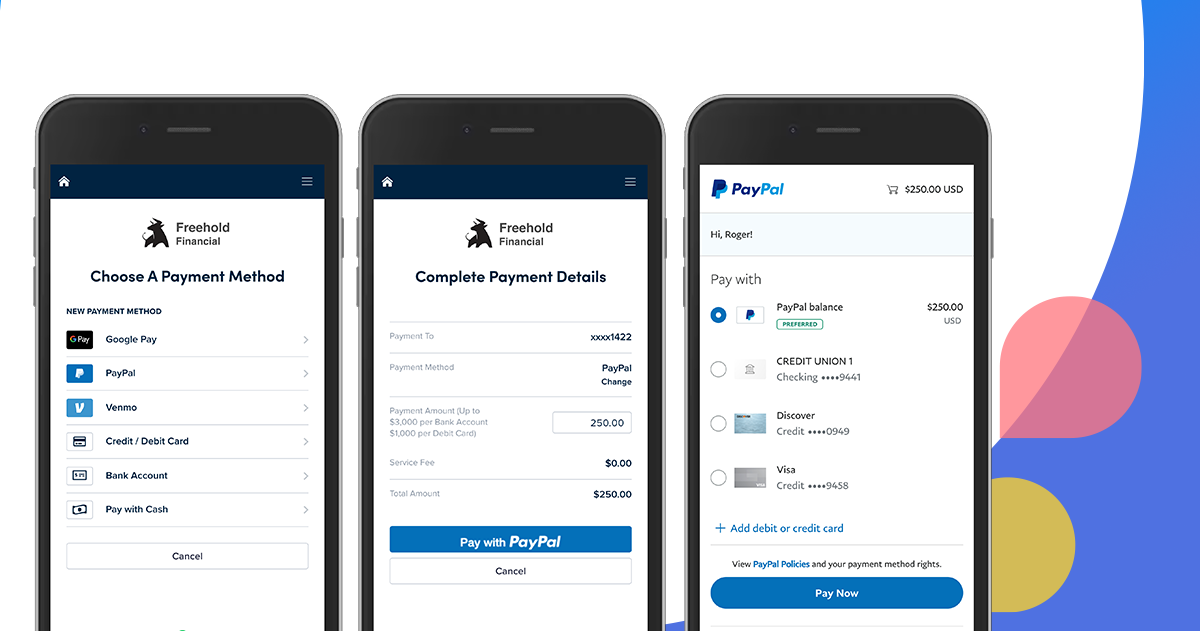
Adopting a few best practices can significantly enhance your Venmo security. Firstly, use a strong, unique password and enable multi-factor authentication (MFA). MFA adds an extra layer of security by requiring a second verification step, like a code sent to your phone, in addition to your password. Secondly, link a bank account or debit card for primary funding rather than relying solely on credit cards, especially for person-to-person payments, to avoid unnecessary fees and potential credit card fraud liability issues.
Regularly review your transaction history for any unfamiliar activity. If you suspect unauthorized access or fraudulent transactions, immediately change your password and contact Venmo support. Be wary of public Wi-Fi networks when conducting financial transactions, as they can be less secure. Finally, keep your Venmo app updated to ensure you have the latest security patches and features. By taking these proactive steps, you can enjoy the convenience of Venmo with peace of mind.
Venmo has undoubtedly revolutionized personal payments, making financial interactions more accessible, social, and streamlined. From splitting a lunch bill to receiving your paycheck, the platform offers a versatile suite of features designed for the modern digital consumer. By understanding its foundational setup, mastering its payment mechanisms, exploring its diverse functionalities, and diligently implementing security best practices, users can fully harness the power of Venmo. It’s more than just an app; it’s a pivotal technology shaping the future of everyday transactions, empowering users with instant control over their digital finances.
aViewFromTheCave is a participant in the Amazon Services LLC Associates Program, an affiliate advertising program designed to provide a means for sites to earn advertising fees by advertising and linking to Amazon.com. Amazon, the Amazon logo, AmazonSupply, and the AmazonSupply logo are trademarks of Amazon.com, Inc. or its affiliates. As an Amazon Associate we earn affiliate commissions from qualifying purchases.