
In an increasingly digital financial landscape, tools that simplify money management have become indispensable. Among these, Cash App stands out as a versatile platform, empowering millions to send, spend, save, and even invest directly from their smartphones. At the heart of its utility is the Cash App Card, a Visa debit card that seamlessly integrates with your Cash App balance, offering a tangible link to your digital funds. Understanding how to effectively add money to your Cash App card is fundamental to harnessing the full power of this financial tool, enabling everything from everyday purchases to managing specific budgets. This guide will walk you through the various methods of funding your Cash App card, delve into best practices, and offer insights into leveraging it for smarter personal finance.
Understanding the Cash App Card and Its Role in Personal Finance
Before diving into the mechanics of funding, it’s crucial to grasp what the Cash App Card represents and its significance within your financial ecosystem. It’s more than just a piece of plastic; it’s a gateway to your digital funds in the physical world.
What is the Cash App Card?
The Cash App Card is a customizable, free-to-order Visa debit card directly linked to your Cash App balance. Unlike traditional bank debit cards that draw from a checking account, the Cash App Card draws exclusively from the money you have available in your Cash App account. This means that if you have $100 in your Cash App balance, your Cash App Card has $100 available for spending. It functions exactly like any other Visa debit card, allowing you to make purchases online, in stores, and withdraw cash from ATMs (though ATM fees may apply).
Why Use the Cash App Card?
The appeal of the Cash App Card lies in its convenience and control. For many, it serves as an excellent tool for managing specific budgets, for those without traditional bank accounts, or as a secondary spending card. Its integration with the Cash App platform means you can monitor transactions, set spending limits, and even lock your card instantly from your phone. This level of immediate control over your funds can be incredibly beneficial for financial discipline and security. Furthermore, Cash App’s popular “Boosts” feature, which offers instant discounts at various merchants, adds a unique value proposition, directly saving you money on everyday spending.
The Interplay with Your Cash App Balance
It’s important to clarify that when we talk about “adding money to your Cash App card,” we are effectively talking about “adding money to your Cash App balance.” The card is simply the physical representation that allows you to access and spend those funds in places where Cash App itself isn’t directly accepted. Therefore, any funds you add to your Cash App account will immediately become available for use via your Cash App Card. This direct correlation simplifies the funding process, as there’s no separate step required to transfer funds from your Cash App balance to the card itself.
Direct Methods to Add Money to Your Cash App Card
Cash App offers several straightforward ways to fund your account, ensuring flexibility for various user needs. These methods range from digital transfers to physical cash deposits.
Linking an External Bank Account
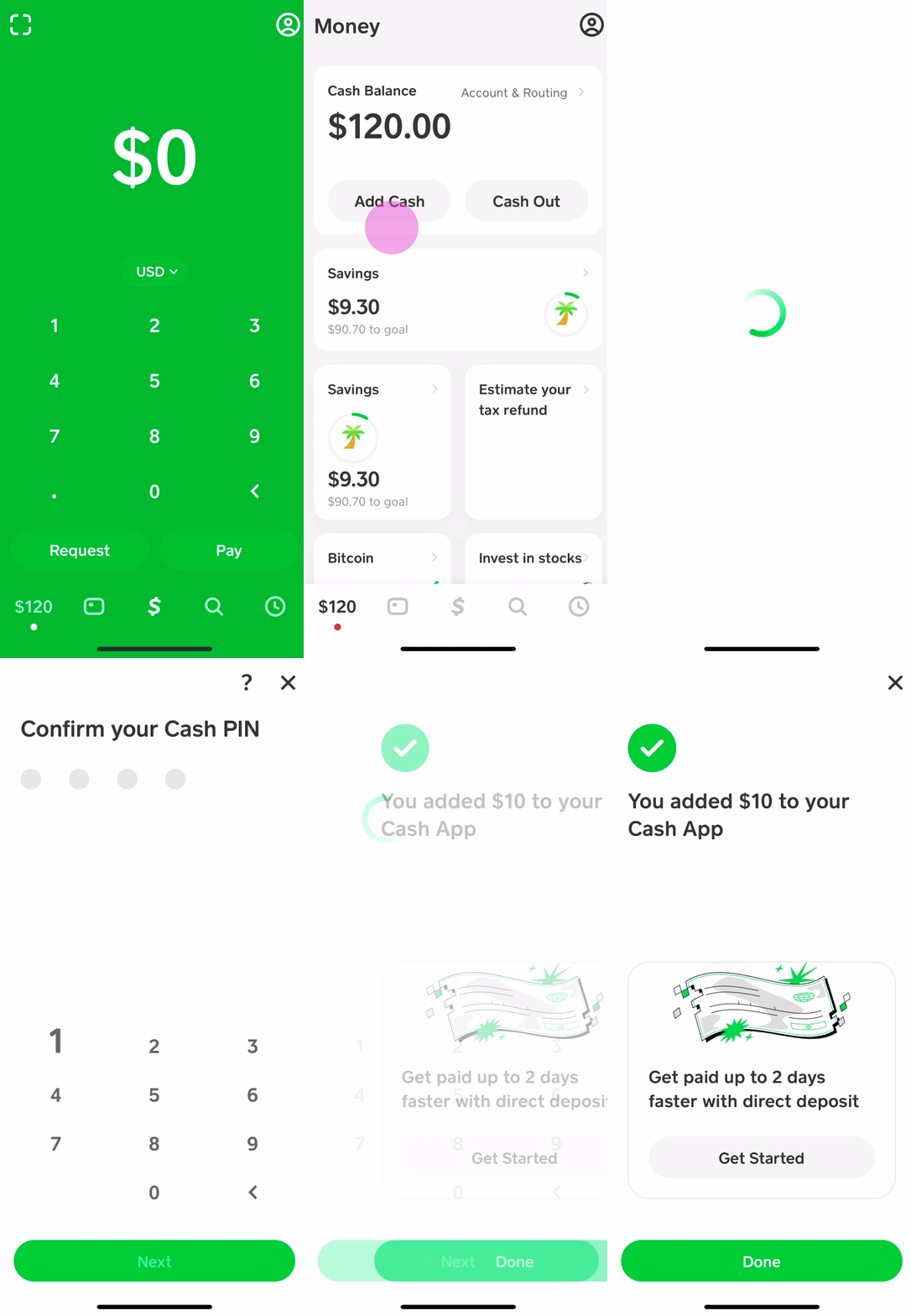
The most common and often preferred method for adding money to your Cash App balance is by linking an external bank account. This provides a direct digital pipeline between your traditional bank and your Cash App.
- Process:
- Open Cash App and tap the Banking tab (the house icon or dollar amount on your home screen).
- Select “Add Cash.”
- Enter the desired amount you wish to transfer.
- Tap “Add.”
- Confirm your transfer using your PIN or Touch ID.
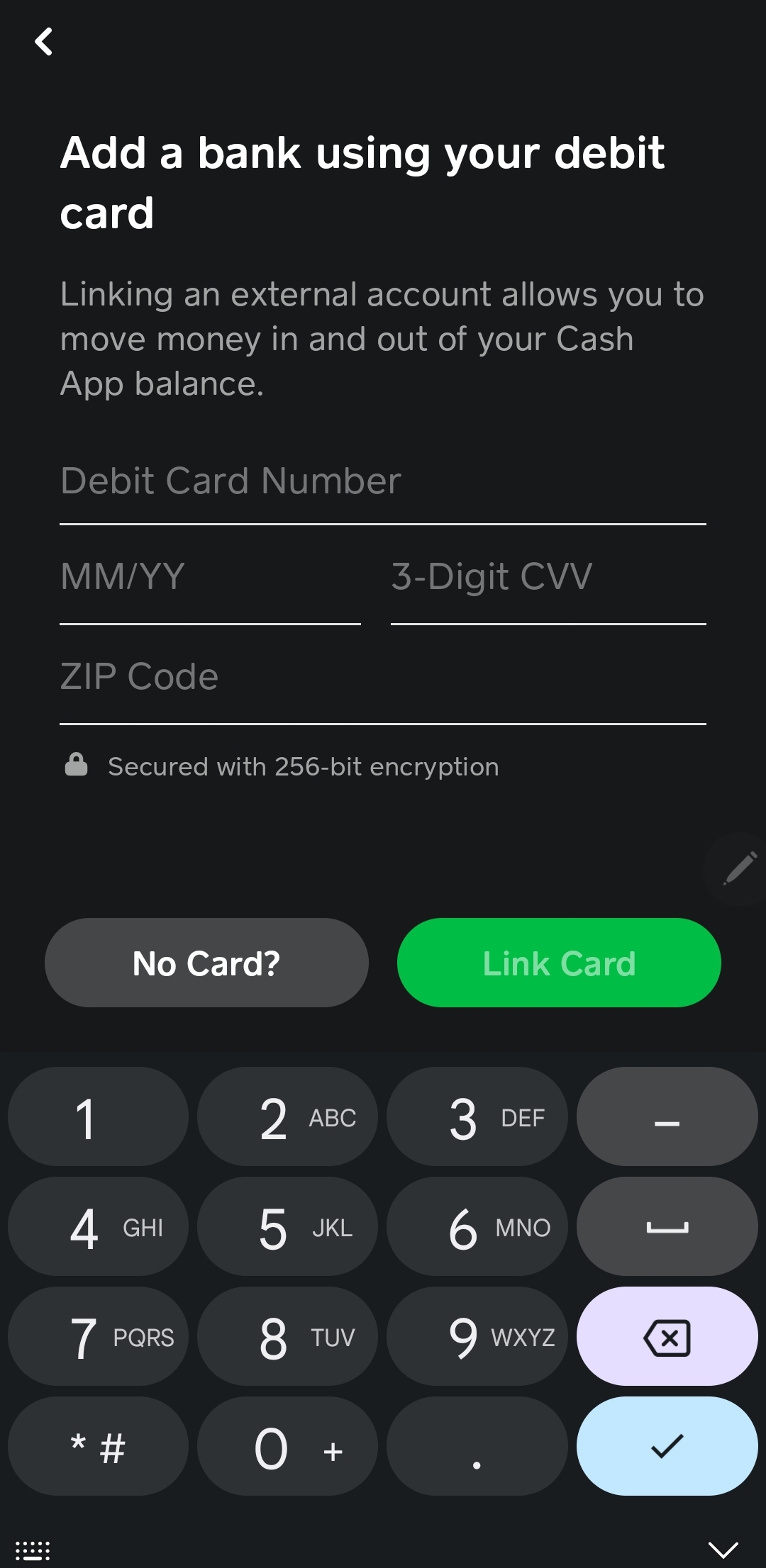
- Details: You’ll first need to link a bank account (and potentially a debit card) if you haven’t already. This usually involves entering your bank login credentials or manually inputting your account and routing numbers. Transfers from linked bank accounts are generally free, with standard deposits taking 1-3 business days. For those needing immediate access, Cash App offers an “Instant Deposit” option, which typically incurs a small fee (e.g., 0.5% – 1.75%) but makes funds available instantly.
Receiving Funds from Other Cash App Users
One of Cash App’s core functionalities is its peer-to-peer payment system. Receiving money from friends, family, or customers who also use Cash App is an immediate way to fund your balance.
- Process:
- Provide your unique $Cashtag (e.g., $YourName) or phone number/email associated with your account to the sender.
- The sender initiates a payment to you.
- Once sent, the funds immediately appear in your Cash App balance, ready for use with your card.
- Details: This method is instant and free for both sender and receiver. It’s ideal for splitting bills, receiving payments for small services, or getting money from someone quickly.
Using Direct Deposit
For a more automated and regular way to fund your Cash App card, setting up direct deposit for your paycheck or government benefits is an excellent option. This turns your Cash App into a primary account for managing your income.
- Process:
- In Cash App, navigate to the Banking tab.
- Tap on “Direct Deposit.”
- You’ll find your Cash App account number and routing number.
- Provide these details to your employer’s payroll department or the relevant government agency. They will typically require you to fill out a direct deposit form.
- Details: Direct deposits are free and can often arrive up to two days earlier than traditional bank deposits, a benefit touted by Cash App. This method is particularly useful for those who want to use Cash App as their primary banking solution or for budgeting specific income streams.
Depositing Paper Money at Retailers

For those who primarily deal with cash, Cash App facilitates physical cash deposits through participating retail stores. This bridges the gap between physical currency and your digital balance.
- Process:
- Open Cash App and tap the Banking tab.
- Scroll down and select “Paper Money.”
- Tap “Deposit Paper Money” and follow the prompts to find a nearby participating retailer (e.g., Walmart, Walgreens, Dollar General, 7-Eleven).
- At the checkout, tell the cashier you want to deposit cash to your Cash App. They will scan a barcode on your phone (generated within the app).
- Hand the cashier the cash amount you wish to deposit.
- Details: Funds are usually available in your Cash App balance immediately after the transaction is completed. There might be a small fee charged by the retailer for this service (e.g., $1-$4), and daily or weekly deposit limits typically apply (e.g., $500 per deposit, $1,000 per week). It’s always wise to check the current limits and fees within the app before heading to a store.
Best Practices and Troubleshooting for Adding Funds
While adding money to your Cash App card is generally straightforward, understanding best practices and common issues can enhance your experience and prevent potential frustrations.
Verifying Your Account
Account verification is paramount for unlocking full functionality and higher limits on Cash App. Unverified accounts often face lower sending and receiving limits, which can hinder your ability to add substantial funds.
- Importance: To verify your account, Cash App typically requires your full legal name, date of birth, and the last four digits of your Social Security Number (SSN). Sometimes, a full SSN or photo ID may be requested. This process complies with financial regulations (KYC – Know Your Customer) and helps secure your account against fraud. Verified accounts enjoy significantly higher limits for adding cash, sending money, and withdrawing funds.
Understanding Limits and Fees
Every financial service comes with limits and fee structures, and Cash App is no exception. Being aware of these details helps in planning your transactions.
- Limits: Cash App imposes limits on how much money you can add, send, and withdraw within specific timeframes. For example, unverified accounts might have a weekly limit of $250 for adding cash, while verified accounts can typically add up to $7,500 per week. Similarly, retail cash deposits often have their own daily and weekly limits. These limits are subject to change, so always check the “Limits” section within your app settings.
- Fees: While many services are free, be mindful of potential fees. Instant transfers from a linked bank account incur a small percentage fee. ATM withdrawals with your Cash App Card also typically come with a fee from Cash App, in addition to any fee charged by the ATM owner, unless you qualify for free ATM withdrawals (e.g., through direct deposit eligibility). Retail cash deposits may also carry a small convenience fee.
Common Issues and Solutions
Even with seamless technology, issues can arise. Knowing how to troubleshoot common problems can save you time and stress.
- Failed Deposits/Transfers: If a bank transfer fails, check your bank account for sufficient funds, ensure your linked bank account details are correct, and verify if your bank has any daily transaction limits. For retail cash deposits, ensure the barcode scanned correctly and the cashier processed it properly.
- Funds Not Appearing: Most funds should appear instantly. If not, wait a few minutes and refresh your app. If funds are still missing after an extended period, check your transaction history. If it indicates a successful transfer but the balance isn’t updated, or if there’s no record, contact Cash App support.
- Account Locked/Suspended: This can happen due to suspicious activity, multiple failed login attempts, or violations of Cash App’s terms of service. You’ll need to contact Cash App support directly to resolve this, providing any requested verification documents.
- Security Precautions: Always be wary of unsolicited messages or calls claiming to be from Cash App. Never share your login credentials, PIN, or full SSN with anyone via text or email. Enable two-factor authentication for added security.
Maximizing Your Cash App Card for Financial Management
Beyond just adding money, the Cash App Card can be a powerful tool for broader financial management. Integrating it thoughtfully into your money habits can yield significant benefits.
Budgeting with Cash App
The Cash App Card is an excellent instrument for specific budgeting strategies. You can load a set amount onto your Cash App for discretionary spending, groceries, or entertainment, effectively creating a “digital envelope.” This helps in keeping track of specific expenditures and prevents overspending from your primary bank account. Since all transactions are immediately visible in the app, you get a real-time overview of where your money is going.
Leveraging Boosts
Cash App’s “Boosts” feature is a unique differentiator that offers instant discounts at various merchants when you use your Cash App Card. These aren’t cash back that you receive later; they’re immediate deductions from your total purchase amount. Regularly checking and activating relevant Boosts can lead to tangible savings on your everyday spending, adding an unexpected financial perk to using your card.
Integrating with Other Financial Habits
While Cash App can serve as a primary financial tool for some, for others, it integrates seamlessly into a broader financial strategy. It can be used as a secondary card for online purchases, minimizing exposure of your main bank account details. Its direct deposit feature makes it convenient for managing side hustle income or specific allowances. For those interested in micro-investing, Cash App also offers the ability to buy fractional shares of stocks and Bitcoin, tying spending, saving, and investing into one accessible platform.
Conclusion
The Cash App Card is a remarkably versatile financial instrument that empowers users with control and convenience in managing their funds. Whether you’re linking a traditional bank account, receiving peer-to-peer payments, setting up direct deposit for your income, or converting physical cash at a retail store, Cash App provides a multitude of ways to keep your card funded and ready for use. By understanding these various methods, adhering to best practices regarding verification and limits, and leveraging the card’s unique features like Boosts, you can optimize your personal finance management. In an age where financial flexibility is key, mastering how to add money to your Cash App card is an essential skill for navigating the modern economic landscape with ease and confidence.
aViewFromTheCave is a participant in the Amazon Services LLC Associates Program, an affiliate advertising program designed to provide a means for sites to earn advertising fees by advertising and linking to Amazon.com. Amazon, the Amazon logo, AmazonSupply, and the AmazonSupply logo are trademarks of Amazon.com, Inc. or its affiliates. As an Amazon Associate we earn affiliate commissions from qualifying purchases.