
In an increasingly digital financial landscape, mobile payment applications like Cash App have become indispensable tools for managing money, sending funds, and making purchases. A key component of this ecosystem is the Cash App Card – a free, customizable Visa debit card that extends the utility of your digital Cash App balance into the physical world. For many, it bridges the gap between their virtual wallet and everyday transactions, offering convenience, security, and unique benefits. This comprehensive guide will walk you through the entire process of ordering your very own Cash App Card, from understanding its features to activation and optimal usage, all within the technological framework that defines modern financial apps.

Understanding the Cash App Card: A Digital Wallet’s Physical Extension
The Cash App Card is more than just a piece of plastic; it’s a gateway that unlocks a plethora of spending possibilities directly linked to your Cash App balance. Designed for seamless integration with your digital finances, it offers a robust solution for individuals seeking a straightforward way to access and manage their money.
What is the Cash App Card?
Essentially, the Cash App Card is a Visa debit card directly connected to your Cash App balance. Unlike traditional bank debit cards, it doesn’t draw from a separate checking account but rather from the funds you hold within your Cash App. This means any money sent to you via Cash App, or funds you’ve deposited, becomes instantly accessible through the card. It functions like any standard debit card, allowing you to make purchases online, in stores, and withdraw cash from ATMs wherever Visa is accepted. What sets it apart is its direct linkage to a peer-to-peer payment app, making it a powerful tool for those who primarily manage their finances through digital platforms.
Key Features and Benefits for the Tech-Savvy User
The Cash App Card is packed with features designed to enhance user experience and financial flexibility, appealing particularly to a technologically adept audience:
- Instant Access to Funds: As soon as money lands in your Cash App account, it’s available for use via the card. This eliminates transfer delays often associated with moving funds between different financial institutions.
- Customization: One of Cash App’s most popular tech-driven features is the ability to personalize your card. Users can choose from various colors, add unique designs (like drawings or emojis), and even customize their signature, making it a true personal statement.
- Cash App Boosts: This innovative loyalty program offers instant discounts at specific merchants when you use your Cash App Card. Boosts can be activated and swapped directly within the app, providing real-time savings on everything from coffee to groceries, demonstrating a dynamic interaction between the app and physical spending.
- ATM Access: While primarily a spending card, the Cash App Card allows for ATM withdrawals, providing essential access to physical cash when needed. Note that fees may apply, though Cash App offers free ATM withdrawals for users who receive at least $300 in direct deposits per month.
- Robust Security Controls: Through the Cash App, users have complete control over their card’s security. You can instantly freeze or unfreeze your card, report it stolen, change your PIN, and manage spending limits directly from your smartphone, offering peace of mind and immediate response capabilities.
- Digital Wallet Integration: The card can be easily added to Apple Pay or Google Pay, enabling contactless payments and further integrating your physical card into your digital payment ecosystem.
Eligibility Requirements: Getting Started
Before you can order a Cash App Card, you need to meet a few basic requirements to ensure a smooth process:
- Active Cash App Account: You must have a verified Cash App account. This typically involves linking a bank account or debit card for funding and withdrawing.
- Age Requirement: You must be at least 13 years old to order a Cash App Card. For users under 18, the account will be co-owned by a parent or legal guardian who can monitor transactions and manage card controls.
- Identity Verification: To fully utilize all features, including ordering a card and increasing transaction limits, Cash App often requires identity verification. This typically involves providing your full legal name, date of birth, and the last four digits of your Social Security Number. This measure is crucial for financial regulatory compliance and security.
Meeting these prerequisites ensures that your account is ready to support the card and its associated functionalities, providing a secure and compliant platform for your financial activities.
Step-by-Step Guide to Ordering Your Cash App Card
Ordering your Cash App Card is a straightforward process designed to be intuitive and user-friendly, primarily managed through the Cash App mobile application. Follow these steps to get your personalized card on its way.
Navigating the Cash App Interface
The journey begins within the Cash App itself.
- Open the Cash App: Launch the Cash App on your smartphone.
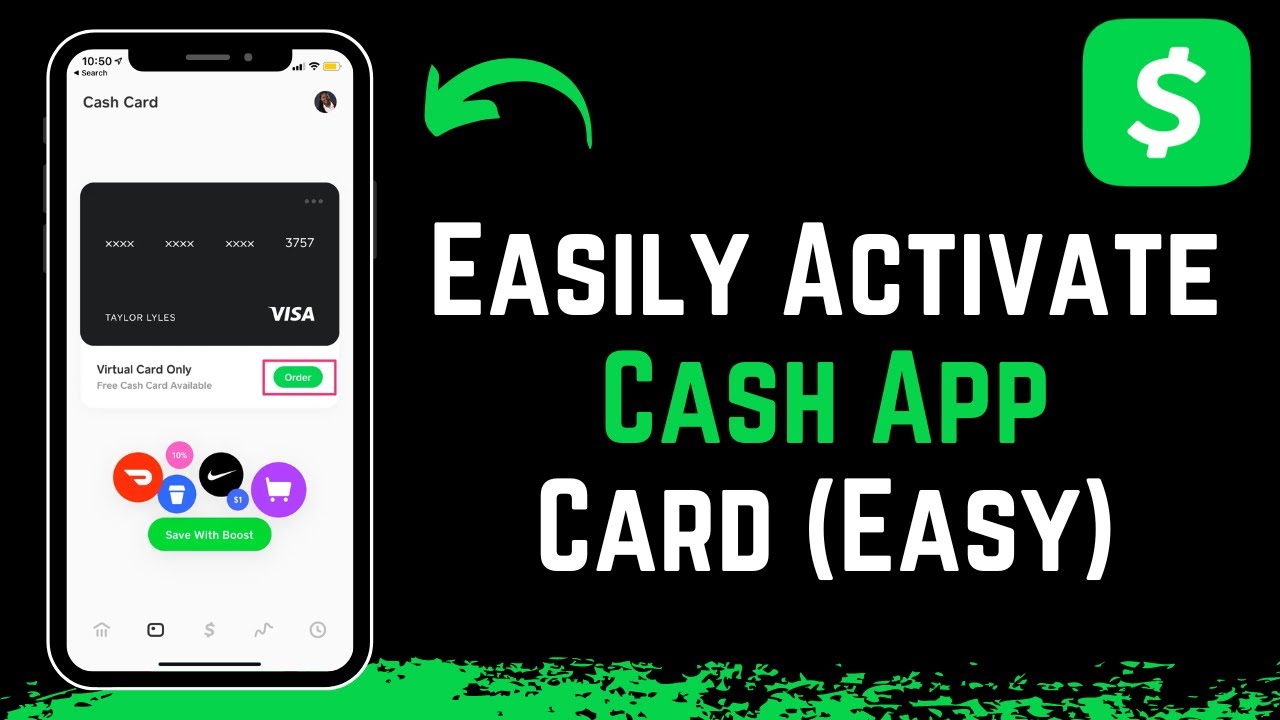
- Locate the Card Tab: On the home screen, you’ll typically see a row of icons at the bottom. Tap the card-shaped icon, which is usually the second from the left. This will take you to the “Cash Card” section.
- Initiate Order: If you haven’t ordered a card before, you’ll likely see an option that says “Get Free Cash Card” or “Order Card.” Tap this to begin the ordering process.
Customizing Your Card
This is where your personal touch comes in, leveraging Cash App’s unique design features.
- Choose Your Design: Cash App offers various aesthetic options. You might select a specific color, a basic design, or even a glow-in-the-dark option (if available).
- Add Personalization (Optional): Many users enjoy the ability to draw on their card or add emojis directly within the app’s interface. Use the provided tools to create a unique look. Be mindful that certain offensive or copyrighted designs may be rejected.
- Confirm Signature/Cashtag (Optional): Some designs allow you to choose whether your Cashtag or a custom signature appears on the card. Follow the prompts to finalize this aspect of your design.
Providing Shipping Details
Accurate shipping information is crucial for successful delivery.
- Enter Your Full Name: Ensure the name matches your verified Cash App account and any government-issued ID you might use for verification.
- Input Your Shipping Address: Provide a complete and accurate mailing address where you wish to receive your card. Double-check the street number, apartment/suite number, city, state, and zip code. This address does not need to be the same as your billing address for a linked bank account, but it must be a valid physical address in the United States. Cash App cards cannot be shipped to P.O. Boxes.
- Review Contact Information: The app might prompt you to confirm your phone number or email for delivery updates.
Reviewing and Confirming Your Order
Before finalizing, take a moment to verify all the details.
- Review All Information: Carefully check your chosen card design, your name, and especially your shipping address for any errors. Mistakes here can lead to delays or non-delivery.
- Agree to Terms and Conditions: You will be prompted to read and agree to Cash App’s terms of service for the Cash Card. It’s advisable to review these to understand the associated policies.
- Confirm Order: Once everything is correct and you’ve agreed to the terms, tap the “Order Card” or “Confirm” button to submit your request.
What Happens After You Order?
Once confirmed, your card is on its way.
- Order Confirmation: You’ll typically receive an in-app confirmation and possibly an email indicating that your card order has been placed.
- Delivery Timeframe: Cash App usually states that cards arrive within 7-10 business days. However, shipping times can vary depending on your location and postal service efficiency. Keep an eye on your mailbox for a plain white envelope from “Cash App.”
By following these precise steps, you leverage the app’s intuitive design to quickly and easily order a physical extension of your digital finances.
Activating and Managing Your New Cash App Card
Receiving your Cash App Card is an exciting step, but it’s crucial to activate it correctly and understand how to manage its settings to ensure both functionality and security. The power to control your card fully resides within the Cash App.
Receiving Your Card
Your Cash App Card will arrive in a discrete, unmarked white envelope, often without prominent Cash App branding for security reasons.
- Look for a Plain Envelope: Do not discard what might look like junk mail. The card will be securely attached to a piece of paper with instructions.
- Verify Your Card: Once opened, ensure the card has your name and the design you selected.
Activating the Card via the App
Activation is mandatory before you can use your card. This process links the physical card to your digital account, ensuring security and proper functioning.
- Open Cash App: Navigate back to the Cash Card tab within the application.
- Tap “Activate Cash Card”: You’ll see this option prominently displayed once your card has been ordered.
- Scan QR Code (Recommended): The easiest method is to use your phone’s camera to scan the QR code printed on the packaging your card came with. This instantly links the card.
- Manual Activation (If QR Code is Unavailable): If you can’t scan the QR code, tap “Missing QR Code.” You will then be prompted to enter the CVV number (the 3-digit code on the back of your card) and the card’s expiration date.
- Set Your PIN: During activation, you’ll be prompted to set a 4-digit Personal Identification Number (PIN). Choose a memorable but secure PIN that you haven’t used for other accounts. This PIN will be required for ATM withdrawals and certain in-store purchases.
Linking to Apple Pay/Google Pay
For enhanced convenience and security, integrate your Cash App Card with your smartphone’s digital wallet.
- Access Digital Wallet Settings: Go to your phone’s settings for Apple Pay (iOS) or Google Pay (Android).
- Add a New Card: Select the option to add a debit card.
- Enter Card Details: You can usually scan your Cash App Card or manually enter the card number, expiration date, and CVV.
- Verification: Follow any on-screen prompts for verification, which might involve a code sent to your phone or email.
Once added, you can make contactless payments using your phone wherever Apple Pay or Google Pay are accepted.
Managing Card Settings: Full Control at Your Fingertips
One of the most powerful tech aspects of the Cash App Card is the extensive control you have directly from the app.
- Freeze/Unfreeze Card: If you misplace your card or suspect unauthorized activity, you can instantly freeze it within the app to prevent any further transactions. Unfreeze it just as easily once it’s secure. This is a critical security feature, allowing immediate response to potential threats.
- Change PIN: You can reset your PIN anytime directly from the app, adding another layer of security control.
- Report Lost/Stolen: If your card is permanently lost or stolen, report it through the app to deactivate it and order a replacement.
- Manage Boosts: Access and swap your active Boosts for instant discounts at various merchants, tailoring your savings to your current spending habits.
- View Transaction History: Keep a detailed record of all your spending and ATM withdrawals directly within the app, making budgeting and expense tracking simple.
This comprehensive control panel ensures that you are always in charge of your financial instrument, providing flexibility and peace of mind in managing your digital and physical spending.
Maximizing Your Cash App Card Experience
Beyond basic transactions, the Cash App Card offers several features and best practices that can enhance your financial management and security. Leveraging these tools effectively is key to a superior user experience.
Leveraging Cash App Boosts: Smart Savings
Cash App Boosts are a standout feature, providing instant discounts directly applied at the point of sale.
- How Boosts Work: Within the Cash App, navigate to the Cash Card tab. You’ll see a selection of available “Boosts” from various merchants (e.g., 10% off at DoorDash, $1 off coffee at Starbucks).
- Activating Boosts: Tap on a Boost to activate it. Important: You can only have one Boost active at a time. If you want to use a different one, you must swap it out before making your purchase.
- Instant Savings: When you use your Cash App Card at the selected merchant, the discount is automatically applied to your transaction. No coupons or codes are needed, making it a seamless way to save money on everyday purchases. Regularly check for new Boosts relevant to your spending habits.
Understanding ATM Usage and Fees
While primarily designed for spending, your Cash App Card also provides access to cash.
- Withdrawal Limits: Be aware of daily ATM withdrawal limits, which are typically $310 per transaction and $1,000 per 24-hour period.
- ATM Fees: Cash App charges a $2 fee for ATM withdrawals. Additionally, the ATM operator may levy its own fees.
- Free ATM Withdrawals: Cash App waives its $2 fee for users who receive at least $300 in direct deposits into their Cash App account each month. If this criterion is met, Cash App will also reimburse the fees charged by the ATM operator. This feature encourages users to make Cash App their primary banking alternative.
Security Best Practices: Protecting Your Digital and Physical Funds
As with any financial tool, vigilance and adherence to security best practices are paramount.
- Strong, Unique Password: Use a robust, complex password for your Cash App account and enable two-factor authentication (2FA) for an extra layer of security.
- Monitor Notifications: Keep app notifications enabled to receive real-time alerts for all transactions, allowing you to quickly identify any unauthorized activity.
- Be Wary of Scams: Cash App is a frequent target for scammers. Never share your PIN, full card number, CVV, or account login details with anyone. Be skeptical of unsolicited requests for money or information. Cash App support will never ask for your PIN.
- Regularly Check Transaction History: Periodically review your transaction history within the app to ensure all activity is legitimate.
- Keep Your App Updated: Ensure your Cash App is always updated to the latest version to benefit from the newest security patches and features.
Customer Support and Troubleshooting
Should you encounter any issues with your Cash App Card or account, prompt support is available.
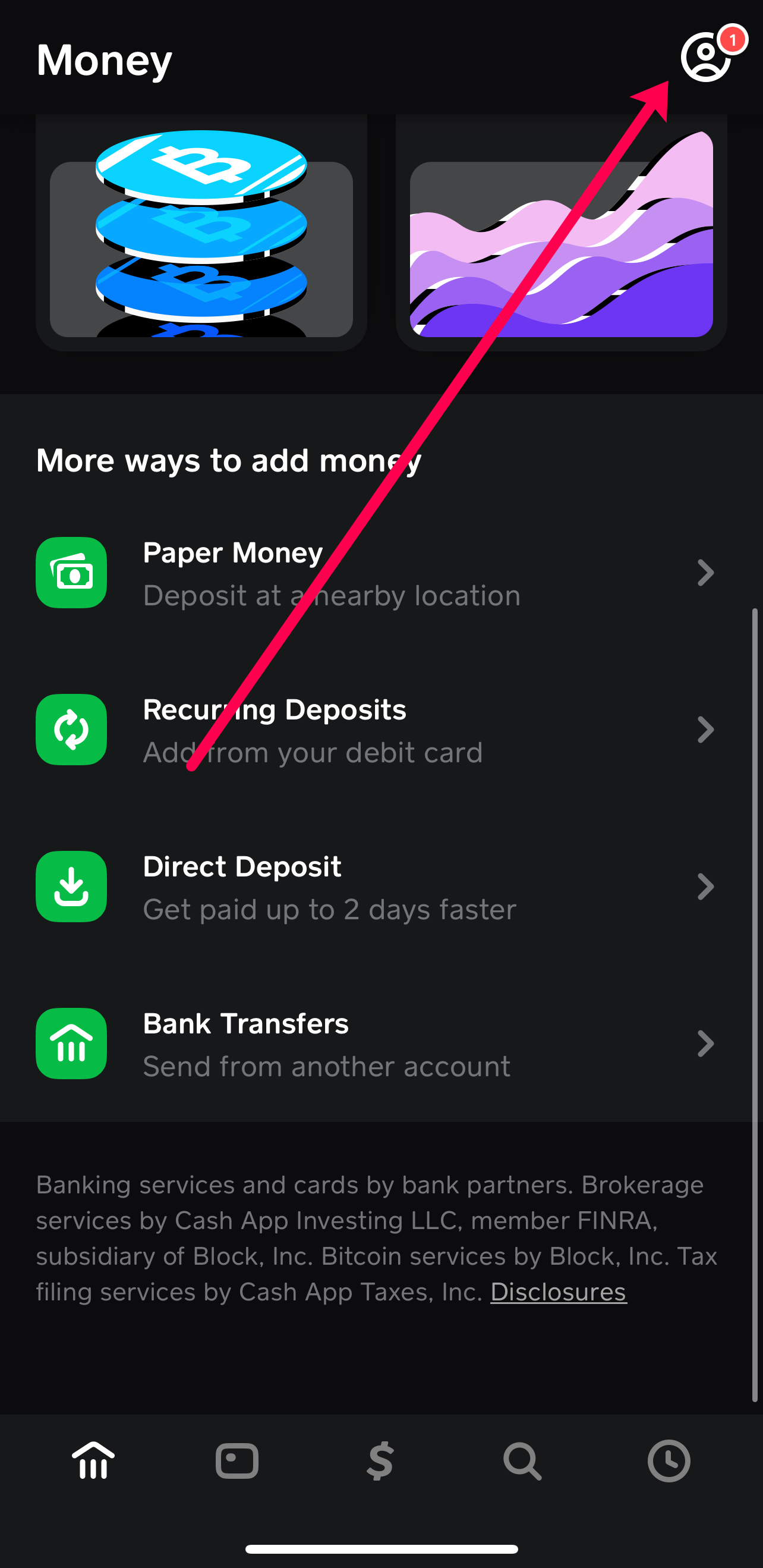
- In-App Support: The most efficient way to get help is through the Cash App itself. Go to your profile icon (top right corner) and select “Support.” You can browse FAQs or contact the support team directly.
- Website Resources: Cash App’s website also features an extensive support section with articles and troubleshooting guides.
- Reporting Lost/Stolen Card: As mentioned earlier, immediately use the in-app feature to freeze your card and report it lost or stolen to prevent unauthorized use.
By actively engaging with these features and maintaining strong security habits, you can transform your Cash App Card into a powerful, secure, and highly convenient tool for managing your daily finances within the modern digital landscape.
The Cash App Card exemplifies the convergence of technology and personal finance, offering a flexible and feature-rich solution for managing your money. From its intuitive ordering process and customizable design to advanced security controls and instant savings with Boosts, the card serves as a robust extension of your digital wallet. By following the steps outlined in this guide – understanding its features, ordering, activating, and leveraging its full potential – you can seamlessly integrate your Cash App balance into your everyday spending, embodying the efficiency and accessibility of modern tech-driven finance. Embrace the convenience and control that the Cash App Card puts directly in your hands.
aViewFromTheCave is a participant in the Amazon Services LLC Associates Program, an affiliate advertising program designed to provide a means for sites to earn advertising fees by advertising and linking to Amazon.com. Amazon, the Amazon logo, AmazonSupply, and the AmazonSupply logo are trademarks of Amazon.com, Inc. or its affiliates. As an Amazon Associate we earn affiliate commissions from qualifying purchases.