
In the vast landscape of digital tools, few applications have achieved the same level of ubiquity and indispensable utility as spreadsheet software. Often referred to generically as “Calc,” these programs are the backbone of data management, analysis, and visualization for individuals and organizations across every sector imaginable. From intricate financial models to simple household budgets, “Calc” represents a powerful digital canvas where numbers tell stories, data reveals insights, and complex problems are broken down into manageable, calculable components. But beyond its common perception as merely a tool for tables and sums, what exactly is Calc, and what makes it such a fundamental pillar of the modern technological toolkit?
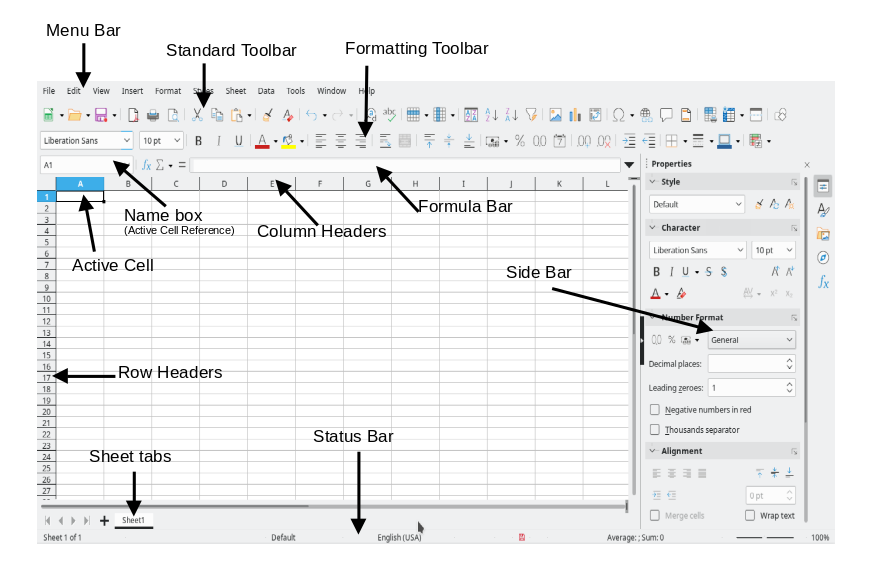
At its core, “Calc” is an abbreviation commonly associated with spreadsheet applications, most notably LibreOffice Calc, the free and open-source alternative to Microsoft Excel. However, the term serves as a powerful synecdoche, encompassing the entire class of software designed to organize, analyze, and store data in tabular form. These applications empower users to perform calculations, create charts, manage lists, and automate tasks, transforming raw data into actionable intelligence. The enduring relevance of Calc software stems from its flexibility, its capacity for intricate data manipulation, and its intuitive interface that bridges the gap between complex algorithms and everyday utility. Understanding Calc isn’t just about knowing how to use a specific program; it’s about grasping a fundamental paradigm of data processing that underpins nearly all aspects of contemporary digital life.
The Ubiquity and Evolution of Calc Software
The journey of Calc software reflects humanity’s age-old need to organize and analyze numerical data, evolving from manual ledgers to sophisticated digital platforms. This evolutionary path highlights not only technological advancements but also a continuous quest for efficiency and insight.
From Manual Ledgers to Digital Spreadsheets
Before the advent of computers, businesses and individuals meticulously recorded financial transactions and inventories in physical ledgers. These paper-based systems, while functional, were incredibly labor-intensive, prone to errors, and extraordinarily difficult to update when assumptions or figures changed. A single error could necessitate redoing entire sections, and real-time analysis was virtually impossible. The vision of automating these cumbersome processes laid the groundwork for what would become Calc software. Early mechanical and then electronic calculators offered a glimpse into the future, but it was the advent of personal computing that truly unlocked the potential for a dynamic, interactive digital ledger.
The Rise of Pioneering Spreadsheet Software
The true revolution began in the late 1970s with the introduction of VisiCalc for the Apple II. Often credited as the first “killer app,” VisiCalc transformed personal computers from hobbyist machines into essential business tools. For the first time, users could change a single value in a cell and instantly see the ripple effect across an entire sheet of interconnected calculations. This immediate feedback loop was revolutionary. Following VisiCalc’s success, Lotus 1-2-3 emerged in the early 1980s, dominating the DOS era with its integrated spreadsheet, database, and graphics capabilities. It quickly became the industry standard, establishing many conventions that persist today.
However, it was the arrival of Microsoft Excel for the Macintosh in 1985 and later for Windows that cemented the spreadsheet’s place in computing history. Excel’s graphical user interface, superior charting capabilities, and robust feature set propelled it to global dominance, eventually eclipsing its predecessors. Its continuous innovation, integration with the broader Microsoft Office suite, and wide adoption have made “Excel” almost synonymous with “spreadsheet” for many.
Open-Source Alternatives and LibreOffice Calc
While proprietary solutions like Microsoft Excel define the commercial landscape, the open-source movement has provided powerful and equally capable alternatives. This is where the name “Calc” often takes on a specific identity, primarily referring to LibreOffice Calc. As part of the free and open-source LibreOffice suite (a successor to OpenOffice.org), LibreOffice Calc offers a comprehensive set of features comparable to its commercial counterparts. It provides a robust environment for data analysis, complex calculations, charting, and database integration, all without licensing fees. LibreOffice Calc is widely adopted by governments, educational institutions, and individuals seeking powerful, accessible, and ethically transparent software solutions. Its existence underscores the principle that advanced technological tools should be available to everyone, fostering digital literacy and productivity across diverse communities.
Core Functionalities and Capabilities of Calc Software
Regardless of whether you’re using Microsoft Excel, Google Sheets, or LibreOffice Calc, the fundamental principles and core functionalities remain strikingly similar, providing a universal language for data manipulation.
Data Organization and Management
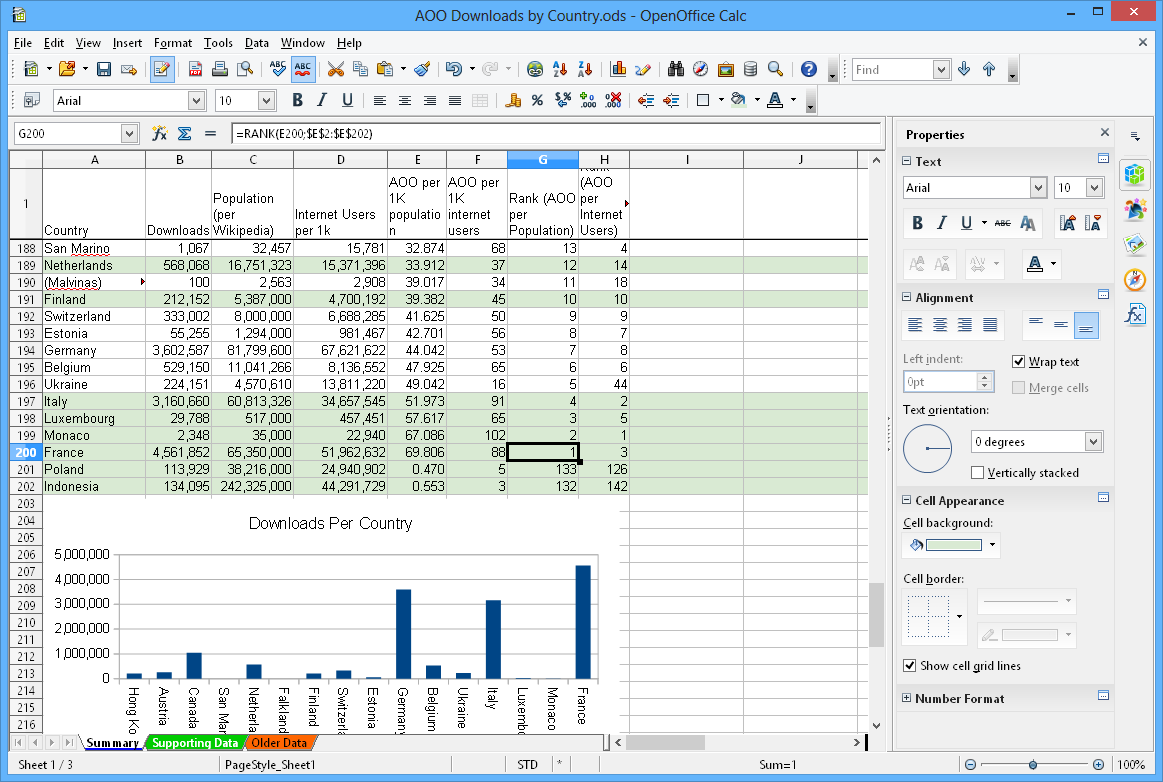
At its heart, Calc software is a grid of cells organized into rows and columns, forming a sheet, which in turn can be part of a larger workbook. This simple yet powerful structure allows for unparalleled data organization. Each cell can hold various types of data—numbers, text, dates, or formulas. Users can easily input, edit, and categorize information, creating structured datasets ideal for subsequent analysis. Features like freezing panes, splitting windows, and managing multiple sheets within a single workbook enhance navigation and readability, especially when dealing with large volumes of data. The ability to define tables within a sheet further improves data integrity and management, allowing for easy sorting, filtering, and summarization of related data points.
Formulae and Functions: The Engine of Calculation
The true power of Calc lies in its ability to perform calculations automatically through formulae and functions. A formula is an expression that calculates a value, starting with an equals sign (=). For instance, =A1+B1 adds the values in cells A1 and B1. Functions are predefined formulas that perform specific calculations. Calc software boasts hundreds of built-in functions covering various categories:
- Mathematical & Trigonometric:
SUM(),AVERAGE(),MAX(),MIN(),ROUND(),SQRT() - Statistical:
COUNT(),MEDIAN(),MODE(),STDEV() - Logical:
IF(),AND(),OR(),NOT()(allowing for conditional logic) - Text:
CONCATENATE(),LEFT(),RIGHT(),FIND() - Date & Time:
TODAY(),NOW(),DAYS() - Lookup & Reference:
VLOOKUP(),HLOOKUP(),INDEX(),MATCH()(essential for extracting specific data from large tables)
These functions can be nested, combined, and extended to build incredibly complex models, automating repetitive calculations and significantly reducing the potential for human error. This capability transforms Calc from a static ledger into a dynamic analytical engine.
Data Analysis and Visualization
Beyond raw calculation, Calc software excels in transforming data into understandable insights. Tools for data analysis include:
- Sorting and Filtering: Quickly rearrange data based on specific criteria or display only relevant subsets of data.
- Pivot Tables: A monumental feature that allows users to summarize, analyze, explore, and present summary data. Pivot tables can automatically count, sum, average, and perform other calculations on data, presenting it in a dynamic, easy-to-digest format.
- Data Validation: Ensure data integrity by restricting cell input to specific types or values (e.g., only numbers between 1 and 100, or selections from a predefined list).
Complementing analysis is data visualization, where numbers are translated into compelling graphics. Calc applications offer a wide array of chart types:
- Bar Charts & Column Charts: For comparing values across categories.
- Line Charts: To show trends over time.
- Pie Charts: To illustrate proportions of a whole.
- Scatter Plots: To reveal relationships between two numerical variables.
- Area Charts, Radar Charts, Stock Charts: For more specialized visualizations.
These charting capabilities are crucial for communicating complex data findings effectively to diverse audiences, making insights immediately apparent and understandable.
Advanced Features for Power Users
For those who delve deeper, Calc software offers a suite of advanced features that elevate its utility from a simple calculator to a powerful analytical and automation platform:
- Conditional Formatting: Automatically apply formatting (e.g., cell color, font style) based on cell values, making patterns and anomalies jump out visually.
- Solver and Goal Seek: Tools for “what-if” analysis. Goal Seek works backward from a desired result to find the input value needed. Solver, more advanced, handles multiple changing variables and constraints to find optimal solutions for complex problems.
- Macros and VBA (Visual Basic for Applications): Users can record sequences of actions or write custom code to automate repetitive tasks, create custom functions, or build interactive user forms, transforming the spreadsheet into a custom application. LibreOffice Calc uses its own scripting language called LibreOffice Basic, which serves a similar purpose.
- Scenario Manager: Allows users to save and easily switch between different sets of input values (scenarios) to see how they affect a model’s outcome.
These advanced features empower power users to build sophisticated analytical models, streamline workflows, and develop custom solutions tailored to specific business or research needs.
Why Calc Remains Indispensable in the Digital Age
Despite the rise of specialized databases, business intelligence platforms, and big data tools, Calc software continues to be an indispensable tool across virtually every domain. Its versatility, accessibility, and ability to handle both simple and complex tasks ensure its enduring relevance.
Business Operations and Financial Modeling
In the business world, Calc software is paramount. It’s the go-to tool for:
- Budgeting and Forecasting: Companies of all sizes use Calc to create detailed budgets, project future revenues and expenses, and model financial scenarios. Its ability to handle dynamic inputs makes it ideal for iterative planning.
- Accounting and Bookkeeping: While dedicated accounting software exists, many small businesses and departments use Calc for basic ledgers, expense tracking, payroll calculations, and generating simple financial statements.
- Inventory Management: Tracking stock levels, sales data, and reorder points is often managed efficiently using Calc, especially for businesses with moderate inventory volumes.
- Sales and Marketing Analysis: Analyzing customer data, tracking campaign performance, segmenting markets, and forecasting sales trends are common applications.
- Project Management: Simple Gantt charts, resource allocation tables, and progress trackers can be effectively built and maintained in Calc.
Its flexibility allows businesses to adapt spreadsheet models to unique requirements without the need for expensive custom software development, making it a cost-effective solution for countless operational needs.
Scientific Research and Data Processing
The scientific community heavily relies on Calc for various stages of research:
- Experimental Data Recording: Lab scientists often use Calc to log raw data from experiments, ensuring structured and organized record-keeping.
- Statistical Analysis: While specialized statistical packages exist, Calc’s built-in statistical functions are sufficient for many common analyses (e.g., mean, median, standard deviation, t-tests, ANOVA) and for preparing data for more advanced tools.
- Data Cleaning and Transformation: Researchers frequently use Calc to clean messy datasets, handle missing values, and transform data into formats suitable for advanced analysis.
- Simulations and Modeling: Simple simulations and mathematical models can be constructed in Calc to test hypotheses and visualize relationships between variables.
- Presenting Results: Creating charts and graphs from experimental data for publications and presentations is a fundamental use case.
The transparency of formulas and the ability to directly manipulate data make Calc an invaluable tool for exploring and understanding scientific observations.
Personal Productivity and Household Management
For individuals, Calc is an incredibly powerful tool for enhancing personal productivity and managing personal finances:
- Personal Budgeting: Tracking income, expenses, and savings goals is perhaps one of the most common personal uses. Calc allows for detailed category breakdowns and visual tracking of spending habits.
- Investment Tracking: Monitoring stock portfolios, mutual funds, and other investments, calculating returns, and planning for retirement.
- Household Inventories: Creating lists of assets, insurance information, or even grocery lists.
- Event Planning: Managing guest lists, budgets, task assignments, and timelines for weddings, parties, or trips.
- Goal Tracking: Monitoring progress towards fitness goals, reading challenges, or skill development.
Its accessibility and customization make it a superior alternative to generic apps for those who prefer granular control over their data and analytical methods.
Education and Skill Development
Calc software is a foundational tool in education, taught from secondary school through university. Students learn critical thinking, logical reasoning, and problem-solving skills by building models and analyzing data. It’s used in courses ranging from mathematics and statistics to economics, business, and engineering. Proficiency in Calc is often a prerequisite for many professional roles, making it a key skill for career readiness in the digital economy. Beyond formal education, the vast online resources, tutorials, and communities dedicated to Calc software make it an excellent platform for continuous self-improvement and skill development.
Choosing the Right Calc Tool for Your Needs
With several powerful spreadsheet applications available, selecting the right “Calc” tool depends on individual or organizational requirements, budget, and ecosystem preferences.
Proprietary vs. Open-Source Solutions
The primary distinction often lies between proprietary and open-source software:
- Proprietary Solutions (e.g., Microsoft Excel):
- Pros: Industry standard, extensive feature set, seamless integration with other Microsoft Office applications, robust support from Microsoft, vast online resources and community, often includes advanced features like Power Query/Pivot.
- Cons: Requires a subscription (Microsoft 365) or a one-time purchase, which can be a significant cost for businesses or multiple users.
- Cloud-Based Solutions (e.g., Google Sheets):
- Pros: Excellent real-time collaboration features, accessible from any device with an internet connection, often free for personal use, integrates well with other Google Workspace apps.
- Cons: Requires an internet connection for full functionality (though offline mode exists), features can be slightly less robust than desktop applications for highly complex tasks, data security concerns for some highly sensitive data.
- Open-Source Solutions (e.g., LibreOffice Calc):
- Pros: Completely free to use, highly customizable, strong community support, excellent compatibility with Microsoft Office file formats (though some complex formatting might differ slightly), promotes software freedom.
- Cons: Interface might feel less polished or familiar to users accustomed to Excel, community support can be less immediate than commercial support, some very niche advanced features found in Excel might be missing or implemented differently.
The choice often comes down to budget, comfort with specific interfaces, and the criticality of real-time cloud collaboration versus local processing power and data privacy.
Integration and Ecosystem Considerations
How well a Calc tool integrates with other software and workflows is a crucial factor. If your organization heavily relies on the Microsoft ecosystem, Excel’s seamless integration with Word, PowerPoint, Outlook, and SharePoint is a significant advantage. Similarly, Google Sheets thrives within the Google Workspace environment, integrating effortlessly with Google Docs, Slides, and Drive. LibreOffice Calc, while part of a comprehensive office suite, might require more manual steps for integration with external cloud services or proprietary platforms. Consider your existing digital infrastructure and how your chosen Calc tool will fit into it to avoid workflow friction.
Performance and Scalability
For users dealing with extremely large datasets (millions of rows) or highly complex calculations involving thousands of interlinked formulas, performance and scalability become critical. Desktop applications like Excel or LibreOffice Calc generally offer superior performance for very large files compared to cloud-based solutions like Google Sheets, which might experience slowdowns with immense datasets. Some advanced features in Excel (like Power Pivot’s data model) are specifically designed to handle and analyze millions of rows of data efficiently, a capability that not all Calc tools fully replicate. Assess your typical data volume and complexity to ensure your chosen tool can handle your heaviest workloads without significant lag or crashes.
Mastering Calc: Tips for Enhanced Productivity
Becoming proficient in Calc software can dramatically boost productivity, automate mundane tasks, and unlock deeper insights from your data. Here are some tips to move beyond basic usage.
Keyboard Shortcuts: The Path to Efficiency
Reliance on the mouse can significantly slow down your workflow. Investing time in learning essential keyboard shortcuts is one of the quickest ways to improve your Calc productivity. Shortcuts for navigation (e.g., Ctrl + Arrow keys), selecting cells/ranges (e.g., Ctrl + Shift + Arrow keys), formatting (e.g., Ctrl + B for bold), and executing commands (e.g., F2 to edit a cell, Ctrl + S to save) can save hours over the long run. Many experienced users can navigate and manipulate complex spreadsheets almost entirely without touching their mouse.
Understanding Data Types and Formatting
Proper data management starts with understanding data types. Entering numbers as text, or dates in an inconsistent format, can lead to errors in calculations and analysis. Always ensure your data is clean and consistently formatted. Utilize features like “Text to Columns” to parse messy data and “Data Validation” to prevent future input errors. Furthermore, effective formatting (e.g., currency symbols, percentage signs, conditional formatting for visual cues) makes your data easier to read and interpret, enhancing the clarity of your reports and analyses.
Leveraging Templates and Add-ins
Don’t reinvent the wheel. Calc software often comes with a variety of built-in templates for common tasks like budgeting, invoicing, and project planning. These templates provide a solid starting point and can save considerable time. Additionally, explore the world of add-ins or extensions. Both proprietary and open-source Calc tools offer marketplaces or repositories for third-party add-ins that extend functionality, providing specialized tools for data analysis, visualization, or integration with other services. These can range from advanced statistical packages to tools that help clean data or perform complex web scraping.
Collaboration Features for Teamwork
In today’s interconnected work environments, collaboration is key. Cloud-based Calc tools like Google Sheets excel in real-time co-editing, allowing multiple users to work on the same spreadsheet simultaneously, seeing each other’s changes live. Desktop applications like Excel and LibreOffice Calc also offer robust collaboration features, including change tracking, commenting, and version control, which are crucial for team projects. Familiarize yourself with these features to ensure seamless teamwork, clear communication, and efficient management of shared data. Understanding how to share, protect, and merge changes will significantly enhance collaborative productivity.
Conclusion
The question “what is Calc?” leads us to a fascinating exploration of one of technology’s most enduring and versatile innovations. Far more than just a table of numbers, Calc software represents a powerful paradigm for data organization, analysis, and visualization that has profoundly impacted business, science, education, and personal productivity. From its humble origins in manual ledgers to its sophisticated modern incarnations like LibreOffice Calc, Microsoft Excel, and Google Sheets, its core value proposition remains unchanged: to empower users to derive meaning and insight from data.
As technology continues to evolve, Calc software adapts, integrating with cloud services, embracing advanced analytics, and offering ever more intuitive interfaces. Its continued relevance in an era of big data and AI speaks volumes about its fundamental utility and flexibility. Whether you’re a student budgeting for college, a scientist analyzing experimental results, a small business owner tracking inventory, or a data analyst building complex financial models, mastering “Calc” is an essential skill that unlocks efficiency, fosters insight, and empowers informed decision-making in our increasingly data-driven world. The journey into Calc is a journey into the heart of modern data literacy, a skill set that will continue to pay dividends for decades to come.
aViewFromTheCave is a participant in the Amazon Services LLC Associates Program, an affiliate advertising program designed to provide a means for sites to earn advertising fees by advertising and linking to Amazon.com. Amazon, the Amazon logo, AmazonSupply, and the AmazonSupply logo are trademarks of Amazon.com, Inc. or its affiliates. As an Amazon Associate we earn affiliate commissions from qualifying purchases.