
For countless small to medium-sized businesses worldwide, QuickBooks stands as the undisputed leader in accounting software. Its robust capabilities for managing finances, tracking expenses, invoicing clients, and preparing taxes have made it an indispensable tool for maintaining fiscal health. However, before integrating any critical financial system into your operations, a fundamental question emerges: “How much is QuickBooks per month?”
Understanding the cost of QuickBooks is more than just looking at a price tag; it’s about evaluating an investment that directly impacts your business’s financial efficiency, compliance, and strategic decision-making. The monthly subscription fee is just one component of a broader financial assessment. This comprehensive guide will dissect the various QuickBooks Online plans, explore additional costs that might arise, and, crucially, help you evaluate the return on investment (ROI) to ensure you’re making a sound financial choice for your business.

Unpacking QuickBooks Online Subscription Plans and Pricing
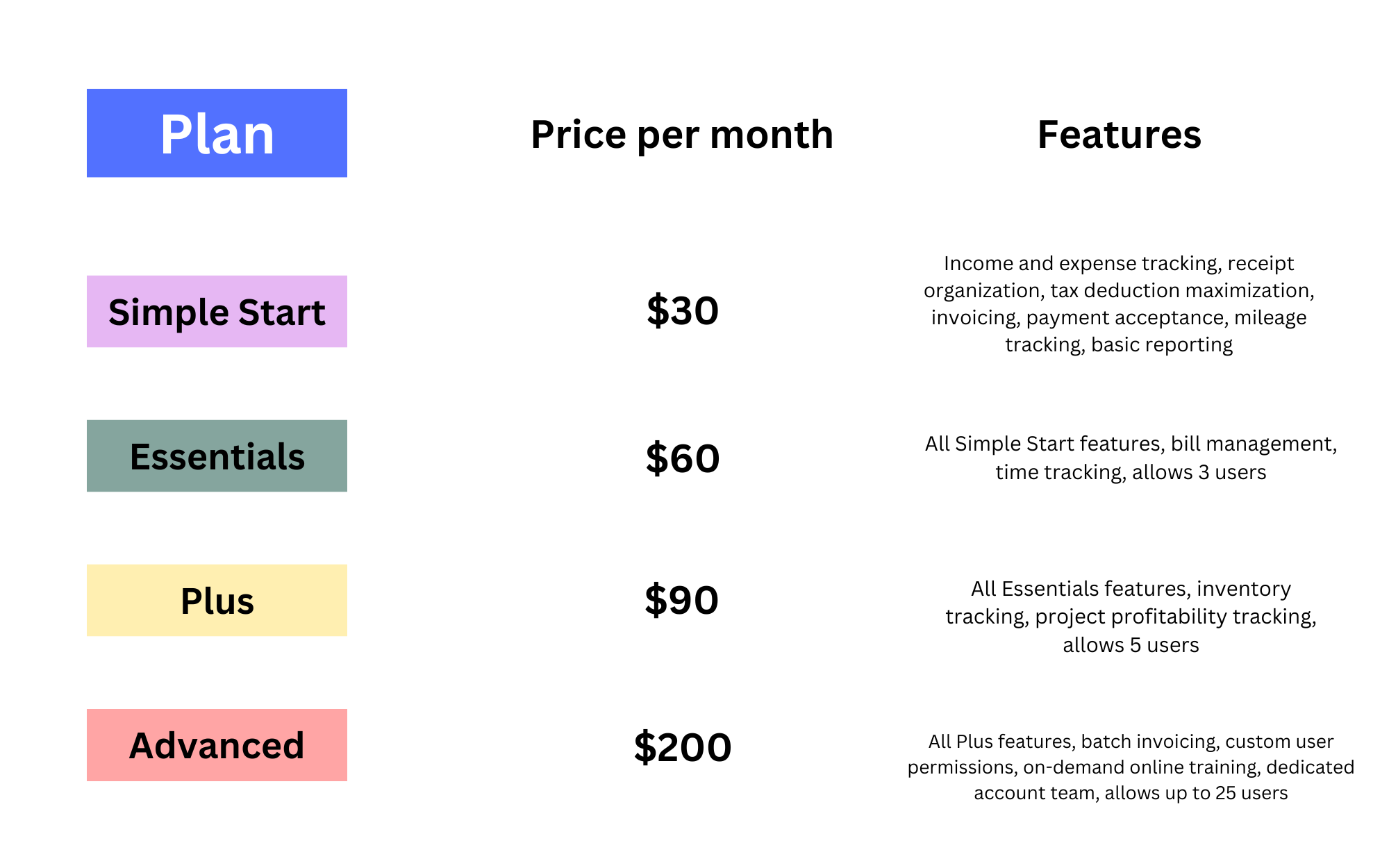
QuickBooks Online (QBO) offers a tiered subscription model designed to cater to businesses of varying sizes and complexities. Each tier builds upon the features of the one below it, progressively offering more sophisticated tools to manage your finances. While specific pricing can fluctuate due to promotions or regional differences, understanding the structure and core offerings of each plan is vital for budgeting.
Simple Start: The Essentials for Sole Proprietors and Small Businesses
The Simple Start plan is QuickBooks Online’s entry-level offering, ideally suited for freelancers, sole proprietors, and very small businesses with straightforward financial management needs. At its core, this plan provides the foundational tools required to keep your financial house in order. Users can efficiently send professional invoices and estimates, track income and expenses, connect bank accounts for automated transaction importing, and run basic financial reports like profit & loss statements. It’s designed for a single user, simplifying the initial accounting process and providing a clear snapshot of your business’s financial performance without overwhelming complexity. This plan typically represents the most affordable entry point into the QuickBooks ecosystem, making it a popular choice for those just beginning their entrepreneurial journey or seeking to transition from manual spreadsheets.
Essentials: Growing Businesses Needing More Control
As businesses grow, so does their financial complexity. The Essentials plan addresses this need by building upon Simple Start with critical enhancements. Most notably, it expands user access, allowing up to three users to collaborate on financial tasks, which is crucial for businesses with a bookkeeper, an office manager, or multiple partners. Beyond multi-user access, Essentials introduces features like bill management, enabling you to track and pay bills efficiently, ensuring you never miss a payment and can better manage cash flow. Time tracking capabilities also come into play, perfect for service-based businesses that bill clients based on hourly work. This plan represents a significant leap in control and collaborative functionality, justifying its higher monthly investment for businesses that require more sophisticated financial oversight and team involvement.
Plus: Comprehensive Features for Inventory and Project-Based Businesses
The Plus plan is often considered the sweet spot for many small to medium-sized businesses due to its robust feature set. It incorporates all the functionalities of Essentials and introduces powerful tools essential for managing more complex operations, particularly those involving physical goods or detailed project management. Key additions include comprehensive inventory management, allowing businesses to track product costs, quantities, and sales. This is invaluable for retail, e-commerce, and manufacturing businesses needing precise control over their assets. Furthermore, Plus offers project profitability tracking, enabling service-based businesses to monitor income and expenses for individual projects, ensuring they remain profitable. With up to five users, advanced reporting capabilities, and budgeting tools, the Plus plan provides a holistic financial management solution that empowers businesses to gain deeper insights into their profitability and operational efficiency, making its higher monthly cost a strategic investment for growth.
Advanced: Enterprise-Level Power for Complex Operations
For larger small businesses or those with rapidly escalating financial demands, the Advanced plan delivers enterprise-level power within the QuickBooks Online framework. This premium tier offers an expansive suite of features designed for scale and complexity. It supports up to 25 users, making it suitable for larger teams with diverse financial responsibilities. Key differentiators include custom user permissions, allowing granular control over who can access and modify specific financial data, enhancing security and accountability. AI-powered analytics and custom reporting provide deep insights into business performance, enabling more sophisticated strategic planning. Priority customer support and dedicated account management ensure that complex issues are resolved quickly. While the Advanced plan comes with the highest monthly subscription fee, it offers unparalleled scalability, automation, and analytical capabilities, transforming QuickBooks from a basic accounting tool into a powerful financial management system capable of handling intricate business operations and driving informed growth.
Understanding Discounts and Promotional Offers
When assessing the monthly cost of QuickBooks Online, it’s crucial to factor in promotional offers and discounts that are frequently available. Intuit, the maker of QuickBooks, often provides significant introductory discounts for new subscribers, sometimes offering 50% off for the first three months or even a full year. These promotions can substantially reduce your initial financial outlay, but it’s important to remember that the price will revert to the standard rate after the promotional period ends. Additionally, paying annually instead of monthly can sometimes unlock further discounts, providing a small but tangible saving over the course of the year. Always check the current promotions directly on the QuickBooks website or consult with an accountant who is a QuickBooks ProAdvisor, as they often have access to exclusive offers or can guide you on the best payment strategy to maximize your savings.
Beyond the Monthly Fee: Factors Influencing Your Total Investment
While the monthly subscription is the most obvious cost, making a fully informed financial decision about QuickBooks requires looking beyond this singular figure. Several other factors can influence your total investment, impacting your budget and the overall financial efficacy of the software for your business.
Add-ons and Integrations: Expanding Functionality
QuickBooks Online is a powerful tool, but its true strength often lies in its ability to integrate with a vast ecosystem of third-party applications and Intuit’s own add-on services. For many businesses, integrating payroll functionality is non-negotiable. QuickBooks Payroll is a robust solution that manages employee wages, taxes, and direct deposits, but it comes with its own separate monthly fee, typically based on a base charge plus a per-employee fee. Similarly, if you process credit card payments through QuickBooks Payments, transaction fees will apply. Beyond Intuit’s offerings, businesses may integrate third-party apps for e-commerce, CRM, inventory management, advanced reporting, or time tracking. While these integrations significantly enhance functionality and streamline operations, each often carries its own subscription cost, which needs to be budgeted alongside your core QuickBooks plan. Overlooking these potential add-on costs can lead to an underestimation of your true financial commitment.
Implementation and Setup Costs
The initial setup of QuickBooks can range from a quick DIY job for simple businesses to a significant undertaking for more complex operations. While QuickBooks Online is designed to be user-friendly, ensuring a proper setup from the start is critical for accurate financial reporting and long-term efficiency. If you’re migrating from another accounting system or manual records, data migration can be time-consuming and prone to errors if not handled carefully. Businesses with intricate charts of accounts, specific invoicing needs, or complex inventory structures may benefit from hiring an accountant or a QuickBooks ProAdvisor for initial setup and customization. This professional assistance can be a significant upfront cost, but it’s often a worthwhile investment to ensure your system is configured optimally, preventing costly errors and rework down the line. Budgeting for professional setup can save time and money in the long run by establishing a solid financial foundation.
Training and Support Considerations
Even with intuitive software, there’s always a learning curve. The time invested in learning how to effectively use QuickBooks, or training your team, represents an implicit cost. While Intuit provides extensive online resources, video tutorials, and basic customer support included with your subscription, some businesses may require more in-depth training. This could involve purchasing specialized courses, engaging a QuickBooks consultant for tailored sessions, or dedicating internal staff time for self-study. For urgent or complex issues, relying solely on basic support might not suffice, potentially leading to lost productivity. Businesses that value immediate, expert assistance might consider premium support plans, which come with an additional fee but offer faster response times and dedicated service. Understanding and budgeting for these training and support needs is crucial for maximizing your team’s efficiency and minimizing financial disruptions.
Hardware and Infrastructure Needs
For QuickBooks Online, the hardware and infrastructure requirements are relatively minimal. As a cloud-based solution, it primarily requires a reliable internet connection and a modern web browser, accessible from virtually any computer, tablet, or smartphone. This significantly reduces the overhead typically associated with on-premise software. However, businesses might still incur indirect costs related to ensuring their existing infrastructure is adequate. For instance, if internet connectivity is frequently unreliable, investing in an upgraded service becomes a necessity to maintain productivity. Similarly, while QuickBooks Online is accessible on mobile devices, some users might find larger screens or dedicated accounting workstations more efficient, potentially leading to hardware upgrade costs. These are generally minor compared to software fees, but they represent a part of the overall financial ecosystem supporting your QuickBooks investment.
Evaluating the Return on Investment (ROI) of QuickBooks
Beyond simply tallying up the costs, the truly insightful financial decision involves evaluating the return on investment (ROI) that QuickBooks can deliver. A monthly fee is not an expense but an investment if it generates tangible financial benefits that outweigh its cost.
Time Savings and Operational Efficiency
One of the most immediate and impactful ROIs of QuickBooks is the significant time savings it offers. By automating tedious, repetitive accounting tasks such as data entry, bank reconciliation, and invoice generation, businesses free up valuable employee hours. This automation reduces the likelihood of manual errors, which can be costly to correct. Faster invoicing leads to quicker payments, improving cash flow. Streamlined expense tracking makes tax preparation simpler and less time-consuming. Quantifying this time savings—for instance, calculating the hourly wage of the person whose time is saved—can quickly demonstrate how the efficiency gains alone can offset or even surpass the monthly subscription fee. This reclaimed time can then be redirected towards revenue-generating activities, strategic planning, or customer service, directly contributing to the business’s bottom line.
Improved Financial Visibility and Decision-Making
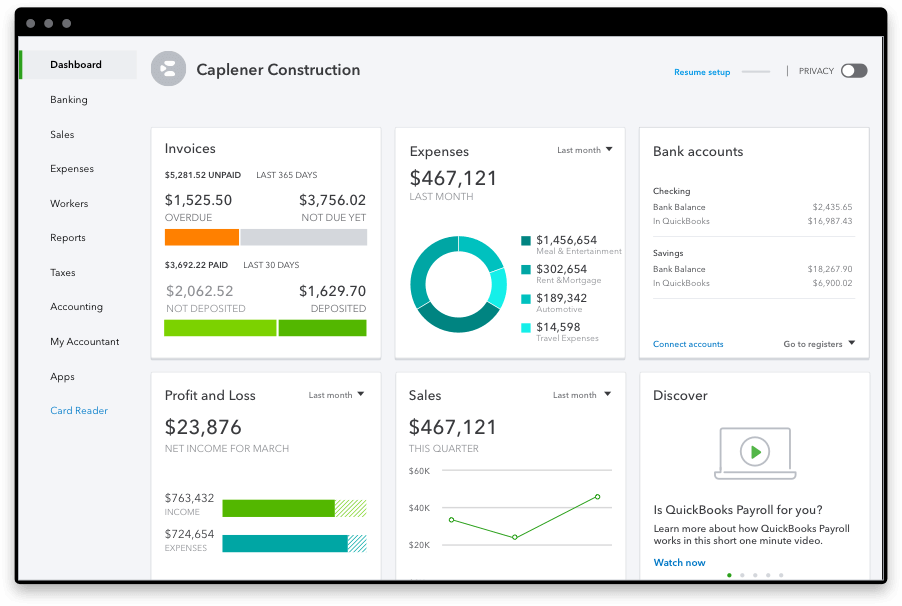
QuickBooks transforms raw financial data into actionable insights. Its real-time reporting features provide immediate access to critical financial statements like profit & loss, balance sheets, and cash flow statements. Dashboards offer an at-a-glance overview of key performance indicators (KPIs). This improved financial visibility empowers business owners to understand exactly where their money is coming from and where it’s going. With a clear picture of profitability, expenses, and cash reserves, leaders can make more informed strategic decisions about budgeting, pricing, expansion, and cost reduction. Identifying trends, spotting potential issues early, and capitalizing on opportunities become much easier when supported by accurate, up-to-date financial data. The ability to make smarter, data-driven financial decisions is an invaluable return on investment, mitigating risks and steering the business towards greater profitability.
Enhanced Compliance and Accuracy
Maintaining accurate financial records is not just good practice; it’s a legal requirement. QuickBooks significantly enhances compliance by providing an organized, auditable trail of all financial transactions. This meticulous record-keeping simplifies tax preparation, often allowing businesses to save money on accounting fees and reduce the stress associated with tax season. The software’s built-in checks and balances help minimize errors, reducing the risk of costly mistakes, penalties, or even audits. Generating professional financial statements that adhere to accounting standards also boosts credibility with lenders, investors, and regulatory bodies. The peace of mind that comes from knowing your financial records are accurate, organized, and compliant is a substantial, albeit intangible, financial benefit that prevents potential future liabilities and strengthens the business’s financial integrity.
Scalability and Future-Proofing Your Business
Investing in QuickBooks is also an investment in your business’s future. Its tiered structure means that as your business grows and its financial needs become more complex, you can seamlessly upgrade to a higher plan without having to migrate to an entirely new accounting system. This scalability saves significant time, effort, and potential costs associated with switching platforms. Starting with QuickBooks establishes a robust financial management foundation that can adapt to increased transaction volumes, new employees, inventory management needs, or project-based accounting. By choosing a system that can grow with you, you future-proof your financial operations, avoiding the disruption and expense of later overhauls. This long-term strategic advantage ensures your accounting system remains a catalyst for growth, rather than a bottleneck.
Is QuickBooks Right for Your Business? Making an Informed Financial Decision
Deciding whether QuickBooks is the right financial tool for your business, and which plan to choose, is a critical strategic decision that demands careful consideration of your unique circumstances. It’s not just about the monthly fee, but how that fee aligns with your operational needs and long-term financial goals.
Assessing Your Business Needs and Budget
Before committing to any accounting software, conduct a thorough assessment of your business’s specific requirements. Consider your industry: does it have unique accounting needs, like detailed project costing or multi-currency transactions? What is your typical transaction volume? How many users will need access to the financial data? Do you manage inventory, and if so, what level of detail do you require? Equally important is your budget. While QuickBooks offers plans across a spectrum of prices, you need to determine how much you can comfortably invest each month without compromising other critical business areas. This self-assessment will help you align your operational needs with the features offered by each QuickBooks plan and ensure your financial commitment is sustainable. Matching the software’s capabilities to your current and projected business needs is the cornerstone of a financially sound decision.
Comparing QuickBooks to Alternatives
While QuickBooks dominates the market, it’s not the only accounting solution available. A financially savvy business owner will always explore alternatives like Xero, FreshBooks, Wave, or even industry-specific ERP systems. Each alternative has its own pricing structure, feature set, and target audience. For instance, FreshBooks might appeal more to freelancers and service-based businesses with simpler invoicing needs, while Xero offers a strong suite for small businesses similar to QuickBooks. Wave Accounting is often free for basic features but may lack the scalability or advanced reporting of paid platforms. The comparison should focus on how these alternatives stack up against QuickBooks in terms of features relevant to your needs, their respective monthly costs, and the overall ecosystem (integrations, payroll, payment processing). By understanding the competitive landscape, you can ensure that QuickBooks offers the best financial value and functionality for your specific business requirements.
Leveraging Free Trials and Professional Advice
The best way to truly assess if QuickBooks is the right financial investment for your business is to take advantage of its free trial period. This allows you to navigate the interface, test out key features with your own data (or sample data), and gauge its ease of use and suitability for your workflows without any financial commitment. Beyond self-exploration, consulting with a professional accountant or bookkeeper who specializes in QuickBooks (a QuickBooks ProAdvisor) can provide invaluable guidance. These professionals can offer tailored advice on which plan best fits your business, assist with initial setup and data migration, and help you unlock the full financial potential of the software. Their expertise can ensure your system is optimized from day one, preventing costly errors and maximizing your ROI. This professional guidance, while potentially an upfront cost, can save you significant time and money in the long run.
In conclusion, “how much is QuickBooks per month” is a question that opens the door to a deeper financial conversation about your business’s accounting infrastructure. The monthly subscription fee is a critical element, but it’s only one piece of a larger financial puzzle. By understanding the different plans, accounting for potential add-on costs, and, most importantly, evaluating the tangible and intangible returns on investment, you can transform a simple expenditure into a strategic financial decision that supports your business’s efficiency, growth, and long-term profitability. Choose wisely, and QuickBooks can become a cornerstone of your financial success.
aViewFromTheCave is a participant in the Amazon Services LLC Associates Program, an affiliate advertising program designed to provide a means for sites to earn advertising fees by advertising and linking to Amazon.com. Amazon, the Amazon logo, AmazonSupply, and the AmazonSupply logo are trademarks of Amazon.com, Inc. or its affiliates. As an Amazon Associate we earn affiliate commissions from qualifying purchases.