
In the rapidly evolving digital landscape, the distinction between websites and mobile applications has progressively blurred. Users demand seamless, fast, and reliable experiences regardless of their device or internet connection. This demand has catalyzed the rise of Progressive Web Apps (PWAs), a revolutionary approach to web development that combines the best aspects of both traditional websites and native mobile applications. More than just a buzzword, PWAs represent a fundamental shift in how we conceive, build, and interact with web content, offering an enriched user experience that is inherently progressive, reliable, and installable.

To truly understand what a PWA entails, one must look beyond its acronym and delve into the core technologies and principles that define it. It’s not a framework or a specific technology, but rather a set of best practices and capabilities that enable web applications to deliver an app-like experience. This article will unravel the complexities of PWAs, exploring their technical foundations, advantages, limitations, and their transformative impact on the digital world.
The Evolution of Web Experiences: From Websites to PWAs
The journey to Progressive Web Apps is a story of continuous innovation, driven by the desire to overcome the inherent limitations of earlier digital platforms. For years, developers and businesses faced a dichotomy: build a broad-reaching, accessible website or invest in platform-specific native applications for iOS and Android, each with their own development cycles and distribution challenges.
The Limitations of Traditional Web and Native Apps
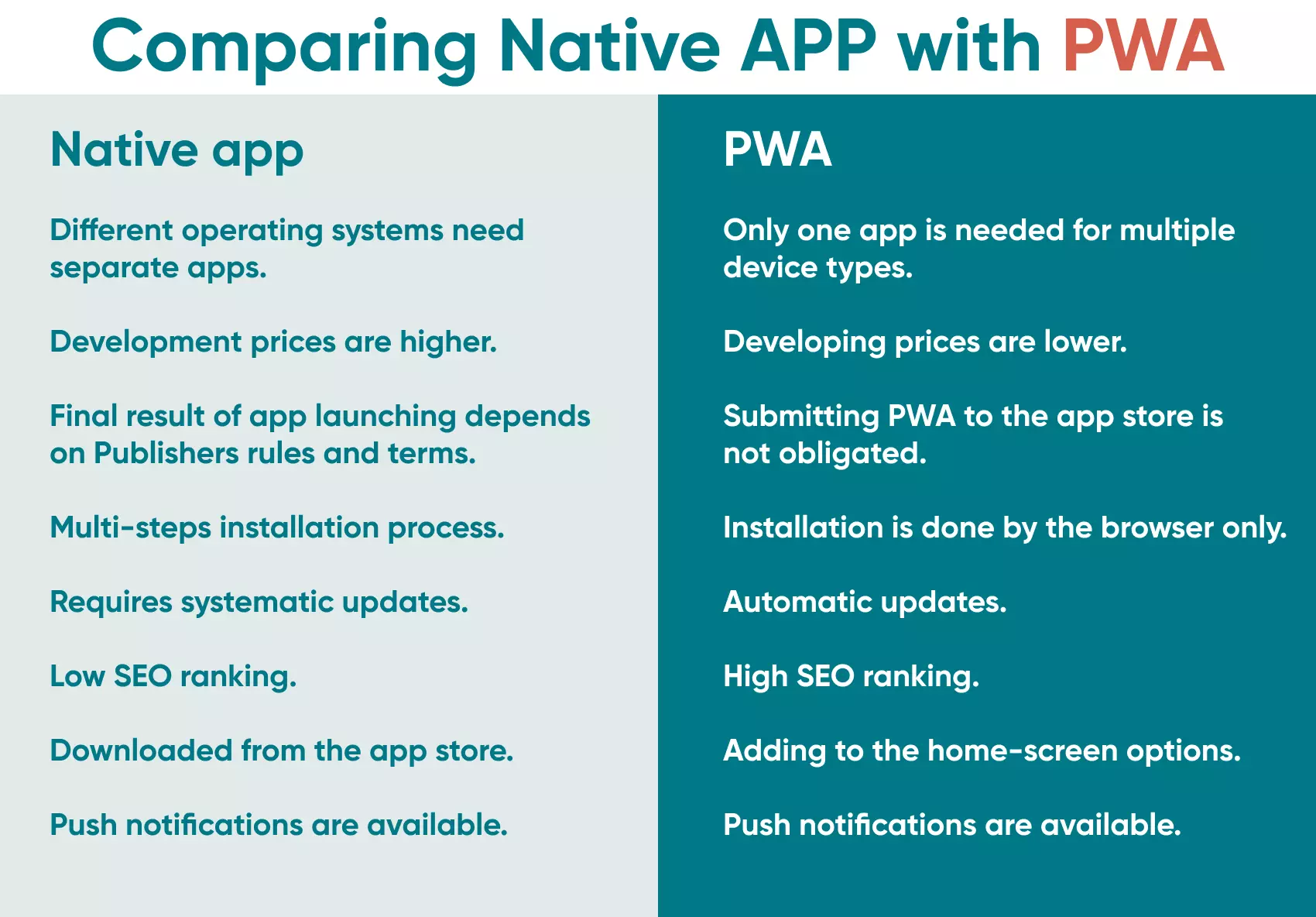
Traditional websites, while universally accessible via a browser, often fell short in terms of user experience. They could be slow, unreliable on patchy networks, lacked offline capabilities, and couldn’t offer the deep system integrations like push notifications or home screen icons that users expected from mobile apps. This often led to lower engagement, higher bounce rates, and a sense that the web experience was secondary to native apps.
On the other hand, native mobile apps offered unparalleled performance, rich user interfaces, and direct access to device hardware. However, they came with their own set of hurdles: expensive and time-consuming development for multiple platforms (iOS and Android), stringent app store review processes, large download sizes, and the barrier of user installation. Maintaining and updating these apps also required significant ongoing effort, and their discoverability often relied solely on app store search and rankings.
Bridging the Gap: The Promise of PWAs
The concept of PWAs emerged as a solution to this dilemma, aiming to bridge the gap by bringing the best features of native apps to the web. The term was coined by Google in 2015, advocating for web applications that are “progressive” in their enhancement of user experience, leveraging modern browser capabilities to deliver a reliable and engaging interaction.
The promise of PWAs lies in their ability to offer the ubiquity and accessibility of the web, combined with the rich features, performance, and user engagement typically associated with native mobile apps. They are not about replacing native apps but providing a powerful, flexible alternative that lowers friction for users and developers alike. By focusing on principles like speed, reliability, and engagement, PWAs are reshaping user expectations and setting new standards for digital interaction.
Defining Progressive Web Apps: Core Principles and Features
At its heart, a PWA isn’t a single technology but an approach that leverages a combination of modern web standards and design patterns. For a web application to be considered a PWA, it typically adheres to a set of core principles that imbue it with app-like qualities. These principles are what differentiate a PWA from a standard website, making it a more robust and engaging experience.
Progressive: Enhancing User Experience
The “Progressive” in PWA means that the app works for every user, regardless of browser choice, by utilizing progressive enhancement principles. The core content and functionality should be accessible on any browser, while modern capabilities are progressively layered on top for users with compatible browsers, delivering a richer experience. This ensures a broad reach while still pushing the boundaries of what the web can do.
Responsive: Adapting to Any Device
A PWA must be responsive, meaning its user interface fluidly adapts to fit any form factor: desktop, mobile, tablet, or future devices. This design principle is crucial for providing a consistent and optimal experience across the diverse range of devices users employ today, ensuring content is always readable and interactive.
App-like: Native Feel, Web Foundation
PWAs are designed to feel like native apps, even though they run in a browser environment. This includes smooth animations, fast loading times, and intuitive navigation that mimics platform-specific UI patterns. The goal is to make the user forget they are interacting with a website and instead feel like they are using a dedicated application.
Connectivity Independent: Offline Capabilities
One of the most defining features of a PWA is its ability to work offline or on low-quality networks. Through the use of Service Workers (discussed in detail later), PWAs can cache essential resources, allowing users to access previously visited content or even perform certain actions without an internet connection. This drastically improves reliability and user satisfaction in areas with unreliable connectivity.
Re-engageable: Push Notifications and Home Screen Access
PWAs can keep users engaged through features traditionally exclusive to native apps. Web push notifications allow applications to re-engage users even when they are not actively using the app, delivering timely updates or promotions directly to their device’s notification center. Furthermore, users can add a PWA to their device’s home screen, making it easily accessible and indistinguishable from a native app icon.
Secure: HTTPS by Default
Security is paramount for PWAs. They must be served over HTTPS, ensuring that all communications between the user and the server are encrypted. This protects data integrity and privacy, prevents eavesdropping, and builds trust with users, especially when handling sensitive information. HTTPS is also a prerequisite for many PWA features, including Service Workers.
Discoverable: Search Engine Indexing
Unlike native apps which are primarily discovered through app stores, PWAs are still fundamentally web pages. This means they are discoverable via search engines, allowing for greater reach and easier accessibility without the need for app store submissions or installations. This SEO advantage is a significant benefit for businesses.
Installable: Add to Home Screen Functionality
A key user-facing feature of PWAs is the ability to “install” them directly to a device’s home screen. When added, the PWA launches from its icon without a browser UI, providing an immersive, full-screen experience that feels integrated with the operating system. This reduces friction and makes the app readily available.
Linkable: Shareable URLs
Because PWAs are web-based, every screen or state can have a unique URL. This makes it incredibly easy to share specific content or functionalities with others via a simple link, fostering virality and improving content discoverability—a distinct advantage over traditional native apps where sharing specific app states can be more complex.
The Technical Underpinnings: How PWAs Work
The magic of Progressive Web Apps is not in a single, groundbreaking technology, but rather in the intelligent orchestration of several modern web standards and architectural patterns. These technical components work in concert to deliver the speed, reliability, and engagement that define a PWA. Understanding these underpinnings is crucial for appreciating the power and flexibility of this approach.
Service Workers: The Backbone of Offline Functionality
Perhaps the most critical component of a PWA is the Service Worker. A Service Worker is a JavaScript file that runs in the background, separate from the main web page, acting as a programmable proxy between the browser and the network. It intercepts network requests, allowing developers to control how these requests are handled.
Key capabilities of Service Workers include:
- Caching Assets: They can intelligently cache static assets (HTML, CSS, JavaScript, images) and even dynamic data, enabling instant loading of pages even when offline.
- Offline First Strategy: By serving cached content when the network is unavailable, Service Workers make PWAs reliable regardless of connectivity.
- Background Sync: They can defer actions until a stable network connection is available, ensuring data consistency even if the user goes offline mid-operation.
- Push Notifications: Service Workers are essential for delivering re-engagement notifications to users, even when the PWA is not open in their browser.

The power of Service Workers lies in their ability to provide a robust, reliable experience, fundamentally changing how web applications interact with the network and users.
Web App Manifest: Describing Your PWA
The Web App Manifest is a simple JSON file that provides information about the web application in a text file. It tells the browser how the PWA should behave when “installed” on the user’s mobile device or desktop.
Key information provided by the manifest includes:
nameandshort_name: The name displayed to the user.start_url: The URL that loads when the user launches the PWA.display: Defines how the app should be displayed (e.g.,fullscreen,standalonefor an app-like experience without browser UI,minimal-ui,browser).icons: An array of icon objects with different sizes for various contexts (e.g., home screen, splash screen).theme_color: The default theme color for the application.background_color: The background color displayed on the splash screen while the PWA loads.
The manifest is crucial for providing the native app-like experience, from the home screen icon to the splash screen and the full-screen display mode.
HTTPS: Ensuring Security and Trust
As previously mentioned, HTTPS (Hypertext Transfer Protocol Secure) is a non-negotiable requirement for PWAs. It encrypts all communication between the user’s browser and the web server, protecting data from interception and tampering. This security layer is not just good practice; it’s a technical prerequisite for many PWA features, including Service Workers, which require a secure context to operate. HTTPS builds user trust and is fundamental to the reliable nature of PWAs.
Application Shell Architecture: Fast Loading Experiences
While not a specific technology, the Application Shell Architecture is a design pattern commonly employed in PWAs to achieve instant and reliable loading. It involves separating the core UI (the “shell”) from the dynamic content. The shell, which includes the header, navigation, and basic layout, is cached by the Service Worker and loaded instantly. This provides immediate visual feedback to the user, who then sees dynamic content populate the shell as it loads from the network (or cache). This architecture greatly enhances perceived performance and user experience by minimizing “white screen” waiting times.
By combining these powerful components, developers can construct web applications that are incredibly fast, resilient, secure, and deeply engaging, delivering an experience that often rivals or surpasses traditional native apps.
Advantages and Disadvantages of Adopting PWAs
The adoption of Progressive Web Apps has surged across various industries, from e-commerce to news publishers, driven by the compelling benefits they offer. However, like any technology, PWAs also come with certain considerations and limitations that businesses and developers must weigh.
Benefits for Developers and Businesses
The advantages of PWAs are multifaceted, impacting development workflows, operational costs, user engagement, and market reach.
Cross-Platform Development
One of the most significant benefits is the “write once, run anywhere” philosophy. Developers can build a single codebase using standard web technologies (HTML, CSS, JavaScript) that works across all platforms and devices, eliminating the need for separate iOS and Android native app development teams and significantly reducing development time and effort. This dramatically lowers initial development costs and streamlines ongoing maintenance.
Improved Performance and User Engagement
PWAs are designed for speed. With Service Workers caching assets and the Application Shell architecture, they load much faster than traditional websites, even on slow networks. Faster loading times lead to lower bounce rates, higher user satisfaction, and increased conversion rates. Features like push notifications also foster re-engagement, turning casual visitors into loyal users.
Reduced Development and Distribution Costs
Beyond the cost savings from cross-platform development, PWAs avoid app store fees and complex submission processes. Distribution is as simple as sharing a URL. Updates are also seamless; users always access the latest version directly from the server, eliminating the need for manual updates through app stores. This efficiency translates to significant long-term cost savings.
Enhanced SEO and Discoverability
Since PWAs are essentially websites, they are indexable by search engines. This means they benefit from traditional SEO strategies, allowing them to be discovered through web search rather than solely relying on app store rankings. This broader discoverability can drive organic traffic and attract new users more effectively than native apps.
Considerations and Current Limitations
While the benefits are substantial, PWAs are not a panacea. There are still areas where they may not fully match the capabilities of native applications.
Browser Support Variations
Although support for core PWA features like Service Workers and Web App Manifests is widespread across modern browsers (Chrome, Firefox, Edge, Safari), there can still be inconsistencies in the implementation of certain advanced features or platform integrations. Safari, for instance, has historically lagged in its support for some PWA capabilities compared to Chrome.
Limited Access to Device Hardware
Native apps generally offer deeper integration with device hardware and operating system features (e.g., NFC, Bluetooth, advanced camera controls, comprehensive file system access, geofencing). While web APIs are continually expanding, PWAs currently have more limited access to these low-level device functionalities, which might be critical for certain highly specialized applications.
Discovery in App Stores (Historically, now improving)
Traditionally, PWAs were not listed in app stores like Google Play or Apple App Store, limiting their visibility for users accustomed to searching for apps there. However, both Google and Microsoft now allow PWAs to be listed in their respective app stores, and Apple has also made strides in improving PWA support, though the integration isn’t always as seamless as for native apps. This area is continually evolving.
Monetization Models
While PWAs can integrate various web-based monetization strategies (subscriptions, ads, direct sales), the in-app purchase systems deeply integrated into native app stores are generally not available. This might necessitate different monetization approaches or reliance on third-party payment gateways.
Despite these limitations, the rapid evolution of web standards and browser capabilities is continuously narrowing the gap between PWAs and native apps, making PWAs an increasingly viable and powerful option for a wide range of use cases.
The Future Landscape: Why PWAs are More Relevant Than Ever
The trajectory of web development is unmistakably pointing towards more immersive, reliable, and performant web experiences. Progressive Web Apps are not just a passing trend; they are a fundamental pillar of this future, redefining user expectations and challenging traditional paradigms of app development and distribution. Their increasing relevance is underscored by several key factors at play in the digital ecosystem.
Shifting User Expectations
Modern users are increasingly sophisticated. They expect applications to be fast, responsive, and available instantly, regardless of their network connection. The patience for slow-loading pages or cumbersome installation processes is dwindling. PWAs directly address these expectations by offering near-instant load times, offline capabilities, and a seamless “install-to-home-screen” experience that removes friction. As users become more accustomed to these high standards, PWAs will become the benchmark for web-based interactions.
Innovation in Web Technologies
The pace of innovation in web technologies is relentless. Browsers are constantly evolving to support new APIs that grant web applications more power and access, progressively bridging the gap with native apps. From advanced device capabilities like Web Bluetooth and Web USB to more sophisticated graphics rendering with WebGL and WebGPU, the web platform is becoming an increasingly capable environment for building complex and powerful applications. This continuous advancement ensures that PWAs will only become more feature-rich and performant over time. Furthermore, the standardization efforts by organizations like the W3C ensure that these new capabilities are implemented consistently across different browsers, fostering broader adoption and developer confidence.
Case Studies and Industry Adoption
Major players across various industries have already embraced PWAs, demonstrating their real-world impact. Companies like Twitter (Twitter Lite), Starbucks, Pinterest, Uber, and Forbes have reported significant improvements in user engagement, conversion rates, and reduced data usage after implementing PWAs. For instance, Twitter Lite saw a 65% increase in pages per session, 75% increase in Tweets sent, and a 20% decrease in bounce rate. Starbucks’ PWA allows users to browse menus and order even when offline, showcasing the power of connectivity independence. These success stories serve as compelling evidence of the tangible benefits PWAs deliver, inspiring more businesses to explore this approach.
The growth of PWAs also signifies a broader movement towards a more open and accessible digital world. By leveraging the web, PWAs democratize app development and distribution, making it easier for businesses of all sizes to reach a global audience without the gatekeepers of app stores. This openness fosters innovation and creates a more level playing field.
Conclusion
Progressive Web Apps represent a paradigm shift in how we build and consume digital experiences. By marrying the ubiquity and openness of the web with the rich, reliable, and engaging characteristics of native applications, PWAs offer a compelling path forward for developers and businesses alike. They are not merely a collection of features but a philosophy focused on delivering a user-centric experience that is fast, reliable, and engaging by design.
As web standards continue to evolve and browser support matures, the capabilities of PWAs will only expand, further blurring the lines between web and native. For anyone looking to build robust, future-proof applications that prioritize user experience and accessibility, understanding and adopting the principles of Progressive Web Apps is no longer an option but a strategic imperative in the modern tech landscape. The question is no longer “what is a PWA,” but rather, “how can a PWA transform my digital presence?” The answer, for many, is a resounding success.
aViewFromTheCave is a participant in the Amazon Services LLC Associates Program, an affiliate advertising program designed to provide a means for sites to earn advertising fees by advertising and linking to Amazon.com. Amazon, the Amazon logo, AmazonSupply, and the AmazonSupply logo are trademarks of Amazon.com, Inc. or its affiliates. As an Amazon Associate we earn affiliate commissions from qualifying purchases.