
The way we conduct financial transactions has undergone a profound transformation over the past decade. What was once the exclusive domain of physical cash and plastic cards has now largely shifted to the digital realm, with our smartphones leading the charge. Paying with your phone is no longer a futuristic concept; it’s a mainstream reality, offering unparalleled convenience, enhanced security features, and a streamlined experience. This guide will demystify the technology behind mobile payments, walk you through the setup process, explain how to execute transactions, address security considerations, and glance into the exciting future of this rapidly evolving payment method.
Understanding Mobile Payment Technologies
At the heart of phone payments lies a sophisticated interplay of hardware, software, and secure communication protocols. Far from a simple tap, each transaction involves multiple layers designed to protect your financial data and ensure seamless processing.
Near Field Communication (NFC)
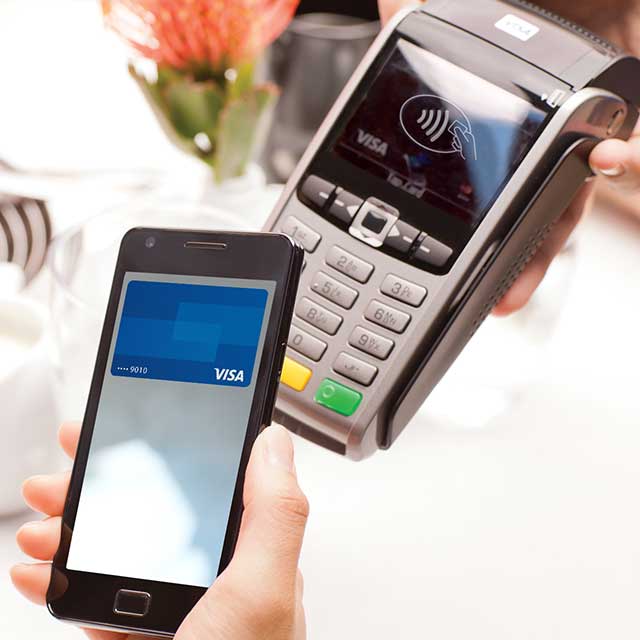
The cornerstone of most modern mobile payment systems is Near Field Communication (NFC). This short-range wireless technology enables two devices to communicate when they are brought within a few centimeters of each other. In the context of payments, your NFC-enabled smartphone communicates with an NFC-enabled point-of-sale (POS) terminal. When you tap your phone, encrypted data—not your actual card number—is exchanged, initiating the payment process. NFC’s short range is a key security feature, making it difficult for unauthorized interception.
QR Codes
While NFC dominates tap-and-pay scenarios, QR codes offer another versatile method for mobile payments, particularly prevalent in certain regions and for specific applications. A QR (Quick Response) code is a two-dimensional barcode that can store various types of information. For payments, a merchant might display a QR code containing their payment details, which you scan with your phone’s camera. Alternatively, your phone might generate a unique QR code for the merchant to scan. This method is often used for peer-to-peer payments, online transactions, or in shops that may not have NFC-enabled terminals but can display a code.
Digital Wallets: The Central Hub
The practical implementation of these technologies is facilitated by digital wallets, often built into your phone’s operating system or available as standalone apps. The most prominent examples include Apple Pay, Google Pay, and Samsung Pay. These wallets act as secure repositories for your credit, debit, and loyalty card information. Instead of directly transmitting your card details, digital wallets employ a process called tokenization, creating a unique, one-time-use encrypted token for each transaction. This token is useless if intercepted, adding a crucial layer of security.
Tokenization and Encryption
Tokenization is a fundamental security measure in mobile payments. When you add a card to your digital wallet, the actual card number is not stored directly on your device or transmitted during a transaction. Instead, a unique, encrypted token is generated and linked to your card. When you make a payment, this token, along with a cryptogram (a one-time dynamic security code), is sent to the merchant’s bank. The bank then communicates with the card network (Visa, Mastercard, etc.) to de-tokenize the information, verify the payment, and process the transaction. This ensures that your sensitive card details are never exposed to the merchant or potential fraudsters. All communications are further protected by strong encryption protocols, scrambling data to prevent unauthorized access.
Setting Up Your Phone for Payments
Transitioning to phone payments is remarkably straightforward, designed to be intuitive even for first-time users. The process generally involves enabling certain features on your device and securely linking your payment cards to your chosen digital wallet.
Enabling Necessary Device Features
Before you can make a payment, ensure your phone’s essential features are active. For NFC-based payments, you’ll need to enable NFC in your phone’s settings. On Android devices, this is typically found under “Connected devices” or “NFC & payment settings.” For iPhones, NFC is automatically enabled for Apple Pay, but you’ll need to set up Face ID, Touch ID, or a passcode. Location services might also be required by some payment apps for fraud prevention or to identify relevant offers, though it’s not universally mandatory for all transactions. Keeping your phone’s operating system updated is crucial, as updates often include security patches and performance improvements for payment functionalities.
Adding Payment Cards to Your Digital Wallet
The core of setting up phone payments is adding your credit and debit cards to your digital wallet.
- For Apple Pay: Open the Wallet app, tap the “+” icon, and follow the on-screen prompts to scan your card or enter details manually. Your bank may require an additional verification step, such as a text message code, email, or a phone call.
- For Google Pay: Open the Google Pay app (or navigate to “Wallet” on newer Android versions), tap “Add to Wallet,” then choose “Payment card” and either scan your card or input the details manually. Verification from your bank will follow.
- For Samsung Pay: Open the Samsung Wallet app, tap the “+” icon for “Payment cards,” and proceed to scan or manually enter your card information. Samsung Pay often utilizes both NFC and its proprietary Magnetic Secure Transmission (MST) technology, allowing it to work with older magnetic stripe readers in addition to modern NFC terminals.
Most digital wallets support major credit and debit cards from various banks. You can usually add multiple cards, making it easy to switch between them.
Setting Default Cards and Biometric Authentication
Once your cards are added, you can typically designate a default card for quicker transactions. This card will be automatically selected unless you choose otherwise. Crucially, securing your digital wallet is paramount. Biometric authentication (fingerprint scan or facial recognition) or a strong PIN/passcode is required to authorize payments. This ensures that even if your phone is lost or stolen, unauthorized individuals cannot make purchases using your stored cards. Setting up and routinely using these authentication methods is a non-negotiable step for secure mobile payments.
Making a Payment: Step-by-Step
The act of paying with your phone is designed for speed and simplicity, often quicker than traditional card transactions. Whether you’re at a physical store, using an app, or shopping online, the process is largely intuitive.
At Point-of-Sale (POS) Terminals
Making a payment at a physical store that accepts mobile payments (look for the contactless payment symbol, which resembles four curved lines) is usually a swift two-step process:

- Activate Your Digital Wallet: For Apple Pay, simply double-click the side button (or home button on older models) to bring up your default card. For Google Pay and Samsung Pay, unlock your phone and hold it near the terminal, or open the app first. Some Android phones might require you to tap the payment icon within the app.
- Authenticate and Tap: Once your default card (or chosen alternative) is displayed, authenticate the payment using Face ID, Touch ID, or your PIN. Then, hold your phone a few centimeters from the contactless reader until you see a confirmation on your phone screen and/or the POS terminal. A gentle vibration or a chime often indicates a successful transaction. No need to open the bank app or enter a PIN on the terminal for transactions under a certain limit, thanks to the inherent security of tokenization and device authentication.
In-App Purchases
Many mobile applications now integrate digital wallet functionality, allowing for seamless purchases within the app itself. When checking out, you’ll often see options like “Pay with Apple Pay” or “Pay with Google Pay.” Selecting this option will prompt your digital wallet to appear, requiring you to authenticate the purchase using your biometric data or PIN. This eliminates the need to manually enter card details, billing addresses, or shipping information for each transaction, significantly speeding up the checkout process. This method leverages the same secure tokenization process as physical store payments, ensuring your financial data remains protected.
Online Shopping
Mobile payments have also revolutionized online shopping, especially when performed on your smartphone. Many e-commerce websites and online retailers now offer Apple Pay or Google Pay as a checkout option. When you choose to pay with your phone’s digital wallet, you’ll be prompted to authenticate the purchase, often with Face ID or Touch ID/fingerprint. The necessary payment and shipping information associated with your digital wallet is then securely transmitted to the merchant. This not only makes online shopping faster by bypassing tedious form-filling but also enhances security, as your actual card details are never shared with the online merchant, reducing the risk of data breaches.
Security and Privacy in Mobile Payments
While the convenience of phone payments is undeniable, concerns about security and privacy are natural. Fortunately, the underlying technologies and protocols are built with robust safeguards designed to protect your financial information and personal data.
Encryption and Tokenization
As discussed, encryption and tokenization form the bedrock of mobile payment security. Every piece of sensitive data, from your card number to transaction details, is encrypted, rendering it unreadable to unauthorized parties. Tokenization further ensures that your actual card number is never exposed during a transaction; a unique, disposable token is used instead. This significantly reduces the risk of data compromise, as even if a merchant’s system were breached, the stolen tokens would be worthless without the ability to de-tokenize them via the secure card networks.
Biometric and PIN Authentication
Another critical layer of security is the requirement for strong user authentication. Before any payment can be authorized, you must verify your identity using biometric methods (fingerprint, facial recognition) or a secure PIN/passcode. This means that even if your phone falls into the wrong hands, an unauthorized individual cannot make purchases unless they can bypass your device’s security. This personal authentication step is mandatory for virtually all mobile payment transactions, providing a formidable barrier against fraud.
Lost or Stolen Devices
The fear of losing a device filled with financial information is a common concern. However, digital wallets are designed with this in mind. If your phone is lost or stolen, you can remotely wipe or lock it using services like Apple’s Find My or Google’s Find My Device. Furthermore, because your actual card numbers are not stored on the device and payments require biometric authentication, a thief cannot simply pick up your phone and start spending. Most banks and card issuers also offer zero-liability policies for unauthorized transactions, providing an extra layer of consumer protection.
Privacy Concerns and Data Usage
Beyond security, privacy is a key consideration. Digital wallet providers are generally committed to protecting your privacy. Transaction data is typically anonymized and aggregated, meaning it’s used for analytical purposes without being linked back to individual users. Your purchase history is usually kept private between you and your bank, and the digital wallet provider itself does not track individual purchase items. Merchants only receive the tokenized payment information, not your personal card details, further safeguarding your privacy in each transaction. However, it’s always wise to review the privacy policies of your chosen digital wallet provider and linked financial institutions to understand their data handling practices fully.
The Future of Phone Payments
The evolution of mobile payments is far from complete. As technology advances and consumer expectations shift, we can anticipate even more integrated, seamless, and secure ways to transact using our phones.
Biometric Advancements
While fingerprint and facial recognition are standard, future advancements in biometrics could introduce even more sophisticated authentication methods. Technologies like vein pattern recognition, behavioral biometrics (analyzing unique typing patterns or gestures), or even voice recognition could offer enhanced security and convenience, eliminating the need for physical interaction or memorized passwords entirely. These advancements aim to make the payment process even faster and more secure by uniquely identifying the user.
Integration with Wearables
Mobile payments have already begun their expansion beyond smartphones to smartwatches and other wearables. This trend is set to accelerate, integrating payment capabilities into a wider array of devices, from smart rings to augmented reality glasses. The goal is to make payments truly ambient, allowing users to complete transactions with a mere gesture or glance, without even needing to pull out a phone. This ubiquitous integration will blur the lines between technology and daily life, making payments an almost invisible part of our interactions.
Cross-Border Payments and Remittances
The current landscape of international payments can be complex and costly. Phone payment technologies hold immense potential to streamline cross-border transactions and remittances. By leveraging digital wallets and secure networks, sending money across borders could become as simple and inexpensive as a local transfer. This would be particularly beneficial for migrant workers sending money home, international travelers, and global businesses, fostering greater financial inclusion and reducing friction in global commerce.
Cryptocurrency Integration
As cryptocurrencies gain wider acceptance, their integration into mainstream mobile payment systems is a logical next step. While some platforms already allow for crypto payments, widespread adoption through established digital wallets could enable users to spend their digital assets as easily as traditional fiat currency. This would involve secure conversion mechanisms and robust regulatory frameworks, but the potential for decentralized, borderless, and potentially lower-fee transactions could redefine how we perceive and use money in our daily lives.

Conclusion
Paying with your phone is more than just a convenience; it’s a paradigm shift in personal finance, driven by continuous technological innovation. From the secure protocols of NFC and tokenization to the user-friendly interfaces of digital wallets, the ecosystem is designed to offer a fast, reliable, and highly secure method for handling transactions. As we’ve explored, setting up is straightforward, making payments is intuitive, and the layers of security are robust. With ongoing advancements in biometrics, wearable integration, and the potential for new payment models like cryptocurrency, the future of phone payments promises even greater efficiency and accessibility. Embracing this technology not only streamlines your daily transactions but also places you at the forefront of the evolving digital economy.
aViewFromTheCave is a participant in the Amazon Services LLC Associates Program, an affiliate advertising program designed to provide a means for sites to earn advertising fees by advertising and linking to Amazon.com. Amazon, the Amazon logo, AmazonSupply, and the AmazonSupply logo are trademarks of Amazon.com, Inc. or its affiliates. As an Amazon Associate we earn affiliate commissions from qualifying purchases.