
In the rapidly evolving landscape of fintech, the tools we use to manage our digital lives are constantly being audited for efficiency, security, and user experience. PayPal, once the undisputed titan of online payment processing, now shares the stage with a multitude of specialized software solutions, decentralized finance (DeFi) platforms, and integrated mobile wallets. Whether you are streamlining your digital footprint, migrating to a platform with better API integration, or enhancing your digital security posture, knowing how to properly decommission a PayPal account is a critical technical skill.
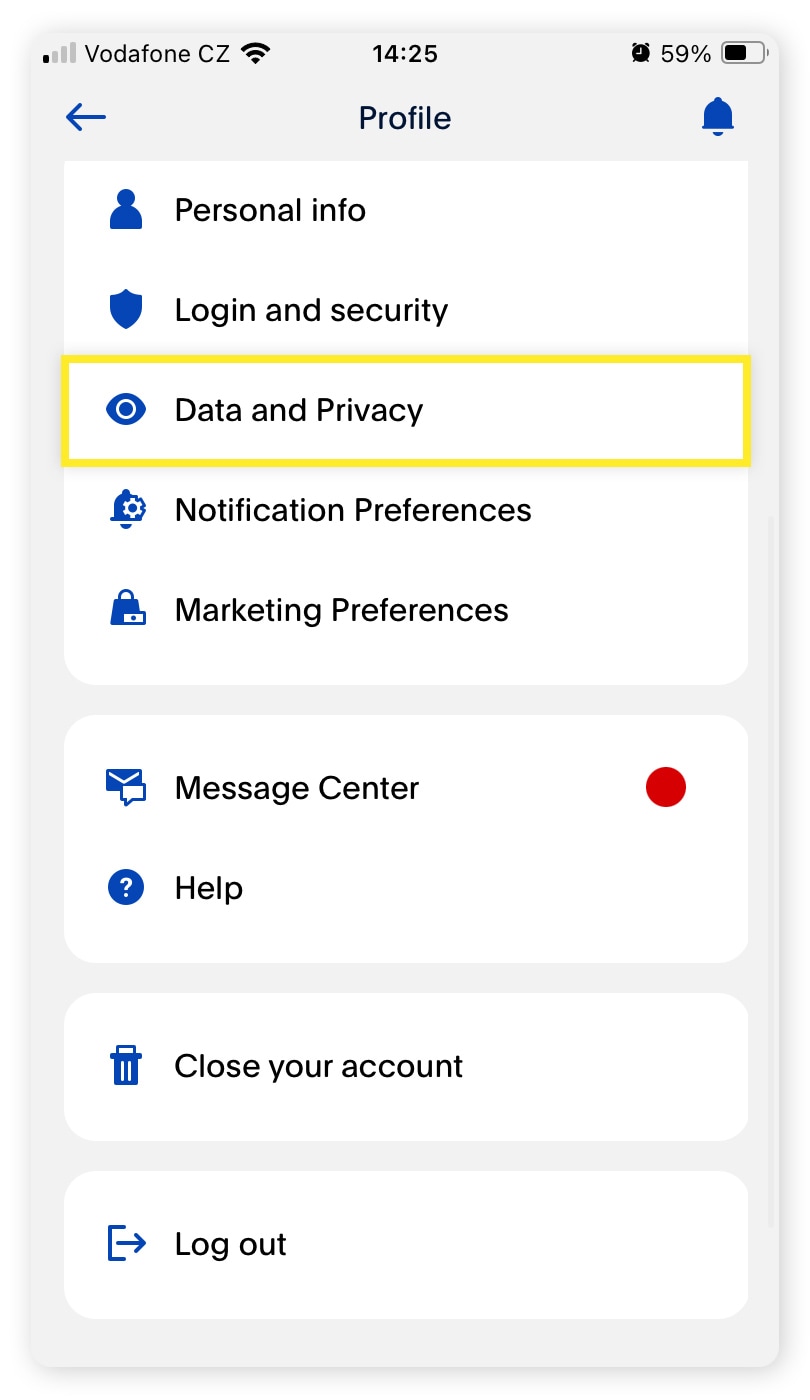
Closing a financial account is more than just clicking a “delete” button; it requires a systematic approach to data portability, the revocation of software permissions, and the clean severance of linked financial nodes. This guide provides a comprehensive technical walkthrough for permanently canceling your PayPal account while ensuring your digital assets and information remain secure.
Pre-Cancellation Protocol: Securing Your Digital Footprint
Before initiating the deletion sequence within the PayPal interface, a series of preparatory steps must be taken. PayPal’s software architecture includes several fail-safes that will prevent account closure if certain technical or financial conditions are not met. Addressing these proactively ensures a frictionless exit.
Transferring Your Remaining Balance
The PayPal ledger must be at exactly zero before the system will allow a permanent shutdown. From a software perspective, any residual balance—even a few cents—represents an active liability. Users should initiate a standard “Transfer to Bank” command. For those seeking immediate liquidation, the “Instant Transfer” feature utilizes the Real-Time Payments (RTP) network, though it incurs a small fee. Ensure that the transfer status is marked as “Completed” in the activity log before proceeding to the next step, as “Pending” transfers will trigger a system block on account deletion.
Resolving Pending Transactions and Disputes
PayPal’s internal risk management algorithms will flag any account with open disputes, insurance claims, or pending authorizations. If you have an active “Buyer Protection” claim or an unresolved “Chargeback,” the database will lock the account settings to prevent users from evading financial responsibilities. Technically, you must wait for the resolution of these entries. Furthermore, check for “Pending” payments where a merchant has authorized a charge but not yet captured the funds. These authorizations must either expire or be completed before the “Close Account” option becomes functional.
Downloading Your Transaction History for Future Reference
Once a PayPal account is closed, the user loses all access to the transaction database. From a data management perspective, it is essential to export your financial history. PayPal provides a robust reporting tool within the “Activity” section. Users should navigate to “Statements” and select “Custom.” We recommend downloading at least the last seven years of data in CSV or Tab-delimited formats for easy integration into accounting software like QuickBooks or Xero, as well as a PDF version for human-readable archival purposes. This ensures that your data portability rights are exercised before the account metadata is purged or anonymized.
The Step-by-Step Technical Process of Deletion
The actual process of closing the account is nested within the security and profile settings of the PayPal web application. It is important to note the distinction between the mobile app interface and the desktop web interface.
Navigating the Desktop Interface
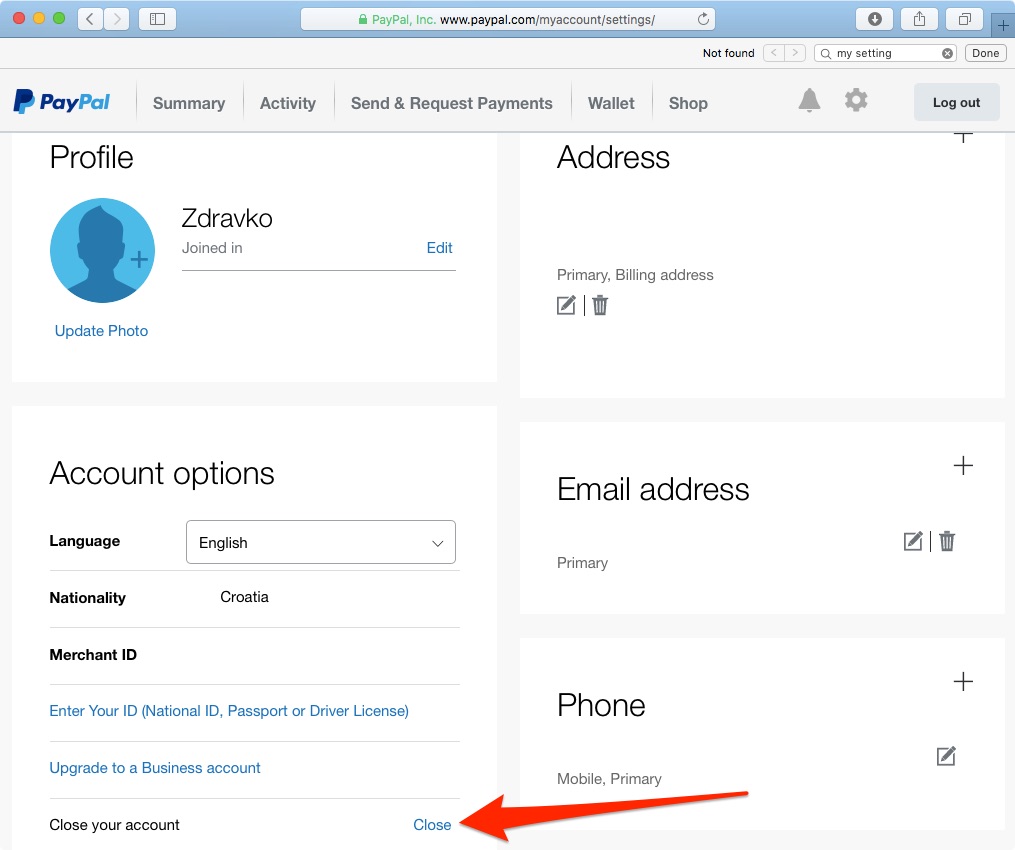
Currently, the most reliable way to close a PayPal account is through a desktop browser. The mobile application’s UI/UX is often optimized for transactions rather than administrative account destruction.
- Log in to the PayPal dashboard using a secure, encrypted connection.
- Click on the “Settings” icon (the gear symbol) in the top right corner of the header.
- Under the “Account” tab, scroll to the bottom of the interface.
- Locate the “Close your account” link within the “Account Options” segment.
- The system will prompt a final security challenge, often requiring a Multi-Factor Authentication (MFA) code to verify the user’s identity before executing the deletion script.
Limitations of the Mobile Application
Users often find that the “Close Account” feature is obscured or entirely missing within the iOS or Android versions of the PayPal app. This is a common design choice in software engineering to prevent accidental deletion and to ensure that users are in a stable environment when performing high-level administrative changes. If you attempt to close your account via a mobile device, it is recommended to use the browser in “Desktop Mode” to access the full suite of account management tools.
Troubleshooting Common Obstacles to Closure
If you receive an error message during the closure process, it is usually due to one of three technical hurdles:
- Unresolved Negative Balance: If your account balance is sub-zero due to a reversed payment, the system will require a deposit to square the ledger.
- Active Subscriptions: PayPal serves as a gateway for recurring billing. While the system should cancel these upon closure, existing “Reference Transactions” can sometimes cause a conflict.
- Verification Requirements: If your account was never fully verified (KYC/AML protocols), PayPal might require a final identity confirmation before allowing the account to be closed to ensure the request is legitimate and not part of a malicious takeover.
Removing Linked Financial Infrastructure and Third-Party Permissions
Deleting the PayPal account is the primary goal, but from a digital security standpoint, you must also clean up the “hooks” PayPal has into your other financial and digital ecosystems.
Revoking Bank and Credit Card Authorizations
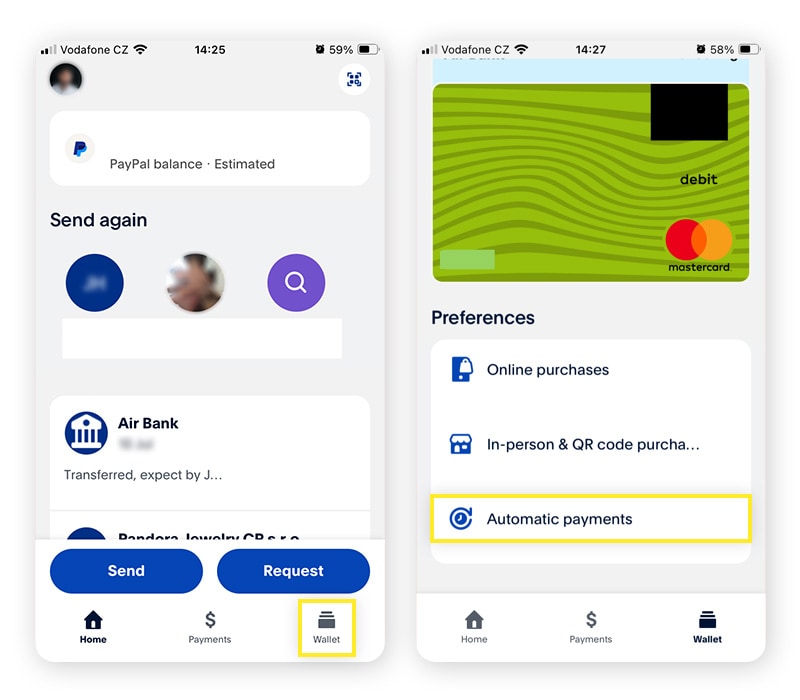
While closing the account should technically sever the link, it is a best practice to manually remove linked credit cards and bank accounts prior to closure. This forces the software to drop the “Tokens” associated with your financial institutions. In the “Wallet” section, select each payment method and click “Remove Card” or “Remove Bank.” This ensures that no “Zombie Authorizations” can occur if a merchant attempts to charge a previously saved PayPal billing agreement.
Auditing Automated Billing and Subscriptions
PayPal’s “Automatic Payments” dashboard is a repository of all third-party software permissions you have granted over the years. This includes everything from Spotify subscriptions to SaaS API integrations. Before closing the account, navigate to “Payments” then “Manage Automatic Payments.” Manually canceling these ensures that you are aware of which services will lose their funding source, preventing a sudden service outage in your professional or personal tech stack.
Managing Integrated App Permissions and API Access
If you are a developer or a business owner, your PayPal account might be linked to an e-commerce platform via API credentials (Client ID and Secret Key). Closing the account will immediately break these integrations. Ensure that your website’s checkout logic is updated to a new provider (such as Stripe or Adyen) before the PayPal account is decommissioned. Failure to do so will result in 400-level HTTP errors on your site’s checkout page, leading to a degraded user experience and lost revenue.
Privacy and Data Security Post-Cancellation
The technical lifecycle of an account does not end the moment the “Close Account” button is pressed. Understanding the backend implications of data retention is vital for privacy-conscious users.
What Happens to Your Personal Data?
When an account is closed, PayPal enters a “Deactivated” state in their production database. However, due to global financial regulations such as the Bank Secrecy Act and GDPR, PayPal is legally obligated to retain certain data points for a set period—often between five to ten years. This includes your transaction history, verified identity documents, and communication logs. While the account is no longer “active” for transactions, the data remains in cold storage for regulatory auditing and anti-money laundering (AML) tracking.
Preventing Identity Theft After Account Closure
After your account is closed, remain vigilant against phishing attempts. Often, malicious actors use “account closure” as a social engineering hook, sending spoofed emails claiming there was an issue with your account shutdown. Remember: once the account is closed, PayPal will no longer contact you for credentials. Furthermore, ensure that the email address previously associated with the account is secured with robust encryption and 2FA, as it remains a primary identifier in PayPal’s legacy records.
Exploring Digital Alternatives: Beyond the PayPal Ecosystem
The decision to cancel PayPal often stems from a desire to utilize more modern software architectures that offer lower latency, better developer tools, or enhanced privacy features.
Comparing Modern Payment Software Architectures
The tech industry has moved toward modular payment solutions. Platforms like Wise (formerly TransferWise) offer superior mid-market exchange rates and multi-currency accounts through a more transparent UI. For developers, Stripe provides an industry-leading API documentation and sandbox environment that far surpasses PayPal’s legacy “Sandbox” tools. Meanwhile, Apple Pay and Google Pay leverage hardware-level security (Secure Enclave) and tokenization to provide a more secure mobile-first payment experience.
By systematically following this technical guide, you ensure that your transition away from PayPal is not just a deletion of an app, but a secure and organized migration of your digital financial identity. In the age of digital transformation, maintaining control over where and how your data is stored is the ultimate security protocol.
aViewFromTheCave is a participant in the Amazon Services LLC Associates Program, an affiliate advertising program designed to provide a means for sites to earn advertising fees by advertising and linking to Amazon.com. Amazon, the Amazon logo, AmazonSupply, and the AmazonSupply logo are trademarks of Amazon.com, Inc. or its affiliates. As an Amazon Associate we earn affiliate commissions from qualifying purchases.