
The transition from physical billfolds to digital containers represents one of the most significant shifts in the modern mobile landscape. Google Wallet stands at the epicenter of this evolution, serving as a comprehensive digital repository for payment cards, transit passes, loyalty programs, and even government-issued IDs. While users experience the convenience of a simple “tap,” the underlying architecture is a complex orchestration of hardware communication, cryptographic security, and cloud synchronization. To understand how Google Wallet works is to understand the intersection of Near Field Communication (NFC), tokenization technology, and the secure hardware environments of the Android operating system.

The Technological Infrastructure of Contactless Interaction
At its core, Google Wallet operates primarily through a hardware-software handshake. The primary facilitator of this interaction is Near Field Communication (NFC), a short-range wireless connectivity standard that allows devices to communicate over distances of four centimeters or less.
Near Field Communication (NFC) and Radio Frequency Identification (RFID)
Google Wallet utilizes NFC technology to transmit data from the smartphone to a Point of Sale (POS) terminal. Unlike Bluetooth, which requires manual pairing and can operate over several meters, NFC is designed for proximity and speed. When you bring your phone near a reader, an electromagnetic field is created. This field powers a small chip in the terminal or the phone, allowing for the exchange of data packets. The technical advantage of this short range is twofold: it prevents accidental payments from a distance and makes “skimming” or intercepting the signal significantly more difficult for malicious actors.
Host Card Emulation (HCE)
A critical breakthrough in the development of Google Wallet was the implementation of Host Card Emulation (HCE). In the early days of mobile payments, digital wallets required a physical “Secure Element” (SE)—a dedicated chip provided by mobile carriers or device manufacturers. This created a fragmented ecosystem. With HCE, Google allowed the Android operating system to emulate a smart card directly within the software environment while still utilizing a secure cloud-based or hardware-backed architecture. This allows Google Wallet to function across a vast array of Android devices without needing specific carrier-approved hardware for every transaction.
Integration with Wear OS and Cross-Device Synchronization
The architecture of Google Wallet extends beyond the smartphone to the Wear OS ecosystem. Smartwatches equipped with NFC chips use a mirrored version of the Wallet application. The technology ensures that credentials added on a primary device are securely synced to the wearable. This requires a continuous background sync via Google Play Services, ensuring that if a card is updated or removed on the phone, the change is reflected instantly on the watch, maintaining a singular digital identity across the user’s hardware.
Security Protocols: Tokenization and Encryption
The most common concern regarding digital wallets is the safety of financial data. Google Wallet does not actually store or transmit your real credit card number during a transaction. Instead, it employs a sophisticated process known as tokenization.
The Science of Tokenization
When you add a credit or debit card to Google Wallet, the app communicates with the issuing bank to request a “Token.” This token is a Virtual Account Number (VAN) or a Device Primary Account Number (DPAN). This string of numbers replaces your actual Primary Account Number (PAN). When you make a payment, Google Wallet shares this token and a one-time dynamic security code with the merchant. Because the merchant never sees your actual card details, even if their database is breached later, your real financial information remains secure. The token is useless outside of the specific cryptographic context of that single transaction.
Biometric Authentication and Hardware-Backed Security
Google Wallet leverages the Android “BiometricPrompt” API to ensure that only the authorized owner can initiate a transaction. Depending on the device’s hardware, this involves fingerprint sensors, 3D facial recognition, or iris scanning. On a deeper level, the sensitive cryptographic keys used to sign transactions are often stored in a TEE (Trusted Execution Environment) or a dedicated security chip like the Titan M2 found in Google Pixel devices. This hardware isolation ensures that even if the main Android OS is compromised by malware, the “keys to the kingdom” remain inaccessible in a hardened, separate partition of the processor.

Remote Data Management and “Find My Device”
Because Google Wallet is tied to a Google Account, the security of the physical device is augmented by cloud-level controls. If a device is lost or stolen, the user can utilize the “Find My Device” service to remotely lock the phone or wipe the wallet’s contents. Unlike a physical leather wallet, which requires calling every individual bank to cancel cards, a digital wipe instantly deauthorizes the tokens stored on that specific hardware, rendering the digital wallet useless to a thief while keeping the actual bank accounts intact.
The Digital Folder: Beyond Financial Transactions
While payments are the most frequent use case, Google Wallet functions as a sophisticated data management tool for various types of digital credentials. Each type of pass—whether a boarding pass, a gym membership, or a car key—utilizes different data formats and APIs.
The Google Wallet API and Vertical Integration
For developers, Google provides a specific API that allows businesses to create “Add to Google Wallet” buttons. These passes are typically JSON (JavaScript Object Notation) objects that contain metadata such as the user’s name, an expiration date, and a barcode or QR code. For example, when a movie theater sends a digital ticket, Google Wallet parses this data and organizes it into a visual card. These passes can also trigger “location-based notifications” via GPS, where the wallet app pushes the ticket to the user’s lock screen the moment they arrive at the cinema.
Digital Keys and Ultra-Wideband (UWB) Technology
The most recent leap in Google Wallet technology involves digital car and home keys. While many keys use NFC (requiring you to tap the phone against the door handle), newer implementations utilize Ultra-Wideband (UWB) technology. UWB allows for spatial awareness, meaning the car can detect exactly how far away the phone is. This allows for “passive entry,” where the vehicle unlocks as you approach without the phone ever leaving your pocket. The communication is encrypted with a mutual authentication protocol, ensuring the signal cannot be intercepted or spoofed.
Government IDs and Verifiable Credentials
Google is increasingly working with regional governments to support digital Driver’s Licenses (mDL) and state IDs. This uses the ISO 18013-5 standard, which allows for a secure, privacy-preserving exchange of identity information. When a user presents a digital ID from Google Wallet, the system can share only the necessary information (e.g., “Over 21” status) without revealing the user’s full address or exact birth date, showcasing a technological shift toward “zero-knowledge” proofs in identity management.
Setup, Compatibility, and the User Experience Flow
The seamless nature of Google Wallet is the result of a rigorous setup and verification process that ensures only legitimate credentials enter the ecosystem.
Device Requirements and Software Dependencies
To run Google Wallet, a device must be running a relatively modern version of Android (typically Android 7.0 or higher) and, crucially, must pass Google’s “Play Integrity API” (formerly SafetyNet) checks. These checks ensure the device is not rooted or tampered with, as a compromised operating system could potentially leak sensitive transaction data. Furthermore, the device must have an NFC chip to support tap-to-pay, though non-NFC devices can still use the app to store and display QR-code-based loyalty cards and tickets.
Card Provisioning and Bank Verification
The process of adding a card is known as “provisioning.” When a user takes a photo of their card or enters the digits, Google Wallet initiates a “handshake” with the bank’s servers. The bank then sends a verification challenge—usually a code via SMS or email—to ensure the person adding the card is the actual owner. Once verified, the bank pushes the encrypted token to the device’s secure storage. This entire cycle, though it takes seconds, involves cross-checking the user’s identity against the bank’s records and Google’s own fraud detection algorithms.
The Mechanics of a Transaction
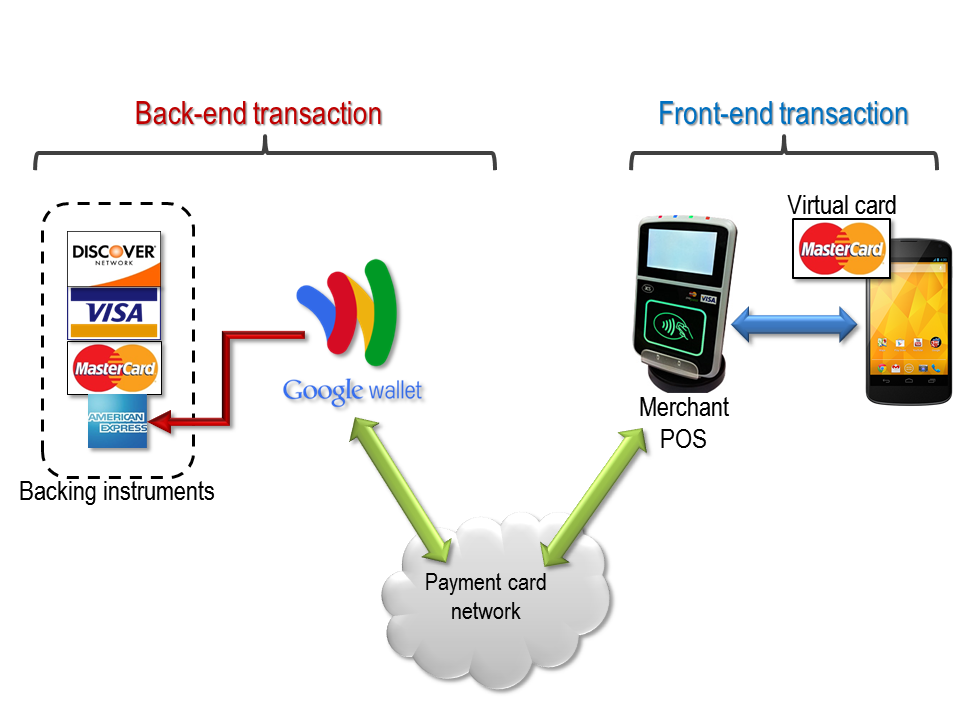
When a user “taps” to pay, several events occur in milliseconds:
- Wake-up: The NFC field “wakes” the Wallet app.
- Authentication: The OS requests a fingerprint or PIN.
- Token Exchange: The Wallet app selects the default token and signs it with a one-time dynamic cryptogram.
- Transmission: The token is sent to the POS terminal via the 13.56 MHz frequency.
- Authorization: The merchant’s bank (acquirer) sends the token to the card network (Visa/Mastercard), which de-tokenizes it to identify the real account, approves the funds, and sends a “success” message back through the chain.
The result is a completed transaction that is faster than inserting a chip card and significantly more secure than swiping a magnetic stripe. Through this intricate web of hardware communication and software encryption, Google Wallet has successfully transformed the smartphone into an essential, multi-functional tool for the modern digital age.
aViewFromTheCave is a participant in the Amazon Services LLC Associates Program, an affiliate advertising program designed to provide a means for sites to earn advertising fees by advertising and linking to Amazon.com. Amazon, the Amazon logo, AmazonSupply, and the AmazonSupply logo are trademarks of Amazon.com, Inc. or its affiliates. As an Amazon Associate we earn affiliate commissions from qualifying purchases.