
In the rapidly evolving landscape of digital finance, a Bitcoin wallet serves as your indispensable gateway to interacting with the world’s first and most prominent cryptocurrency. Far from being a physical receptacle, a Bitcoin wallet is a sophisticated piece of software or hardware designed to manage the cryptographic keys essential for controlling your Bitcoin assets. Understanding how to establish and secure such a wallet is not just a technicality, but a fundamental prerequisite for anyone looking to navigate the digital economy with confidence and safety. This comprehensive guide will demystify the process, exploring the underlying technology, surveying the various types of wallets available, and providing a robust framework for secure setup and management, all firmly rooted in the principles of digital security and software functionality.
Understanding Bitcoin Wallets: The Core Technology
At its heart, a Bitcoin wallet is not a place where your Bitcoin is “stored.” Instead, Bitcoin itself exists as entries on a public, distributed ledger known as the blockchain. Your wallet, therefore, is a tool that holds the secret information, specifically cryptographic keys, required to prove ownership of those entries and authorize transactions. It is a sophisticated piece of software or hardware that interfaces with the Bitcoin network, allowing you to send and receive Bitcoin by digitally signing transactions.
What is a Bitcoin Wallet? The Digital Interface
A Bitcoin wallet functions as your user interface to the blockchain. It generates and stores your public and private keys, which are the fundamental components of Bitcoin ownership. When you “receive” Bitcoin, it’s actually being sent to an address derived from your public key, visible on the blockchain. When you “send” Bitcoin, your wallet uses your private key to digitally sign a transaction, proving that you are the rightful owner of the funds associated with that public address. This signature allows the transaction to be broadcast to the Bitcoin network and subsequently verified and added to the blockchain by miners.
Public and Private Keys: The Foundation of Ownership
The security and functionality of a Bitcoin wallet hinge entirely on the intricate relationship between public and private keys.
- Private Key: This is a randomly generated, extremely long string of alphanumeric characters. It is the ultimate secret, akin to a super-secure password, and must never be revealed to anyone. Possession of the private key grants control over the Bitcoin associated with its corresponding public address. If lost or compromised, your Bitcoin is irrevocably lost or stolen.
- Public Key: Derived mathematically from your private key, the public key is also a long string of characters. From this, a Bitcoin address is generated, which is what you share with others to receive funds. While the public key is publicly known, it is computationally infeasible to reverse-engineer the private key from it. This asymmetric cryptography forms the bedrock of Bitcoin’s security model.
Hot vs. Cold Wallets: A Spectrum of Security
The primary distinction between wallet types often boils down to their connectivity to the internet, which directly impacts their security profile.
- Hot Wallets: These are wallets that are connected to the internet, even if only intermittently. Examples include desktop, mobile, and web wallets. Their convenience lies in their accessibility for frequent transactions. However, this internet connectivity inherently exposes them to online threats such as malware, phishing, and hacking attempts. While practical for smaller amounts or transactional use, they are generally not recommended for storing significant holdings.
- Cold Wallets: These wallets are kept offline, providing a robust layer of security against internet-based threats. Hardware wallets and paper wallets are prime examples. By isolating the private keys from any internet-connected device, they significantly reduce the attack surface for malicious actors. Cold storage is widely considered the most secure method for storing substantial amounts of Bitcoin over the long term.
Exploring Wallet Types and Their Technical Implementations
The diversity of Bitcoin wallets caters to various needs, blending different levels of convenience, security, and technical complexity. Choosing the right wallet involves assessing your personal risk tolerance, the amount of Bitcoin you intend to hold, and your frequency of transactions.
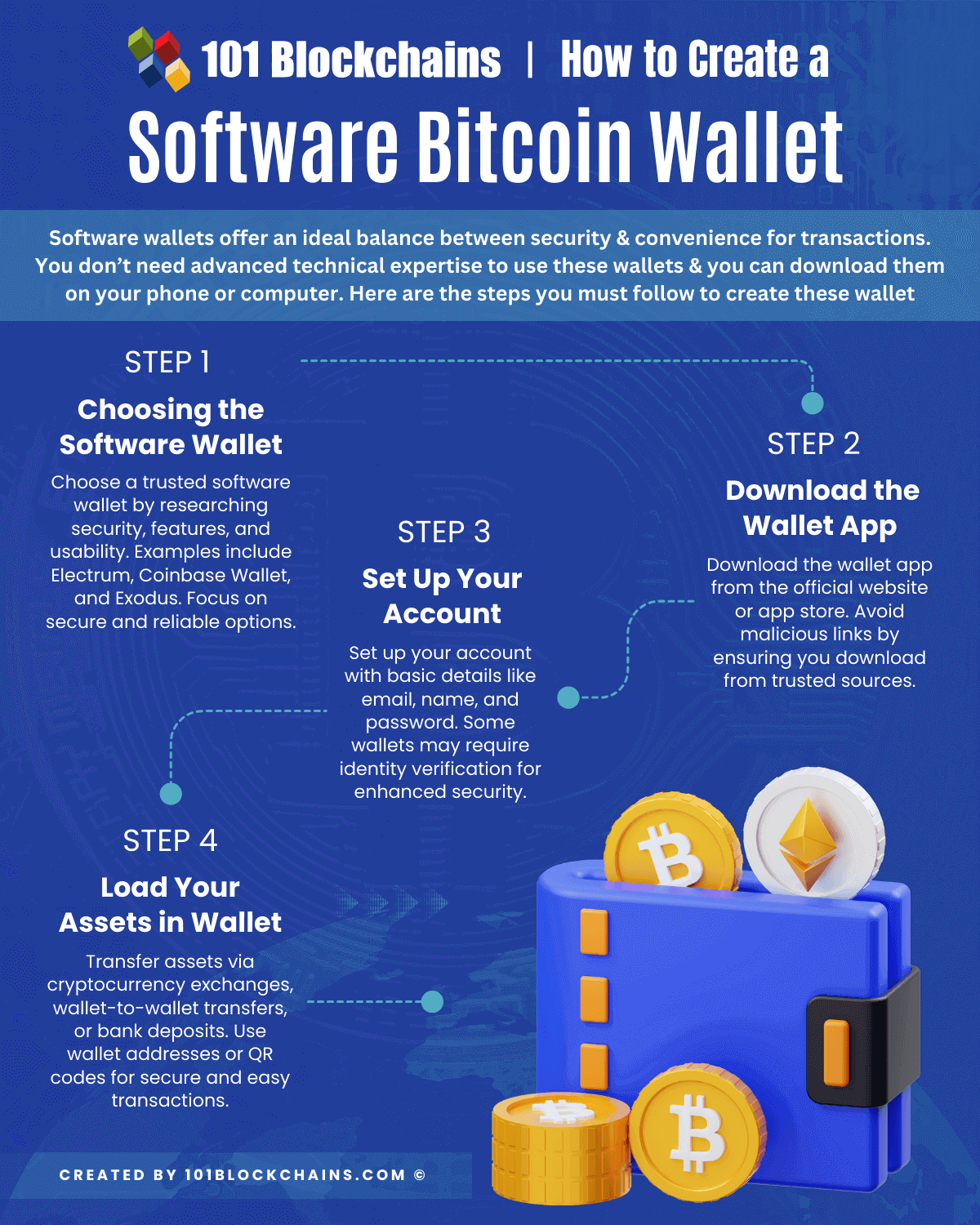
Software Wallets: Convenience Meets Functionality
Software wallets encompass a range of applications installed on your internet-connected devices, offering varying degrees of technical sophistication.
- Desktop Wallets: These applications are installed directly onto your computer, giving you full control over your private keys. Examples include Electrum or Bitcoin Core. They offer a good balance of security (assuming your computer is secure) and functionality, but are vulnerable if your computer is compromised by viruses or malware. Full node wallets like Bitcoin Core also require significant storage and bandwidth to download and verify the entire blockchain.
- Mobile Wallets: Designed for smartphones, these apps provide unparalleled convenience for everyday transactions, allowing you to pay and receive Bitcoin on the go. Wallets like BlueWallet or Samourai Wallet integrate QR code scanning and NFC capabilities. While highly accessible, mobile devices are susceptible to loss, theft, and malicious apps, making them generally less secure than desktop wallets for larger sums.
- Web Wallets: Hosted by third-party services and accessed via a web browser, these wallets are the most convenient but also present the highest security risk. While some reputable exchanges and service providers offer robust web wallet solutions with multi-factor authentication, you ultimately entrust the security of your private keys (or a portion thereof) to the third party. This introduces a “single point of failure” and counterparty risk.
Hardware Wallets: The Pinnacle of Offline Security
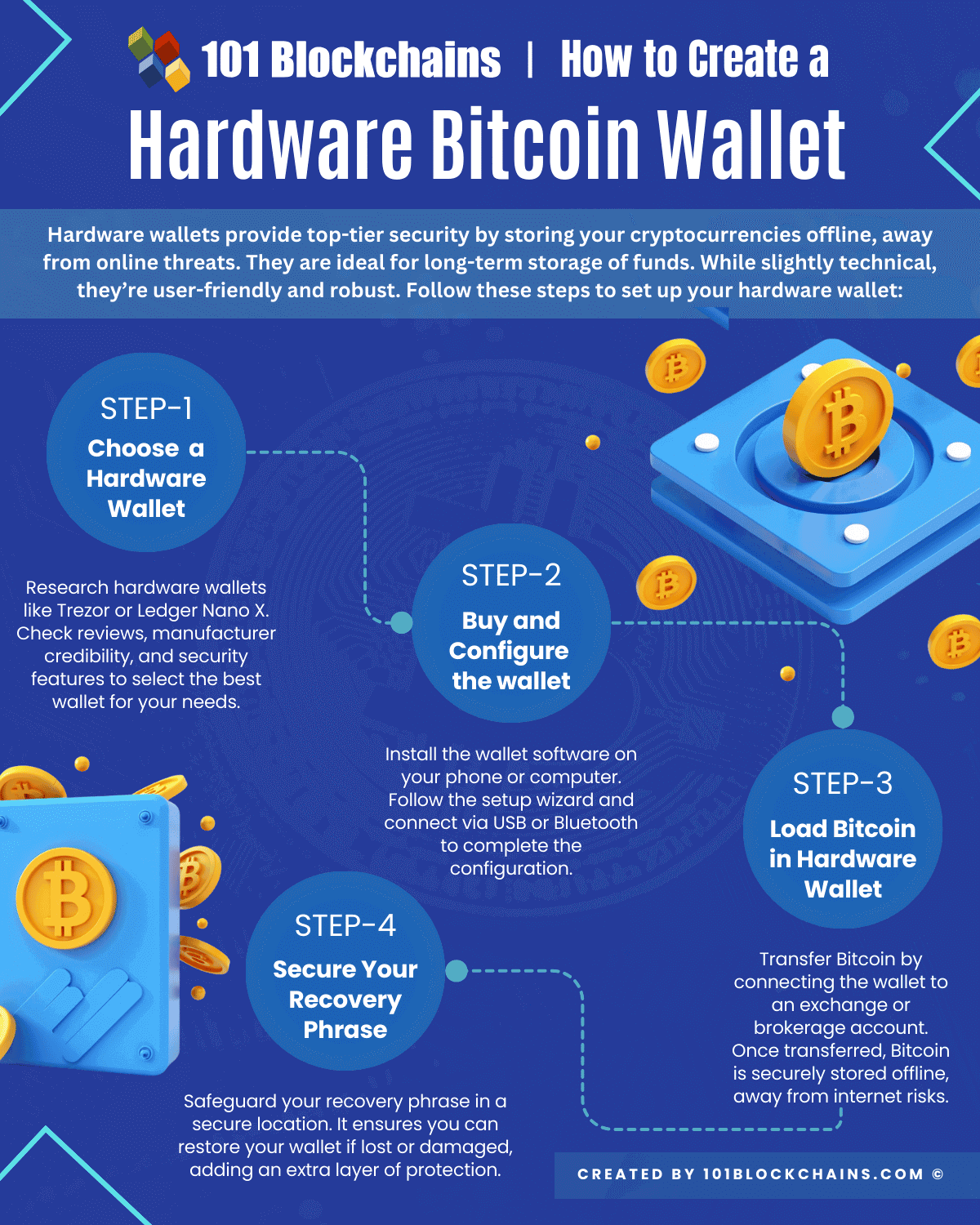
Hardware wallets are specialized physical devices engineered specifically to secure your private keys offline. They are arguably the most secure type of wallet for storing significant amounts of Bitcoin.
- Dedicated Security Chips: These devices contain a secure element chip, similar to those found in passports or credit cards, which is designed to be tamper-resistant and impervious to most software-based attacks.
- Offline Transaction Signing: The crucial innovation of hardware wallets is their ability to sign transactions without exposing the private key to an internet-connected computer. When you initiate a transaction on your computer, the unsigned transaction data is sent to the hardware wallet. The device then processes the transaction internally, uses its secure element to sign it with your private key, and sends the signed transaction back to the computer for broadcast to the network. Your private key never leaves the device.
- Examples: Ledger and Trezor are leading manufacturers of hardware wallets, offering robust security features and user-friendly interfaces.
Paper Wallets: An Analog Approach
A paper wallet is essentially a physical printout of your Bitcoin public address and its corresponding private key (often represented as QR codes).
- Offline Key Generation: The most secure way to create a paper wallet involves generating the keys offline on a clean, air-gapped computer (one never connected to the internet) to ensure no malicious software can intercept them.
- Physical Security: Once printed, the security of a paper wallet relies entirely on its physical safekeeping. It is immune to cyberattacks but vulnerable to physical damage (fire, water), loss, or theft.
- Limited Utility: While highly secure for cold storage, spending Bitcoin from a paper wallet typically requires importing the private key into a software wallet, which then exposes it to online risks. This makes them less practical for frequent use.
A Practical Guide to Setting Up Your Bitcoin Wallet
The process of creating a Bitcoin wallet involves several critical steps, with an overarching emphasis on security from the outset. Regardless of the type of wallet you choose, careful execution is paramount.
Choosing a Reputable Wallet Provider
The digital asset space is rife with both innovative solutions and malicious actors. Therefore, selecting a trustworthy wallet provider is your first line of defense.
- Research and Reviews: Look for providers with a long-standing reputation, positive community reviews, and transparent security practices.
- Open Source: Many highly regarded wallets are open-source, meaning their code is publicly auditable. This transparency allows security researchers to identify and fix vulnerabilities, fostering trust.
- Security Audits: Check if the wallet software has undergone independent security audits.
- Feature Set: Evaluate features like multi-signature capabilities, integrated exchange functionality, and supported cryptocurrencies, if relevant.
The Setup Process: From Download to Configuration
While specific steps vary by wallet type and provider, a general workflow applies:
- Download/Acquire: For software wallets, download the official application directly from the provider’s website or an official app store. Never use third-party links. For hardware wallets, purchase directly from the manufacturer or an authorized reseller.
- Initialization: Upon first launch (software) or connection (hardware), you’ll typically be guided through an initialization process. This usually involves generating a new wallet.
- Seed Phrase Generation: This is the most critical step. Your wallet will display a “seed phrase” (also known as a recovery phrase, mnemonic phrase, or recovery seed), which is a sequence of 12 or 24 common words. This phrase is a human-readable representation of your private key(s) and is the only way to recover your funds if your wallet is lost, stolen, or damaged.
- Confirm Seed Phrase: The wallet will often ask you to re-enter a portion or all of the seed phrase to ensure you have recorded it correctly. Do not skip this step.
- Set PIN/Password: For software wallets, you’ll set a strong password. For hardware wallets, you’ll set a PIN to protect the device from unauthorized physical access.
Securing Your Seed Phrase and Private Keys
The seed phrase is the master key to your Bitcoin. Losing it means losing your Bitcoin; having it stolen means having your Bitcoin stolen.
- Offline Storage: Crucially, write down your seed phrase on paper or engrave it on metal. Never store it digitally (e.g., in a text file, email, cloud storage) where it could be vulnerable to hacking.
- Multiple Copies (Securely Stored): Create at least two copies and store them in separate, physically secure locations (e.g., a home safe, a bank safety deposit box).
- Confidentiality: Never share your seed phrase with anyone, regardless of who they claim to be. No legitimate service will ever ask for it.
- Memorization (Optional but Recommended): While not a primary storage method, committing the phrase to memory can add an extra layer of redundancy.
Mastering Bitcoin Wallet Security: Protecting Your Digital Assets
Creating a wallet is only the first step; ongoing vigilance and the implementation of robust security practices are essential to safeguard your Bitcoin. The decentralized nature of Bitcoin means you are your own bank, and with that power comes immense responsibility for security.
Implementing Two-Factor Authentication (2FA)
For any online service connected to your Bitcoin, especially web wallets or exchanges, 2FA is a non-negotiable security layer.
- How it Works: 2FA requires two distinct forms of identification before granting access, typically something you know (password) and something you have (a code from an authenticator app or hardware key).
- Types: Software-based authenticator apps (e.g., Google Authenticator, Authy) are common. Hardware-based FIDO U2F keys (e.g., YubiKey) offer even stronger protection by requiring physical presence.
- Avoid SMS 2FA: While better than nothing, SMS-based 2FA is susceptible to SIM-swapping attacks and is generally not recommended for high-value accounts.
Understanding Multisignature (Multi-sig) Wallets
Multi-signature wallets provide an enhanced layer of security by requiring multiple private keys to authorize a transaction.
- Shared Control: Instead of a single private key, a multi-sig wallet requires ‘M’ out of ‘N’ possible keys to sign a transaction (e.g., 2-of-3, meaning any two out of three designated private keys are needed).
- Use Cases: Ideal for joint accounts, corporate funds, or increasing personal security by distributing key control across different devices or trusted individuals. If one key is compromised, your funds remain secure.
- Technical Complexity: While offering superior security, multi-sig setups are more complex to configure and manage.
Protecting Against Phishing and Malware
The vast majority of cryptocurrency theft occurs due to social engineering and malware, not direct attacks on the Bitcoin protocol itself.
- Phishing Awareness: Always verify URLs. Malicious websites often mimic legitimate ones with subtle misspellings. Be wary of unsolicited emails, messages, or calls asking for private information.
- Malware Protection: Use reputable antivirus software, keep your operating system and applications updated, and avoid downloading software from untrusted sources. Be especially cautious of clipboard hijackers that can swap Bitcoin addresses when you copy and paste.
- Dedicated Device (Optional but Recommended): For significant holdings, consider using an air-gapped computer or a dedicated, freshly installed operating system (like Linux on a live USB) for all cryptocurrency-related activities.
Regular Software Updates and Backups
Maintaining the health of your wallet ecosystem is crucial for long-term security.
- Software Updates: Always keep your wallet software and hardware wallet firmware updated to the latest version. Developers frequently release updates that patch security vulnerabilities and introduce new features.
- Redundant Backups: Beyond your seed phrase, consider regular backups of your wallet files (for software wallets) to encrypted external storage, especially if you create new addresses frequently or use features not fully covered by a simple seed phrase.
Managing Transactions and Wallet Maintenance
Once your Bitcoin wallet is set up and secured, understanding how to effectively manage your transactions and maintain your wallet is key to a seamless and secure experience.
Sending and Receiving Bitcoin: A Technical Overview
The core function of a Bitcoin wallet is to facilitate transactions.
- Receiving Bitcoin: To receive Bitcoin, you simply provide your public Bitcoin address to the sender. Your wallet application will usually have a “Receive” section where you can view your address, often as a QR code for easy scanning.
- Sending Bitcoin: When sending, you’ll need the recipient’s Bitcoin address. Your wallet will prompt you to enter the amount and optionally set a transaction fee. Higher fees generally lead to faster confirmation times on the network. The wallet then constructs the transaction, signs it with your private key (or via your hardware wallet), and broadcasts it to the Bitcoin network. The transaction then awaits confirmation from miners.
- Understanding Fees: Transaction fees compensate miners for processing and securing the network. Fees fluctuate based on network congestion. Your wallet software typically estimates an appropriate fee.
Monitoring Your Wallet Activity
Transparency is a cornerstone of the Bitcoin blockchain.
- Wallet Interface: Most wallet applications provide a transaction history, showing incoming and outgoing transactions, their status (pending/confirmed), and associated fees.
- Blockchain Explorers: For more detailed information, you can use a public blockchain explorer (e.g., blockchain.com, mempool.space). By entering your Bitcoin address or a transaction ID, you can view all related transactions, their confirmation status, the block they were included in, and other technical details. This is an excellent tool for verifying payments or troubleshooting issues.
Preparing for the Future: Upgrades and Recovery
The technology landscape is dynamic, and your approach to wallet management should reflect this.
- Technology Evolution: Stay informed about advancements in wallet technology, security protocols, and Bitcoin network upgrades (e.g., Taproot). Periodically review your chosen wallet’s compatibility and security features.
- Recovery Planning: Regularly test your recovery plan. If you have a hardware wallet, practice recovering it using your seed phrase on a different, new device (using small test amounts initially). This ensures your seed phrase is correct and you understand the process before an emergency arises.
- Regular Audits: Periodically audit your own security practices. Are your backups still secure? Is your 2FA active? Have your software and firmware been updated?
In conclusion, creating a Bitcoin wallet is a foundational step into the world of cryptocurrency, intertwining software interaction, cryptographic principles, and stringent security protocols. By understanding the distinction between hot and cold storage, carefully selecting a reputable wallet provider, diligently securing your seed phrase, and adopting a proactive approach to digital hygiene, you can establish a robust and secure framework for managing your digital assets. Your wallet is more than just an application; it is your personal treasury, and its security is ultimately in your hands.
aViewFromTheCave is a participant in the Amazon Services LLC Associates Program, an affiliate advertising program designed to provide a means for sites to earn advertising fees by advertising and linking to Amazon.com. Amazon, the Amazon logo, AmazonSupply, and the AmazonSupply logo are trademarks of Amazon.com, Inc. or its affiliates. As an Amazon Associate we earn affiliate commissions from qualifying purchases.