
In an increasingly digital world, Amazon stands as a colossus, redefining how we shop, consume media, and even manage our homes. Its ubiquitous presence means that for many, “ordering from Amazon” is synonymous with online shopping itself. However, for newcomers, or even those seeking to optimize their experience, navigating this vast digital marketplace can present a learning curve. This comprehensive guide will demystify the process, breaking down the technological infrastructure and user interface that underpins Amazon’s unparalleled efficiency, ensuring a professional, insightful, and engaging journey from browsing to delivery, all strictly within the realm of technology and digital interaction.

Setting Up Your Amazon Foundation: Account Creation and Personalization
The gateway to Amazon’s expansive digital catalog begins with establishing your personal presence on their platform. This foundational step is crucial, as it links your identity to your activity, preferences, and, most importantly, your secure transaction capabilities.
The Initial Step: Creating Your Amazon Account
Before you can add items to a cart or complete a purchase, a personal Amazon account is essential. This account serves as your digital identity within the Amazon ecosystem, housing your personal information, order history, and preferences. The creation process is streamlined for user accessibility:
- Navigate to the Amazon Website or App: Open your web browser and go to amazon.com (or your regional domain, e.g., amazon.co.uk) or download the Amazon Shopping app from your device’s app store.
- Locate “Accounts & Lists”: On the website, hover over “Accounts & Lists” in the top right corner. In the app, tap the profile icon.
- Initiate Account Creation: Click “Start here” next to “New customer?” or tap “Create account.”
- Input Personal Details: You’ll be prompted to enter your name, a valid email address or mobile phone number, and a strong password. The choice between email and phone number offers flexibility, especially for mobile-first users.
- Verify Your Identity: Amazon employs a verification step, usually sending a One-Time Password (OTP) to your provided email or phone number. This security measure helps confirm your ownership of the contact information and safeguards against fraudulent account creation, highlighting Amazon’s commitment to digital security from the outset.
The importance of choosing a robust, unique password cannot be overstated. With cyber threats ever-present, a complex password (combining uppercase and lowercase letters, numbers, and symbols) acts as the first line of defense for your digital storefront on Amazon.
Enhancing Your Profile: Addresses, Payment Methods, and Prime
Once your account is active, populating it with essential information transforms it from a mere login to a ready-to-use shopping profile. This includes establishing your physical destinations for deliveries and your digital financial pathways.
- Adding Shipping Addresses: To facilitate seamless deliveries, you’ll need to add one or more shipping addresses. Navigate to “Your Account” and select “Your Addresses.” Here, you can input your primary home address, work address, or even gift recipient addresses. Amazon’s system allows for multiple addresses, and you can designate a default for quicker checkout. This geo-tagging and address management system is a core technological feature simplifying logistics.
- Securely Linking Payment Methods: Under “Your Account,” select “Your Payments” to add credit cards, debit cards, or link gift card balances. Amazon employs advanced encryption protocols (SSL/TLS) to protect your financial data. When you input card details, they are tokenized and securely stored, meaning the raw card number is never directly exposed during transactions. This technological safeguard is critical for user trust and financial security within the platform. You can also utilize Amazon Pay, a digital wallet service, for faster checkouts across various online merchants, extending Amazon’s payment tech beyond its own domain.
- Introduction to Amazon Prime: While not strictly necessary for ordering, understanding Amazon Prime is crucial for optimizing the tech-driven experience. Prime is Amazon’s subscription service that unlocks a suite of enhanced digital benefits:
- Expedited Shipping: Often free two-day, one-day, or even same-day delivery on eligible items, enabled by Amazon’s sophisticated logistics and warehousing technology.
- Prime Video & Music: Access to a vast library of streaming content, showcasing Amazon’s prowess in digital media distribution.
- Prime Reading: A rotating selection of free ebooks, integrating with Kindle devices and apps.
- Exclusive Deals: Early access to Lightning Deals and special discounts, leveraging data analytics to offer personalized promotions.
Prime fundamentally enhances the technological utility of your Amazon account, transforming it into a hub for e-commerce, entertainment, and more.
Navigating the Digital Aisles: Finding and Evaluating Products
With your account established, the next phase involves exploring Amazon’s vast inventory, a task made efficient by its sophisticated search algorithms and user-centric design. This is where Amazon’s technology truly shines, guiding you through millions of products to find exactly what you need.
Search & Discovery: Leveraging Amazon’s Powerful Search Engine
The cornerstone of Amazon’s user experience is its robust search engine. Unlike generic web search engines, Amazon’s is specifically optimized for product discovery, employing complex algorithms that factor in keywords, categories, sales history, customer reviews, and even personalized browsing data.
- Effective Search Queries: Begin by typing precise keywords into the search bar. For instance, instead of “headphones,” try “noise-cancelling Bluetooth headphones” to narrow results.
- Filtering and Sorting: Once results appear, utilize the extensive filters on the left sidebar: brand, price range, customer review rating, features, color, size, and more. These filters act as digital sieves, refining your search based on specific criteria. Sorting options (by relevance, price, average customer review, new arrivals) further empower you to organize results according to your priorities.
- Product Categories and Browsing: For those unsure of specific keywords, browsing by department (e.g., “Electronics,” “Books,” “Home & Kitchen”) allows for exploratory shopping, reminiscent of wandering physical aisles but with a digital guide.
- Utilizing Voice Search (Alexa Integration): For smart home users or those with Alexa-enabled devices, voice search offers a hands-free alternative. Simply say, “Alexa, search for [product name] on Amazon,” leveraging Amazon’s AI and natural language processing capabilities for a truly integrated shopping experience.
Informed Decisions: Product Pages and User Reviews
Once you click on a product, you land on its dedicated product page – a meticulously designed digital hub of information crucial for making an informed purchasing decision.
- Deconstructing a Product Page: Each page is a data-rich environment:
- High-Resolution Images & Videos: Multiple angles, lifestyle shots, and even 360-degree views provide a comprehensive visual understanding. Video walkthroughs offer dynamic demonstrations.
- Detailed Product Description & Specifications: Technical specs, material composition, dimensions, and unique features are clearly laid out. For electronics, this often includes processor speed, RAM, storage, and connectivity options.
- Variations: For items with multiple options (size, color, model), interactive selectors allow you to view different iterations and their respective prices.
- Price & Availability: Clearly displayed, often with comparisons to competitors or historical price data.
- The Role of Customer Reviews and Ratings: User-generated content is paramount on Amazon. The star rating system (out of 5) provides an at-a-glance consensus, while individual reviews offer detailed insights. Amazon often highlights “Verified Purchase” reviews, indicating the reviewer actually bought the product, adding credibility. Machine learning algorithms analyze review sentiment to provide helpful summaries and identify common themes, guiding you to frequently asked questions or noted pros/cons.
- Q&A Section: This interactive feature allows potential buyers to ask specific questions about a product, which can be answered by the seller or previous purchasers. It functions as a crowd-sourced knowledge base, addressing niche concerns that might not be covered in the main description.
Smart Shopping Tools: Wishlists, Watchlists, and Price Trackers
Amazon provides several digital tools to streamline your decision-making and ensure you get the best value, embodying intelligent e-commerce practices.
- Wishlists: Create private or public lists of items you intend to buy later. This digital ‘saving’ feature helps organize your desires and can even be shared for gift suggestions.
- Watchlists: For products like digital content (movies, TV shows), you can add them to a watchlist to be notified of availability or price drops.
- Price Trackers: While Amazon doesn’t offer a native price tracking tool directly on every product page, numerous third-party browser extensions and websites (e.g., CamelCamelCamel, Keepa) integrate with Amazon’s data. These tech tools allow you to view historical price charts, set up alerts for price drops, and make more strategic purchasing decisions, showcasing the interoperability of digital platforms.
The Checkout Process: From Cart to Confirmation
Once you’ve identified your desired items, the journey culminates in the checkout process – a sequence of digital steps meticulously designed for security and convenience. This phase is a testament to Amazon’s sophisticated backend systems handling transactions and logistics.
Managing Your Cart: Adding, Removing, and Modifying Items
Your shopping cart functions as a temporary digital repository for all items you intend to purchase. It’s flexible and dynamic:
- Adding Items: Simply click “Add to Cart” on a product page. The item is then added to your virtual basket.
- Quantity Adjustments: Within the cart, you can easily change the quantity of each item using a dropdown menu or input field.
- Removing Items: Items can be deleted from your cart if you change your mind, or moved to a “Save for later” section if you’re not ready to purchase them immediately. This feature helps declutter your current purchase intention while preserving items for future consideration.
The Final Steps: Shipping, Payment, and Order Review
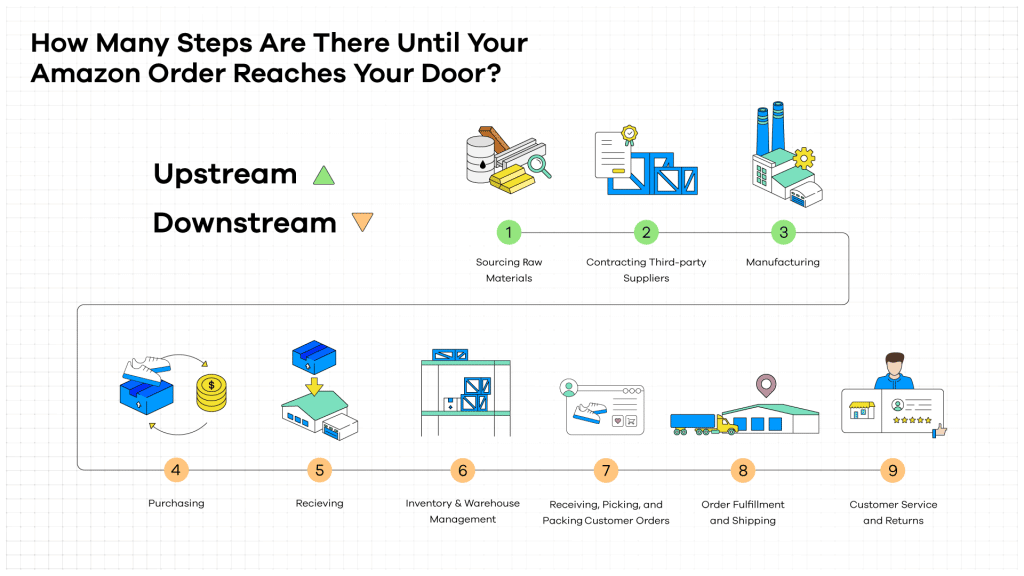
Proceeding to checkout initiates a guided sequence that confirms delivery details and financial transaction specifics.
- Shipping Information: You’ll be prompted to select a shipping address from your saved list or add a new one. Amazon’s system then presents available shipping speeds (e.g., Standard, Expedited, Prime Two-Day) along with their estimated delivery dates and costs. This logistical wizardry relies on complex algorithms calculating optimal routes and warehouse availability.
- Payment Method Selection: Choose a stored payment method or add a new one. This could be a credit/debit card, Amazon gift card, or even financing options like Amazon Store Card.
- Applying Promotional Codes: If you have a digital coupon or promotional code, there will be a designated field to enter it, applying the discount before finalizing the total.
- Order Review: This crucial final screen summarizes your entire order: items, quantities, shipping address, selected shipping speed, payment method, any applied discounts, and the final total. It’s imperative to review every detail for accuracy before proceeding. This step acts as a digital confirmation, preventing errors before the transaction is processed.
- One-Click Ordering: For ultimate convenience, Amazon offers “One-Click Ordering.” Once enabled and a default shipping address/payment method is set, clicking “Buy Now with 1-Click” on a product page bypasses the entire cart and checkout process, instantly placing the order. While incredibly fast, users should be mindful of its immediacy to avoid accidental purchases.
Digital Security Measures During Checkout
Amazon places paramount importance on securing your financial transactions. The checkout process is fortified with several technological safeguards:
- Encryption (SSL/TLS): All data exchanged during checkout (payment details, personal information) is encrypted using industry-standard SSL/TLS protocols. This creates a secure, private tunnel between your device and Amazon’s servers, making it virtually impossible for unauthorized parties to intercept sensitive information.
- Two-Factor Authentication (2FA): For certain account changes or high-value transactions, Amazon may prompt for 2FA, requiring an additional verification code sent to your phone or email. This adds an extra layer of security beyond just your password.
- Fraud Detection Systems: Amazon employs sophisticated, AI-driven fraud detection systems that continuously monitor transactions for unusual patterns, potentially flagging and suspending suspicious activities before they can harm customers.
- PCI DSS Compliance: Amazon adheres to the Payment Card Industry Data Security Standard (PCI DSS), a set of security standards designed to ensure that all companies that process, store, or transmit credit card information maintain a secure environment.
Post-Purchase: Tracking, Returns, and Customer Support
The Amazon experience extends far beyond the “Place Your Order” button. A robust set of post-purchase technological features ensures you stay informed, empowered, and supported after your purchase.
Real-Time Updates: Tracking Your Order
Once an order is placed, Amazon provides comprehensive tools to monitor its journey from warehouse to your doorstep. This relies on advanced logistics and real-time data integration.
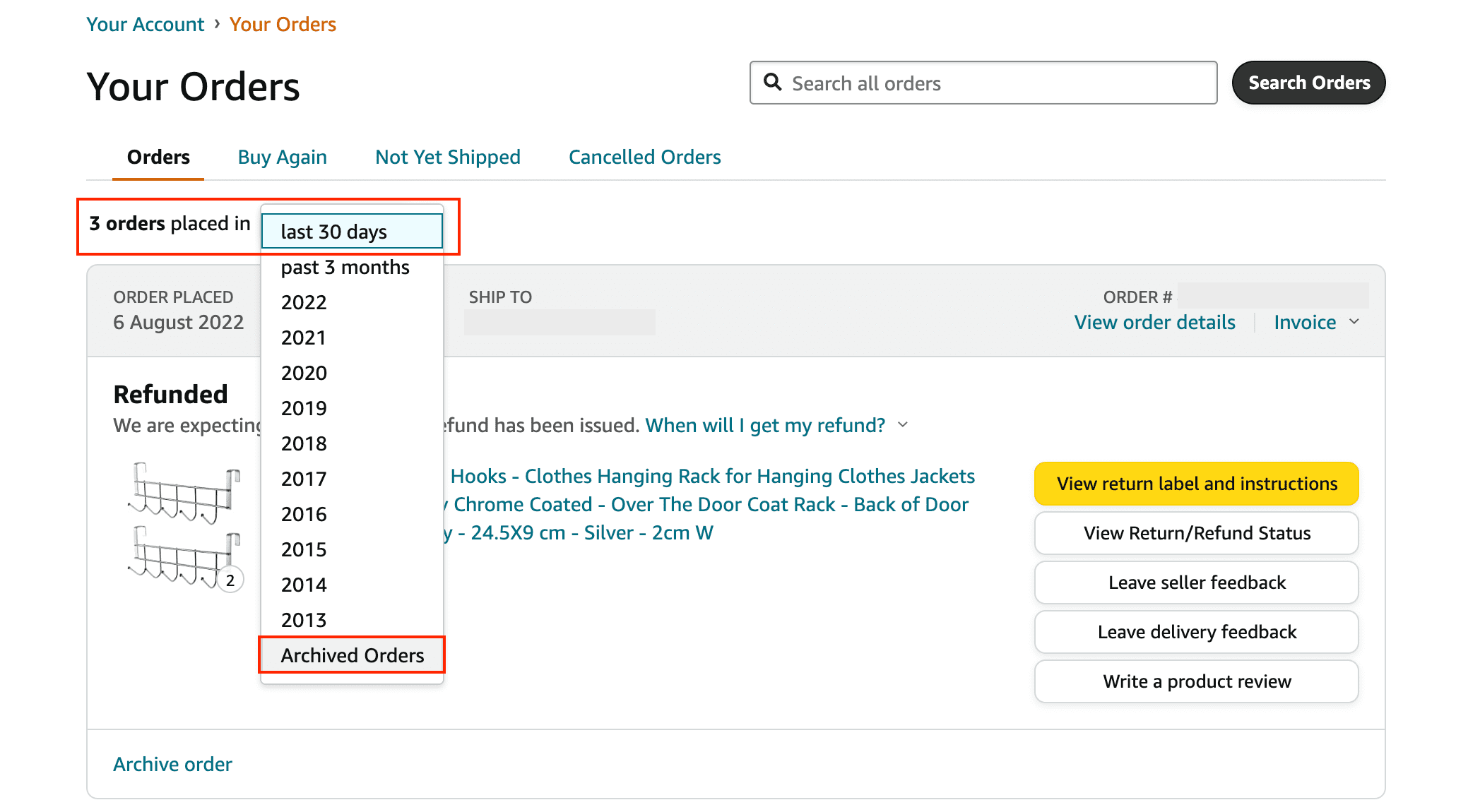
- Order Tracking Page: Navigate to “Your Orders” in your account. Each order has a dedicated tracking link that displays its current status (e.g., “Order Received,” “Preparing for Shipment,” “Shipped,” “Out for Delivery,” “Delivered”).
- Notifications (Push, Email): Amazon leverages push notifications via its mobile app and email alerts to keep you informed of key milestones, such as shipment confirmation, out-for-delivery status, and successful delivery. This proactive communication minimizes uncertainty and enhances the user experience.
- Understanding Shipping Statuses: The tracking interface provides detailed breakdowns, often including estimated delivery windows, carrier information, and even map views showing the package’s progress in certain regions, utilizing GPS and real-time carrier data.
Hassle-Free Returns: The Digital Return Process
Should an item not meet your expectations, Amazon’s return process is largely digital, intuitive, and designed for user convenience, leveraging their logistics network.
- Initiating a Return Online: Go to “Your Orders,” locate the item you wish to return, and click “Return or Replace Items.”
- Reason for Return: Select a reason from a dropdown menu. This data helps Amazon and its sellers understand product quality and customer satisfaction trends.
- Return Method: Amazon offers various tech-enabled return options:
- Printable Return Labels: Generate and print a return label at home, then drop the package off at a designated carrier location.
- QR Code Returns: For select items, Amazon can provide a QR code to be scanned at drop-off locations (e.g., Amazon Fresh stores, UPS stores), eliminating the need for a printer. This is a prime example of streamlining physical processes with digital tools.
- Scheduled Pickups: In some cases, you can schedule a carrier pickup directly from your home, further simplifying the logistics for the customer.
- Refund Processing: Once the return is received and processed at an Amazon facility, the refund is typically issued to your original payment method, often within a few business days, with automated notifications updating you on the status.
Digital Assistance: Amazon Customer Support
For any issues or questions that arise, Amazon’s customer support system is highly integrated into its digital platform, offering multiple channels for assistance.
- Accessing Support within the Platform/App: The “Customer Service” section (usually found at the bottom of the website or in the app’s menu) is your primary portal.
- Chatbots and Live Chat: Amazon utilizes AI-powered chatbots for initial queries, guiding users to relevant help articles or escalating to a live chat agent if needed. This provides immediate, text-based support without waiting on hold.
- Email and Phone Support: Options to send an email or request a callback are also available, ensuring comprehensive access to human assistance when automated solutions are insufficient.
- FAQs and Help Articles: A vast, searchable knowledge base of self-help articles covers common questions and issues, allowing users to quickly find solutions independently, a cornerstone of efficient online customer service.
Advanced Tips for the Savvy Amazon Shopper (Tech Focus)
Beyond the basic ordering process, Amazon offers a wealth of advanced features that can significantly enhance your digital shopping experience, demonstrating its continuous innovation in user-centric technology.
Optimizing with the Amazon Mobile App
The Amazon mobile app provides a superior, often more integrated, experience compared to the desktop website, especially for on-the-go shopping.
- Push Notifications: Receive instant alerts for order updates, price drops on wishlisted items, and personalized deals.
- Barcode Scanning & Camera Search: Use your phone’s camera to scan product barcodes in physical stores to compare prices on Amazon, or use image recognition to search for products based on photos you take. This blurs the line between physical and digital shopping.
- Personalized Recommendations: The app often has more intuitive and immediate access to highly personalized product recommendations based on your browsing and purchase history, driven by sophisticated machine learning algorithms.
- Seamless Mobile Experience: Features like “Shake to find a deal” (on some apps) or simplified navigation make the mobile experience fluid and engaging.
Exploring Amazon’s Tech Ecosystem
Amazon is more than just an e-commerce site; it’s a vast ecosystem of interconnected technologies.
- Alexa Integration for Voice Shopping: Link your Amazon account to Alexa-enabled devices (Echo speakers, Fire TV) to reorder past purchases, add items to your cart, or even discover new products using voice commands, illustrating the power of conversational AI in commerce.
- Amazon Smile: Designate a charitable organization to receive a portion of your eligible purchase price, integrating social good directly into the transaction process without extra cost to you.
- Subscribe & Save: For frequently purchased household items, this program automates regular deliveries, often with discounts, and can be easily managed through your account. It’s a sophisticated inventory management and subscription service for consumers.
- Digital Content Purchases: Seamlessly purchase Kindle ebooks, Audible audiobooks, digital music, and Prime Video content directly through the same Amazon account, demonstrating its comprehensive digital media distribution platform.
Prioritizing Digital Security and Privacy
Maintaining the security and privacy of your Amazon account is paramount in the digital age.
- Regular Password Changes: Periodically update your Amazon password to a strong, unique one.
- Reviewing Order History for Anomalies: Regularly check “Your Orders” for any unfamiliar purchases, which could indicate unauthorized account access.
- Understanding Amazon’s Privacy Settings: Explore the “Your Account” section for privacy controls, including advertising preferences and data management options.
- Beware of Phishing Scams: Be vigilant against suspicious emails or messages purporting to be from Amazon, especially those asking for personal information or payment details. Always verify sender legitimacy and never click suspicious links.
In conclusion, ordering from Amazon is an exercise in interacting with one of the most advanced and user-friendly e-commerce platforms in existence. By understanding the technological underpinnings of account management, search algorithms, secure checkout processes, and robust post-purchase support, users can transform a simple transaction into a seamless, efficient, and highly personalized digital shopping experience. Amazon continually evolves its platform, integrating new technologies from AI to advanced logistics, making the mastery of its interface an ongoing, rewarding endeavor for the modern digital consumer.
aViewFromTheCave is a participant in the Amazon Services LLC Associates Program, an affiliate advertising program designed to provide a means for sites to earn advertising fees by advertising and linking to Amazon.com. Amazon, the Amazon logo, AmazonSupply, and the AmazonSupply logo are trademarks of Amazon.com, Inc. or its affiliates. As an Amazon Associate we earn affiliate commissions from qualifying purchases.