
The phrase “tax season” can strike fear or dread into the hearts of many, conjuring images of complex forms, confusing jargon, and the potential for costly errors. While many opt for professional assistance, the reality is that filing your own taxes is not only entirely achievable for most individuals but can also be a profoundly empowering and cost-saving exercise in personal financial management. With the right approach, a clear understanding of the basics, and access to readily available tools, you can take control of your financial responsibilities and ensure compliance without breaking the bank on an accountant.
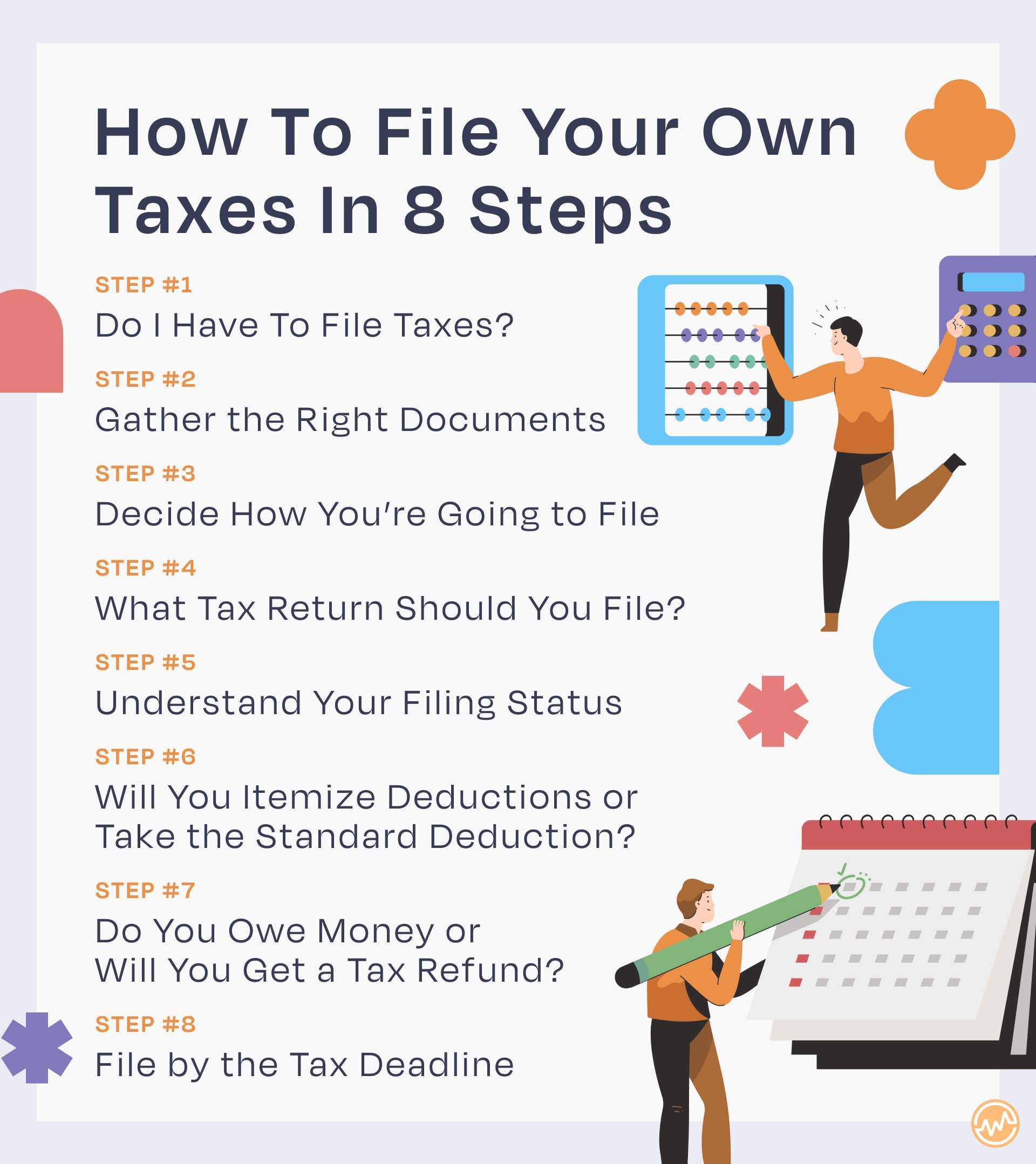
This guide will demystify the process of DIY tax filing, breaking it down into manageable steps. We’ll equip you with the knowledge to navigate the necessary forms, understand your obligations, and potentially maximize your refund or minimize your tax liability. By the end, you’ll feel more confident about tackling your taxes independently, transforming a once daunting task into a valuable component of your financial literacy.
Understanding the Fundamentals of Tax Filing
Before you even think about numbers or forms, a foundational understanding of who needs to file, what documents are essential, and how your personal situation impacts your filing status is crucial. This groundwork sets the stage for a smoother, more accurate filing experience.
Who Needs to File?
Not everyone is required to file a federal income tax return, but a vast majority of working adults are. The requirement typically hinges on your gross income, filing status, and age. For instance, if your gross income exceeds a certain threshold (which changes annually and depends on your filing status), you must file. Even if your income is below the threshold, you might still want to file to claim a refund for withheld taxes or eligible tax credits, such as the Earned Income Tax Credit or the Child Tax Credit. Generally, if you had federal income tax withheld from your pay, you’ll want to file to get that money back if you overpaid. It’s also mandatory if you had net earnings from self-employment of $400 or more.
Key Documents You’ll Need
Preparation is key. Gathering all your necessary documents before you start will prevent frustrating stops and starts. Here’s a checklist of common documents:
- Income Statements:
- Form W-2: From your employer(s), showing wages, tips, and other compensation, along with federal, state, and local taxes withheld.
- Form 1099-NEC: For nonemployee compensation (freelancers, independent contractors).
- Form 1099-MISC: For miscellaneous income, such as rent, royalties, or awards.
- Form 1099-INT: For interest income from banks or brokerage accounts.
- Form 1099-DIV: For dividend income from stocks or mutual funds.
- Form 1099-R: For distributions from pensions, annuities, IRAs, or retirement plans.
- Schedule K-1: For income from partnerships, S corporations, and trusts.
- Statements from online payment platforms: If you receive income through services like PayPal, Venmo (for business transactions), or similar platforms, you might receive Form 1099-K.
- Proof of Deductions and Credits:
- Form 1098: Mortgage interest statement.
- Form 1098-E: Student loan interest statement.
- Form 1098-T: Tuition statement from educational institutions.
- Childcare expense records: Including the provider’s Employer Identification Number (EIN) or Social Security Number (SSN).
- Medical expense receipts, charitable donation receipts, property tax statements, state and local tax payments, business expense records: If you plan to itemize deductions.
- Other Essential Information:
- Your Social Security Number (SSN) or Individual Taxpayer Identification Number (ITIN) and those of your spouse and dependents.
- Your previous year’s Adjusted Gross Income (AGI) – often required for identity verification when e-filing.
- Bank account information (routing and account number) for direct deposit of refunds or direct debit of payments.
Choosing Your Filing Status
Your filing status is crucial as it determines your standard deduction, eligibility for certain credits, and the tax rates applied to your income. There are five main statuses:
- Single: For unmarried individuals who don’t qualify for another status.
- Married Filing Jointly: For married couples who file one return together.
- Married Filing Separately: For married couples who choose to file separate returns. This can sometimes be beneficial in specific financial situations or if there are trust issues.
- Head of Household: For unmarried individuals who pay more than half the cost of keeping up a home for a qualifying person (usually a child or dependent) for more than half the year. This status often provides a higher standard deduction and more favorable tax rates than Single.
- Qualifying Widow(er) with Dependent Child: For individuals whose spouse died in one of the two previous tax years and who have a dependent child. This status allows for the Married Filing Jointly tax rates for two years after the spouse’s death.
Understanding which status applies to you is a critical first step, as selecting the wrong one can lead to incorrect tax calculations and potential issues with the IRS.
Navigating the DIY Tax Filing Process
Once your documents are in order and you’ve determined your filing status, the practical process of calculating and submitting your taxes begins. There are several avenues available for DIY filers, each with its own advantages.
Software vs. Paper Forms vs. Free File Programs
The method you choose largely depends on the complexity of your tax situation and your comfort level with technology.
- Tax Software (e.g., TurboTax, H&R Block, TaxAct): This is the most popular option for DIY filers. These programs guide you step-by-step, asking simple questions and automatically populating the correct forms. They perform calculations, check for errors, and often identify deductions or credits you might overlook. Most offer different tiers, from free (for very simple returns) to paid versions for more complex scenarios (e.g., self-employment income, investments). They are user-friendly, minimize errors, and allow for easy e-filing.
- IRS Free File Program: If your Adjusted Gross Income (AGI) is below a certain threshold (which changes annually, often around $79,000), you can use the IRS Free File program. This allows you to use guided tax preparation software from various partners for free. If your income is above the threshold, you can still use Free File Fillable Forms, which are electronic versions of IRS paper forms. This requires more tax knowledge as there’s no interview process or error checking.
- Paper Forms: You can download all IRS forms and instructions directly from the IRS website (IRS.gov) and complete them by hand. This method is generally recommended only for those with very simple tax situations or who prefer the tactile process. It’s labor-intensive, prone to mathematical errors, and requires you to mail your return, which can delay processing.
For most DIY filers, especially those with moderately complex returns (e.g., W-2 income, some investments, student loan interest), tax software or the IRS Free File program offers the best balance of ease, accuracy, and cost-effectiveness.
Step-by-Step Walkthrough with Tax Software
Assuming you opt for tax software, here’s a typical workflow:
- Select Your Software: Choose a reputable tax software provider. Many offer free trials or basic versions for simple returns.
- Create an Account: You’ll need to set up an account, often requiring your email and a password.
- Enter Personal Information: Input your name, SSN, date of birth, and select your filing status. If you have dependents, you’ll enter their information here too.
- Import or Enter Income: The software will prompt you to enter information from your W-2s, 1099s, and other income statements. Many programs allow you to import W-2 data directly from your employer or financial institutions, saving time and reducing transcription errors.
- Claim Deductions and Credits: This is where the software shines. It will ask you a series of questions about your life events (e.g., “Did you pay student loan interest?”, “Did you buy a home?”, “Did you pay for childcare?”) to identify potential deductions and credits. Be thorough and honest in your responses.
- Review Your Return: Before filing, the software will perform a comprehensive review, checking for common errors, missed deductions, and inconsistencies. It will show you a summary of your income, deductions, and your calculated refund or amount due. Take this opportunity to meticulously review every entry against your original documents.
- Choose How to File: You’ll typically have the option to e-file (electronically submit) your return or print and mail it. E-filing is almost always faster and more secure.
Common Pitfalls to Avoid
Even with user-friendly software, mistakes can happen. Be vigilant about:

- Missing Income: Forgetting to report all income, especially from side hustles or investments, can lead to IRS penalties.
- Mathematical Errors: While software minimizes this, manual entry can introduce errors. Always double-check.
- Incorrect Filing Status: As discussed, this impacts your entire return.
- Forgetting Deductions/Credits: Not claiming eligible deductions or credits is like leaving money on the table.
- Incorrect SSNs/ITINs: A simple typo can delay your return significantly.
- Not Signing the Return: If filing by mail, an unsigned return will be sent back.
- Failing to Report Foreign Bank Accounts: If you have over $10,000 in foreign bank accounts, you might need to file an FBAR (Report of Foreign Bank and Financial Accounts) with FinCEN, separate from your tax return.
Optimizing Your Tax Outcome: Beyond Basic Filing
Filing your taxes isn’t just about compliance; it’s an opportunity to optimize your financial position. Understanding and leveraging available deductions and credits is key to this.
Maximizing Deductions and Credits
Deductions reduce your taxable income, while credits directly reduce the amount of tax you owe (a dollar of credit is worth a dollar of tax reduction).
- Standard vs. Itemized Deductions: Most people take the standard deduction, which is a fixed amount based on your filing status. However, if your eligible itemized deductions (e.g., mortgage interest, state and local taxes, medical expenses above a certain threshold, charitable contributions) exceed the standard deduction, it’s beneficial to itemize. Keep meticulous records for itemizing.
- Common Tax Credits:
- Child Tax Credit (CTC): For qualifying children under 17.
- Earned Income Tax Credit (EITC): A refundable credit for low to moderate-income working individuals and families.
- Education Credits (American Opportunity Tax Credit, Lifetime Learning Credit): For tuition and related expenses.
- Child and Dependent Care Credit: For expenses paid for the care of a qualifying individual to allow you to work or look for work.
- Retirement Savings Contributions Credit (Saver’s Credit): For low and moderate-income taxpayers who contribute to an IRA or employer-sponsored retirement plan.
- Above-the-Line Deductions: These reduce your AGI and are available even if you take the standard deduction. Examples include contributions to traditional IRAs, student loan interest paid, and self-employment tax deductions.
Proactively understanding these opportunities throughout the year, not just at tax time, can lead to significant savings.
The Importance of Record Keeping
Good record-keeping is the backbone of successful DIY tax filing. It ensures accuracy, helps you identify all eligible deductions and credits, and provides documentation in case of an IRS inquiry.
- What to Keep: W-2s, 1099s, bank statements, brokerage statements, receipts for large purchases, medical bills, charitable donation receipts, mileage logs for business travel, home improvement receipts (affecting basis), and previous year’s tax returns.
- How Long to Keep Records: Generally, you should keep records for at least three years from the date you filed your original return or two years from the date you paid the tax, whichever is later. For certain situations (e.g., unfiled returns, substantial underreporting of income), the period can be longer.
- Digital vs. Physical: Both are acceptable. Many people scan and save digital copies to cloud storage for easy access and backup. Ensure any physical documents are stored securely.
Understanding Estimated Taxes
If you’re self-employed, a gig worker, receive significant income from investments, or don’t have enough tax withheld from other income, you may need to pay estimated taxes throughout the year. The U.S. tax system is “pay-as-you-go,” meaning you need to pay income tax as you earn or receive income during the year. If you don’t pay enough tax throughout the year through withholding or estimated payments, you could face penalties. Estimated taxes are typically paid in four installments: April 15, June 15, September 15, and January 15 of the following year. This is a crucial consideration for anyone with non-W-2 income to avoid a hefty tax bill and potential penalties at year-end.
What Happens After You File?
Your responsibility doesn’t end the moment you hit “submit” or drop your envelope in the mail. Understanding the post-filing process is just as important.
E-filing vs. Mailing: Advantages and Disadvantages
- E-filing (Electronic Filing):
- Advantages: Faster processing of refunds (often within 21 days), instant confirmation of receipt, reduced error rates, more secure than mailing.
- Disadvantages: Requires internet access and potentially a tax software subscription.
- Mailing:
- Advantages: No internet or software needed.
- Disadvantages: Slower processing (weeks to months for refunds), no immediate confirmation of receipt, higher risk of loss or error, requires postage.
For speed, security, and convenience, e-filing is overwhelmingly the preferred method for DIY filers.
Tracking Your Refund or Making a Payment
- Tracking Your Refund: If you’re expecting a refund, you can track its status using the IRS “Where’s My Refund?” tool on IRS.gov. You’ll need your SSN, filing status, and the exact refund amount shown on your return.
- Making a Payment: If you owe taxes, you have several options:
- Direct Debit: Most tax software and the IRS Free File program allow you to authorize a direct debit from your bank account when you e-file.
- IRS Direct Pay: Pay directly from your checking or savings account for free on IRS.gov.
- Debit/Credit Card: Pay through an authorized third-party processor (fees apply).
- Check/Money Order: Mail a check or money order with Form 1040-V, Payment Voucher.
- Payment Plans: If you can’t pay the full amount due, you can apply for an IRS payment plan, such as a short-term payment plan or an Offer in Compromise.
The Possibility of an Audit and How to Prepare
While the thought of an IRS audit can be intimidating, it’s important to remember that most tax returns are never audited. Audits often result from discrepancies, unusually high deductions compared to income, or random selection. If you do receive an audit notice:
- Don’t Panic: It’s often just a request for more information or clarification.
- Read Carefully: Understand what the IRS is asking for.
- Organize Your Records: This is where good record-keeping pays off. Have all relevant receipts, statements, and documents readily available.
- Seek Professional Help (If Needed): If the audit is complex or you feel overwhelmed, consider consulting a tax professional (an enrolled agent, CPA, or tax attorney).
- Respond Promptly: Adhere to deadlines specified in the notice.
By maintaining accurate records and filing truthfully, you significantly reduce your chances of issues and are well-prepared should an inquiry arise.
Filing your own taxes is a valuable skill that puts you directly in charge of your personal financial management. While it demands attention to detail and a commitment to understanding the rules, the resources available today – particularly tax software and the IRS Free File program – make it more accessible than ever. By embracing the process, staying organized, and leveraging the tools at your disposal, you can confidently navigate tax season, ensure compliance, and even discover opportunities to optimize your financial health, transforming a perceived burden into a powerful step in your financial journey.
aViewFromTheCave is a participant in the Amazon Services LLC Associates Program, an affiliate advertising program designed to provide a means for sites to earn advertising fees by advertising and linking to Amazon.com. Amazon, the Amazon logo, AmazonSupply, and the AmazonSupply logo are trademarks of Amazon.com, Inc. or its affiliates. As an Amazon Associate we earn affiliate commissions from qualifying purchases.