
Navigating the landscape of standardized tests like the SAT requires more than just academic prowess; it demands a strategic understanding of the tools at your disposal. Among these, the calculator stands out as a critical piece of technology that can significantly influence your performance in the mathematics sections. However, the College Board, the organization behind the SAT, has stringent policies regarding which devices are permitted. This isn’t just about having a calculator; it’s about making an informed tech decision to ensure compliance, maximize your efficiency, and avoid disqualification. For tech-savvy test-takers and those new to the complexities of test day regulations, understanding these rules is paramount. This guide delves into the technical specifics of SAT-approved calculators, offering insights to help you select, prepare, and effectively utilize your tech on test day.

Navigating the SAT Calculator Policy: The Technicalities of Permitted Devices
The SAT’s calculator policy is designed to ensure fairness and prevent any unfair advantage derived from advanced or communicative technologies. Understanding these technical parameters is the first step in preparing for test day.
The “Allowed” List: Understanding Acceptable Technologies
Generally, the College Board permits two primary categories of calculators: scientific and graphing. These devices are allowed because their functionalities align with the mathematical demands of the SAT without introducing unfair capabilities.
- Scientific Calculators: These are basic algebraic tools capable of handling fundamental operations, exponents, roots, logarithms, and trigonometric functions. They are straightforward, reliable, and perfectly acceptable for the SAT’s Math with Calculator section, especially if you’re comfortable with manual graphing or prefer a less complex interface. Many students find models like the Casio fx-991EX or Texas Instruments TI-36X Pro to be sufficient.
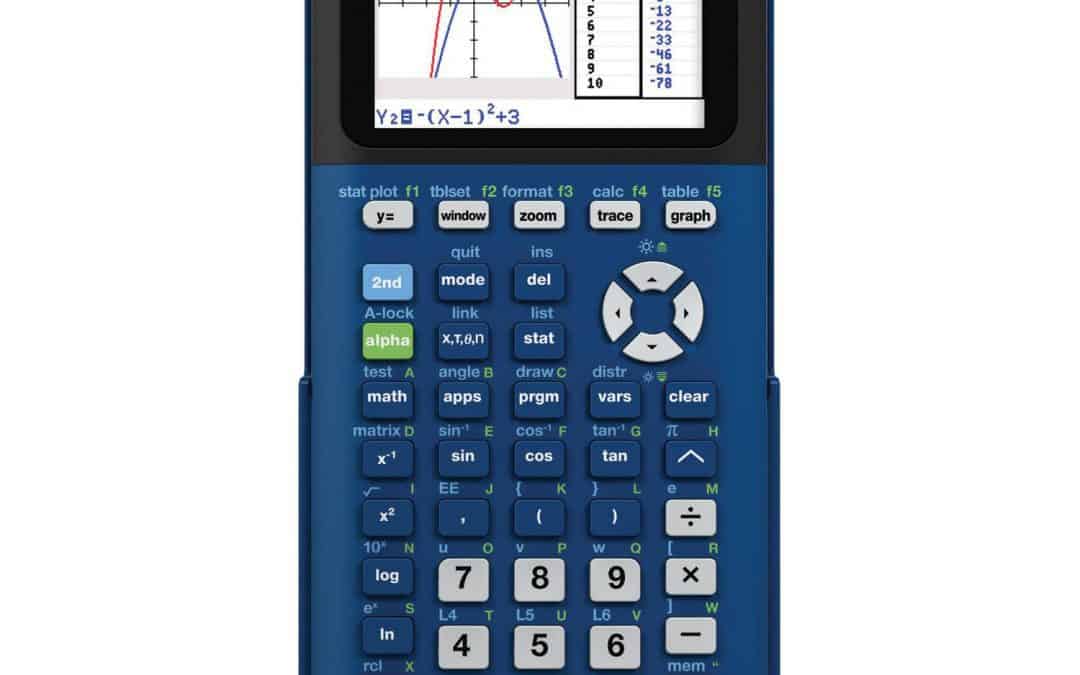
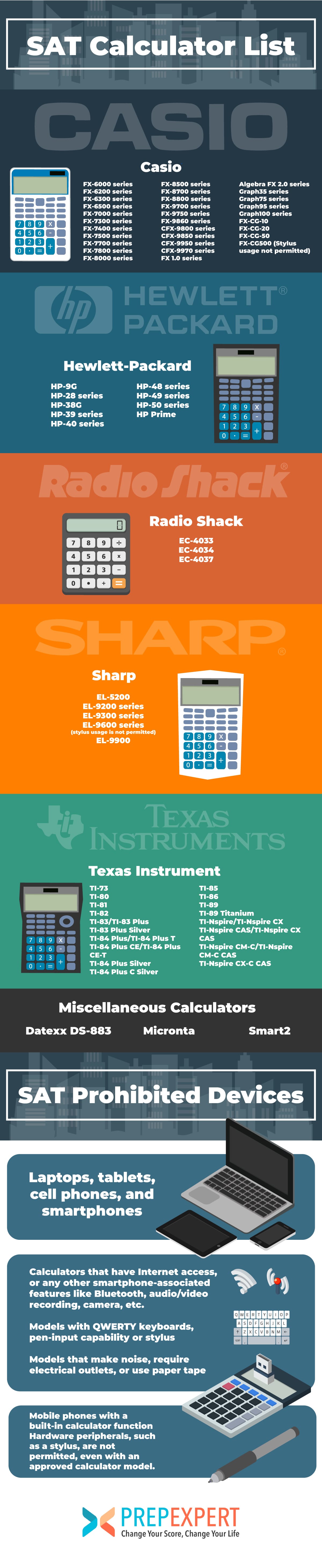
- Graphing Calculators: These are the workhorses of SAT mathematics, offering advanced computational and visualization capabilities. Popular models include the TI-83, TI-84 Plus, TI-84 Plus CE, TI-Nspire (non-CAS and non-QWERTY versions), Casio fx-9750GII, Casio fx-CG50, and HP Prime. These devices can plot functions, solve complex equations, perform statistical analyses, and handle matrices, providing a significant advantage in certain problem types. Their visual representation of data and equations can often simplify challenging questions. It’s crucial to note that while these devices are powerful, their use is strictly monitored for specific models and features.
The key technical features that make these calculators suitable are their computational engines and the absence of features that could compromise test integrity. They are standalone devices designed purely for mathematical operations and visualization.
The “Prohibited” List: Technologies to Avoid at All Costs
Just as important as knowing what’s allowed is understanding what technology is strictly forbidden. Bringing a prohibited device can lead to immediate dismissal from the test center and cancellation of your scores. The College Board’s restrictions target devices that offer communication, information storage, or processing capabilities beyond standard mathematical computation.
- Multifunction Devices: Any device that can serve purposes other than a basic calculator is strictly prohibited. This includes, but is not limited to:
- Cell phones, smartphones, smartwatches, fitness trackers: These devices inherently possess communication, internet access, and extensive memory capabilities.
- Tablets, laptops, portable computers: These are powerful computing devices with vast functionalities unsuitable for standardized testing.
- Pocket organizers and handheld computers: Older technologies with similar advanced capabilities.
- Calculators with QWERTY Keyboards: While some graphing calculators have alphanumeric keypads, those with full QWERTY keyboards (like a computer keyboard) are generally banned. This is because they can be used for text entry and potentially storing notes or unauthorized information. Even specific versions of otherwise permitted calculators, like the TI-Nspire CX CAS with a full QWERTY layout, are often flagged, requiring careful verification of the exact model.
- Calculators with Wireless Communication or Internet Access: Any calculator with Bluetooth, Wi-Fi, or cellular connectivity is disallowed. The intent is to prevent any form of external communication or access to online resources during the exam.
- Calculators Requiring Electrical Outlets: Only battery-operated calculators are permitted, ensuring all test-takers have equally portable and self-sufficient devices.
- Calculators with Audio/Video Recording or Playback Capability: Features like cameras or microphones, if present on a device, automatically disqualify it.
The underlying principle for these prohibitions is to maintain a level playing field and prevent access to external resources or the ability to share information, focusing solely on the test-taker’s individual knowledge and problem-solving skills.
Specific Manufacturer Restrictions and Model Nuances
The College Board provides an exhaustive list of acceptable and unacceptable calculator models on its official website. It’s imperative to consult this list directly, as policies can be updated to reflect advancements in technology or to clarify existing rules. For instance, while most TI-Nspire models are allowed, specific versions with “CAS” (Computer Algebra System) or QWERTY keyboards might have nuanced restrictions. Similarly, older HP models with non-standard key arrangements or advanced functionalities might be prohibited. Always verify your specific model number against the official list to avoid any last-minute surprises or disqualifications.
Maximizing Your Calculator’s Tech Potential on the SAT
Having an allowed calculator is merely the first step. The true advantage comes from knowing how to leverage its technological capabilities efficiently and strategically on test day.
Strategic Feature Utilization for Test Success
Your graphing calculator, if chosen wisely and mastered, is a powerful computational tool.
- Graphing Functions: Use the graphing feature to visualize equations, find intersection points, determine slopes, and analyze function behavior (e.g., maximum/minimum points, domain/range). This is particularly useful for problems involving quadratic equations, linear systems, or inequalities.
- Equation Solvers: Many advanced calculators include built-in equation solvers that can quickly find roots or solutions to complex algebraic expressions, saving valuable time.
- Statistical Functions: The SAT often includes data analysis and probability questions. Your calculator’s statistical functions (mean, median, mode, standard deviation, linear regression) can rapidly process data sets and help you interpret results.
- Matrix Operations: For problems involving systems of linear equations, matrix functions can provide a quick and accurate solution.
The key to unlocking these advantages is practice. Familiarize yourself with your calculator’s interface, menu structure, and specific functions well before the test. Treat it as an extension of your problem-solving toolkit.
Pre-Test Tech Check-up: Ensuring Device Readiness
Technical preparedness goes beyond simply owning the right model. A thorough pre-test check-up of your device is crucial.
- Battery Life: This is non-negotiable. Ensure your calculator has fresh batteries or is fully charged if it’s a rechargeable model. Carry spare batteries if possible, or a portable charging brick for rechargeable models (though you won’t be able to charge during the test). A dead calculator is functionally equivalent to no calculator.
- Resetting Memory: Prior to test day, clear any custom programs, notes, or data stored on your calculator. While most allowed calculators don’t have extensive storage for prohibited content, clearing memory ensures there’s no misunderstanding or accusation of having unauthorized materials. This brings the device back to a “factory standard” tech state.
- Familiarity with Functions: Practice with your calculator under timed conditions. You should be able to quickly access and use its various functions without fumbling through menus. Knowing keyboard shortcuts or preferred input methods can shave off critical seconds.
When to Use (and Not Use) Your Calculator: A Tactical Approach
The SAT Math section is divided into “Math – No Calculator” and “Math – Calculator” sections.
- Math – No Calculator: Absolutely no calculators are allowed here. These questions are designed to test your mental math, number sense, and algebraic manipulation skills. Attempting to use a calculator here will result in disqualification.
- Math – Calculator: This section permits calculator use. However, “allowed” doesn’t always mean “necessary.” Many questions in this section can be solved faster without a calculator, using mental math or estimation. Over-reliance on the calculator can slow you down or lead to input errors. Develop a strategic approach: use your calculator when it genuinely provides an efficiency or accuracy advantage (e.g., complex calculations, graphing functions, statistical analysis), but default to mental math for simpler operations. Optimize your tech usage rather than defaulting to it.
Beyond the Basics: Advanced Considerations for Tech-Savvy Test-Takers
For those who delve deeper into their technology, there are a few more nuanced considerations that can enhance preparedness and compliance.
Software Updates and Firmware: Staying Compliant
Modern graphing calculators, particularly those with sophisticated operating systems, occasionally receive firmware updates from manufacturers. While these updates often improve functionality or fix bugs, it’s vital to ensure that any installed firmware is official and doesn’t introduce features that would violate SAT policies. Generally, test-takers should ensure their calculator’s operating system is standard and devoid of any unauthorized third-party software or modified firmware. It’s safer to use a calculator with its factory-installed software.
The Advantages of a Graphing Calculator: A Tech Deep Dive
While a scientific calculator is sufficient, a graphing calculator offers a deeper level of analytical capability. Its ability to visually represent functions, identify intersection points, analyze data distributions, and perform regression analysis provides a multifaceted approach to problem-solving that can be invaluable for complex SAT questions. It allows test-takers to not only compute answers but also to understand the underlying mathematical relationships visually, which can be a significant advantage in verifying solutions or approaching problems from different angles.
Borrowing vs. Owning: Practical Tech Acquisition
If you don’t own an SAT-approved calculator, you might consider borrowing one. While this is an option, it comes with a significant caveat: unfamiliarity. Using a borrowed calculator that you haven’t extensively practiced with can be a major disadvantage. Different models have different button layouts, menu structures, and input methods. The time spent fumbling with an unfamiliar device on test day is time lost from answering questions. If borrowing, ensure you have ample time to practice and become proficient with it. Ideally, investing in an approved model early in your SAT preparation allows you to build muscle memory and confidence with your chosen tech tool.
The Future of Calculators and Standardized Testing: A Tech Outlook
As technology continues its rapid evolution, so too might the policies governing its use in standardized testing.
Evolving Policies in a Digital Age
The College Board continually evaluates its policies to keep pace with technological advancements. As calculators become more integrated with other devices, and as digital testing platforms become more prevalent, it’s conceivable that the rules for calculator use might evolve. We might see a shift towards integrated digital tools within the testing platform itself, potentially phasing out physical calculators, or more sophisticated methods for detecting prohibited functionalities. The ongoing challenge is balancing the allowance of modern, useful tools with the imperative of maintaining a fair and secure testing environment.
The Role of Digital Tools in Modern Education
The SAT calculator policy reflects a broader discussion about the role of technology in education. While calculators are powerful computational aids, the SAT still values foundational mathematical skills that don’t rely on them. The policy strikes a balance, acknowledging the utility of these tools in complex problem-solving while ensuring that core competencies are still assessed. This ongoing dance between human intellect and technological assistance will continue to shape how we learn, teach, and assess in the digital age.
In conclusion, your choice and mastery of an SAT-approved calculator are more than just logistical details; they are critical components of your test-day strategy. By understanding the College Board’s technical regulations, preparing your device meticulously, and using its features strategically, you can transform your calculator from a mere gadget into a powerful asset that helps you achieve your best possible score. It’s about being technologically smart and prepared for a high-stakes academic endeavor.
aViewFromTheCave is a participant in the Amazon Services LLC Associates Program, an affiliate advertising program designed to provide a means for sites to earn advertising fees by advertising and linking to Amazon.com. Amazon, the Amazon logo, AmazonSupply, and the AmazonSupply logo are trademarks of Amazon.com, Inc. or its affiliates. As an Amazon Associate we earn affiliate commissions from qualifying purchases.