
In the modern digital landscape, managing one’s digital footprint is as much about deletion as it is about creation. As we navigate an era defined by data privacy concerns and software consolidation, many users find themselves auditing their active accounts to streamline their digital lives. PayPal, once the undisputed titan of online payments, now exists within a crowded ecosystem of fintech apps and digital wallets. Whether you are migrating to more integrated software solutions or simply practicing rigorous digital hygiene, knowing how to properly decommission a financial software account is a critical technical skill.
Closing a PayPal account is not merely about clicking a “delete” button; it is a multi-stage technical process that involves data backup, the severance of API permissions, and the resolution of pending software triggers. This guide provides a deep dive into the technicalities of canceling your PayPal account while ensuring your digital security remains uncompromised.
The Pre-Closure Audit: Managing Data and Dependencies
Before initiating the deletion sequence within the PayPal interface, a user must address the various technical dependencies tied to the account. Because PayPal acts as a middle-layer software between your bank and third-party vendors, simply closing the account without preparation can lead to “broken” payment loops and data loss.
Securing Your Digital Transaction History
From a technical standpoint, once an account is closed, your access to the platform’s database is permanently revoked. For tax purposes, business audits, or personal record-keeping, it is essential to export your data.
To do this, navigate to the “Activity” tab and utilize the “Download” tool. You should request a CSV or Quicken file format, as these are machine-readable and can be integrated into other financial management software. This step is a cornerstone of digital security; having a local, encrypted backup of your financial history ensures that you are not reliant on a third-party server that you no longer have the credentials to access.
Revoking API Permissions and Third-Party Integrations
One of the most overlooked aspects of deleting a PayPal account is the web of “Permissions” granted to third-party apps. Over years of use, you likely linked your PayPal to various e-commerce platforms, streaming services, or mobile apps. These integrations function via OAuth or specific API tokens.
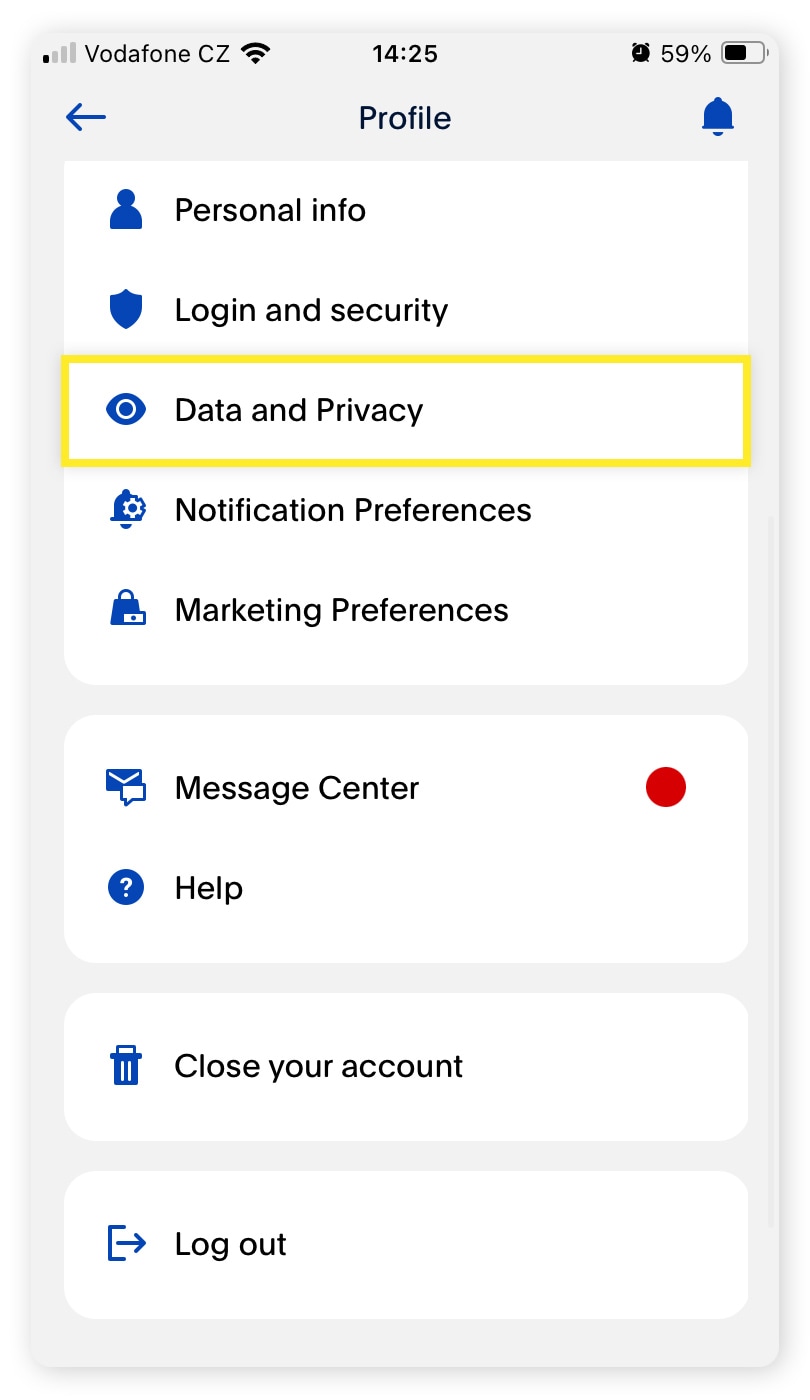
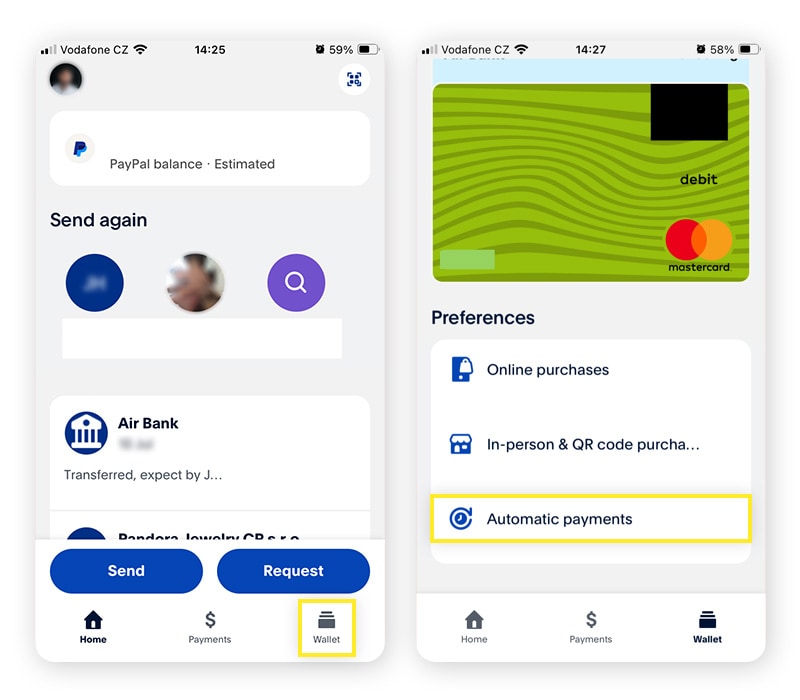
Before deletion, you must navigate to the “Security” settings and review “Permissions you’ve given.” Manually revoking these access tokens prevents these external softwares from attempting to ping a non-existent account, which can sometimes trigger security alerts or service disruptions on those external platforms. Ensuring that no active “Automatic Payments” are pending is vital; if a software subscription attempts to pull funds during the deletion process, the system may flag the account for “suspicious activity,” temporarily locking the deletion feature.
Navigating the Interface: The Technical Walkthrough
PayPal’s user interface (UI) is designed for retention, meaning the “Close Account” option is often tucked away within sub-menus to prevent accidental deletion. The process varies slightly between the desktop web application and the mobile interface.
The Desktop Deletion Procedure
The most stable environment for closing your account is via a desktop browser, which provides full access to the account’s administrative settings.
- Authentication: Log in using multi-factor authentication (MFA) to ensure the session is secure.
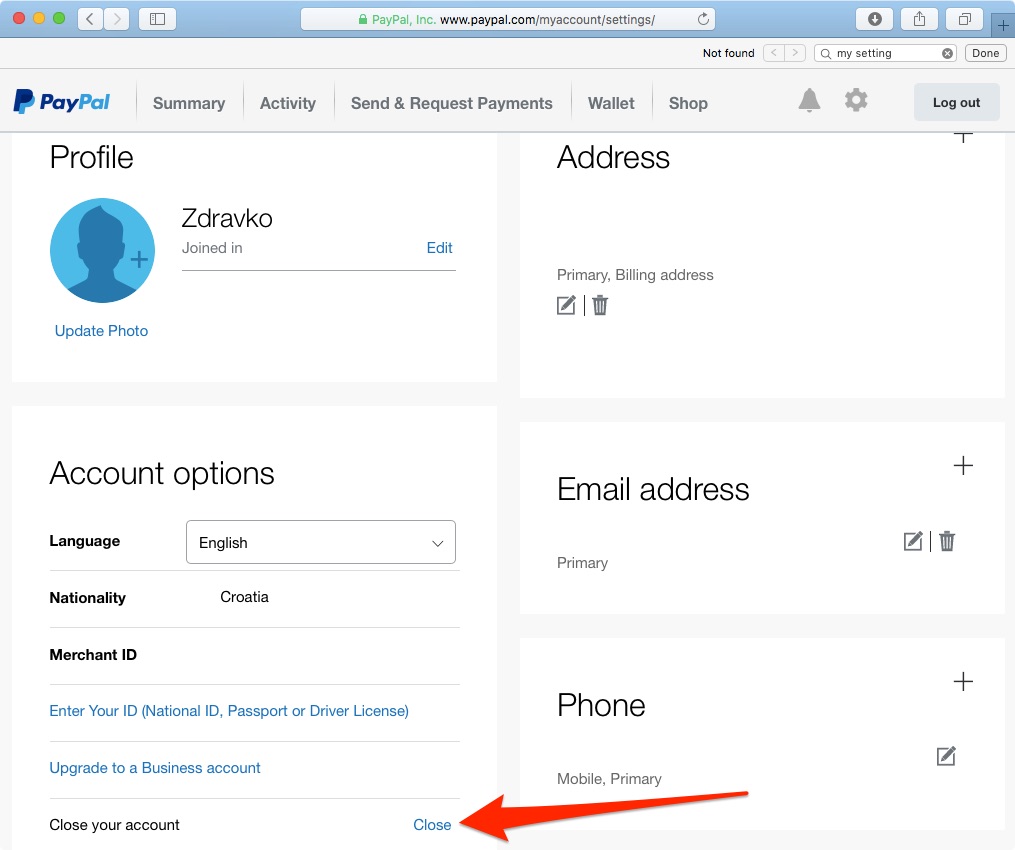
- Navigation: Click on the “Settings” (gear icon) in the top-right corner.
- Account Options: Under the “Account” tab, scroll to the bottom. Here, you will find the “Close your account” link.
- Verification: The system will perform a real-time check of your account status. If there are any “Technical Blocks”—such as a remaining balance, an unresolved dispute, or a pending transfer—the software will halt the process. You must resolve these at the database level (by transferring funds or waiting for transactions to clear) before the “Close Account” command will execute.
Mobile App Limitations and Software Syncing
While the PayPal mobile app is robust for transactions, it sometimes limits administrative overrides. If you are using the app on iOS or Android, the “Close Account” option may redirect you to an in-app browser view.
From a tech perspective, it is important to ensure that your app is updated to the latest version before attempting this. An outdated app may fail to communicate the deletion command to the central server correctly, leading to a “zombie account” state where the account appears closed on your phone but remains active on the server side. After the deletion is confirmed, it is a best practice to clear the app’s cache and then uninstall the software to remove any locally stored metadata or login tokens.
Security Protocols and Post-Deletion Data Retention
A common misconception in the world of software is that “deleted” means “immediately erased.” When you cancel your PayPal account, you are essentially triggering a status change in their global database from “Active” to “Closed.”
Understanding Data Retention Policies
From a digital security and legal-tech standpoint, PayPal is required by various international financial regulations (such as the Bank Secrecy Act in the U.S. and GDPR in Europe) to retain certain data for a specific period—often between five to ten years.
This retained data includes your identity verification documents and transaction logs. While you can no longer log in, the data exists in a “cold storage” state for the purpose of preventing money laundering and fraud. As a user, understanding this helps you realize that deleting an account is a way to stop active data collection, but it does not instantly scrub your historical data from the corporate servers.
Preventing Identity Theft Post-Deletion
After you have closed the account, your email address remains a “unique identifier” in the system’s legacy logs. For maximum security, if you are closing PayPal due to a previous security breach, you should also consider changing the password of the email account associated with the PayPal account.
Furthermore, ensure that you remove PayPal as a “recovery” or “linked” account on other platforms. Many people use PayPal as a verification method for other software services; if that account no longer exists, you might inadvertently lock yourself out of other digital tools if they attempt to verify your identity via a defunct PayPal link.
The Technical Shift: Managing Your Digital Ecosystem Post-PayPal
Once the PayPal account is closed, the goal shifts to maintaining a streamlined and secure digital payment ecosystem. Modern technology offers several alternatives that may better suit a user’s specific software preferences or security needs.
Transitioning to New Software Architectures
For users who are deep into the Apple or Google ecosystems, transitioning to Apple Pay or Google Pay offers a more “native” experience. These tools utilize tokenization—a security process where your actual card details are never shared with the merchant. Instead, a unique, encrypted token is generated for each transaction. This is a significant technical upgrade over older methods that relied on static account numbers.
If your reason for leaving PayPal was to find a more developer-friendly or transparent tool, looking into platforms like Stripe (for business-heavy users) or decentralized finance (DeFi) wallets might be the next step. These platforms often provide more granular control over API keys and data sharing, allowing for a more customized tech stack.
Conducting Regular Digital Audits
The process of canceling a PayPal account should serve as a template for a broader “Digital Audit.” In a world where “Software as a Service” (SaaS) is the norm, many of us suffer from “account bloat.”
A technical audit involves:
- Password Manager Review: Deleting old entries for closed accounts to keep your vault clean.
- Email Filter Management: Removing filters or folders specifically designated for the closed service.
- Hardware Decoupling: Ensuring that your browser’s “Auto-fill” settings no longer store the credentials for the defunct account.
Conclusion
Canceling a PayPal account is a significant step in optimizing your digital life. It is a process that requires a technical eye—moving beyond the simple interface to consider data backups, API revocations, and long-term security protocols. By following a structured approach to account closure, you ensure that your transition is seamless and that your personal information remains secure.
As we continue to evolve in our relationship with financial software, the ability to effectively “offboard” from a platform is just as important as the ability to “onboard.” Through proper data management and a clear understanding of the software’s underlying mechanics, you can maintain a lean, secure, and efficient digital presence.
aViewFromTheCave is a participant in the Amazon Services LLC Associates Program, an affiliate advertising program designed to provide a means for sites to earn advertising fees by advertising and linking to Amazon.com. Amazon, the Amazon logo, AmazonSupply, and the AmazonSupply logo are trademarks of Amazon.com, Inc. or its affiliates. As an Amazon Associate we earn affiliate commissions from qualifying purchases.