
In the contemporary digital landscape, Amazon has evolved from a simple online bookstore into a gargantuan ecosystem of cloud computing, digital streaming, artificial intelligence, and e-commerce infrastructure. To the average user, setting up an Amazon account might seem like a trivial task of entering an email and a password. However, from a technical perspective, establishing your digital identity within this ecosystem requires an understanding of user interface (UI) navigation, data privacy protocols, and cross-platform synchronization.
This guide provides a comprehensive technical walkthrough for setting up an Amazon account, optimizing your digital settings, and ensuring your personal data remains secure within one of the world’s most complex software environments.

1. Navigating the Digital Infrastructure: Initial Configuration
Setting up an Amazon account is the first step in interacting with a sophisticated database that manages millions of SKUs and user profiles. Whether you are accessing the platform via a web browser or a dedicated mobile application, the underlying architecture is designed to create a seamless “Single Sign-On” (SSO) experience that will eventually span across services like Prime Video, Kindle, and AWS.
Choosing Your Interface: Desktop vs. Mobile App
The registration process differs slightly depending on your hardware. The desktop version offers a more expansive view of the Terms of Service and Privacy Notices, which are critical for users concerned with data telemetry. The mobile application, available on iOS and Android, utilizes localized API calls to streamline the process, often allowing for biometric integration (FaceID or Fingerprint) right from the start. For a comprehensive setup, starting on a desktop is often recommended to ensure all security fields are meticulously filled.
The Registration Protocol
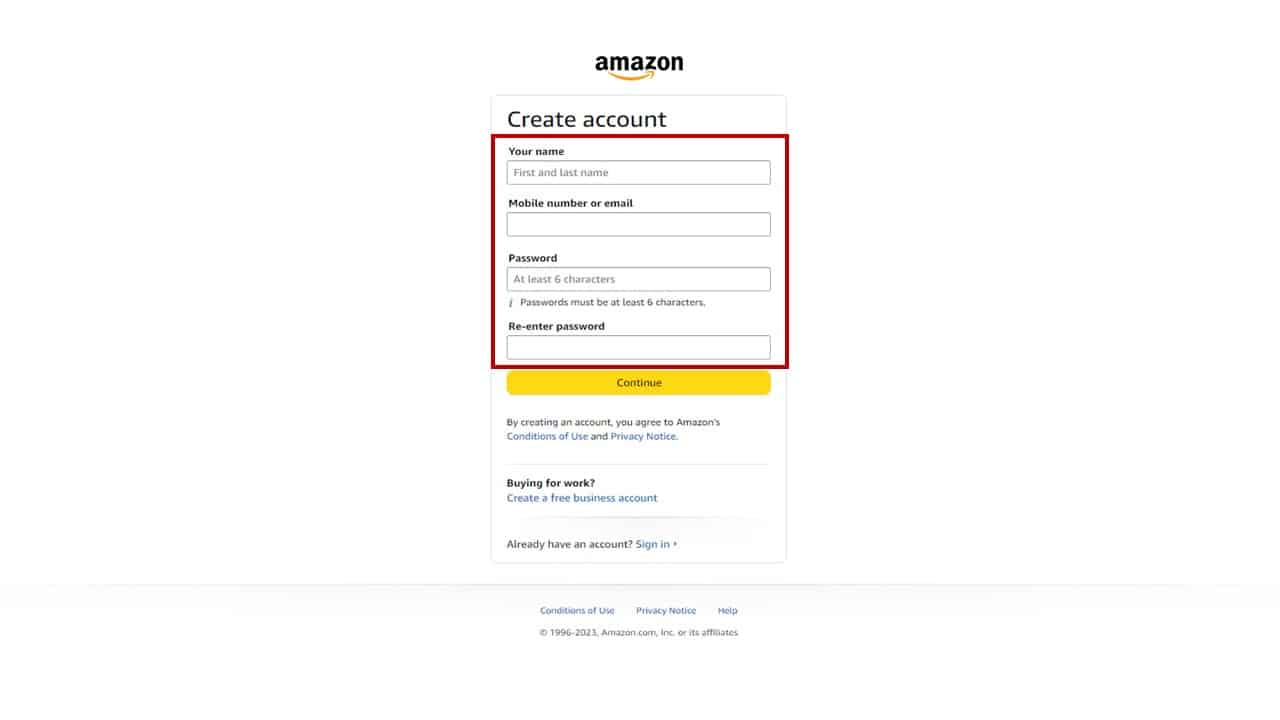
To begin, navigate to the “Accounts & Lists” dropdown menu. The system initiates a POST request to Amazon’s user-management servers the moment you click “Start here.” You will be required to provide a legal name, a unique email address or mobile number, and a password. From a cybersecurity standpoint, the password should be a high-entropy string of at least 12 characters, including a mix of alphanumeric symbols, to resist brute-force attacks.
Email Verification and Handshaking
Once the initial data is submitted, Amazon utilizes a standard “handshaking” protocol via email verification. A One-Time Password (OTP) is sent to your registered address. This step is crucial for verifying that the user is a human and that the communication channel is open. Entering this code completes the initial synchronization between your local device and Amazon’s global identity servers.
2. Optimizing the User Experience: Profiles and Preferences
An Amazon account is more than just a gateway to shopping; it is a personalized data profile that utilizes machine learning algorithms to predict user intent. Setting up your profile correctly ensures that the software serves you relevant data rather than digital noise.
Personalizing the User Profile
Within the “Your Account” dashboard, the “Your Profiles” section allows you to manage the digital identity of various household members. Technically, this functions as a multi-tenant environment within a single primary account. You can set up specific “Adult,” “Teen,” or “Child” profiles. Each profile maintains its own recommendation engine and viewing history, preventing the algorithm from conflating a child’s search for toys with an adult’s search for professional software or hardware tools.
Managing Digital Assets and Content
Amazon accounts serve as a centralized hub for digital rights management (DRM). Under the “Content and Devices” tab, users can manage their Kindle ebooks, Audible audiobooks, and software downloads. When you set up your account, you are essentially creating a digital vault. It is important to configure your “Country/Region Settings” here, as digital licensing agreements vary significantly by geography. Incorrectly configuring your locale can lead to software incompatibility or the inability to access specific cloud-based services.
Language and Currency Localization
For users operating in international environments, navigating to the “Language Settings” is vital. This doesn’t just change the display text; it adjusts the regional Amazon store you interact with (e.g., .com vs. .co.uk vs. .de). From a technical standpoint, this alters the Content Delivery Network (CDN) nodes that serve your data, potentially improving latency and ensuring that pricing is reflected in the correct currency based on localized financial APIs.
3. Strengthening Your Digital Perimeter: Security and Privacy

In an era of frequent data breaches, the security configuration of your Amazon account is the most critical phase of the setup process. Amazon provides several layers of defense-in-depth to protect your payment information and personal metadata.
Implementing Multi-Factor Authentication (MFA)
The most significant security upgrade you can perform is enabling Two-Step Verification (2SV). In the “Login & Security” section, you can link your account to a Time-based One-Time Password (TOTP) app like Google Authenticator or Authy. Unlike SMS-based verification, which is susceptible to SIM-swapping attacks, TOTP apps generate codes locally on your device, providing a robust layer of security that protects your account even if your password is compromised.
Managing Active Sessions and Device Authorization
Amazon allows users to see every device currently logged into their account. Under “Manage Your Content and Devices,” the “Devices” tab lists every smartphone, tablet, and browser that has an active session. If you are setting up a new account, it is a best practice to audit this list periodically. You can remotely “Deregister” devices, which instantly invalidates the session tokens on those machines, preventing unauthorized access if a device is lost or stolen.
Data Privacy and Communication Telemetry
Amazon’s default settings are often optimized for data collection to improve their advertising algorithms. To reclaim your digital privacy, navigate to the “Privacy Notice” and “Advertising Preferences” sections. Here, you can opt out of personalized tracking and limit the amount of telemetry data Amazon shares with third-party advertisers. Disabling “Interest-Based Ads” does not reduce the number of ads you see, but it does stop the system from building an intrusive digital twin based on your browsing habits.
4. Leveraging the Ecosystem: App Integration and Smart Hardware
The true power of an Amazon account lies in its extensibility. Once the core account is established, it serves as the foundational identity for a wide array of hardware and software integrations.
Synchronizing with the Alexa Ecosystem
For users with Echo devices or smart home integrations, your Amazon account acts as the central controller. When you log into the Alexa app, you are granting the software permission to access your account’s “Skills” and “Smart Home” APIs. During setup, ensure that “Voice Purchasing” is either disabled or protected by a confirmation code to prevent accidental transactions triggered by the AI’s voice recognition software.
Amazon Prime: The Service Layer
If you opt to upgrade your account to Amazon Prime, you are essentially unlocking a premium tier of API access across multiple apps. Prime Video, Amazon Music, and Prime Gaming are separate applications that all rely on your primary account’s credentials. The technical beauty of this system is the “Whispersync” technology, which synchronizes your progress across devices. For example, if you stop a movie at the 10-minute mark on your smart TV, the metadata is updated in the cloud, allowing you to resume at the exact same millisecond on your mobile device.
Troubleshooting Common Technical Hurdles
Occasionally, account setup can be interrupted by “Account Hold” protocols. These are automated security triggers usually caused by a mismatch in IP address location and credit card billing addresses, or the use of a high-risk VPN. To resolve these, avoid using anonymizing proxies during the initial setup phase. Once the account is established and a “trust score” is built through successful logins and verified payment methods, the system becomes less sensitive to minor environmental changes.
5. Advanced Digital Management: Subscriptions and API Basics
For power users, an Amazon account is a gateway to managing various digital subscriptions and even exploring developer tools.
Managing the Subscription Stack
Modern Amazon accounts often juggle multiple recurring billing cycles—ranging from “Subscribe & Save” for physical goods to monthly digital channel subscriptions like HBO or Paramount+. The “Memberships & Subscriptions” dashboard provides a centralized UI to monitor these outgoing API calls to your financial institution. Keeping this area clean is essential for maintaining “digital hygiene” and ensuring you are not paying for unused cloud storage or streaming bandwidth.
A Note on Amazon’s Developer and Business Tools
While most users stick to the consumer interface, your account credentials can also provide a bridge to the Amazon Associates program or basic AWS (Amazon Web Services) interactions. If you intend to use your account for professional purposes, it is vital to keep your personal and professional metadata separate by utilizing the “Business Account” toggle, which provides different tax-filing UIs and procurement software integrations.
Conclusion: Maintaining Your Digital Identity
Setting up an Amazon account is an exercise in managing a sophisticated digital identity. By moving beyond the basic registration and diving into security protocols, multi-profile management, and ecosystem integration, you transform a simple shopping tool into a secure, high-performance digital hub. In the modern tech landscape, your account is an asset; configuring it with professional care ensures that your data remains private, your transactions remain secure, and your user experience remains fluid across all devices and services.
aViewFromTheCave is a participant in the Amazon Services LLC Associates Program, an affiliate advertising program designed to provide a means for sites to earn advertising fees by advertising and linking to Amazon.com. Amazon, the Amazon logo, AmazonSupply, and the AmazonSupply logo are trademarks of Amazon.com, Inc. or its affiliates. As an Amazon Associate we earn affiliate commissions from qualifying purchases.