
In the current era of digital transformation, an Amazon account is more than just a gateway to online shopping; it is a central hub for a vast ecosystem of cloud services, streaming media, smart home integration, and personalized AI-driven consumer experiences. Whether you are looking to access the world’s largest marketplace, stream high-definition content via Prime Video, or manage a network of Alexa-enabled IoT devices, the foundational step is the creation of a robust, secure, and well-configured user account.
This guide provides a comprehensive technical walkthrough for establishing your Amazon presence, focusing on multi-platform synchronization, advanced digital security protocols, and the optimization of the user interface to ensure a seamless digital experience.

1. Navigating the Setup Process Across Digital Platforms
The process of creating an Amazon account has been engineered to be frictionless, yet it requires attention to detail to ensure that your data is correctly indexed across Amazon’s global server network. Depending on your primary hardware—whether a desktop workstation or a mobile device—the initial handshake with Amazon’s servers varies slightly.
Desktop Web Browser Method
For users who prefer the high-visibility environment of a desktop, creating an account via a web browser (Chrome, Firefox, Safari, or Edge) offers the most granular control over settings.
- URL Navigation: Begin by navigating to the official Amazon homepage. Ensure the URL is
https://www.amazon.com(or your country-specific TLD) to avoid phishing clones. - The “Hello, Sign in” Protocol: Hover over the “Accounts & Lists” menu in the top right corner. Below the “Sign in” button, you will find the prompt “New customer? Start here.”
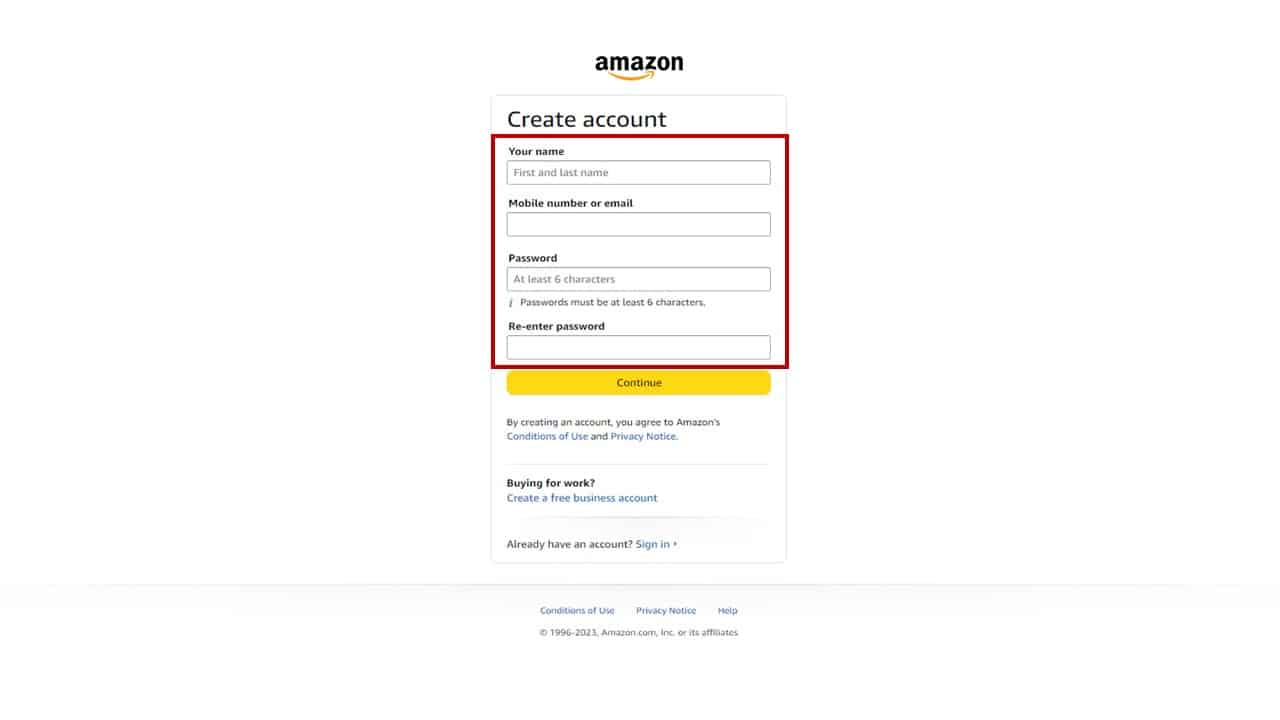
- Data Input: You will be prompted to enter your name, a valid email address or mobile number, and a password. From a technical standpoint, it is highly recommended to use an email address rather than a mobile number for the primary ID, as it provides a more stable recovery path during potential service provider migrations.
- Verification: Amazon employs an OTP (One-Time Password) system to verify the authenticity of the provided contact information. This ensures that the account is tied to a verified human user and prevents automated bot registrations.
Mobile App Integration (iOS and Android)
The Amazon Shopping app is optimized for mobile architecture, utilizing native OS features for a more integrated experience.
- Application Installation: Download the official app from the Apple App Store or Google Play Store. Verify the developer is “Amazon Mobile LLC” to ensure software integrity.
- Onboarding UI: Upon launching the app, select the “Create an account” radio button. The mobile interface often allows for “Sign in with” options depending on your OS (such as “Sign in with Apple” on iOS), which utilizes OAuth tokens to simplify the login process without sharing your master password.
- Synchronization: Once created on mobile, your account is immediately synced via Amazon’s cloud infrastructure, allowing you to switch to a desktop or tablet without losing your configuration or shopping cart state.
2. Optimizing Your Account for Enhanced Digital Security
In an age of increasing cybersecurity threats, simply creating an account is not enough. A “Tech-first” approach to account management requires implementing layers of defense to protect your financial data and personal information stored within the Amazon cloud.
Two-Step Verification (2FA) and Biometrics
Two-Step Verification (2V) is the gold standard for securing consumer accounts. It requires two forms of identification to access your data: something you know (your password) and something you have (your phone or an authenticator app).
- Authenticator Apps vs. SMS: While SMS-based codes are common, they are vulnerable to SIM-swapping attacks. For maximum security, navigate to “Login & Security” in your account settings and enable 2V using an app like Google Authenticator or Authy. These apps generate time-based one-time passwords (TOTP) locally on your device, providing a much higher level of security.
- Biometric Authentication: On mobile devices, enable FaceID or Fingerprint scanning. This adds a physical layer of security that prevents unauthorized access even if your mobile device is unlocked.
Managing Login Activity and Device Permissions
Amazon allows users to audit every device that has access to their account. This is a critical technical hygiene practice.
- Registered Devices: Under the “Content and Devices” section, you can view a list of every Kindle, Fire TV, and mobile app logged into your account. If you see an unrecognized device, you can “Deregister” it remotely, effectively killing the active session and forcing a re-authentication.
- Secure Password Architecture: Avoid using recycled passwords. Amazon’s system allows for complex strings. Utilizing a dedicated password manager to generate and store a unique, 16-character alphanumeric password for Amazon ensures that a breach on another platform does not compromise your Amazon ecosystem.
3. Configuring Your Digital Profile for a Seamless Experience
Once the account is technically secure, the next phase is optimizing the backend settings that govern how the platform interacts with your physical and digital world.
Address Book and Payment Method Synchronization
The efficiency of Amazon’s “1-Click” technology relies on a correctly configured backend.
- Default Settings: By setting a “Default” address and payment method, you streamline the API calls during the checkout process. This reduces the latency between your intent to purchase and the server’s processing of the transaction.
- Digital Wallet Management: Amazon supports various payment protocols, including credit/debit cards, HSA/FSA cards, and direct bank links. From a tech perspective, keeping your digital wallet updated ensures that subscription-based services (like Prime or Kindle Unlimited) do not face service interruptions due to expired tokens.
Personalizing Communication and Privacy Settings
Amazon’s recommendation engine is powered by complex machine learning algorithms that track your browsing and purchase history.
- Privacy Controls: If you prefer a more private browsing experience, you can navigate to “Your Browsing History” and toggle the “Manage history” setting to “Off.” This prevents the algorithm from using your current session data to influence future advertisements or product recommendations.
- Communication Preferences: To prevent “notification fatigue,” configure your “Communication Preferences.” You can granularly decide which events trigger a push notification, an email, or an SMS—ranging from delivery updates to security alerts.
4. Advanced Tech Features and Ecosystem Integration
For power users, an Amazon account serves as the central nervous system for a broader array of interconnected technologies.
Linking Household Profiles and Alexa Smart Home
Amazon allows for the technical linking of two adult accounts through “Amazon Household.” This is not merely a shared login; it is a sophisticated data-sharing arrangement.
- Shared Digital Libraries: Through Household, two users can share Prime benefits and digital content (e-books, apps, and games) while maintaining separate login credentials and private recommendation profiles.
- Alexa Integration: Your Amazon account is the foundational identity for the Alexa Voice Service (AVS). When you log into an Echo device, the device pulls your “Voice Profile” from the cloud, allowing for personalized responses and smart home control. You can manage these IoT permissions directly from the “Alexa Privacy” dashboard within your account settings.
Troubleshooting Common Technical Onboarding Issues
Even with a streamlined process, technical glitches can occur during account creation.
- Email Redundancy: If the system states that an account already exists with your email, it usually indicates a legacy account or a “shadow profile” created through a subsidiary like Audible or Goodreads. Use the “Forgot Password” flow to recover and merge these identities.
- Browser Cache and Cookies: If the “Create Account” button appears unresponsive, it is often a result of a script conflict within the browser. Clearing your cache or attempting the process in an “Incognito” or “Private” window bypasses local data corruption and ensures a clean handshake with Amazon’s servers.
- IP Geolocation Issues: If you are using a VPN, Amazon’s security filters may flag the registration as suspicious. It is recommended to disable high-latency VPNs during the initial account creation to ensure your geographic region is correctly assigned to the appropriate localized storefront.

Conclusion
Creating an Amazon account is the first step in engaging with one of the world’s most sophisticated technological infrastructures. By moving beyond the basic sign-up process and focusing on robust security protocols, device management, and privacy configurations, you transform a simple shopping profile into a secure, personalized digital command center. As the boundaries between e-commerce, AI, and the Internet of Things continue to blur, a well-maintained and technically optimized Amazon account remains an essential tool for the modern digital consumer.
aViewFromTheCave is a participant in the Amazon Services LLC Associates Program, an affiliate advertising program designed to provide a means for sites to earn advertising fees by advertising and linking to Amazon.com. Amazon, the Amazon logo, AmazonSupply, and the AmazonSupply logo are trademarks of Amazon.com, Inc. or its affiliates. As an Amazon Associate we earn affiliate commissions from qualifying purchases.