
In the modern digital landscape, e-commerce platforms have evolved from simple digital storefronts into complex software ecosystems. Amazon, as the global leader in this space, manages millions of data points every second, ranging from cloud computing services to intricate logistics algorithms. For the end-user, the most critical piece of data within this ecosystem is the shipping address. Whether you have recently moved, are sending a gift, or are traveling and need a delivery at a temporary residence, understanding the technical process of modifying your shipping information is essential for a seamless user experience.
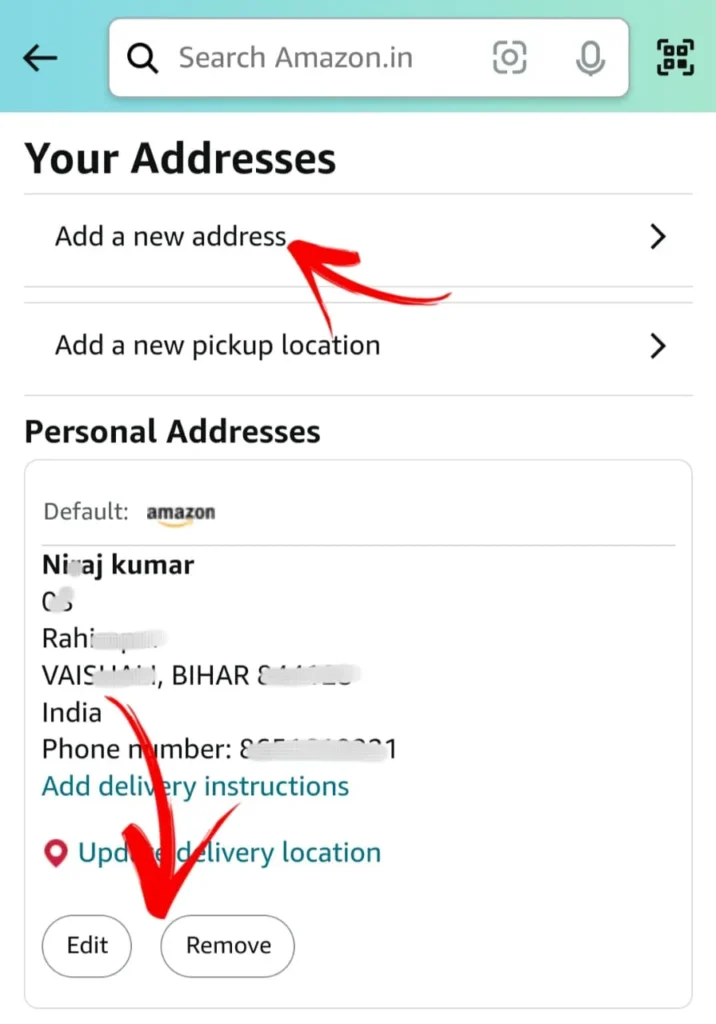
This guide provides a comprehensive technical walkthrough on how to change your shipping address on Amazon, exploring the interface nuances of both desktop and mobile platforms, while also addressing the backend considerations of order management.
Navigating the Amazon Web Portal: A Desktop Guide
The desktop version of Amazon offers the most robust interface for managing account settings. From a software perspective, the web portal provides a centralized dashboard where users can manipulate their profile data, which is then synchronized across Amazon’s global server network.
Accessing Account Settings and Your Addresses
To begin the process on a desktop browser, you must first authenticate your session. Once logged in, the primary navigation node is the “Accounts & Lists” dropdown menu located in the top-right corner of the header. This element is the gateway to the “Your Account” page, which serves as the central hub for all user-specific configurations.
Within the “Your Account” dashboard, look for the “Ordering and shopping preferences” section. Here, you will find the “Your Addresses” link. Clicking this initiates a request to Amazon’s database to retrieve all stored location records associated with your unique User ID. This page is designed with a card-based UI, displaying each address as a distinct module for easy scanning and interaction.
Adding a New Address vs. Editing Existing Entries
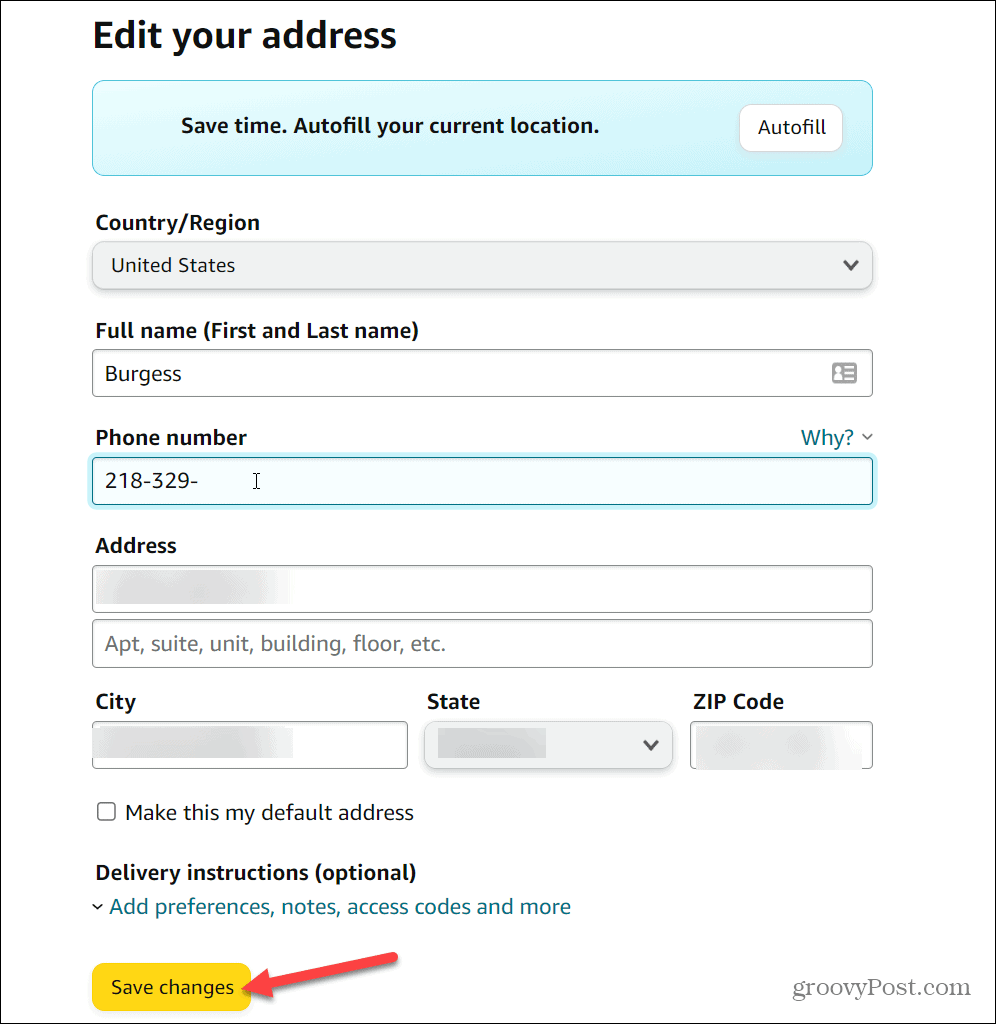
Amazon’s software architecture allows for multiple address entries, which is a key feature for users who frequently ship to various locations. When you select “Add Address,” you are presented with a form that includes fields for full name, street address, city, state, zip code, and phone number.
A critical technical feature here is the “Address Validation” system. As you input data, Amazon’s backend cross-references your entry against postal service databases (such as the USPS in the United States). If the system detects a discrepancy—such as a missing apartment number or a typo in the zip code—it will suggest a “Suggested Address” based on standardized data. Utilizing the suggested version is highly recommended to ensure that the logistics software can accurately calculate routing and delivery times.
If you are simply correcting a typo in an existing entry, the “Edit” button allows you to modify specific fields without creating a redundant record. This maintains a clean data profile, which is beneficial for the platform’s predictive checkout features.
Setting a Default Shipping Destination
For frequent shoppers, setting a “Default Address” is a significant technical convenience. By clicking the “Set as Default” link on a specific address card, you modify your account’s primary metadata. This ensures that every time you initiate a “Buy Now” transaction or proceed to checkout, the system automatically populates the shipping field with this preferred location. This reduces the number of API calls required during the checkout process, resulting in a faster, more streamlined transaction.
Optimizing the Amazon Mobile App for On-the-Go Updates
The Amazon mobile application, available on iOS and Android, is optimized for touch interaction and quick navigation. While it mirrors the functionality of the desktop site, the UI flow is streamlined to accommodate smaller screens and mobile browsing habits.
The UI Layout: Where to Find the “Your Account” Menu
In the mobile app, the navigation is anchored by a bottom menu bar. To access your address settings, tap the “Profile” icon (the person-shaped silhouette) or the “Hamburger” menu (three horizontal lines) in the bottom right corner. From here, navigate to “Your Account” and scroll down to the “Account Settings” sub-section.
Selecting “Your Addresses” will open the mobile-optimized version of the address management screen. The technical implementation here utilizes responsive design principles, ensuring that the form fields and action buttons are easily tappable.
Synchronizing Changes Across Multiple Devices
One of the hallmarks of Amazon’s cloud-based software architecture is real-time synchronization. When you update an address on the mobile app, the change is pushed to Amazon’s servers and updated across all instances of your account. This means if you add a new shipping location while on your phone during a commute, that address will be immediately available if you log in to your desktop at the office later that day.

This synchronization is governed by persistent data protocols, ensuring that there is a “single source of truth” for your account data, regardless of the hardware or operating system you are using to access the platform.
Using Location Services for Precise Address Entry
A unique advantage of the mobile app is its ability to integrate with the device’s GPS and location services. When adding a new address, the app may offer a “Use my current location” feature. This utilizes the device’s hardware to pull latitude and longitude coordinates, which are then reverse-geocoded into a physical mailing address. While this is highly efficient, users should always manually review the generated address to ensure it includes specific details like suite or apartment numbers that GPS may not capture.
Managing Pending Orders and Subscription Deliveries
Changing an address in your account settings updates your profile for future purchases, but it does not automatically retroactively apply to orders that have already been placed. Managing active shipments requires a different technical approach within the “Your Orders” section.
Updating the Address for an Active Order
If you realize an order is headed to the wrong location immediately after purchase, there is a narrow window of time to modify the destination. In the “Your Orders” section, locate the specific shipment. If the order has not yet entered the “Shipping Soon” or “Shipped” status, an “Update Shipping Address” button will be available.
From a technical standpoint, this action sends an interrupt signal to the fulfillment center’s management software. If the package has not yet been picked and packed, the system can update the digital label. However, once the status moves to “Shipped,” the data is locked within the carrier’s (UPS, FedEx, or Amazon Logistics) tracking system, and changes can often only be made by contacting the carrier directly or using their respective package-interception tools.
Redirecting Subscribe & Save Shipments
Amazon’s “Subscribe & Save” is a sophisticated recurring-billing and automated-delivery software feature. Because these orders are generated automatically on a set schedule, changing your default account address may not automatically update your active subscriptions.
To change the shipping location for these items, you must navigate to the “Subscribe & Save” dashboard. Within this interface, you can manage individual subscriptions or update the “Shipping Settings” for the entire subscription group. This ensures that the recurring logic associated with your account points to the correct destination for every future delivery cycle.
Troubleshooting Delivery Restrictions and Regional Locks
Occasionally, you may encounter technical errors when changing an address, such as “This item cannot be shipped to the selected location.” This occurs because Amazon’s software integrates regional inventory data with local shipping regulations. Certain items (like lithium batteries or specific chemicals) may have transit restrictions, or third-party sellers may have defined specific shipping zones. In these cases, the software cross-references the item’s SKU (Stock Keeping Unit) with the zip code of the new address to determine eligibility.
Security Protocols and Data Management
Updating personal information like a shipping address involves interacting with sensitive data. Amazon employs several layers of digital security to protect this information during the update process.
Safeguarding Your Personal Information during Address Changes
When you attempt to modify your address book, Amazon’s security algorithms may trigger a re-authentication prompt. This is especially common if you are accessing the account from a new IP address or a different device. You may be asked to enter your password again or provide a Two-Factor Authentication (2FA) code sent to your mobile device. This “Step-Up Authentication” is a critical security measure designed to prevent unauthorized users from redirecting your packages to a different location—a common tactic in e-commerce fraud.
Understanding Amazon’s Address Validation Technology
The software that powers Amazon’s address entry is more than just a text box; it is a sophisticated API integration. By utilizing standardized databases like the Address Management System (AMS), Amazon ensures that every address exists in the real world. This reduces the “bounce rate” of packages and optimizes the efficiency of the Last-Mile delivery software used by drivers. When a user ignores a “Suggested Address” in favor of a non-standardized one, they increase the likelihood of a delivery failure, as the driver’s GPS software may not be able to resolve the location.
How Amazon Uses AI to Predict Shipping Errors
Looking toward the future of the platform, Amazon is increasingly integrating Machine Learning (ML) into its address management. AI models analyze historical delivery data to identify addresses that are frequently associated with “Package Not Received” claims. If a user changes their address to a location that the AI identifies as high-risk or difficult to access (such as a complex building with a history of gate-code issues), the system may proactively prompt the user to provide additional “Delivery Instructions.” This data-driven approach ensures that the physical act of shipping remains as reliable as the digital act of ordering.
By understanding the technical frameworks behind Amazon’s address management—from UI navigation and cross-device synchronization to security protocols and AI-driven validation—users can ensure their account remains accurate, secure, and optimized for the best possible e-commerce experience.
aViewFromTheCave is a participant in the Amazon Services LLC Associates Program, an affiliate advertising program designed to provide a means for sites to earn advertising fees by advertising and linking to Amazon.com. Amazon, the Amazon logo, AmazonSupply, and the AmazonSupply logo are trademarks of Amazon.com, Inc. or its affiliates. As an Amazon Associate we earn affiliate commissions from qualifying purchases.