
In the contemporary landscape of personal finance, the transition from brick-and-mortar banking to digital-first management has become nearly absolute. JPMorgan Chase, as one of the “Big Four” banks in the United States, has been at the forefront of this evolution, providing a robust digital ecosystem through the Chase Mobile app. For the modern consumer, understanding the intricacies of this app is not merely about convenience—it is a fundamental component of effective financial management. One of the most common yet critical tasks a user must perform is locating their routing number. Whether you are setting up a new direct deposit, automating your monthly bill payments, or initiating a high-value wire transfer, the routing number serves as the essential “address” for your capital.

This guide provides an in-depth exploration of how to navigate the Chase Mobile app to find this crucial information, while also examining the broader role these identifiers play in your personal financial health.
Understanding the Role of Routing Numbers in Modern Personal Finance
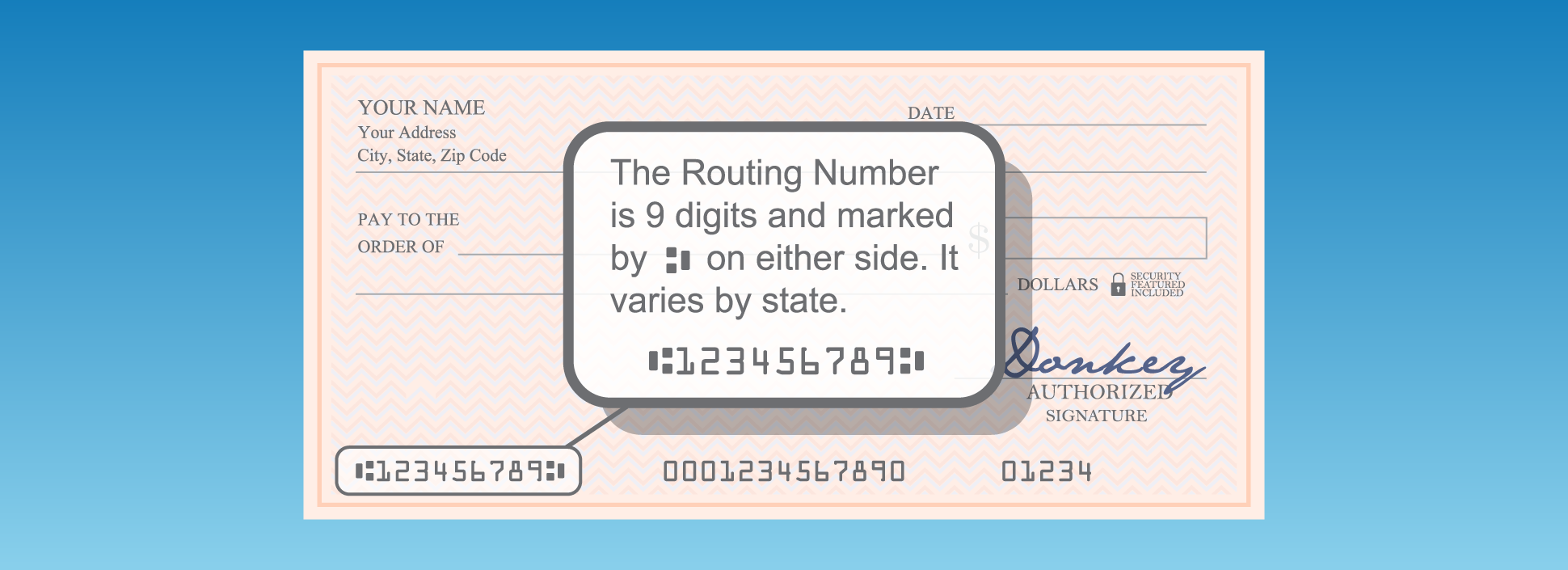
Before diving into the technical “how-to,” it is vital to understand what a routing number represents within the American financial infrastructure. Formally known as an ABA (American Bankers Association) routing transit number (RTN), this nine-digit code is the backbone of the domestic payment system.
What is an ABA Routing Number?
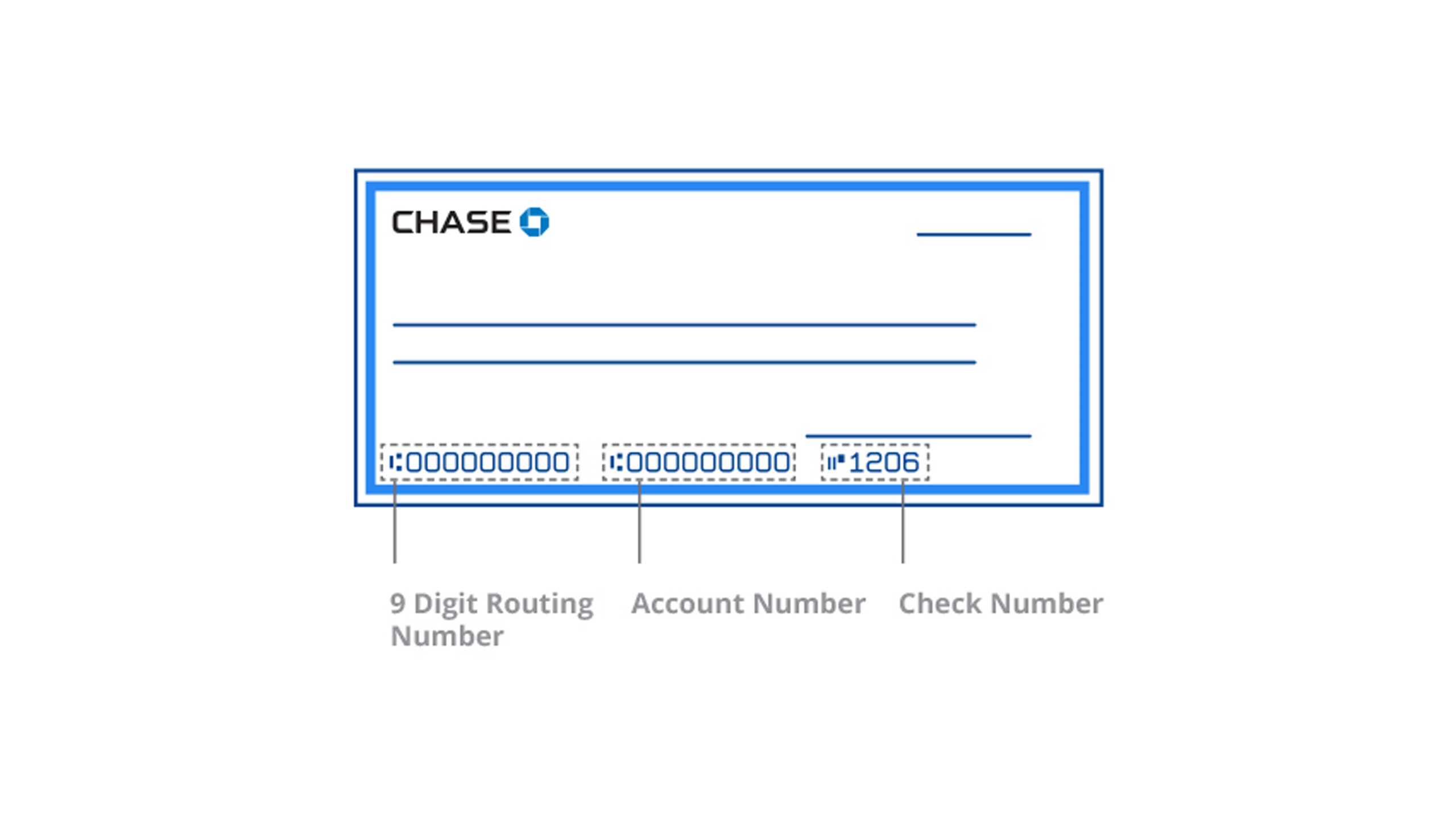
The ABA routing number was developed in 1910 to streamline the processing of paper checks. Today, it has evolved into a digital GPS coordinate for your money. Each digit in the nine-digit sequence holds specific meaning: the first four identify the Federal Reserve Bank district, the next four identify the specific institution (in this case, Chase), and the final digit is a “check digit” used for verification. In the context of your personal finance, the routing number ensures that when an external entity—like an employer or a utility company—sends or requests funds, the money lands in the correct vault.
Why Routing Numbers are Essential for Your Digital Transactions
In the ecosystem of online income and automated wealth building, the routing number is the primary bridge between platforms. If you are a freelancer receiving payments through platforms like Stripe or PayPal, or an investor transferring funds to a brokerage like Vanguard or Fidelity, the routing number is the prerequisite for connection.
Furthermore, routing numbers are categorized by the type of transaction. It is a common misconception that a bank has only one routing number. Large institutions like Chase often utilize different numbers for ACH (Automated Clearing House) transfers—typically used for direct deposits and bill pay—and domestic wire transfers. Using the incorrect number can result in delayed transactions, returned fees, or significant administrative hurdles. Therefore, knowing how to verify this information directly through the Chase app is a hallmark of a fiscally responsible individual.
Step-by-Step Guide: Accessing Your Routing and Account Numbers via the Chase App
The Chase Mobile app is designed with a user-centric interface, but because it houses a vast array of financial tools, sensitive information like routing numbers is tucked behind layers of security and specific menus. Following these steps ensures you can retrieve your data efficiently without compromising your security.
Navigation Path: From Login to Account Details
To begin, ensure you are using the latest version of the Chase Mobile app on a secure device.
- Authentication: Open the app and log in using your credentials or biometric authentication (FaceID or Fingerprint). Biometrics are preferred as they offer a higher layer of security in public spaces.
- Account Selection: On the main dashboard, you will see a list of your accounts (Checking, Savings, Credit Cards). Tap on the specific checking or savings account for which you need the routing number.
- The “See More” Toggle: Once inside the specific account view, you will see your “Present balance” and “Available balance.” Directly below these figures, there is typically a blue link or a dropdown option labeled “Account details” or “Show details.”
- Identifying the Numbers: Tapping this will expand a menu revealing three key pieces of information: your masked account number (with an option to view the full number), the ACH routing number, and the Wire routing number.
Troubleshooting Common Access Issues
Occasionally, users may find that the information does not load or appears different than expected. This is often due to the regional nature of banking. Chase’s routing numbers are frequently assigned based on the state where the account was originally opened. If you have moved states and opened a new account, the routing number for your secondary account may differ from your primary one.
If the app fails to display the numbers, it may be due to a pending account verification process or a temporary server synchronization issue. In such cases, checking the “Statements” tab within the app and downloading a PDF of your most recent monthly statement will also reveal the routing number, usually located in the header or footer of the document.
Security Best Practices for Managing Sensitive Financial Information Digitally
In the realm of personal finance, your routing and account numbers are the keys to your “digital vault.” While a routing number is public information for the bank, when paired with your private account number, it grants significant access to your funds. Mastering the Chase app also means mastering digital security.
Safeguarding Your Data on the Chase App
When you access your routing number on your mobile device, you are potentially exposing sensitive data to your surroundings. Always perform these checks in a private environment. A common mistake users make is taking a screenshot of their account details to save for later. This is a high-risk behavior; if your phone is compromised or if your photos are synced to an unsecured cloud, your financial “keys” are essentially out in the open.
Instead, utilize the app’s built-in “Copy” feature (if available) to paste the number directly into the secure portal where it is needed. If you must write it down, ensure the physical note is shredded once the transaction is set up. Furthermore, ensure that “Find My Phone” or equivalent remote-wipe features are enabled on your device to protect your Chase app data in case of theft.
Distinguishing Between Real Communications and Phishing
As you become more active in managing your Chase account digitally, you may become a target for phishing. Cyber-criminals often send sophisticated emails or texts claiming there is an “issue with your routing number” or a “blocked transfer.”
Remember: Chase will never ask you to provide your full account number or your password over a text or email to “verify” a routing number. If you receive such a request, do not click any links. Instead, log into the Chase Mobile app directly to check for secure messages or alerts. Using the app as your “source of truth” is the most effective way to circumvent financial fraud.
Beyond the Basics: Using Your Routing Number for Advanced Financial Management
Once you know how to find and secure your routing number, you can leverage this knowledge to optimize your financial life. The Chase app is more than a viewing portal; it is a tool for wealth acceleration.
Setting Up Direct Deposits and Automated Savings
The most powerful use of your routing and account numbers is the automation of your income. By providing these details to your employer’s payroll department, you ensure that your salary is deposited instantly on payday. To take this a step further, many financial experts recommend “splitting” your direct deposit. Within the Chase app, you can monitor your inflows and then use your routing information to set up automated transfers to high-yield savings accounts or investment platforms. This “pay yourself first” mentality is the cornerstone of building long-term wealth, and it all starts with the accurate application of your routing number.
Executing Domestic and International Wire Transfers
For large transactions, such as a down payment on a home or a significant business investment, an ACH transfer may not be sufficient due to daily limits or processing times. This is where the “Wire Routing Number” found in your Chase app becomes vital.
Wire transfers are processed in real-time or near real-time through the Fedwire system. It is important to note that the routing number for a wire transfer is often different from the one used for standard bill pay. Using the ACH number for a wire transfer can result in the funds being held in limbo for days. By accurately identifying the wire-specific routing number within the Chase app, you ensure that high-stakes transactions are completed with professional precision.
In conclusion, while “how to find a routing number” may seem like a simple technical query, it is actually an entry point into a deeper understanding of financial literacy. By mastering the Chase Mobile app, maintaining rigorous security standards, and understanding the strategic use of routing numbers for automation and large-scale transfers, you are taking a significant step toward total command over your personal finances. In the digital age, your ability to navigate your financial tools is just as important as the capital you keep within them.
aViewFromTheCave is a participant in the Amazon Services LLC Associates Program, an affiliate advertising program designed to provide a means for sites to earn advertising fees by advertising and linking to Amazon.com. Amazon, the Amazon logo, AmazonSupply, and the AmazonSupply logo are trademarks of Amazon.com, Inc. or its affiliates. As an Amazon Associate we earn affiliate commissions from qualifying purchases.