
In the evolving landscape of digital finance, Cash App has transitioned from a simple peer-to-peer payment tool into a robust financial ecosystem. For many users, it serves as a primary vehicle for daily transactions, investing, and even receiving a paycheck. However, the utility of the platform is entirely dependent on your ability to fund the account efficiently. Whether you are dealing with physical cash or digital transfers, understanding the various channels through which you can add money to your Cash App balance is essential for maintaining liquidity and financial flexibility.
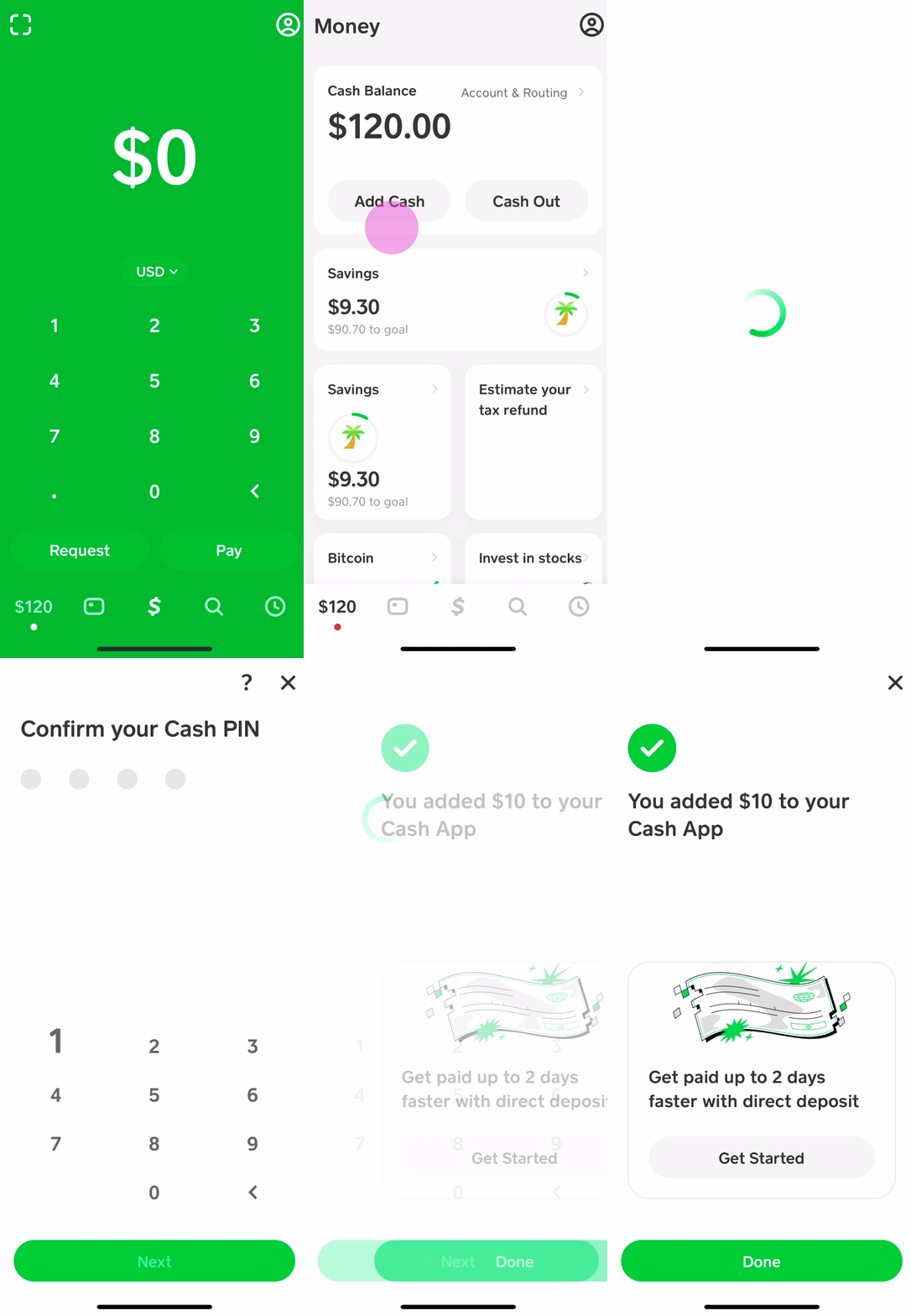
This guide provides a deep dive into the diverse methods available for funding your Cash App, ranging from traditional banking integrations to retail cash deposits, ensuring you can manage your personal finances with ease.
Digital Integration: Linking Bank Accounts and Cards
The most common and seamless way to add money to your Cash App balance is through digital banking integration. Cash App is designed to act as a bridge between your traditional bank and your digital spending, and the platform offers several ways to facilitate this movement of capital.
Linking a Debit Card for Instant Transfers
For most users, the primary method of funding is a linked debit card. By connecting a card issued by a traditional financial institution, you enable “Instant Deposits.” When you select the “Add Cash” option in the banking tab, the funds are pulled directly from your checking account and reflected in your Cash App balance immediately. This is particularly useful for users who need to cover an urgent payment or take advantage of a “Cash Boost” discount at a specific retailer.
Connecting a Bank Account via Plaid
While a debit card is excellent for speed, linking your full bank account via the Plaid integration offers a more stable long-term financial connection. This allows for standard ACH transfers, which are often used when you want to move larger sums of money that might exceed daily debit card limits. By verifying your bank account, you also strengthen the security profile of your Cash App account, making it easier for the platform’s automated systems to verify your identity and approve higher transaction volumes.
The Role of Credit Cards and Limitations
Cash App does allow the integration of credit cards, but it is important to distinguish this from “adding money” to a balance. Generally, you cannot move money from a credit card directly into your Cash App balance to sit as a cash reserve. Instead, you can link a credit card to send payments directly to other users. Users should be aware that Cash App typically charges a 3% fee for credit card transactions, and your card issuer may treat the transaction as a cash advance, which often carries higher interest rates. From a personal finance perspective, using a debit card or bank transfer is always the more cost-effective strategy.
Physical Locations: Utilizing the Paper Money Deposit Feature
A significant hurdle for many digital-first financial tools is the “on-ramping” of physical currency. Cash App has addressed this by creating a massive network of retail partners, allowing users to deposit physical banknotes into their digital accounts. This feature, known as “Paper Money,” has revolutionized how unbanked or underbanked individuals interact with the digital economy.
Major Retail Partners for Cash Deposits
You can add money to your Cash App at thousands of retail locations across the United States. Some of the most prominent partners include:
- Walmart: Visit the MoneyCenter or any register.
- Walgreens and Duane Reade: Often the most accessible locations in urban areas.
- 7-Eleven: Convenient for quick, 24/7 deposits.
- Family Dollar and Dollar General: High-density options in suburban and rural locations.
- Rite Aid and CVS: Reliable pharmacies with widespread availability.
How the “Paper Money” Feature Works
To deposit cash, you must use the in-app map to find a supported location. Once you are at the store, you generate a unique barcode within the “Paper Money” section of your banking tab. You present this barcode to the cashier, who scans it before taking your cash. It is important to note that you should not attempt to use the “Swipe” method with your Cash Card for deposits; the barcode is the only verified way to ensure the funds reach your account. The money typically appears in your balance within minutes of the transaction being finalized.

Understanding Fees and Deposit Limits
While digital transfers from a bank are free, physical cash deposits come with specific parameters. Most retailers charge a flat fee (usually $1 to $4) for the service, which is separate from the amount you are depositing. Additionally, Cash App imposes limits on paper money deposits to prevent fraud and comply with anti-money laundering (AML) regulations. Currently, these limits are typically set at $500 per transaction, $1,000 per rolling 7-day period, and $4,000 per rolling 30-day period. Managing these limits is crucial for users who rely heavily on cash income.
Peer-to-Peer Transfers and Direct Deposit Solutions
Beyond manual “Add Cash” actions, your balance can grow passively through incoming transfers. For many, Cash App serves as a secondary or even primary “bank,” and leveraging its receiving features is a strategic way to consolidate your finances.
Receiving Funds from the Cash App Ecosystem
The most organic way to increase your balance is by receiving money from other users. Using your unique $Cashtag, phone number, or email address, friends, family, or clients can send funds to you instantly. Unlike a bank transfer that might take days to clear, P2P transfers within the app are immediate and can be used the second they arrive. This is ideal for splitting bills, receiving payments for side hustles, or gathering funds for a group gift.
Setting Up Direct Deposit for Payroll and Government Benefits
Cash App provides a routing and account number, much like a traditional bank. By providing these details to your employer’s HR department or a government agency, you can have your paycheck, tax refund, or social security benefits deposited directly into your Cash App balance.
One of the primary financial advantages of this method is that Cash App often makes funds available up to two days earlier than traditional banks. For individuals focused on cash flow management, this 48-hour head start can be a significant advantage in paying bills on time and avoiding late fees.
Mobile Check Deposits
For those who still receive physical checks, Cash App has introduced a mobile check capture feature. By taking a photo of the front and back of a signed check, you can deposit the funds directly into your balance. While this feature is rolled out progressively to verified users, it serves as another vital link between the traditional financial world and your digital wallet, removing the need to visit a physical bank branch or ATM.
Optimizing Your Balance: Savings, Investing, and Security
Once you have mastered the various ways to add money to your Cash App, the focus shifts to how to manage that capital effectively. A balance sitting idle is a missed opportunity for growth, and Cash App offers several tools to help your money work harder for you.
Utilizing the Savings Feature
Cash App now includes a dedicated “Savings” sub-account. You can move money from your main balance into this separate folder to earmark it for specific goals. This creates a psychological barrier to spending, helping with personal budgeting. While the interest rates may vary, the primary benefit is the organizational clarity it provides, allowing you to separate your “spending money” from your “emergency fund.”
Diversifying into Stocks and Bitcoin
One of the most powerful features of the Cash App balance is the ability to pivot into investments instantly. With as little as $1, you can use your balance to purchase fractional shares of publicly traded companies or buy Bitcoin. This level of accessibility is a game-changer for casual investors who want to build wealth incrementally. By setting up “Auto-Invest,” you can even instruct the app to take a specific amount from your balance periodically to buy assets, leveraging the power of dollar-cost averaging.

Security Best Practices for Your Funds
As your balance grows, so does the importance of security. To protect the money you have added, you should always enable the “Security Lock” feature, which requires FaceID, TouchID, or a PIN for every transaction. Furthermore, be wary of “Cash App Fridays” or other social media scams that promise to “flip” your money. No legitimate financial institution will ask you to send money to “verify” an account. By treating your Cash App balance with the same level of caution as a traditional bank account, you ensure that your hard-earned money remains safe and available whenever you need it.
In conclusion, Cash App offers a comprehensive suite of options for adding and managing money. Whether you are scanning a barcode at a local pharmacy, linking a high-speed debit card, or setting up a direct deposit for your salary, the platform provides the flexibility required for modern personal finance. By understanding these methods and the associated limits and fees, you can move your capital with confidence and efficiency.
aViewFromTheCave is a participant in the Amazon Services LLC Associates Program, an affiliate advertising program designed to provide a means for sites to earn advertising fees by advertising and linking to Amazon.com. Amazon, the Amazon logo, AmazonSupply, and the AmazonSupply logo are trademarks of Amazon.com, Inc. or its affiliates. As an Amazon Associate we earn affiliate commissions from qualifying purchases.