
In the landscape of modern mathematics and digital computation, the ability to work with fractions remains a fundamental skill for students, engineers, and data scientists alike. While the move toward decimal-based systems dominated the early era of digital computing, the resurgence of “Natural Display” technology has brought the elegance of fractional notation back to the forefront of hardware and software design. Understanding how to put fractions on a calculator is not merely about pressing a single button; it is about understanding the interface logic of different technological ecosystems, from legacy scientific hardware to sophisticated mobile applications and AI-driven computation engines.
The Evolution of Fractional Logic in Computing Technology
Before diving into the specific keystrokes required for different devices, it is essential to understand the technical evolution of how calculators process non-integer values. In the early days of digital gadgets, calculators were limited by seven-segment displays that struggled to represent the vertical stack of a numerator and a denominator. Users were forced to convert fractions into decimals manually or use a “linear” notation that often led to errors in the order of operations.
From Linear Entry to Natural Display
The technological shift began with the introduction of the “Ab/c” key on scientific calculators in the late 20th century. This allowed for a three-part display (whole number, numerator, and denominator), though it still looked somewhat archaic. Today’s “Natural Display” or “WriteView” technology, found in modern Casio and Sharp devices, uses high-resolution dot-matrix screens. These screens render fractions exactly as they appear in a textbook—stacked vertically with a horizontal vinculum. This advancement in display technology has significantly reduced the cognitive load on users, allowing them to focus on the problem-solving aspect of math rather than the translation of math into a machine-readable format.
Symbolic Logic and Exact Math Engines
In higher-end software and graphing calculators, the technology has moved beyond simple display logic to “Symbolic Math” or Computer Algebra Systems (CAS). Unlike a standard calculator that treats a fraction as a pending division problem (e.g., 1 ÷ 3 = 0.3333…), a CAS-enabled tool treats the fraction as a unique object. This allows the technology to maintain “Exact Math” outputs, such as keeping an answer as 1/3 rather than rounding it to a decimal, which is critical for precision in engineering and physics.
Navigating Hardware: Scientific and Graphing Calculators
For most users, the primary interaction with fractions occurs on physical hardware. Whether you are using a Texas Instruments (TI) or a Casio—the two titans of the calculator industry—the methodology for inputting fractions varies based on the software architecture of the device.
Using the Dedicated Fraction Keys (n/d and Ab/c)
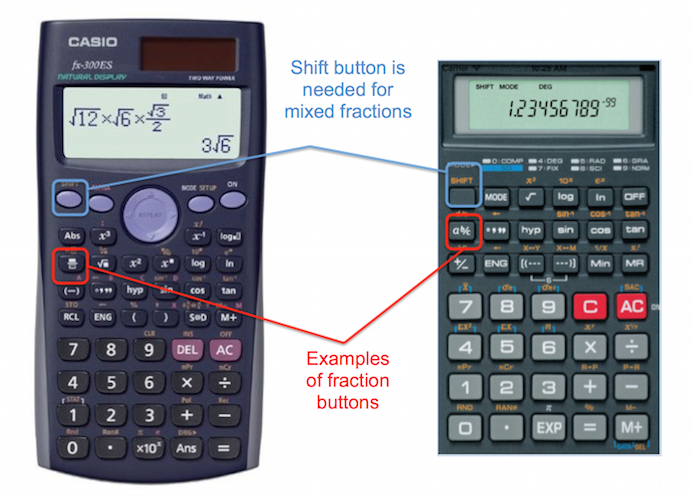
On most entry-level scientific calculators, such as the TI-30XIIS or the Casio fx-300MS, you will find a button labeled either n/d (numerator over denominator) or Ab/c.
- The n/d Method: Press this button first. A template will appear on the screen with two boxes. Use the directional D-pad to toggle between the top and bottom boxes to enter your values.
- The Ab/c Method: This is common on older models. You enter the numerator, press the
Ab/ckey (which creates a small “L” shaped symbol on the screen), and then enter the denominator. If you are entering a mixed number, you press the key again between the whole number and the fraction.
MathPrint and Template-Based Entry on Graphing Calculators
High-performance gadgets like the TI-84 Plus CE or the TI-Nspire utilize “MathPrint” technology. On these devices, inputting a fraction often involves a shortcut menu rather than a dedicated physical key. On a TI-84, for example, hitting Alpha followed by Y= (which accesses the F1 menu) opens a pop-up window. From here, you can select “n/d” to create a vertical fraction template. This UI design mimics modern software interfaces, providing a more intuitive user experience (UX) that aligns with digital literacy standards.
Converting Fractions to Decimals Instantly
A key feature of modern calculator software is the toggle button, often labeled S<=>D (Standard to Decimal) or F<>D. This piece of software logic allows the user to jump back and forth between a fractional representation and its decimal equivalent without re-entering the data. In technical fields, this is vital for checking the “reasonableness” of an answer while maintaining the precision of the fractional form for further calculations.
Digital Solutions: Fractions in Mobile Apps and Cloud Tools
As we transition from dedicated hardware to multi-purpose mobile devices, the way we input fractions has shifted toward touch-based UI and natural language processing. The “appification” of mathematics has made complex fractional arithmetic accessible to anyone with a smartphone.
Leveraging Advanced Calculator Apps
Standard calculator apps on iOS and Android are notoriously basic, often lacking a dedicated fraction button. However, the tech ecosystem offers powerful alternatives like Desmos, GeoGebra, and PCalc. These apps use a “slash” (/) logic that automatically converts the input into a visual fraction. For instance, in Desmos, typing “3/4” immediately stacks the numbers, recognizing the forward slash as a command to generate a fraction template. This “intelligent formatting” is a hallmark of modern math software, streamlining the workflow for researchers and students.
AI-Driven Math and Natural Language Input
The frontier of this technology lies in AI and “Photo-to-Math” apps like Photomath or Microsoft Math Solver. These tools use computer vision to recognize handwritten fractions. Instead of manually inputting the numerator and denominator, the software utilizes neural networks to parse the image, identify the vinculum, and translate the visual data into a digital fractional object. Furthermore, cloud-based engines like WolframAlpha allow for natural language input. You can simply type “add three fourths and five sixths,” and the software’s backend logic will interpret the semantic meaning, perform the calculation, and provide the result in multiple formats (fractional, decimal, and continued fraction).
Troubleshooting and Best Practices for Digital Accuracy
Despite the sophistication of modern tools, user error remains a factor. When inputting fractions into a digital interface, certain technical nuances must be observed to ensure the machine interprets your intent correctly.
The Importance of Parentheses in Linear Syntax
In software environments that do not support vertical templates—such as basic coding environments, Excel, or older calculator software—the order of operations (BODMAS/PEMDAS) is king. If you intend to divide the sum of (2+3) by 7, entering 2+3/7 will result in the calculator performing 3 ÷ 7 first. To ensure the fraction is treated as a single unit, tech-savvy users must use parentheses: (2+3)/7. Mastering this syntax is crucial for anyone moving from a standard calculator to programming in languages like Python or JavaScript.
Managing Mixed Numbers vs. Improper Fractions
Technologically, most calculators prefer improper fractions (where the numerator is larger than the denominator) over mixed numbers. Mixed numbers can be ambiguous in a digital format; does 3 1/2 mean three and a half, or 3 multiplied by 1/2? To avoid this “syntax ambiguity,” most professional-grade calculators require a specific command to enter a mixed number (usually Shift + n/d). When working in higher-level mathematics or engineering software, it is a technical best practice to convert mixed numbers to improper fractions before entry to ensure the software’s logic engine processes the value correctly.

The Future of Fractional Computation
As we look toward the future of educational and professional technology, the “fractional interface” is becoming even more seamless. We are seeing the rise of haptic feedback in math apps that helps users “feel” the placement of numbers within a template and the integration of voice-commanded math solvers that understand complex fractional structures.
The transition from the mechanical calculators of the past to the AI-integrated tools of today has transformed “putting a fraction on a calculator” from a tedious task of manual conversion into a streamlined process of digital expression. By mastering these tools—from the physical n/d keys of a scientific device to the symbolic logic of a CAS-enabled app—users can leverage the full power of modern technology to achieve mathematical precision in an increasingly digital world. Whether you are a student navigating a calculus exam or a developer writing algorithms, understanding the tech behind the toggle is the key to computational efficiency.