
In the realm of personal finance and wealth management, the ability to calculate percentages accurately is more than just a mathematical skill—it is a fundamental pillar of financial literacy. Whether you are determining the impact of a high-yield savings account, calculating the tax implications of a stock sale, or simply budgeting for monthly expenses, the percentage is the primary unit of measurement. While modern software often automates these processes, understanding how to manually execute these calculations on a calculator empowers you to make real-time decisions with confidence.
Understanding the Fundamentals: Why Percentages are the Language of Money
Before diving into the keystrokes of a calculator, one must appreciate why percentages dominate the financial landscape. Money is rarely static; its value fluctuates based on interest, inflation, and market performance. Percentages allow investors and savers to compare different financial instruments on an equal playing field, regardless of the absolute dollar amounts involved.
The Concept of Proportionality in Personal Finance
In money management, a “percentage” literally translates to “per one hundred.” When a financial advisor discusses a 7% annual return, they are describing a proportional increase. Understanding this proportionality is essential for asset allocation. For instance, if you decide to follow a “50/30/20” rule—where 50% of income goes to needs, 30% to wants, and 20% to savings—you are using percentages to build a structural framework for your lifestyle. On a calculator, this involves taking your net income and multiplying it by the decimal equivalent of these percentages to find your specific spending limits.
Decimal Conversions and Financial Ratios
To use a calculator effectively for money matters, you must understand the relationship between percentages and decimals. Most financial calculations require converting a percentage into a decimal by dividing by 100 (e.g., 5% becomes 0.05). This conversion is the “hidden” step in every financial formula. Whether you are calculating debt-to-income ratios or the “expense ratio” of a mutual fund, being able to toggle between these formats on your device is the first step toward masterly financial analysis.
Step-by-Step Guide: Basic Percentage Operations for Daily Budgeting
For the average individual managing a household budget, three specific percentage calculations occur most frequently: finding a portion of a total, calculating discounts, and adding taxes or tips.
Finding the Percentage of a Total Amount
This is the most common task in personal finance. Suppose you want to save 15% of your $4,500 monthly paycheck.
- Enter the total amount ($4,500).
- Press the multiplication key (×).
- Enter the percentage (15).
- Press the percentage key (%) or, if your calculator lacks one, enter 0.15 and press equals (=).
The result, $675, represents your savings goal. Using the percentage key on a standard calculator often automatically handles the “divide by 100” step, making it a streamlined process for quick budgeting.
Determining the Percentage of a Discount or Sale
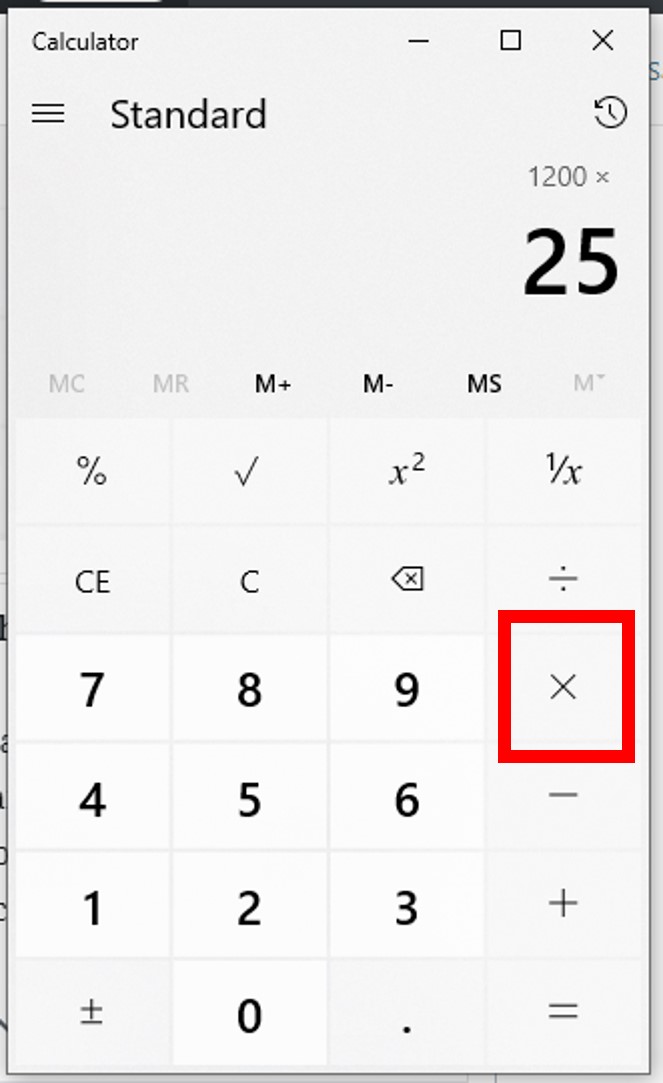
Strategic shopping and corporate procurement both rely on calculating discounts to determine the “Net Cost.” If a business software suite is normally $1,200 but is offered at a 25% discount:
- Enter 1,200.
- Press the multiplication key (×).
- Enter 25 and then the percentage key (%). This shows you the discount amount ($300).
- To find the final price, you would subtract that $300 from the original $1,200.
Advanced calculators allow you to do this in one sequence:1200 - 25% =. This shortcut is invaluable when comparing vendor quotes or evaluating seasonal sales for your small business.
Calculating Sales Tax and Gratuities
In many regions, the price tag is not the final cost. Calculating a 10% sales tax or an 18% gratuity is a daily necessity. To add a percentage to a base price:
- Enter the base amount (e.g., $80).
- Press the plus key (+).
- Enter the tax or tip percentage (e.g., 18).
- Press the percentage key (%).
- Press equals (=).
The calculator will display $94.40. Mastering this sequence ensures you are never caught off guard by the final “all-in” cost of a financial transaction.
Advanced Financial Calculations: Interest Rates and Investment Growth

As you move from basic budgeting to wealth building, the complexity of percentage calculations increases. Here, you are no longer just looking at static portions; you are looking at the growth and decay of capital over time.
Measuring Return on Investment (ROI)
ROI is the ultimate metric for any investor. It tells you the efficiency of an investment as a percentage. To calculate this on your calculator, use the “Percentage Change” formula: [(Current Value - Original Value) / Original Value] * 100.
For example, if you bought a stock for $2,000 and it is now worth $2,500:
- Subtract 2,000 from 2,500 to get the profit ($500).
- Divide $500 by the original cost ($2,000).
- The result is 0.25.
- Multiply by 100 to see a 25% ROI.
Understanding this percentage allows you to compare the performance of your stock portfolio against a benchmark like the S&P 500.
Calculating Compound Interest with a Calculator
While complex compound interest is best handled by financial software, you can calculate annual compounding manually to understand the “Rule of 72” or the “Snowball Effect.” If you have $10,000 at a 5% annual interest rate:
- Year 1:
10,000 * 1.05 = 10,500. - Year 2:
10,500 * 1.05 = 11,025.
By multiplying the principal by 1 plus the interest rate (expressed as a decimal), you can project growth. This exercise illustrates why a seemingly small 1% difference in interest rates can lead to massive differences in wealth over decades.
Understanding Percentage Increases and Decreases in Asset Value
Volatility is a reality in finance. Investors often struggle with the “Asymmetry of Loss.” If a portfolio drops by 50%, it does not need a 50% gain to recover; it needs a 100% gain. You can verify this on your calculator:
- Start with 100.
- Subtract 50% (
100 - 50% = 50). - Now, try to get back to 100 from 50. Adding 50% only gets you to 75 (
50 + 50% = 75). - To reach 100, you must add 100% (
50 + 100% = 100).
This use of a calculator helps clarify the risks involved in high-volatility investments and underscores the importance of capital preservation.
Using Specialized Financial Tools and Digital Calculators
While a standard pocket calculator is useful, specific financial tools—including financial calculators (like the HP-12C or TI-BAII Plus) and digital spreadsheet applications—offer specialized percentage functions for more nuanced money management.
Leveraging Scientific and Financial Calculator Functions
Financial calculators differ from standard ones because they include dedicated buttons for “Time Value of Money” (TVM). These devices allow you to input the number of periods (N), the interest rate per year (I/Y), and the present value (PV) to solve for a future value (FV). When using these, the percentage is often entered as a whole number (entering “5” for 5%), as the device’s internal logic is pre-programmed for financial industry standards. This eliminates the need for manual decimal conversion and reduces the margin for error in complex loan amortization or retirement planning.
The Role of Spreadsheets in Long-Term Financial Planning
In the modern “Money” niche, the spreadsheet is the ultimate calculator. Using the percentage format in Excel or Google Sheets allows for dynamic financial modeling. By typing =A1*0.05, you can instantly calculate interest across thousands of rows. Furthermore, understanding the “Percent Rank” and “Percentage Distribution” functions allows a business owner to see which products are contributing the most to their bottom line. The calculator, in this digital form, becomes a tool for strategic scaling rather than just simple addition.
Common Pitfalls and Strategic Insights for Wealth Management
Calculating percentages is not just about pressing the right buttons; it is about interpreting the data to avoid financial pitfalls.
The Impact of Inflation as a Percentage
Inflation is the “hidden tax” on savings. If your bank account earns 2% interest but inflation is 3%, your “Real Rate of Return” is actually -1%. When using your calculator to plan for retirement, you must always subtract the inflation percentage from your expected growth percentage. This “Net Real Return” provides a much more accurate picture of your future purchasing power than nominal figures alone.

Risk Management and Diversification Percentages
Strategic money management involves “Rebalancing.” Most financial experts suggest a specific percentage-based split between equities, bonds, and cash (e.g., 60/40). Over time, as stocks go up, they might represent 70% of your portfolio. Using your calculator to determine the exact dollar amount you need to sell to return to your 60% target is the hallmark of a disciplined investor. This “percentage-based discipline” removes emotion from the investing process, ensuring you buy low and sell high according to a pre-set financial blueprint.
By mastering the simple percentage on your calculator, you transition from a passive observer of your bank account to an active manager of your wealth. Whether it is calculating a tip or projecting a 30-year investment horizon, the percentage is the essential tool that turns raw numbers into actionable financial intelligence.
aViewFromTheCave is a participant in the Amazon Services LLC Associates Program, an affiliate advertising program designed to provide a means for sites to earn advertising fees by advertising and linking to Amazon.com. Amazon, the Amazon logo, AmazonSupply, and the AmazonSupply logo are trademarks of Amazon.com, Inc. or its affiliates. As an Amazon Associate we earn affiliate commissions from qualifying purchases.