
In a world increasingly dominated by powerful computers and artificial intelligence, the humble calculator often goes overlooked, yet it remains one of the most ubiquitous and essential pieces of personal technology. From balancing a budget to solving complex engineering equations, calculators are an indispensable tool, seamlessly performing arithmetic operations that would be tedious, if not impossible, for the human mind to execute rapidly and accurately. But how exactly does this compact device, often no bigger than a smartphone, manage to crunch numbers with such efficiency? Delving into its internal architecture reveals a fascinating blend of electrical engineering, digital logic, and clever programming that has evolved over decades. This article will peel back the layers to explore the intricate mechanisms that allow a calculator to perform its magic, cementing its place as a foundational gadget in our technologically advanced society.
The Fundamental Building Blocks: From Input to Output
At its core, a calculator is a specialized computer designed for numerical computation. Like any computing device, it follows a basic input-process-output model, but tailored for its specific purpose. Understanding these fundamental components is the first step to appreciating the engineering marvel that sits in our hands or on our desks.
Input Mechanism: Keys and Keypads
The journey of a calculation begins with the user’s input, typically through a keypad. Each button on a calculator keypad isn’t just a simple switch; it’s part of a sophisticated matrix that the calculator’s processor constantly scans. When a key is pressed, it completes an electrical circuit at a specific coordinate within this matrix. The calculator’s internal circuitry detects this change in electrical resistance or capacitance and registers it as a unique key press.
Modern calculators often use a membrane keypad, where conductive pads on the underside of the keys make contact with traces on a circuit board. This design is durable, resistant to dust and moisture, and allows for very thin devices. Each numeric digit, arithmetic operator, and function key (like square root or percentage) is assigned a specific digital code by the processor. This code is then interpreted as an instruction or a data point, initiating the next phase of the calculation. The tactile feedback, though often minimal, assures the user that their input has been registered, bridging the physical interaction with the digital processing.
The Processing Core: Microcontroller and CPU
Once an input is received, it’s sent to the brain of the calculator: the microcontroller or a dedicated calculator chip (often a specialized type of microprocessor or CPU). This tiny chip is engineered to perform a very specific set of tasks: reading input, executing arithmetic and logical operations, storing temporary data, and sending results to the display. Unlike general-purpose CPUs in computers, calculator processors are optimized for numerical tasks, focusing on efficiency, low power consumption, and speed for arithmetic computations rather than complex multitasking.
The microcontroller contains several key elements:
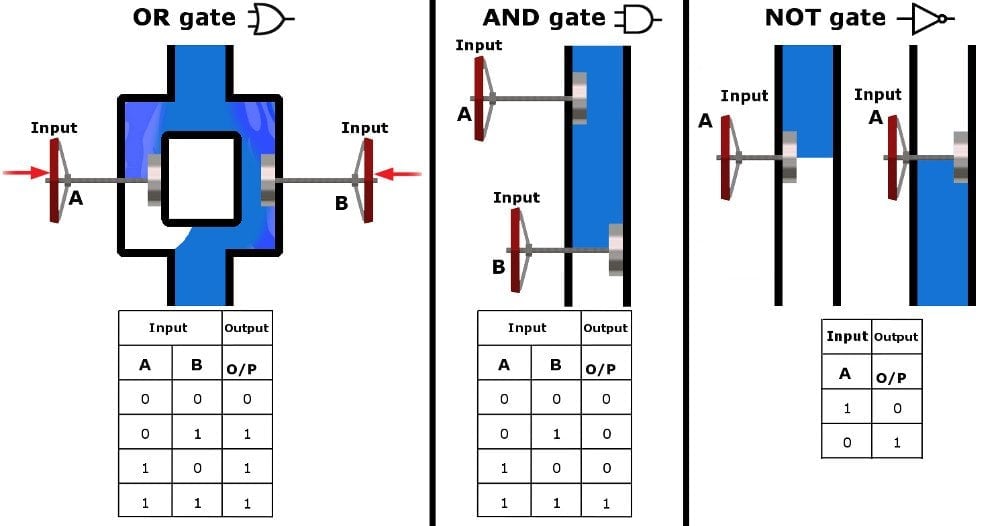
- Arithmetic Logic Unit (ALU): The heart of the processor, responsible for performing all arithmetic operations (addition, subtraction, multiplication, division) and logical operations (AND, OR, NOT).
- Control Unit: Directs and coordinates all operations within the CPU, fetching instructions from memory, decoding them, and managing the flow of data.
- Registers: Small, fast storage locations within the CPU that temporarily hold data, instructions, and memory addresses needed during processing.
- Memory (ROM and RAM): Read-Only Memory (ROM) stores the calculator’s operating system, pre-programmed functions, and constant values. Random Access Memory (RAM) is used for temporary storage of input numbers, intermediate results, and the current state of the calculation.
When you enter “2 + 2”, the microcontroller receives the codes for “2”, “+”, “2”, and then “=”. It stores the first “2” in a register, identifies “+” as an instruction, stores the second “2”, and then, upon receiving “=”, instructs the ALU to perform addition on the two numbers.
Display Technology: LEDs and LCDs
The output of the calculation is presented to the user via a display. Historically, early electronic calculators used Nixie tubes or arrays of light-emitting diodes (LEDs) for their displays. These were bright but consumed significant power.
Today, the vast majority of calculators, from basic models to advanced scientific ones, employ Liquid Crystal Displays (LCDs). LCDs work by manipulating polarized light. Each segment of a digit or character on the display consists of liquid crystal material sandwiched between two polarizing filters and electrodes. When an electrical current is applied to a specific segment’s electrodes, the liquid crystals align themselves, blocking or allowing light to pass through, thus creating the visible segment.
The advantages of LCDs are manifold:
- Low Power Consumption: This is crucial for battery-powered devices, allowing for extended usage between charges or battery replacements.
- Flat Profile: LCDs are thin, enabling the sleek design of modern calculators.
- Clarity: They offer good contrast and readability in various lighting conditions.
More advanced calculators, especially graphing calculators, feature dot-matrix LCDs capable of displaying multiple lines of text, graphs, and complex symbols, providing a richer interactive experience for users tackling higher-level mathematics.
Power Source: Batteries and Solar Cells
Calculators are designed for portability and low power consumption. Their power sources reflect this, typically relying on small batteries or solar cells, often in combination.
- Batteries: Common calculator batteries include coin cells (CR2032, LR44) or AAA/AA batteries for larger models. These provide a stable and consistent power supply, enabling the calculator to operate reliably in any environment.
- Solar Cells: Many calculators incorporate small photovoltaic cells that convert ambient light into electrical energy. This is an incredibly efficient way to power a low-consumption device. In direct sunlight or bright indoor lighting, a solar-powered calculator can operate indefinitely without battery power. Often, a small backup battery is included to ensure functionality in dim conditions or for storing settings/memory, providing a hybrid power solution that maximizes longevity and convenience. The clever integration of these power sources is a testament to the engineering focus on user experience and sustainability within a small form factor.
The Logic Beneath the Surface: Arithmetic and Beyond
While the physical components provide the framework, it’s the digital logic and algorithms embedded within the calculator’s software (firmware) that enable it to perform complex calculations. This is where the magic of binary representation and clever programming truly shines.
Binary Representation and BCD (Binary-Coded Decimal)
Computers, including calculators, fundamentally operate using binary code – a system of 0s and 1s. Every number, instruction, and piece of data is ultimately converted into a sequence of binary digits (bits). However, representing decimal numbers (base-10, what humans use) directly in binary for display can introduce complexities, especially with floating-point numbers and ensuring exact decimal precision.
To circumvent potential issues with floating-point inaccuracies and to simplify conversion for display, many calculators use Binary-Coded Decimal (BCD). In BCD, each decimal digit (0-9) is represented by its own 4-bit binary code. For example, the decimal number 42 would be represented as 0100 0010 in BCD (where 0100 is 4 and 0010 is 2), rather than its pure binary equivalent of 101010. While BCD can be less efficient in terms of memory usage compared to pure binary for storing numbers, it significantly simplifies the process of converting numbers from internal representation to a decimal display, ensuring that the numbers you see are exactly what you entered or expected. This is crucial for financial calculations where precise decimal representation is paramount.
Basic Arithmetic Operations: Addition and Subtraction Algorithms
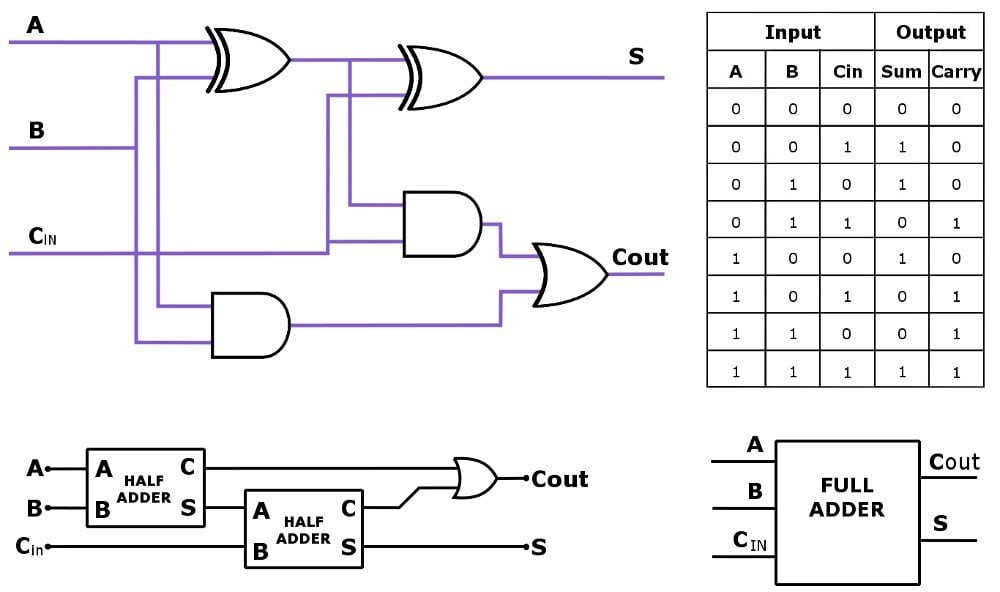
The ALU performs addition and subtraction using specialized electronic circuits. At a fundamental level, addition in binary is straightforward, following rules similar to decimal addition but with only two digits. For subtraction, calculators often employ the “two’s complement” method. Instead of directly subtracting, the calculator converts the number to be subtracted into its two’s complement and then adds it to the first number. For example, A – B becomes A + (-B), where -B is represented by its two’s complement. This allows the same addition circuit to perform both addition and subtraction, simplifying hardware design.
These operations are executed extremely rapidly. When you press the ‘+’ button, the calculator doesn’t just display a plus sign; it prepares its internal state to perform an addition when the next number and the ‘=’ button are entered. The firmware contains precise instructions (algorithms) for handling carries and borrows across multiple binary digits, ensuring accuracy even with very large numbers.
Multiplication and Division: Iterative Processes
Multiplication and division, while appearing as single operations to the user, are often implemented through a series of additions and subtractions, respectively, at the hardware level.
- Multiplication: A common method is repeated addition. For example, 5 × 3 can be calculated as 5 + 5 + 5. More efficiently, modern calculators use algorithms like the “shift and add” method, which is essentially a binary long multiplication. It involves shifting the multiplicand and adding it based on the bits of the multiplier, similar to how we perform long multiplication on paper.
- Division: Division can be performed through repeated subtraction. To divide 15 by 3, the calculator repeatedly subtracts 3 from 15 until the remainder is less than 3, counting how many times 3 was subtracted. More complex and efficient algorithms like “non-restoring division” or “SRT division” are used in hardware to speed up the process, involving shifts and subtractions to arrive at the quotient and remainder.
These iterative processes are incredibly fast due to the electronic speed of the ALU, making these complex operations seem instantaneous to the user.
Floating-Point Math and Precision
For numbers that are not whole integers (decimals), calculators employ floating-point arithmetic. This system represents numbers with a fixed number of significant digits (the mantissa) and scales them using an exponent, similar to scientific notation (e.g., 1.23 x 10^4). Floating-point standards, like IEEE 754, define how these numbers are stored and processed, balancing precision and the range of numbers that can be represented.
While floating-point math allows calculators to handle very large and very small numbers, it’s inherently an approximation. This is why some calculators might show a tiny discrepancy (e.g., 0.0000000001) for what should be an exact zero in certain complex calculations. High-end scientific and financial calculators are designed with more bits for their mantissa and exponent, offering higher precision (e.g., 10, 12, or even 16 decimal places) to minimize these errors, which is critical for scientific and engineering applications where accuracy is paramount. The algorithms account for rounding rules and significant figures, ensuring results are presented consistently and as accurately as possible within the device’s computational limits.
From Basic to Scientific: Evolution of Calculator Functionality
The journey of the calculator is one of continuous innovation, transforming from bulky, single-function machines into powerful, versatile handheld devices. This evolution reflects advancements in microelectronics and a growing demand for specialized computational tools.
Early Mechanical and Electronic Calculators
The concept of mechanical calculation dates back centuries, with devices like the abacus, Napier’s Bones, and Pascal’s calculator (17th century). These early machines performed arithmetic through gears and levers. The late 19th and early 20th centuries saw the advent of more sophisticated mechanical calculators like the Arithmometer and the Curta, which were still complex, hand-cranked devices.
The real revolution began in the 1960s with the advent of transistors and integrated circuits. The Bell Punch ANITA Mark VII (1961) was the world’s first all-electronic desktop calculator, using vacuum tubes. Soon after, companies like Canon, Casio, and Sharp introduced calculators using transistors and then integrated circuits, drastically reducing size, cost, and power consumption. Early electronic handheld calculators, like the Busicom LE-120A “Handy” (1971), were the size of a small book and could only perform basic arithmetic, but they signaled a profound shift away from mechanical computation. These devices still consumed considerable power and used LED displays, but they paved the way for the ubiquitous calculators we know today.
Scientific Calculators: Functions and Graphing Capabilities
The 1970s saw the emergence of scientific calculators, epitomized by Hewlett-Packard’s HP-35 (1972), the world’s first handheld scientific calculator. This marked a significant leap, introducing functions beyond basic arithmetic, such as trigonometry (sine, cosine, tangent), logarithms, exponents, and statistical operations. These calculators were indispensable for students, engineers, and scientists, replacing slide rules and bulky calculation books.
The next major innovation was the graphing calculator, pioneered by Casio (FX-7000G, 1985) and Texas Instruments (TI-81, 1990). These devices featured larger dot-matrix LCDs, allowing users to visualize mathematical functions as graphs, solve systems of equations, and perform matrix operations. Graphing calculators became a standard tool in high school and university mathematics and science courses, transforming how students interact with complex mathematical concepts by providing visual feedback. Their ability to plot data, run simple programs, and store data pushed the boundaries of what a handheld device could achieve.
Financial and Programmable Calculators
Beyond general-purpose and scientific models, specialized calculators cater to specific professions. Financial calculators are designed for business and finance professionals, featuring dedicated keys and functions for time value of money (TVM) calculations (present value, future value, annuities), interest rates, amortization, and cash flow analysis. Hewlett-Packard’s HP-12C, introduced in 1981, remains a staple in finance due to its consistent RPN (Reverse Polish Notation) input and robust feature set.
Programmable calculators, often overlapping with scientific and graphing models, allowed users to input sequences of operations (programs) to automate repetitive or complex calculations. This capability extended the utility of the calculator beyond predefined functions, enabling users to create custom solutions for their unique computational needs. These calculators often featured more memory and the ability to interface with computers for program transfer, blurring the lines between a simple calculator and a miniature computer.
Integration into Modern Devices (Smartphones, Computers)
While dedicated physical calculators remain popular for their focused functionality, tactile feedback, and regulatory compliance in exams, their functionality has been largely absorbed into other modern devices. Smartphones come with built-in calculator apps that range from basic arithmetic to scientific and even unit conversion tools. Desktop and laptop operating systems include powerful calculator applications. Web browsers host numerous online calculators for virtually any purpose imaginable. This integration signifies the calculator’s enduring utility and the ability of technology to converge multiple functions into a single device. However, for specialized tasks, critical examinations, or simply a distraction-free experience, the physical calculator retains its unique niche.
Engineering for Efficiency: Power, Performance, and Design
The design of a calculator is a masterclass in efficiency, optimizing for longevity, user experience, and cost-effectiveness within a compact form factor. Every aspect, from power management to the ergonomic layout of buttons, is carefully considered.
Low-Power Design for Longevity
One of the most remarkable features of modern calculators is their ability to operate for years on a single battery or solely on solar power. This is achieved through meticulous low-power design at every level:
- Microcontroller Selection: Calculators use microcontrollers specifically designed for minimal power consumption. These often employ CMOS (Complementary Metal-Oxide-Semiconductor) technology, which draws very little current when in a static state.
- Operating Voltage: Components are designed to operate at low voltages (e.g., 1.5V to 3V), directly reducing power draw (Power = Voltage * Current).
- Clock Speed: Unlike general-purpose computers that prioritize speed, calculators’ processors run at relatively low clock speeds, which is sufficient for arithmetic operations and consumes less power.
- Sleep Modes: When inactive, calculators often enter deep sleep modes, where most internal circuitry is powered down, drawing only minuscule current to maintain display memory or respond to key presses.
- LCD vs. LED: As discussed, the shift from power-hungry LED displays to highly efficient LCDs was a game-changer for battery life.
- Solar Integration: The seamless integration of solar panels allows the device to draw power from ambient light, further extending battery life or even eliminating the need for batteries in well-lit conditions. This synergy ensures that a calculator is almost always ready for use.
User Interface and Ergonomics
A calculator’s user interface is primarily its keypad and display. The ergonomic design of these elements is crucial for ease of use and efficiency.
- Key Layout: The standard layout of numbers (0-9), arithmetic operators, and common functions is designed for intuitive use, often mimicking phone keypads or accounting machines. Frequently used keys are placed within easy reach.
- Key Feel: The tactile feedback of buttons, whether clicky or membrane-based, is important for user confidence, ensuring a key press has been registered.
- Display Clarity: The size, contrast, and number of lines on the LCD are optimized for readability. Backlighting might be included in some models for low-light conditions.
- Function Grouping: Scientific and graphing calculators group related functions (e.g., trigonometric, statistical) to make them easier to locate, often using color-coded shift keys to access secondary functions.
- Input Logic: Most calculators use algebraic input, where expressions are entered as they are written. However, some professional models (like the HP-12C) use Reverse Polish Notation (RPN), which can be more efficient for complex operations once mastered, reflecting the diverse needs of different user groups.
Manufacturing Processes and Miniaturization
The miniaturization of calculators from desktop behemoths to credit-card-sized devices is a testament to advancements in microelectronics manufacturing.
- Integrated Circuits (ICs): The development of ICs allowed engineers to pack millions of transistors onto a single silicon chip, drastically reducing the physical size and cost of the processing unit.
- Surface Mount Technology (SMT): Instead of through-hole components, SMT allows components to be mounted directly onto the surface of a Printed Circuit Board (PCB), enabling denser layouts and smaller board sizes.
- Flexible Printed Circuits (FPCs): In very thin calculators, flexible circuit boards are used, allowing the circuitry to bend and conform to the device’s shape.
- Automated Assembly: The assembly of calculators is highly automated, allowing for mass production at low costs, making these devices accessible to a global market.
- Durable Casings: The plastic casings are typically injection-molded, providing a lightweight yet durable enclosure that protects the internal electronics from everyday wear and tear.
These manufacturing efficiencies allow for robust, reliable devices that can withstand daily use while remaining incredibly affordable.
The Enduring Relevance of Physical Calculators
Despite the ubiquitous presence of calculator apps on smartphones and computers, physical calculators maintain significant relevance. For students, dedicated calculators remove the distraction of notifications and apps during exams and study sessions, and are often mandated by testing authorities. Professionals in fields like engineering and finance appreciate the tactile feedback, dedicated function keys, and long battery life of specialized models. Furthermore, the simplicity and single-purpose nature of a physical calculator often make it faster and more efficient for quick numerical tasks than navigating menus on a multi-functional device. They are tools designed specifically for computation, refined over decades to optimize that single purpose, proving that specialized gadgets still hold their own in a world of converged technology.
The Future of Calculation: Beyond the Handheld Device
While the physical calculator has reached a high level of maturity, the concept of “calculation” itself is continually evolving, driven by new technological paradigms. The underlying principles of efficient computation remain, but their application and complexity are expanding exponentially.
Advanced Computational Paradigms
The future of calculation extends far beyond basic arithmetic. Modern scientific computing leverages highly parallel processing, often utilizing Graphics Processing Units (GPUs) or specialized tensor processing units (TPUs) for tasks like machine learning, which involve billions of calculations per second. These paradigms are fundamentally about executing massive numbers of arithmetic operations simultaneously, a direct evolution of the calculator’s core function. Cloud computing allows for distributed calculation, offloading intensive tasks to remote servers, making supercomputing power accessible on demand for complex simulations, data analysis, and scientific research.
AI-Enhanced Calculation and Predictive Analytics
Artificial Intelligence is transforming how we approach computation. AI-powered tools can not only perform calculations but also understand context, interpret natural language queries, and even predict outcomes. For instance, AI in financial software can analyze market data, perform complex risk assessments, and forecast trends, going far beyond what a traditional financial calculator can do. In engineering, AI can optimize designs, run virtual simulations, and identify potential failures, effectively acting as an advanced, intelligent computational assistant. These systems perform calculations that are so complex and involve so many variables that they would be impossible for a human or even a traditional computer program to manage without AI-driven algorithms.
Quantum Computing’s Potential Impact
The most revolutionary shift in calculation could come from quantum computing. Unlike classical computers that store information as bits (0 or 1), quantum computers use qubits, which can represent 0, 1, or both simultaneously (superposition). This allows quantum computers to perform certain calculations exponentially faster than classical computers, tackling problems currently intractable for even the most powerful supercomputers. While still in its nascent stages, quantum computing promises to revolutionize fields like materials science, drug discovery, cryptography, and complex optimization problems, requiring an entirely new understanding of “how a calculation works.” The implications for finance, scientific research, and global security are immense, fundamentally redefining the boundaries of what is computationally possible.

The Symbiotic Relationship with Software
The evolution of calculation is increasingly tied to software. Even sophisticated algorithms that power AI and quantum simulations are, at their heart, sequences of logical and arithmetic operations. Software applications, ranging from powerful mathematical suites (like MATLAB, Mathematica) to everyday spreadsheets, embody the spirit of the calculator on a grander scale. They provide interfaces for complex calculations, data visualization, and automated processes. The physical calculator, while enduring, is now part of a broader ecosystem where its digital counterparts in software offer unparalleled flexibility, scalability, and integration with other digital tools, ensuring that the fundamental act of “calculation” continues to evolve and serve humanity in ever more powerful ways.
aViewFromTheCave is a participant in the Amazon Services LLC Associates Program, an affiliate advertising program designed to provide a means for sites to earn advertising fees by advertising and linking to Amazon.com. Amazon, the Amazon logo, AmazonSupply, and the AmazonSupply logo are trademarks of Amazon.com, Inc. or its affiliates. As an Amazon Associate we earn affiliate commissions from qualifying purchases.