
In the rapidly evolving landscape of Video on Demand (VOD) services, the ability to manage one’s digital footprint is as essential as the ability to stream content. Paramount Plus, a titan in the streaming industry owned by Paramount Global, offers a vast library of content ranging from live sports to exclusive cinematic releases. However, as the market becomes increasingly saturated with competing platforms, users often find themselves needing to consolidate their digital subscriptions for better software management or data privacy. Deleting a Paramount Plus account is not merely a matter of clicking a “cancel” button; it involves navigating a complex ecosystem of third-party billing, device-specific interfaces, and data retention policies. This guide provides a deep technical dive into the process of terminating a Paramount Plus account and ensuring your digital data is managed securely.
Navigating the Multi-Platform Ecosystem: Why Deleting Paramount Plus Varies
The technical architecture of modern streaming services is rarely self-contained. When you sign up for Paramount Plus, your account is often tethered to a specific billing gateway. This “platform fragmentation” is the primary reason why a one-size-fits-all approach to account deletion does not exist. To effectively remove your presence from the service, you must first identify the “Source of Truth” for your subscription.
The Web Browser Approach: The Direct Method
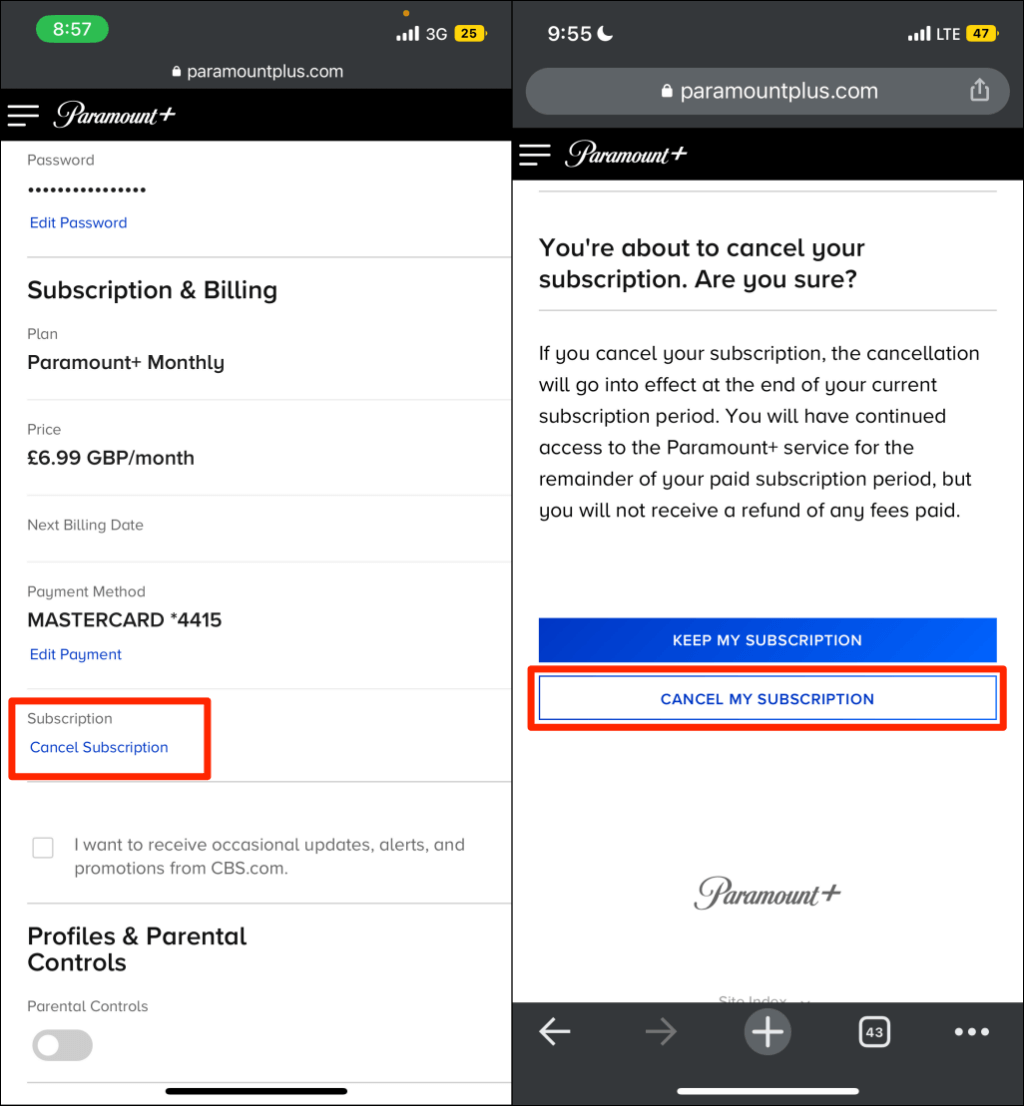
If you registered for Paramount Plus directly through their official website, the management of your account resides on Paramount’s own servers. From a technical standpoint, this is the most straightforward scenario. The process involves interacting with the platform’s user management API via the web interface. Once you log in, the system verifies your credentials and allows you to access the billing section, where the “Cancel Subscription” command triggers a status change in their database from “Active” to “Pending Cancellation.”
Managing Subscriptions via Third-Party Billing
A significant portion of users subscribe through intermediaries like Apple’s App Store, Google Play, Amazon Prime Video Channels, or Roku. In these instances, Paramount Plus does not hold your billing information; they receive an authorization token from the third-party provider. To delete the account, you must first terminate the financial handshake at the source. If you attempt to delete the account via the Paramount website while a third-party billing cycle is active, the system will often redirect you, as it lacks the administrative permissions to halt a transaction processed by Apple or Amazon.
The Difference Between Canceling a Subscription and Deleting an Account
It is a common technical misconception that canceling a subscription is the same as deleting an account. Canceling a subscription merely stops the recurring billing cycle; your user profile, viewing history, and personal data remain stored in the Paramount Plus cloud infrastructure. Deleting an account is a more permanent procedure that involves the erasure of your PII (Personally Identifiable Information). In many cases, you cannot fully delete an account until the active subscription period has officially expired.
Step-by-Step Technical Walkthrough: Closing Your Digital Connection
To ensure a clean break from the service, users must follow specific protocols based on the hardware and software they use to access the platform.
Desktop and Web Interface Execution
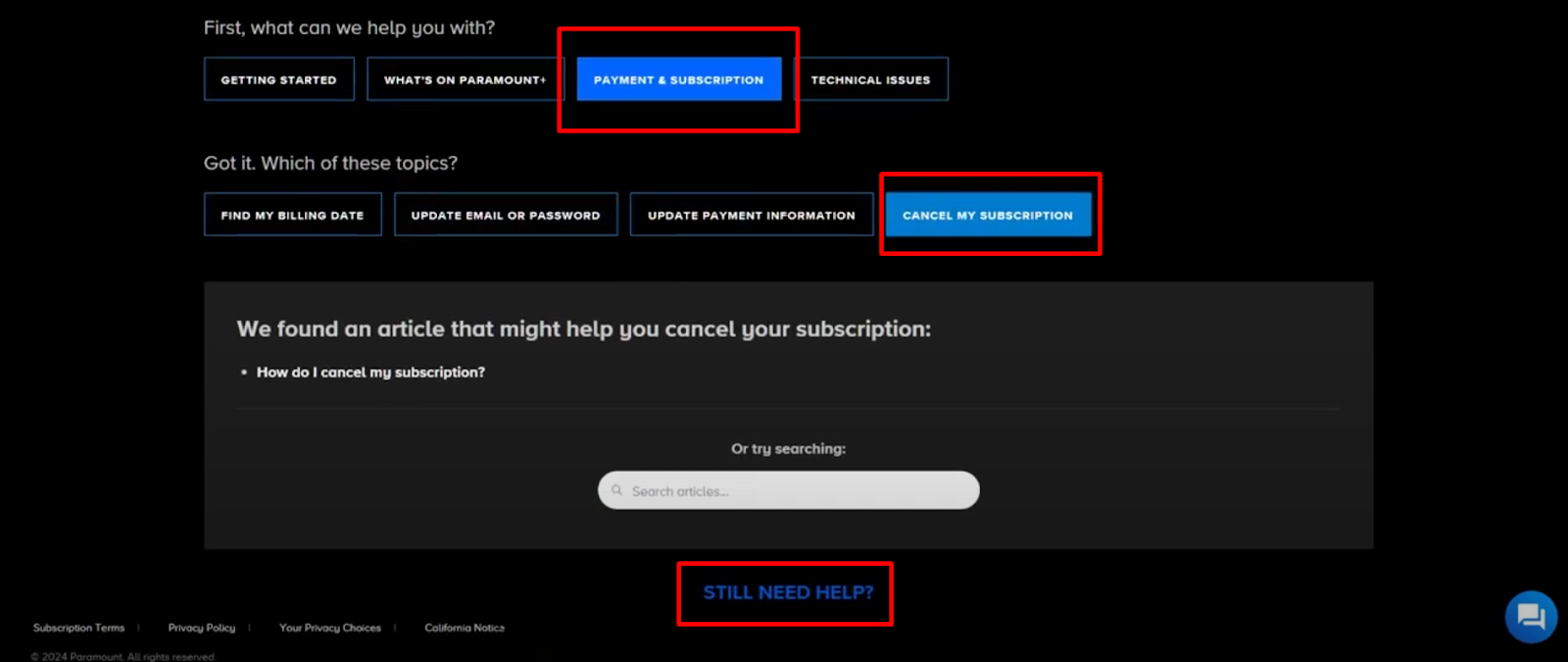
For those who use a PC or Mac, the browser-based method is the most reliable. Navigate to the Paramount Plus website and log in to your account. Access the “Account” settings by hovering over your profile avatar. Under the “Subscription & Billing” section, you will find the option to cancel. Following this, to pursue full account deletion, you may need to contact Paramount’s data privacy team or use their specific “Privacy Request” portal, depending on your regional jurisdiction (such as GDPR in Europe or CCPA in California).
iOS and Android Management
On mobile devices, the account is tied to your Apple ID or Google Account.
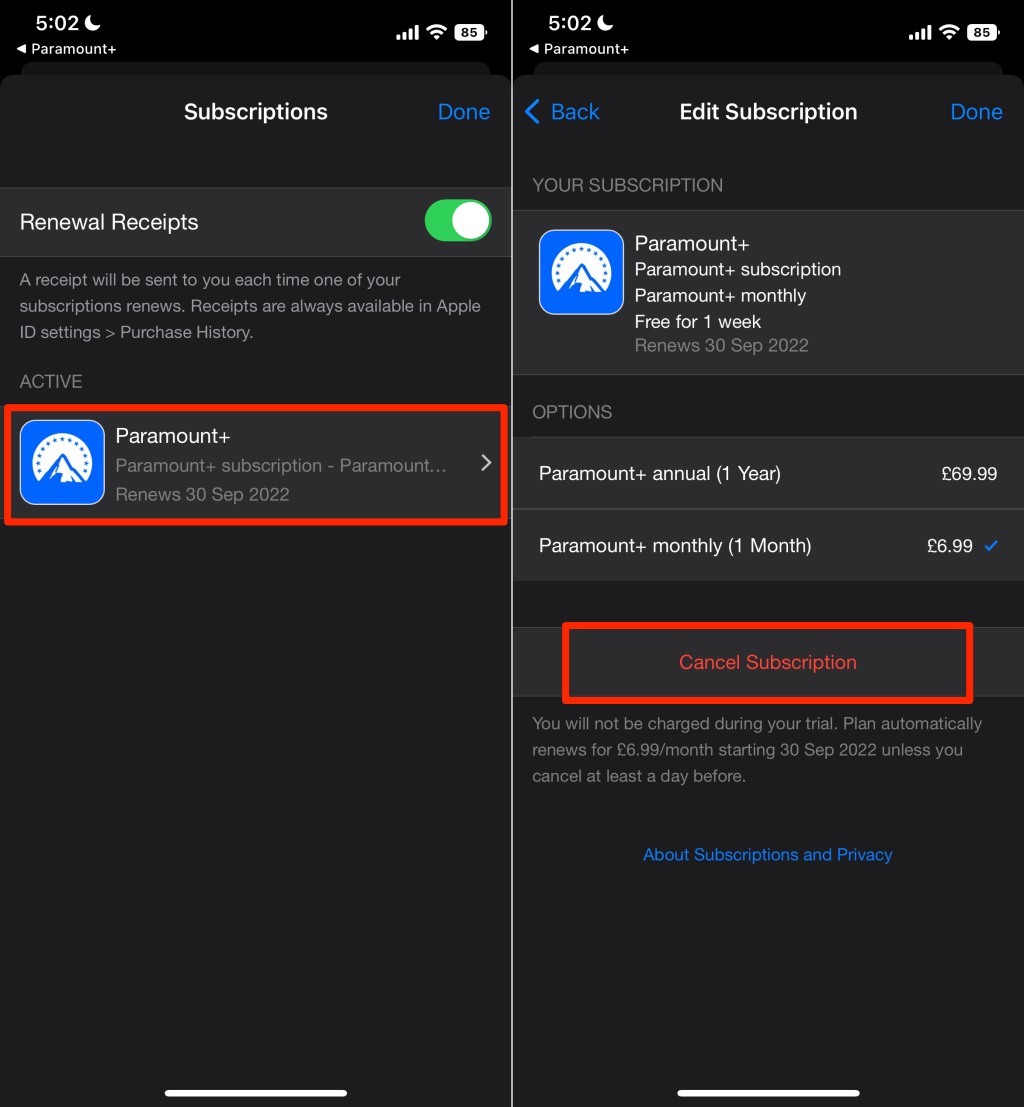
- On iOS: You must enter the Settings app, tap your Name, and select “Subscriptions.” Here, you can find Paramount Plus and toggle off the renewal.
- On Android: Open the Google Play Store, tap the profile icon, and navigate to “Payments & subscriptions.”
The technical nuance here is that the app itself does not usually have the system-level permission to cancel the subscription; it must be done through the OS-level subscription manager.
Handling Partner Devices (Roku and Amazon Fire TV)
Smart TVs and streaming sticks have their own proprietary software layers. For Roku users, managing the subscription involves navigating to the Paramount Plus channel on the home screen, pressing the asterisk (*) button, and selecting “Manage Subscription.” For Amazon Fire TV, users typically need to log into their Amazon account via a web browser, go to “Memberships & Subscriptions,” and modify the Paramount Plus channel settings. Because these devices use different API protocols, ensuring the cancellation has synchronized across all devices is a critical final step.
Data Privacy and Post-Deletion Security: What Happens to Your Information?
In an era defined by data breaches and digital tracking, the “Tech” side of account deletion extends far beyond stopping a monthly payment. It is about data hygiene and ensuring that your information is no longer a liability.
The Right to Erasure: Requesting Complete Data Removal
Under modern data protection laws, users have a “Right to Erasure.” Even after a subscription is canceled, Paramount Plus may retain your email, IP logs, and watch preferences for marketing or analytical purposes. To truly “delete” the account, you should submit a formal data deletion request. This triggers a backend process where your unique User ID (UID) is scrubbed from their active databases and anonymized in their historical archives.
Technical Cleanup: Clearing Cache and App Data
Simply deleting your account does not remove the local data stored on your hardware. Streaming apps are notorious for hoarding cache files to speed up loading times. After confirming your account deletion, it is a technical best practice to manually clear the app cache and then uninstall the application. This ensures that any locally stored tokens or temporary files are purged from your device’s storage, freeing up memory and removing potential security vulnerabilities.
Security Best Practices for Idle Accounts
If you choose not to delete your account but merely leave it “inactive,” you are leaving a door open for credential stuffing attacks. Hackers often target dormant accounts that use old or reused passwords. If you do not intend to use the service again, the most secure technical decision is a full account deletion. If deletion is not immediately possible, changing the password to a unique, complex string and enabling any available multi-factor authentication (MFA) is a necessary stopgap.
Troubleshooting Common Technical Hurdles During Deletion
The process of deleting a digital account is rarely without friction. Several technical barriers can prevent a smooth exit.
Resolving Billing Cycle Conflicts
One of the most frequent issues occurs when a user tries to delete an account mid-cycle. Most VOD platforms are programmed to keep an account “active” until the end of the paid period. If you try to delete the account on the 15th of the month but have paid through the 30th, the system may prevent the final deletion until the 30th to ensure you receive the service you paid for. The workaround is to set a calendar reminder to perform the final account purge the day after the subscription expires.
Bypassing “Inactive” Account Loops
Sometimes, a bug in the UI can lead to an “account loop,” where the system tells you to log in to cancel, but logging in tells you the account is already inactive, yet you are still being charged. This usually indicates a synchronization error between the Paramount Plus database and a third-party biller (like Amazon). In this technical scenario, the solution is to revoke the “Linked App” permissions from your Amazon or Google account settings, effectively cutting off the authorization token that allows Paramount to bill you.
The Future of Subscription Management: Automation and Aggregation
As the number of streaming services continues to grow, the manual process of deleting and managing accounts is becoming unsustainable for the average tech consumer. We are seeing a rise in technical solutions designed to streamline this process.
Using Subscription Management Software
New software tools and fintech apps are emerging that use Plaid or similar APIs to scan your bank statements for recurring “Paramount Plus” charges. These tools can often initiate the cancellation process on your behalf by communicating with the merchant’s API. This represents a shift toward “automated digital hygiene,” where software manages software.
AI and the Personalization of Digital Decluttering
In the near future, we can expect AI-driven digital assistants to handle account deletions. By granting an AI agent temporary administrative access, it could navigate the complex UI of various streaming platforms, follow the multi-step deletion protocols, and verify that your data has been erased. This would eliminate the technical friction currently associated with managing a Paramount Plus account.
In conclusion, deleting a Paramount Plus account is a multi-layered technical process that requires an understanding of platform ecosystems, billing gateways, and data privacy laws. By following a structured approach—starting with the cancellation of the billing source and ending with a formal data erasure request—users can effectively manage their digital lives and maintain high standards of software and security hygiene. As the streaming world continues to expand, mastering these technical management skills will remain an essential part of the modern digital toolkit.
aViewFromTheCave is a participant in the Amazon Services LLC Associates Program, an affiliate advertising program designed to provide a means for sites to earn advertising fees by advertising and linking to Amazon.com. Amazon, the Amazon logo, AmazonSupply, and the AmazonSupply logo are trademarks of Amazon.com, Inc. or its affiliates. As an Amazon Associate we earn affiliate commissions from qualifying purchases.