
In the modern digital landscape, our streaming accounts are more than just repositories for music and podcasts; they are extensions of our digital identities. Spotify, as the world’s leading audio streaming service, holds significant user data, ranging from payment information to deeply personal listening habits and social connections. Therefore, maintaining robust security protocols is paramount. Whether you are performing a routine security update or responding to a potential breach, knowing how to change your password on Spotify is a fundamental skill in digital hygiene.
This guide provides an exhaustive walkthrough of the technical process, the nuances of third-party integrations, and advanced strategies for securing your account within the broader tech ecosystem.
1. The Technical Process: Changing Your Spotify Password
Updating a password on a major SaaS (Software as a Service) platform like Spotify involves navigating specific user interfaces that differ between devices. It is important to note that, for security and architectural reasons, Spotify requires most account management tasks—including password changes—to be performed via a web browser rather than directly inside the mobile application.
Changing Your Password via Desktop Web Browser
The most direct way to update your credentials is through the official Spotify website. From a technical standpoint, the web interface provides the most stable environment for account modifications.
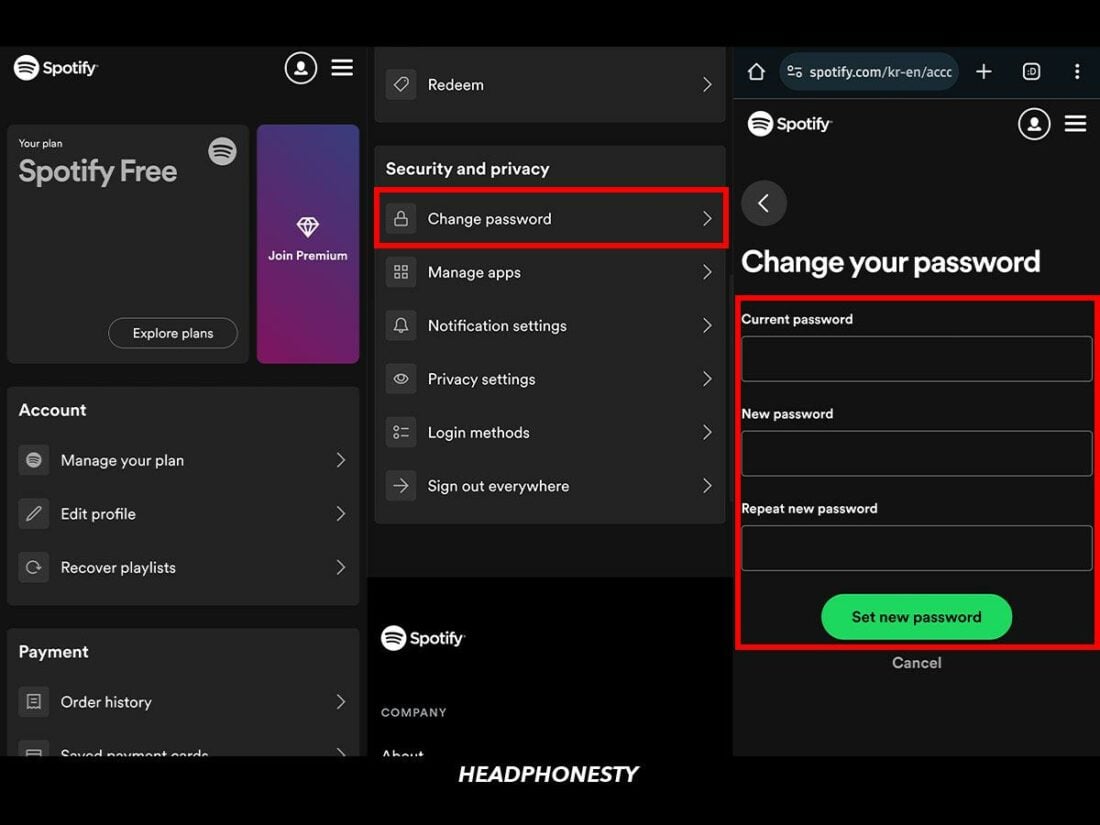
- Access the Account Page: Navigate to Spotify.com and log in with your current credentials. Once logged in, click on your profile icon in the top-right corner and select “Account.”
- Navigate to the Security Tab: On the account overview sidebar, you will find several options. Look for the “Change Password” section.
- Authentication and Validation: You will be prompted to enter your “Current password” to verify your identity. Following this, you must enter your “New password” and repeat it in the “Repeat new password” field to ensure there are no typographical errors.
- Finalizing the Update: Click “Set new password.” The system will instantly update your credentials across Spotify’s global servers.
Resetting a Forgotten Password
If you are locked out of your account, the standard change process is inaccessible. In this scenario, you must utilize the password reset protocol, which relies on email-based identity verification.
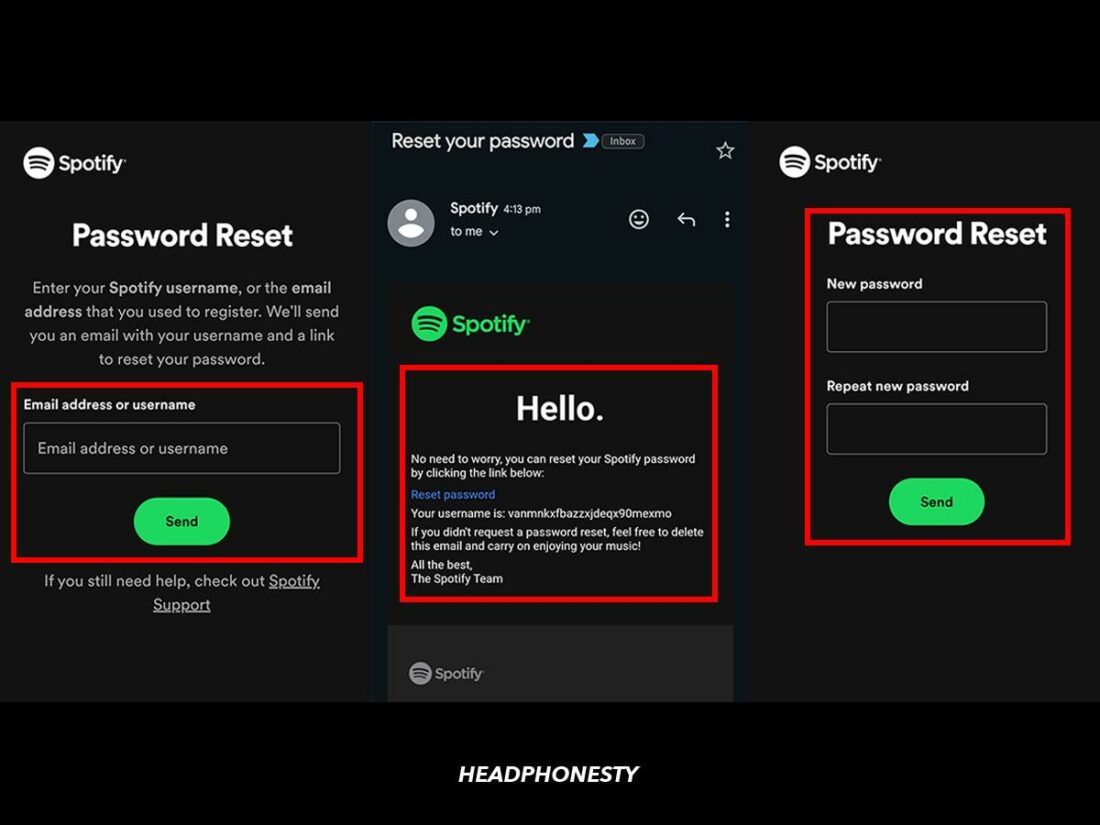
- Go to the Spotify login page and click “Forgot your password?”
- Enter your username or the email address associated with the account.
- Spotify will send an automated SMTP (Simple Mail Transfer Protocol) message to your inbox containing a secure, time-sensitive link.
- Clicking this link bypasses the need for the old password, allowing you to establish a new set of credentials.
Technical Nuance: Facebook, Apple, and Google Logins
A common point of confusion for users is the inability to find a “Change Password” button. This often occurs when the account was created using a third-party OAuth (Open Authorization) provider such as Facebook, Apple, or Google.
When using these services, Spotify does not actually store a password for you; instead, it receives a secure token from the third-party provider. To “change” your password in this context, you must change the password of the original service (e.g., your Facebook password). If you wish to decouple these accounts and create a dedicated Spotify password, you must use the “Forgot your password” flow to set a password for your Spotify email address for the first time.
2. Managing Security Across the Spotify Ecosystem
In an era of ubiquitous connectivity, your Spotify account is likely logged into multiple devices simultaneously—smartphones, tablets, smart speakers, and desktop computers. Changing your password is only the first step; ensuring that the change propagates correctly across your hardware ecosystem is essential for security.
Navigating Mobile Interface Limitations
While the Spotify mobile app is a powerhouse for media consumption, its account management features are intentionally limited to prevent unauthorized changes if a physical device is stolen. If you attempt to change your password through the app settings on iOS or Android, the software will typically redirect you to an external mobile browser.
This architectural choice ensures that sensitive account changes are handled by the secure web-based account portal, which can leverage more robust browser-based security headers and anti-phishing protocols.
The “Sign Out Everywhere” Feature
One of the most powerful tools in Spotify’s technical arsenal is the “Sign Out Everywhere” function. When you change your password due to a suspected security compromise, changing the password alone might not immediately kick an unauthorized user off an active session on another device.
To trigger a global session termination:
- Log into your Account Overview page on a web browser.
- Scroll to the bottom of the page.
- Click the “Sign Out Everywhere” button.
This action invalidates all active access tokens. Every device currently using your account—from your gym’s smart TV to a forgotten laptop—will be forced to re-authenticate using the new password. Note that this process can take up to an hour to sync across all of Spotify’s distributed server nodes.
3. Advanced Digital Security and Account Protection
In the context of modern cybersecurity, a password is merely the first line of defense. As “credential stuffing” and “brute-force attacks” become more sophisticated, users must adopt a tech-forward approach to protecting their digital assets.
The Importance of Password Entropy and Uniqueness
From a technical security perspective, the strength of a password is measured by its “entropy”—a measure of how unpredictable it is. Spotify requires a minimum level of complexity, but users should strive for more.
- Avoid Re-use: Never use the same password for Spotify that you use for your email or banking. If a lower-security site suffers a data breach, hackers will use those leaked credentials to attempt logins on major platforms like Spotify.
- Complexity over Length: While length is important, a mix of alphanumeric characters and symbols increases the computational power required for a machine to guess the password.
Leveraging Two-Factor Authentication (2FA) and Third-Party Security
As of the current technical roadmap, Spotify does not offer native, user-facing Two-Factor Authentication (2FA) for all standard accounts in all regions, which is a point of critique among tech security experts. However, you can secure your account by:
- Securing the Gateway: If you use Facebook or Google to log in, enable 2FA on those platforms. Since Spotify relies on their security tokens, your Spotify account becomes as secure as your Facebook or Google account.
- Email Security: Ensure the email account linked to your Spotify has 2FA enabled. If a hacker gains access to your email, they can easily trigger a password reset and hijack your Spotify account regardless of how strong your password is.
Recognizing Signs of a Compromised Account
A key aspect of software security is monitoring for anomalies. Tech-savvy users should look for these “red flags” that indicate a password change is immediately necessary:
- Play History Discrepancies: “Recently Played” lists showing songs or podcasts you never listened to.
- Unfamiliar Devices: Spotify Connect showing devices you don’t own.
- Account Changes: Your profile picture, display name, or linked social accounts changing without your input.
- Subscription Issues: Receiving notifications about plan changes (e.g., switching from Individual to Family) that you didn’t authorize.
4. Optimizing Account Health through Third-Party Management
Beyond the password itself, the technical integrity of a Spotify account depends on what other software has been granted permission to access your data.
Reviewing Connected Apps and API Permissions
Spotify has a robust API (Application Programming Interface) that allows third-party apps—like receipt generators, stats trackers, or dating apps—to connect to your profile. Over time, these apps can accumulate and represent a “backdoor” security risk.
In the “Apps” section of your account settings, you can view every third-party service with access to your Spotify data. It is a technical best practice to “Remove Access” for any application you no longer actively use. This limits the “attack surface” of your account; if one of those third-party apps is hacked, your Spotify account remains shielded.
Password Managers: The Tech-Forward Solution
The most effective way to manage a complex, unique password for Spotify—and every other app—is by using a dedicated password manager (e.g., Bitwarden, 1Password, or LastPass). These tools use AES-256 bit encryption to store your credentials.
By using a password manager, you can generate a random 32-character string for Spotify that is virtually impossible to crack through traditional means. The manager handles the “heavy lifting” of remembering the sequence, allowing you to prioritize security without sacrificing convenience.

Conclusion: Digital Vigilance in the Streaming Age
Changing your Spotify password is more than a troubleshooting step; it is a critical component of maintaining a secure digital footprint. By understanding the technical workflows of the platform, the necessity of global sign-outs, and the importance of third-party permission management, users can ensure their audio library remains private and secure. In the ever-evolving world of software and apps, staying informed and proactive is the most effective defense against the complexities of the modern web.
aViewFromTheCave is a participant in the Amazon Services LLC Associates Program, an affiliate advertising program designed to provide a means for sites to earn advertising fees by advertising and linking to Amazon.com. Amazon, the Amazon logo, AmazonSupply, and the AmazonSupply logo are trademarks of Amazon.com, Inc. or its affiliates. As an Amazon Associate we earn affiliate commissions from qualifying purchases.