
In the rapidly evolving landscape of global finance, the ability to move capital seamlessly across borders is no longer a luxury—it is a necessity. PayPal has established itself as a foundational pillar of the digital economy, bridging the gap between traditional banking institutions and the high-speed requirements of modern e-commerce. Whether you are an individual looking to manage personal expenses or an entrepreneur launching a global side hustle, understanding how to effectively create and manage a PayPal account is a critical financial skill. This guide explores the strategic nuances of the platform, ensuring you not only set up an account but also optimize it for maximum financial efficiency and security.
The Strategic Importance of PayPal in Personal and Business Finance
Before diving into the technical setup, it is essential to understand where PayPal fits within your broader financial ecosystem. Unlike a traditional bank account, PayPal acts as a digital wallet and a payment processor, providing a layer of insulation between your primary bank and the myriad of merchants you encounter online.
Why PayPal Remains a Cornerstone of Online Finance
In an era where digital fraud is a constant threat, PayPal provides a centralized hub for managing transactions without exposing sensitive credit card or bank account details to every individual vendor. For the modern consumer, this represents a significant reduction in financial risk. Furthermore, PayPal’s ubiquity means it is often the primary gateway for international trade. For those involved in the “Money” niche—investors, freelancers, and digital nomads—PayPal offers a level of liquidity and accessibility that few local banks can match. It facilitates instant peer-to-peer transfers and provides a reliable infrastructure for receiving payments from overseas clients.
Personal vs. Business Accounts: Choosing the Right Path
One of the first financial decisions you will face during the registration process is selecting between a Personal and a Business account. This is not merely a cosmetic choice; it has significant implications for your financial reporting and fee structure.
- Personal Accounts: Ideal for individuals who primarily use the platform for shopping and sending money to friends or family. It offers the standard suite of buyer protection features and is generally the most straightforward for managing personal cash flow.
- Business Accounts: Designed for entities and freelancers who operate under a company name. This account type allows for multi-user access, specialized tax reporting tools, and the ability to accept credit card payments from customers who do not have a PayPal account. From a financial management perspective, a Business account is essential for maintaining clear boundaries between personal and professional assets, which is a hallmark of sound financial practice.
Step-by-Step Guide to Creating and Verifying Your Financial Gateway
Creating a PayPal account is a straightforward process, but doing it correctly is vital to ensure your funds are never frozen or flagged for security audits. Following a disciplined approach to the setup phase will save you significant time and potential financial headaches in the future.
Initial Registration and the “Know Your Customer” (KYC) Process
To begin, navigate to the official PayPal website or download the mobile application. You will be prompted to enter a valid email address and create a strong password. In the world of personal finance, your email address is more than just a contact point; it is your primary financial identifier on the platform.
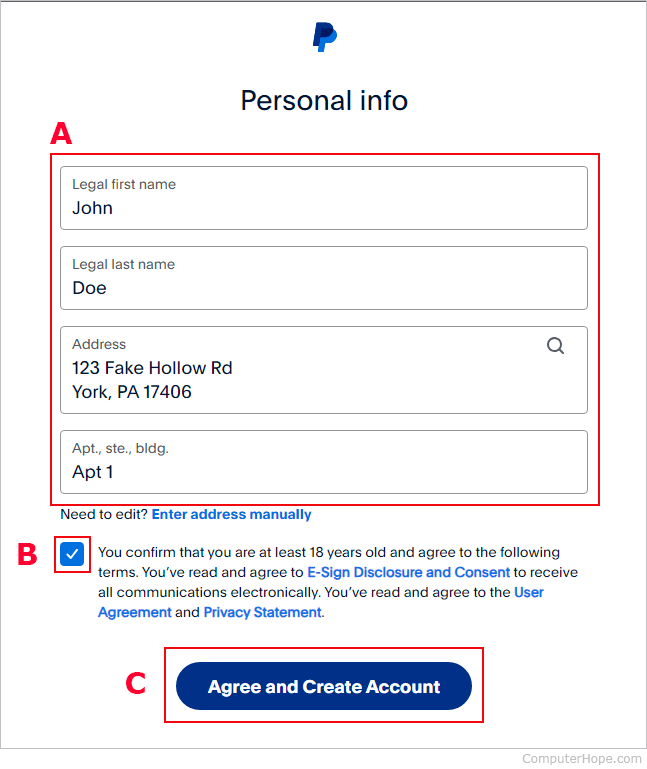
Following the initial sign-up, you must complete the “Know Your Customer” (KYC) requirements. This is a standard regulatory procedure in the financial industry designed to prevent money laundering and fraud. You will need to provide your legal name, physical address, and, depending on your jurisdiction, a government-issued identification number (such as a Social Security Number or Tax ID). Providing accurate information at this stage is non-negotiable; discrepancies between your PayPal details and your official documents can lead to account limitations.
Linking Bank Accounts and Credit Cards for Fluid Cash Flow
An empty PayPal account is of limited use. To unlock its full potential as a financial tool, you must link it to a funding source. This can be a traditional checking account, a debit card, or a credit card.
When you link a bank account, PayPal typically performs a verification process by sending two micro-deposits (usually a few cents) to your bank. Once you see these transactions in your bank statement, you enter the amounts into your PayPal dashboard to confirm ownership. This step is crucial for “verified” status, which often increases your withdrawal and sending limits. From a strategic finance perspective, linking a credit card can also be beneficial, as it allows you to utilize PayPal’s security while still earning rewards or cashback points offered by your card issuer.

Maximizing Financial Security and Transaction Safety
A key component of managing your money is protecting it. PayPal offers several built-in mechanisms that, when used correctly, provide a safety net for your digital transactions.
Understanding PayPal’s Purchase Protection and Refund Policies
One of the most significant financial advantages of using PayPal is “Purchase Protection.” If an item you purchased does not arrive or is significantly different from the description, PayPal can facilitate a full refund, including original shipping costs. For the budget-conscious consumer, this acts as a form of transaction insurance. However, it is important to note that this protection generally applies to physical goods and certain services; it often does not cover real estate, motorized vehicles, or person-to-person money transfers sent as “Friends and Family.” Understanding these nuances is vital for anyone looking to safeguard their capital during online acquisitions.
Two-Factor Authentication and Fraud Prevention Measures
In the niche of personal finance, digital hygiene is just as important as investment strategy. To protect your account from unauthorized access, you should immediately enable Two-Factor Authentication (2FA). This requires a secondary code sent to your mobile device or generated via an authenticator app whenever you log in from a new device. Additionally, being aware of “phishing” attempts—fraudulent emails claiming to be from PayPal—is essential. PayPal will never ask for your password via email. By maintaining these security protocols, you ensure that your digital assets remain secure and your financial integrity is preserved.
Strategic Use of PayPal for Personal and Business Growth
Beyond simple transactions, PayPal can be leveraged as a tool for wealth generation and global financial management. It is particularly effective for those engaged in side hustles or the gig economy.
Managing Global Currencies and International Transfers
For freelancers working with international clients, currency conversion can be a major financial hurdle. PayPal allows you to hold balances in multiple currencies, which can be a strategic advantage. If the exchange rate is unfavorable, you may choose to hold a foreign currency in your PayPal wallet until the market shifts in your favor. While PayPal does charge a conversion fee, the convenience of receiving “Global Payments” instantly often outweighs the logistical nightmare of setting up multiple international bank accounts.
Leveraging PayPal for Freelancing and Side Hustles
If you are using PayPal to generate income, you should take advantage of the invoicing tools available. Professional invoices not only ensure you get paid faster but also provide a clear paper trail for tax purposes. For those focused on “Online Income” and “Side Hustles,” PayPal’s integration with various e-commerce platforms (like Etsy, eBay, or Shopify) creates a seamless pipeline from sale to cash-in-hand. Managing this pipeline effectively is a core component of business finance, allowing you to track your margins and monitor your revenue streams in real-time.
Navigating Fees and Optimizing Financial Efficiency
The most critical aspect of any financial tool is its cost. To truly master your PayPal account, you must understand its fee structure and how to minimize unnecessary expenses.
Understanding the Fee Structure: Friends and Family vs. Goods and Services
PayPal’s business model relies heavily on transaction fees. Sending money to friends and family is usually free if funded by a bank account or PayPal balance. However, when you receive money for “Goods and Services,” PayPal deducts a percentage of the total plus a fixed fee. This is the “cost of doing business” on the platform. For freelancers, it is essential to factor these fees into your pricing strategy. If you are selling a service for $1,000, you must account for the roughly 3% fee to ensure your net profit aligns with your financial goals.
Best Practices for Minimizing Transaction Costs
To optimize your financial efficiency, consider the following strategies:
- Avoid Excessive Withdrawals: If you receive frequent small payments, avoid withdrawing them individually to your bank if your bank charges per-transaction fees.
- Use Bank Transfers Over Instant Withdrawals: PayPal offers “Instant Transfer” to debit cards for a small fee. While convenient, the standard 1–3 day bank transfer is typically free. Over a year, avoiding instant transfer fees can save a significant amount of capital.
- Consolidate Currency Conversions: Only convert currencies when necessary, or wait for favorable market conditions to minimize the impact of conversion spreads.
By approaching your PayPal account not just as a convenience, but as a sophisticated financial instrument, you can enhance your security, streamline your income, and maintain tighter control over your personal or business finances. Whether you are making your first online purchase or scaling a global enterprise, a properly configured PayPal account is an indispensable asset in the modern quest for financial mastery.
aViewFromTheCave is a participant in the Amazon Services LLC Associates Program, an affiliate advertising program designed to provide a means for sites to earn advertising fees by advertising and linking to Amazon.com. Amazon, the Amazon logo, AmazonSupply, and the AmazonSupply logo are trademarks of Amazon.com, Inc. or its affiliates. As an Amazon Associate we earn affiliate commissions from qualifying purchases.